
Quick wins for a faster PC:
Scan for outdated or missing drivers - takes under a minuteDriver Scan →Clear out junk files and repair common Windows errorsFree Scan →Verdict: The Astro A50 Gen 5 is a refined, comfortable premium wireless headset with clear positional audio, controlled bass, a strong boom microphone, 24-hour battery life, and one of the most useful charging docks in gaming. Its standout feature is PLAYSYNC Audio, which lets you switch between up to three USB-connected systems. At $299.99, it is an excellent fit for multi-platform players—but it is not automatically the best choice for music, noise isolation, maximum battery life, or HDMI-based console switching.
Astro A50 Gen 5: price and key specifications
Logitech launched the Astro A50 Gen 5 in 2024 at $299.99. The current U.S. Logitech listing has shown the headset at that price, although offers and stock can change. See the official product page for the current price and availability.
As an Amazon Associate I earn from qualifying purchases.
| Feature | Astro A50 Gen 5 |
|---|---|
| Drivers | 40mm PRO-G Graphene |
| Weight | 363g / 12.8oz |
| Battery | Up to approximately 24 hours |
| Wireless | LIGHTSPEED, with Logitech listing up to 12m range |
| PC audio | Up to 24-bit/48kHz over USB |
| Console audio | Up to 16-bit/48kHz over USB |
| Microphone | Omnidirectional, up to 48kHz according to Logitech specifications |
| Connections | USB-C base station, Bluetooth, LIGHTSPEED |
| Platform switching | Up to three systems through USB-C |
| Noise cancellation | No active noise cancellation |
The package centers on the headset and its magnetic charging base station. Logitech includes a USB-C cable, but a three-system PLAYSYNC setup may require additional or longer cables depending on where your PC and consoles are located.
What is the Astro A50 Gen 5?
The official name is ASTRO A50 (Gen 5) LIGHTSPEED Wireless Gaming Headset and Base Station with PLAYSYNC Audio. It is not the same product as the more expensive Astro A50 X.
#1 Best Overall

- PLAYSYNC AUDIO 3-System Switching: The A50 wireless gaming headset with mic connects to 3 platforms at once via USB-C so you can tap between Xbox, PS5, PC/Mac or Nintendo Switch/Switch 2 via on-ear control
- PRO-G GRAPHENE Audio Drivers: Groundbreaking clarity and response for precise audio separation, location and timing accuracy (40mm diameter with live edge technology)
- 24-bit LIGHTSPEED Wireless: This wireless headset with mic offers uncompressed, immersive gaming audio at lightspeed
- Broadcast-Quality Mic: Experience maximum articulation with the 48 kHz full-bandwidth boom mic that achieves new levels in voice quality
- Bluetooth Dual-Device Mixing: Connect to your mobile device and mix your Discord comms or music into your game audio
The Gen 5 uses USB-C audio switching. The base station can receive audio from up to three systems, such as a PC, PlayStation 5, Xbox Series X|S, or a docked Nintendo Switch. Pressing the PLAYSYNC button changes the active audio source.
That switching is audio-only. The A50 Gen 5 does not switch video and does not include the A50 X’s HDMI 2.1 inputs or passthrough. If several consoles share one display and you want the headset to change the picture as well as the sound, the A50 X is the relevant model.
Design, comfort, and charging
The A50 Gen 5 weighs about 363g, so it is not a lightweight headset. In practice, its headband and fabric ear cushions make it comfortable for long gaming sessions for many users. The cushions are removable and replaceable, and the fabric construction is less heat-trapping than many synthetic-leather alternatives.
Fit remains head-shape dependent. The headset can feel secure without excessive clamping, but buyers who prefer very light headphones should try it before committing if possible. It also offers little reason to choose it for travel or noisy rooms: there is no ANC, and its isolation is not its main strength.
The flip-up microphone mutes when raised. When the session ends, placing the headset on the base station provides a simple charging routine. The dock is more than a cosmetic accessory: it keeps the headset stored, charged, and ready without requiring a cable to be plugged directly into the earcup. Correctly seating the headset on its charging contacts is important.
Sound quality: clearer and more controlled, but not universally superior
The Gen 5 sounds more refined than earlier A50 generations, particularly in bass control, positional detail, and overall clarity. That does not mean it is the best-sounding $300 headset for every use. Independent reviews agree on its strong tactical performance, but differ on its cinematic scale and music presentation.
Competitive gaming
Footsteps, reloads, gunfire, and directional ability cues are easy to place in competitive games. Insider Gaming was especially positive about directional clarity in Escape from Tarkov, while TechRadar found footsteps and gunfire straightforward to locate in Call of Duty: Warzone and Black Ops 6. Windows Central also considered it more than adequate for Valorant.
Recommended Free Tools
Rank #2
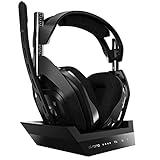
- ASTRO Audio V2 - By providing a precise and smooth frequency spectrum, ASTRO Audio V2 delivers crisp highs, controlled mids and distortion-free bass for clear dialogue, music and in-game sound. you'll enjoy crisp highs that bring out the subtlest audio cues, controlled mids for clear dialogue and impactful effects, and distortion-free bass that adds depth and richness to your gaming, music, and movie experiences.
- Dolby Audio - Immerse yourself in the game thanks to cinematic, high-resolution audio and sound directionality that give you a competitive advantage. Whether you're tracking enemy movements, listening for crucial environmental cues, or simply enjoying the rich depth of the game's audio landscape, Dolby Audio ensures that you're fully immersed in the gaming experience, allowing you to react faster and stay ahead of the competition.
- Game voice balance - Built-in MixAmp technology gives you instant control over chat levels, game audio and EQ presets so you can optimize your soundscape without interrupting your game play. This means you can effortlessly adjust the balance between in-game audio and voice chat, ensuring that you never miss important communication from your teammates while maintaining the perfect audio environment for immersive gaming.
- Battey power that lasts - Don’t let a sudden power loss shut down your audio. A50 Wireless powers your gaming sessions with a rechargeable lithium-ion battery that holds 15+ hours of unstoppable power. Whether you're embarking on epic gaming marathons, engaging in intense multiplayer battles, or simply enjoying your favorite content, the A50 Wireless ensures that you never miss a moment due to battery issues. And when it's time to recharge, the process is quick and convenient, allowing you to get back to gaming with minimal downtime.
- Flip-to-mute Microphone - Unidirectional mic and flip-to-mute functionality for clear, accurate communication. This advanced microphone ensures clear and accurate communication with your teammates, capturing your voice with precision while minimizing background noise. The unidirectional design focuses on picking up sound directly in front of the microphone, enhancing the clarity of your voice while reducing unwanted ambient noise.
These are reviewer impressions rather than controlled laboratory measurements, but they point to the A50 Gen 5’s clearest strength: separating important gameplay sounds without making the presentation feel thin.
Bass, mids, treble, and soundstage
Bass is substantial but generally controlled. Explosions and low-frequency effects have impact without completely masking quieter cues. High frequencies provide useful detail and are not universally described as harsh.
The more divided area is the midrange and the sense of scale. TechRadar praised the broad soundstage and clean high end, while Windows Central found the cinematic presentation and music reproduction less impressive than some alternatives. Depending on your preferences, the A50 Gen 5 can sound exciting and clear or slightly less spacious and cinematic than its price suggests.
For games and music, the best choice depends on what you value: bass impact and positional accuracy, a neutral tonal balance, or a very wide presentation. Competitive clarity should not be mistaken for universal superiority.
Spatial audio needs careful setup
The Gen 5 works with Dolby Atmos and Windows Sonic on compatible PC and Xbox setups, and Logitech lists support for PS5 3D Audio. It does not retain the previous generation’s onboard Dolby Digital processing. Instead, spatial processing is handled through the platform or software.
Do not stack multiple virtual-surround systems while comparing settings. Test one path at a time—for example, stereo, Dolby Atmos, Windows Sonic, or PS5 3D Audio. A neutral G HUB EQ is also the fairest starting point. Presets can be useful, but none is an objective improvement for every game or listener.
What changed from the A50 Gen 4?
The Gen 5 is best understood as a refinement combined with a major connectivity and software upgrade, not a dramatic transformation in sound.
Rank #3
- PLAYSYNC AUDIO 3-System Switching: The A50 wireless gaming headset with mic connects to 3 platforms at once via USB-C so you can tap between all of your consoles via on-ear control
- 40mm PRO-G Graphene drivers replace the older design.
- PC audio supports up to 24-bit/48kHz over USB.
- PLAYSYNC adds switching among up to three USB-connected systems.
- Logitech G HUB and the Logitech G mobile app provide EQ and microphone controls.
- Onboard DSP can store settings as you move between systems.
- Logitech rates battery life at approximately 24 hours.
- The microphone and software ecosystem are updated.
- The Gen 5 moves away from the Gen 4’s onboard Dolby Digital controls in favor of platform spatial-audio solutions.
As RTINGS’ A50-family comparison notes, the older generation retained physical EQ and Dolby controls and had advantages in microphone noise handling, while the newer design provides broader connectivity and longer battery life. An A50 Gen 4 owner should upgrade for PLAYSYNC, battery, software, and refinement—not because every aspect of the audio is radically different.
The Tool Desk
Outbyte PC Repair FREERepair Windows errors before they cause bigger problemsFix Now →Outbyte Driver Updater FREEScan for outdated or missing drivers - takes under a minuteDriver Scan →Microphone and chat mixing
The boom microphone is one of the Gen 5’s strongest features. It uses flip-to-mute operation, and Logitech lists an omnidirectional microphone with up to 48kHz resolution. G HUB and the mobile app provide controls for microphone EQ, noise gate, sidetone, and filtering.
Independent reviewers were positive about voice clarity for multiplayer chat and Discord. That makes the headset suitable for ordinary gaming communication and potentially casual streaming, although “broadcast quality” should be treated as marketing language rather than a guarantee. Room noise, microphone position, processing settings, and the chat application all affect the result.
The microphone is not detachable. That is convenient during play, but it matters if you want to use the A50 as a normal lifestyle headset or pair it with a separate microphone.
Bluetooth mixing is another useful addition: you can combine Bluetooth audio, such as a phone call or music, with game audio. The exact balance still depends on the connected device and software configuration, but it makes the A50 more flexible than a headset that only handles game and chat audio.
What’s actually slowing this PC down?
Pick the symptom - the matching free tool is one click away.
PLAYSYNC Audio in a real setup
PLAYSYNC is the feature that most clearly separates the A50 Gen 5 from ordinary wireless headsets. Connect up to three systems to the base station’s USB-C inputs, assign them to the available inputs, and use the PLAYSYNC button to switch the active audio source.
It works best at a desk where the PC and consoles are close to the dock. In a living-room setup, measure cable distances before buying. Consoles on opposite sides of a room may require longer USB-C cables, and a single included cable may not be enough for a complete three-device installation.
Rank #4

- Extended wireless range up to 15m (50ft) through the 2.4 GHz wireless signal.
- On-device audio balancing between voice chat and game audio on Xbox or PC
- Console specific USB transmitter for easy cross-platform compatibility.
- Built-in battery provides more than 15 hours of battery life and can be recharged through the USB-C port.
- Quick and easy mute functionality with the flip-to-mute microphone.
PLAYSYNC also does not eliminate display switching. You still need to change your monitor or television input separately unless your display setup handles that automatically. This is why the A50 Gen 5 is ideal for audio switching, while the A50 X is aimed at a more integrated multi-console setup.
Independent reader supportYour contribution helps us test, update, and keep practical guides available for everyone.PC, PlayStation, Xbox, and Switch support
PC is the platform with the most customization. G HUB provides EQ, microphone processing, firmware management, and other controls, while PC USB audio is listed at up to 24-bit/48kHz. Xbox and Windows systems can use Dolby Atmos or Windows Sonic, provided the relevant platform settings and licenses are configured.
Console USB audio is listed at up to 16-bit/48kHz. PlayStation users can use PS5 3D Audio. In normal gaming, the bit-depth difference should not be treated as a promise that PC will sound dramatically better than a console; the game mix, spatial processing, fit, and tuning are usually more important to the listening experience.
USB-C port assignments matter when several systems are connected. If one console produces no sound, check the physical cable, the selected PLAYSYNC input, the console’s output device, and the console’s chat settings before assuming the headset is defective.
Battery, software, and common problems
Logitech rates the battery for approximately 24 hours. Actual runtime varies with volume, microphone use, wireless mode, and software features. The dock reduces battery anxiety, but only if the headset is seated correctly after use.
Quick troubleshooting checklist
- No sound: confirm the USB-C cable and base-station port, select the correct PLAYSYNC input, then check the operating system or console output device.
- Flat or boxy audio: reset G HUB EQ, disable duplicate spatial processing, and compare stereo with one spatial-audio mode at matched volume.
- Poor microphone audio: check that the boom is fully lowered, adjust microphone position, then review noise gate, sidetone, EQ, and processing settings.
- Charging failure: reseat the headset carefully, confirm the base station has power, and inspect the charging contacts. Check the current manual for any supported direct USB-C charging procedure before relying on it.
- Inconvenient switching: measure the distance from every system to the dock and account for the cost and routing of additional USB-C cables.
Astro A50 Gen 5 vs A50 X
| A50 Gen 5 | A50 X | |
|---|---|---|
| Primary difference | USB-C audio switching | HDMI 2.1 audio and video switching |
| Systems | Up to three USB-connected systems | Designed for multi-console and PC display setups |
| Video passthrough | No | Yes; Logitech lists support up to 4K/120Hz |
| Best for | Players who need audio switching | Players who need audio and display switching |
| Value | Better if HDMI switching is unnecessary | Worth the premium only when HDMI features solve a real setup problem |
The A50 X is not simply a better-sounding A50 Gen 5. Its major advantage is the HDMI 2.1 base station. Choose it when an Xbox, PS5, and PC share one display and you want a single switching system. Choose the Gen 5 when your display inputs are already convenient or you only need to switch audio.
Do these 3 things before closing this tab:
1Fix the driver behind crashes, sound loss and screen glitches2Repair Windows errors before they cause bigger problems3Scan for outdated or missing drivers - takes under a minuteAlternatives
- SteelSeries Arctis Nova Pro Wireless: a better fit for buyers who want ANC, dual-battery convenience, and a more headphone-like design. RTINGS found it stronger for blocking environmental noise, although comfort can vary with the internal ANC microphone.
- Turtle Beach Stealth Pro: worth considering if sound quality is more important than three-device USB switching. Windows Central considered it potentially better sounding than the Astro, while finding its microphone and multi-USB flexibility weaker.
- Audeze Maxwell: better suited to buyers prioritizing audio quality, isolation, wired support, and much longer battery life over a charging dock and PLAYSYNC convenience. It is also heavier.
Should you buy the Astro A50 Gen 5?
Buy it if you use a PC and consoles, want a reliable charging dock, care about competitive-game positioning, need a good boom microphone, and can place your systems within practical USB-C cable range. The combination of comfort, Bluetooth mixing, stored EQ settings, 24-hour battery life, and quick audio switching is unusually polished.
Reconsider it if you use only one platform, need ANC, want strong passive isolation, prioritize the widest cinematic soundstage or the most neutral music reproduction, require a detachable microphone, or expect a huge sonic leap over the A50 Gen 4.
The Astro A50 Gen 5 does sound better than earlier A50 models in important ways, but its real upgrade is the complete ownership experience. At $299.99, it earns its price most convincingly for multi-platform gamers. For everyone else, an alternative may deliver better value by emphasizing ANC, isolation, battery life, or pure sound quality.
Quick Recap
Product prices and availability are accurate as of the date/time indicated and are subject to change. Any price and availability information displayed on Amazon at the time of purchase will apply.

