Verdict: The Asus ROG Gladius III Wireless AimPoint is a strong fit for right-handed players who want an ergonomic, medium-large shell, very long advertised battery life, three connection modes, and user-replaceable switches. Its 79-gram body is reasonably light for this shape, but not an ultralight esports design. At the $99.99 price listed on the ASUS U.S. store when checked, it makes the most sense if comfort, battery endurance, and repairability matter more to you than ambidextrous styling, more than six buttons, or polling rates above 1,000 Hz.
This is the ROG Gladius III Wireless AimPoint, not the wired Gladius III or the earlier Gladius III Wireless. “AimPoint” identifies the upgraded sensor platform. ASUS product details and regional availability can change; see the official product page for current information.
Specifications at a glance
| Feature | ROG Gladius III Wireless AimPoint |
|---|---|
| Shape | Asymmetrical, right-handed |
| Dimensions | 123 × 68 × 44 mm |
| Weight | 79 g, without cable and dongle |
| Sensor | ROG AimPoint optical sensor |
| Resolution and tracking claims | 100–36,000 DPI; up to 650 IPS; up to 50G; ASUS claims under 1% CPI deviation |
| Polling rate | 1,000 Hz |
| Connections | 2.4-GHz RF, Bluetooth, wired USB |
| Battery rating | Up to 119 hours over RF or 143 hours over Bluetooth, with lighting off |
| Buttons | Six programmable buttons |
| Switches | ROG Micro Switches, rated at 70 million clicks |
| Switch replacement | Push-Fit Switch Socket II; 3-pin mechanical and 5-pin optical micro switches |
| Feet and cable | 100% PTFE feet; detachable 2-meter ROG Paracord |
| Onboard memory | Five profiles |
| Software | ASUS Armoury Crate |
| Operating systems listed by ASUS | Windows 10, Windows 11, macOS 10.11 or later |
| U.S. ASUS price seen | $99.99 at the time checked |
Specifications are from ASUS’s product information and in-box contents listing. Battery, durability, CPI-deviation, speed, and acceleration figures are manufacturer ratings rather than independent measurements.
Shape and comfort
The Gladius III Wireless AimPoint uses a flared, asymmetrical shell designed for right-handed use. Its 123 × 68 × 44 mm proportions give the palm a substantial rear hump and leave room for the thumb on the left side. The shape is most likely to suit palm and relaxed-claw grips; fingertip users and people who prefer compact, symmetrical mice may find the body too tall or broad.
Do these 3 things before closing this tab:
1Repair Windows errors before they cause bigger problems2Fix the driver behind crashes, sound loss and screen glitches3Clear out junk files and repair common Windows errors#1 Best Overall

- The Ever-evolving Classic: An all-time favorite of ROG fans, the Gladius series continues to push through boundaries while retaining the essential characteristic that makes the series so unique – an asymmetrical shape that provides lasting comfort for a variety of right-handed grip styles.
- Great Precision: Track every movement with unrivaled precision with the ROG AimPoint optical sensor. Featuring sensitivity levels ranging from 100 to 36,000 dpi with industry-leading <1% cpi deviation, the sensor registers movement at speeds of up to 650 inches per second (ips) at up to 50 g acceleration to ensure that your movements are swift and effective.
- Tri-Mode Connectivity: Connect the Gladius III Wireless AimPoint any way you want: go with the ultrafast wireless 2.4 GHz RF mode, pair up to three devices with Bluetooth fast pairing technology, or fast-charge while dominating a game with the wired USB mode.
- Weight Reduction: This latest iteration of the Gladius series weighs just 79 grams – ensuring your movements remain sharp and controlled, even after hours of play.
- Energy-Efficient Performance: Game wirelessly for up to 119 hours in ultrafast 2.4 GHz RF. Or go on for up to 143 hours in Bluetooth mode.
Hand size changes the result. Medium and large hands should have an easier time supporting the rear and reaching the two thumb buttons, while small-handed users should check the dimensions carefully before buying. The raised right side can provide ring- and pinky-finger support, but it can also feel restrictive if you prefer a narrow, flat flank. No ergonomic shape is universally comfortable, so grip style and hand measurements matter more than ASUS’s general ergonomic language.
At 79 g without the cable or receiver, it is substantially lighter than the regular Gladius III Wireless, which ASUS lists at 89 g. That makes it a relatively light traditional ergonomic mouse, not an extreme ultralight. Players who use low sensitivity and large arm movements may still prefer a lighter symmetrical shell.
Grip tape and feet
The package includes four pieces of patterned grip tape and replacement PTFE feet. Tape can add control if the shell feels slippery, but it also changes the surface texture and slightly increases the contact profile. ASUS treats the tape as consumable and excludes it from warranty coverage. The feet should be considered a replaceable part rather than a permanent guarantee of glide on every pad.
Sensor and gaming performance
The ROG AimPoint sensor is specified from 100 to 36,000 DPI, with up to 650 IPS, 50G acceleration, and ASUS’s claim of less than 1% CPI deviation. Those maximum numbers exceed what most players need. The practical questions are consistency at ordinary sensitivities, stable tracking during fast swipes, sensible lift-off behavior, and whether wired and 2.4-GHz modes feel the same.
Rank #2
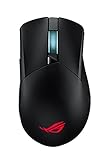
- Tri-mode connectivity with dual-wireless 2.4 GHz and Bluetooth LE, plus wired USB
- 19,000 dpi with 1% deviation (specially tuned to 26,000 dpi), 400 ips optical sensor, and 1000 Hz polling rate
- Revolutionary zero-click latency for real-time response
- Exclusive Push-Fit Switch Socket II design enables hot-swap compatibility with mechanical switches and Omron Optical Micro Switches to vary click force and extend lifespan of the mouse
- ROG Micro Switches offer consistent click force and a 70-million-click lifespan
ASUS lists a 1,000-Hz polling rate. That is a conventional setting for a modern gaming mouse, not a high-polling-rate option aimed at buyers seeking 2,000, 4,000, or 8,000 Hz. Competitive players should therefore choose it for its shape and wireless implementation rather than for headline sensor numbers.
The specifications establish capability, not independent latency or tracking results. Claims such as “under 1% CPI deviation” and any zero-gap or zero-latency button language should be treated as ASUS claims unless measured with dedicated equipment.
Three connection modes
2.4-GHz wireless
For gaming, use the supplied RF receiver and ASUS’s SpeedNova wireless system. The receiver extender lets you position the dongle close to the mouse, which is useful when a desktop tower, USB 3 devices, or a crowded 2.4-GHz environment blocks a direct line of sight.
Bluetooth
Bluetooth is better suited to laptops, travel, and conserving battery than to the lowest-latency competitive play. ASUS’s comparison information says the mouse can pair with up to three Bluetooth devices. Exact switching behavior and interference resistance depend on the host devices and local radio environment.
Rank #3

- REVOLUTIONARY PERFORMANCE - With 19,000 dpi optical sensor the ROG Gladius III offers 1% deviation (tuned to 26,000 dpi) for near-zero latency and unrivaled precision. Comfortable for marathon gaming sessions with Push-Fit Switch Socket II design ensuring compatibility with both mechanical and Omron optical micro switches.
- ULTIMATE PERFORMANCE - A high-end optical sensor delivers the accuracy and precision you need. Offering a range of 100 – 26,000 dpi (with class-leading 1% deviation), Gladius III mouse tracks flawlessly at up to 400 inches per second at 50 g acceleration. A 1000 Hz polling rate in both 2.4 GHz and wired modes offers lag-free response for instantaneous control.* ROG Gladius III features 19,000 dpi optical sensor that is specially tuned to 26,000 dpi.
- INSTANT ACTUATION - ROG Gladius III has a unique pivoted button design with zero gap between the mouse button and switch to ensure instantaneous actuation. In addition, tuned firmware filters out unintended mouse clicks for both mechanical and optical micro switches to give gamers an edge in competitive gaming.
- ROG MICRO SWITCH - The new ROG Micro Switches feature a 70-million-click lifespan and a gold-plated electro-junction to improve durability. Strict ROG manufacturing standards ensure that each individual switch is inspected and sorted, pairing left and right switches to keep force deviation within +/- 5 gram-force for a consistent click feel.
- PUSH-FIT SWITCH SOCKET II – An industry first, Push-Fit Switch Socket II design allows you to hot swap mice traditional 3-pin mechanical switches and the latest 5-pin Omron optical micro switches. Strengthened socket reduces shaking, providing consistent button clicks. With switches varying in feel and characteristics, this innovative socket design gives you the flexibility to select the switch that best suits your play style.
Wired USB
The detachable two-meter ROG Paracord provides a fallback when the battery is low and gives you a direct wired mode. The product information confirms the mode, but does not independently establish a latency difference between wired and RF operation.
Battery life: excellent on paper, conditional in practice
ASUS rates endurance at up to 119 hours over 2.4-GHz RF and 143 hours over Bluetooth with lighting disabled. Its comparison notes reduce those estimates to about 86 hours over RF and 98 hours over Bluetooth with default lighting. Sleep behavior, lighting brightness, connection mode, firmware, and usage pattern all change the result.
That makes battery life one of the mouse’s clearest advantages, but the maximum figure should not be read as a universal runtime. Disable RGB if endurance is the priority, and expect a different result if you use default lighting continuously. You can continue using the mouse through its wired connection while charging.
Clicks, wheel, and replaceable switches
The factory ROG Micro Switches carry a 70-million-click rating. This is a durability specification, not a promise that every unit will reach that count. Click force, pre-travel, post-travel, wheel noise, and side-button feel are also physical characteristics that require hands-on assessment; the published specifications do not establish them.
Rank #4

- Perfect precision: 36,000‑dpi ROG AimPoint optical sensor with 650 ips and 50 g acceleration rate, plus 1000 Hz polling rate.
- Classic look, with added lightness: Renowned asymmetrical aesthetic of the Gladius series, pared down to just 79 grams.
- Tri-mode connectivity: Game on for up to 119 hours with low-latency 2.4 GHz RF, pair up to three devices via Bluetooth mode, or charge and play with wired USB.
- ROG SpeedNova wireless technology: Delivering low-latency, reliable wireless performance and an optimized power solution in the 2.4 GHz RF mode.
- Push-Fit Switch Socket II: Swappable switch design for easy customization; Gladius III Wireless AimPoint includes ROG Micro Switches and is compatible with other 3-pin mechanical and 5-pin optical micro switches.
Push-Fit Switch Socket II is the more unusual feature. After opening the shell, you can replace compatible switches rather than discarding the entire mouse after a failure or changing the click character. ASUS supports both three-pin mechanical and five-pin optical micro switches. Verify the physical and electrical compatibility of any third-party part, and work carefully: bent pins, an incompletely seated switch, damaged clips, or a misaligned shell can create wobble or missed clicks. Availability of replacement switches varies by country.
The box includes two spare switches and a removal tool, plus replacement feet. Opening the mouse may have warranty implications depending on local ASUS terms, so check those terms before modifying it.
Independent reader supportYour contribution helps us test, update, and keep practical guides available for everyone.Armoury Crate and onboard profiles
ASUS Armoury Crate handles button remapping, DPI stages, surface calibration, RGB, firmware updates, profile management, and hardware-status information. The current download and support hub is the ROG Gladius III Wireless AimPoint support page.
The mouse stores five onboard profiles, but ASUS says onboard memory does not retain macros or Windows shortcuts. Advanced configuration therefore remains tied to Armoury Crate even though basic profiles can be recalled without the application. Menu names and firmware behavior can change, so use the current support documentation rather than relying on an old screenshot.
Best Value

- ROG AimPoint optical sensor: 36,000 dpi sensitivity with industry-leading <1% deviation for ultimate precision
- Dual wireless connectivity: Get in the game with ultrafast 2.4 GHz RF or pair up to 3 devices with Bluetooth mode
- ROG SpeedNova wireless technology: Low-latency, reliable 2.4 GHz RF wireless performance with incredible energy efficiency
- ROG Omni Receiver: Connect to multiple supported devices wirelessly with a single receiver
- Lightweight ambidextrous design: Compact form factor at only 57 grams *excluding battery and receiver
This is a trade-off, not an objective flaw: Armoury Crate provides deep control, while users who want a minimal software footprint may dislike installing a vendor suite for firmware and calibration.
Wireless troubleshooting
If the cursor stutters or disconnects, use this order:
- Connect the receiver through the supplied extender and place it near the mouse.
- Update Armoury Crate, mouse firmware, and receiver firmware.
- Move the receiver away from USB 3 devices, Wi-Fi equipment, and other 2.4-GHz sources.
- Test wired USB mode, then test Bluetooth separately.
- Re-pair the mouse if Armoury Crate offers that function.
- If charging, pairing, or dropouts remain abnormal, contact ASUS support.
ASUS’s quick-start guide directs owners to Armoury Crate for setup and firmware work.
How it compares with related ROG mice
| Model | What ASUS lists | Best reason to choose it |
|---|---|---|
| Gladius III Wireless AimPoint | 79 g; 36,000 DPI; up to 119 hours RF | Ergonomic shape, longest listed endurance, AimPoint sensor, replaceable switches |
| Gladius III Wireless | 89 g; 19,000 DPI; 55 hours RF; 85 hours Bluetooth | Choose it only when its price is substantially lower and the older specification is sufficient |
| Wired Gladius III | 79 g; 19,000-DPI optical sensor; six buttons | No battery or wireless management |
| Keris Wireless AimPoint | 75 g; five programmable buttons | Lighter, smaller ROG alternative with the AimPoint concept |
Comparative specifications come from ASUS’s Gladius series comparison. Shape fit should decide between these models; DPI alone is not a meaningful reason to upgrade.
Recommended Free Tools
Quick Recap
Who should buy it?
- Buy it if you are right-handed, prefer palm or relaxed-claw support, want RF, Bluetooth, and USB in one mouse, and value long battery life.
- Buy it if replaceable switches, spare feet, and included grip tape make long-term ownership more appealing.
- Consider another mouse if you need left-handed or ambidextrous use, a compact shell, more than six inputs, or a very light esports body.
- Consider another mouse if you require polling above 1,000 Hz or want to avoid Armoury Crate entirely.
- Choose the wired Gladius III if wireless and Bluetooth provide no benefit.
Product prices and availability are accurate as of the date/time indicated and are subject to change. Any price and availability information displayed on Amazon at the time of purchase will apply.



