Outdated Drivers Are Slowing You Down
One free scan finds every outdated or missing driver and matches the right update for your exact hardware.Free scan · exact hardware matchPC Slower Than It Used to Be?
A free scan shows the junk files, broken settings and background clutter dragging Windows down - then fixes them in one click.Free scan · Windows 10 & 11Verdict: The ASUS ROG Strix GeForce RTX 3060 OC is an excellent 1080p graphics card with an exceptionally quiet cooler, useful 12GB of VRAM and strong build quality. Its 1,882MHz Gaming Mode and 1,912MHz OC Mode clocks provide only a small performance advantage, however. The enormous 2.7-slot design is worthwhile for buyers who prioritize silence, but rarely justifies a large premium over a cheaper RTX 3060. In 2026, it makes sense mainly as a discounted or carefully inspected used card—not when priced close to a newer RTX 4060.
What exactly is this card?
This review covers the ASUS ROG-STRIX-RTX3060-O12G-GAMING, commonly called the ASUS ROG Strix RTX 3060 OC. It is not the separately listed non-OC model, ROG-STRIX-RTX3060-12G-GAMING.
As an Amazon Associate I earn from qualifying purchases.
The card uses NVIDIA’s Ampere-based GeForce RTX 3060 GPU. Its 12GB memory capacity is useful for modern textures, creative applications and some AI workloads, but it does not give the card the shader performance of a higher-tier GPU. The underlying RTX 3060 remains primarily a 1080p product.
ASUS ROG Strix RTX 3060 OC specifications
| Specification | ROG Strix RTX 3060 OC |
|---|---|
| GPU | NVIDIA GeForce RTX 3060 |
| CUDA cores | 3,584 |
| Memory | 12GB GDDR6 |
| Memory bus | 192-bit |
| Memory speed | 15Gbps |
| Boost clock | 1,882MHz Gaming Mode; 1,912MHz OC Mode |
| Outputs | Three DisplayPort 1.4a; two HDMI 2.1 |
| Power connector | One 8-pin PCIe connector |
| Recommended PSU | 650W |
| Size | Approximately 300 × 133.6 × 53.5mm |
| Slot thickness | 2.7 slots |
| Maximum displays | Four |
| Lighting | Aura Sync ARGB |
These specifications are from ASUS’s official product page. Check the label and model number before buying: the OC and non-OC Strix cards are separate products.
#1 Best Overall
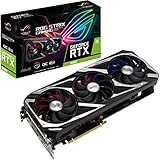
- NVIDIA Ampere Streaming Multiprocessors: The building blocks for the world’s fastest, most efficient GPU, the all-new Ampere SM brings 2X the FP32 throughput and improved power efficiency.
- 2nd Generation RT Cores: Experience 2X the throughput of 1st gen RT Cores, plus concurrent RT and shading for a whole new level of ray tracing performance.
- 3rd Generation Tensor Cores: Get up to 2X the throughput with structural sparsity and advanced AI algorithms such as DLSS. Now with support for up to 8K resolution, these cores deliver a massive boost in game performance and all-new AI capabilities.
- OC mode: Boost clock 1912 MHz (OC mode)/ 1882 MHz (Gaming mode)
- Axial-Tech Fan Design has been tuned up with more fan blades and a reversed rotational direction for the center fan.
Design and build quality
The defining feature is the cooler. ASUS equips this RTX 3060 with three Axial-tech fans, a large 2.7-slot heatsink, heatpipes and a MaxContact heat-spreader surface. The center fan and outer fans use a reversed-rotation arrangement intended to reduce turbulence. The fans can also stop at low load, allowing silent desktop operation when temperatures permit.
ASUS adds a backplate, reinforced structural elements, premium chokes, solid-polymer capacitors and high-current power stages. These are sensible premium-board features, but they should be understood as construction and electrical-design advantages—not as guarantees of higher frame rates or a particular lifespan. The official product description details the design.
The compromise is size. A mid-range RTX 3060 normally suggests a reasonably compact card; this Strix implementation is anything but. At roughly 300mm long, 133.6mm tall and 53.5mm thick, it can interfere with front fans, radiators, drive cages, motherboard headers and neighboring expansion slots. It may also need a support bracket to reduce visible sag and PCIe-slot strain.
Do these 3 things before closing this tab:
1Scan for outdated or missing drivers - takes under a minute2Clear out junk files and repair common Windows errors3Fix the driver behind crashes, sound loss and screen glitchesInstallation and compatibility
Before buying, measure the case rather than relying on its advertised GPU length. Allow room for:
- Front fans or a radiator ahead of the card.
- The card’s height beneath the side panel.
- At least 2.7 expansion slots, including anything blocked on the motherboard.
- A clean bend for the 8-pin power cable.
- A support bracket if the case does not adequately support the card.
ASUS recommends a 650W power supply. That is a system-level recommendation, not a claim that every computer needs exactly 650W. A good-quality 550W unit may be adequate in a modest system, while a high-power CPU, overclocking or an old low-quality PSU can justify more capacity. Use a native PCIe cable from the PSU where possible; avoid questionable SATA-to-PCIe adapters.
The card uses PCI Express 4.0 and will work in compatible older PCIe systems, although platform performance can vary. Connect the monitor directly to the graphics card, not the motherboard video outputs.
Gaming performance: a strong 1080p card
The RTX 3060 is best suited to 1080p high or ultra settings. Esports games can run at high refresh rates, although the CPU becomes increasingly important at very high frame rates. Modern AAA games are more demanding: 1440p is practical with high settings and selective reductions, while 4K is a compromise workload rather than this card’s natural target.
The Strix OC’s factory clock is only part of the story. NVIDIA GPU Boost can raise real-world clocks above the advertised boost frequency when temperature and power limits allow, so 1,912MHz is not a guaranteed sustained speed. The GPU model determines almost all of the gaming performance; ASUS’s cooler mainly helps the card maintain clocks quietly and consistently.
Guru3D’s testing found the factory-overclocked card only modestly ahead of reference RTX 3060 specifications. That is the right way to interpret the OC label: expect a small uplift, not a transformation into an RTX 3060 Ti or RTX 4060-class product. Its review and benchmark results are historical measurements from that test platform, so they should not be treated as current universal FPS figures across every driver, game patch and CPU.
Ray tracing, DLSS and 12GB of VRAM
Ampere provides second-generation RT cores and third-generation Tensor cores. Ray tracing is usable, but demanding RT effects generally require reduced settings and DLSS. A sensible order of testing is native rendering first, then DLSS Quality, and finally DLSS Balanced if more performance is needed.
DLSS Super Resolution is not the same as Frame Generation. RTX 30-series cards such as this one support DLSS Super Resolution and related NVIDIA features, but they do not have the RTX 40-series hardware feature used for DLSS Frame Generation. Do not assume that every modern DLSS option is available.
Recommended Free Tools
The 12GB framebuffer is a genuine advantage over many 8GB cards in texture-heavy games and some creator workloads. It can prevent memory pressure when a comparable 8GB card must reduce textures. It cannot overcome limited shader throughput, ray-tracing performance or memory bandwidth. Lowering texture quality may solve a VRAM problem; it will not make an overloaded GPU render a demanding scene quickly.
Rank #2

- NVIDIA Ampere Streaming Multiprocessors: The building blocks for the world’s fastest, most efficient GPU, the all-new Ampere SM brings 2X the FP32 throughput and improved power efficiency.
- 2nd Generation RT Cores: Experience 2X the throughput of 1st gen RT Cores, plus concurrent RT and shading for a whole new level of ray tracing performance.
- 3rd Generation Tensor Cores: Get up to 2X the throughput with structural sparsity and advanced AI algorithms such as DLSS. Now with support for up to 8K resolution, these cores deliver a massive boost in game performance and all-new AI capabilities.
- This GeForce RTX 3060 Ti graphics card with LHR (lite hash rate) delivers 25 MH/s ETH hash rate (est.).Avoid using unofficial software
- OC Edition: Boost clock 1890 MHz (OC mode)/ 1860 MHz (Gaming mode)
Cooling, noise and power
The oversized cooler is the card’s strongest reason to exist. In Guru3D’s testing, the Silent BIOS produced approximately 32dBA and kept the GPU below 60°C under its reported conditions. Those figures depend on the test bench, case airflow, ambient temperature, measurement equipment and individual sample, but they demonstrate the Strix’s substantial acoustic headroom.
Guru3D measured typical board power at approximately 167W. That is a card measurement using a particular test method, not whole-system wall power or a universal consumption figure. Expect power use to vary with the BIOS, game, frame rate, voltage, driver and tuning.
The three-fan, 2.7-slot design is arguably excessive for a roughly 170W-class GPU. That is not a criticism of its effectiveness: it is a criticism of what the premium cooler costs in size and price. A smaller dual-fan RTX 3060 can deliver nearly the same frame rates while being easier to install.
The Tool Desk
Outbyte Driver Updater FREEScan for outdated or missing drivers - takes under a minuteDriver Scan →Outbyte PC Repair FREEClear out junk files and repair common Windows errorsFree Scan →Performance and Silent BIOS modes
The dual-BIOS arrangement provides Performance and Silent modes. The Performance setting generally favors more assertive fan behavior, while Silent mode prioritizes acoustics. Fan-stop behavior and the exact switch arrangement should be verified on the specific board revision and manual rather than inferred from another Strix model.
Power the computer off before changing the physical BIOS switch. If a tuning experiment causes instability, return to the default BIOS and clocks, reboot, and remove third-party tuning settings. A BIOS switch is useful insurance, but it is not a substitute for careful testing.
Overclocking and undervolting
ASUS supports GPU Tweak II for profiles, monitoring, fan control and basic adjustment. The three practical tuning options are:
- OC Mode: use the manufacturer’s profile with minimal effort.
- Silent Mode: reduce noise if the default Performance behavior is unnecessary.
- Manual tuning: adjust the power limit, voltage/frequency curve, memory offset and fan curve one variable at a time.
Do not buy this card expecting a particular manual overclock. Silicon quality varies, and the card is already factory overclocked. Validate changes with a repeatable game benchmark, then perform a longer stability test. Driver resets, artifacts, corrupted textures and clock oscillation mean the setting is not stable, even if a short synthetic benchmark completes.
What’s actually slowing this PC down?
Pick the symptom - the matching free tool is one click away.
Undervolting is arguably more useful. A well-tuned voltage/frequency curve can reduce power, temperature and noise while preserving similar gaming performance. Save the default profile first, test cold-start and warmed-up behavior, and confirm stability in several games rather than relying on one benchmark.
How it compares with the alternatives
RTX 4060
The RTX 4060 is the most important comparison. It is newer, generally more power-efficient and supports newer RTX-generation features. Tom’s Hardware found that the RTX 4060 was typically the better choice when new pricing was similar, while recognizing the RTX 3060’s 12GB memory advantage. Its comparison measured roughly 30W less typical power at 1080p and 1440p, rising to about 40W at 4K in that test setup.
Choose the RTX 4060 when buying new, when efficiency matters, or when its price is close. Choose the Strix RTX 3060 when it is substantially cheaper, 12GB matters, or quiet premium cooling is a priority. See Tom’s Hardware’s comparison for the cited test results.
Cheaper RTX 3060 models
Cards such as ASUS Dual or TUF models and comparable MSI or Gigabyte designs may offer nearly identical gaming performance for less money. The Strix’s advantage is noise, cooling capacity, RGB and construction—not a major change to the RTX 3060 GPU itself. If the savings fund a faster GPU tier, a cheaper model is usually the smarter purchase.
Used RTX 3060 Ti
A used RTX 3060 Ti can provide more conventional raster performance, but typically has less VRAM. It is attractive for traditional gaming if the price and condition are right, but less suitable when 12GB capacity is important for memory-heavy games or creator workloads.
Rank #3

- For ASUS ROG Strix GeForce RTX 3080 V2 OC Edition 10GB GDDR6X
- For ASUS ROG Strix GeForce RTX 3080 V2 10GB GDDR6X
- For ASUS ROG Strix GeForce RTX 3060 Ti V2 OC Edition 8GB GDDR6
- For ASUS ROG Strix GeForce RTX 3060 Ti V2 8GB GDDR6
- For ASUS ROG Strix GeForce RTX 3070 V2 OC Edition 8GB GDDR6
AMD and Intel alternatives
An AMD card may offer more raster performance or memory at a similar price, while Intel Arc can be relevant at the value end. The decision depends on ray tracing, upscaling, streaming encoders, CUDA-dependent applications, ReBAR requirements, older DX9/DX11 behavior, drivers and warranty. Do not compare headline specifications without checking the games and software you actually use.
Independent reader supportYour contribution helps us test, update, and keep practical guides available for everyone.Buying the card used in 2026
Do not use launch pricing as a current buying recommendation. The official ASUS page does not provide a dependable current street price, so the right question is whether the listing is meaningfully cheaper than a comparable newer card after accounting for warranty and condition.
Before purchasing a used unit:
- Request a GPU-Z screenshot showing the exact 12GB desktop RTX 3060 model.
- Check for a modified mining BIOS and confirm the BIOS switch works normally.
- Inspect fans for grinding, rattling or delayed startup.
- Look for corrosion, bent fins, damaged screw heads and missing backplate screws.
- Run a repeatable benchmark and a demanding game for at least 20–30 minutes.
- Check for artifacts, driver crashes and abnormal hotspot behavior.
- Test every display output, RGB function and fan-stop behavior.
- Prefer a seller offering a return window and clear warranty information.
Mining history cannot be proven or ruled out from the model name alone. Fan wear, BIOS condition, temperature behavior and seller protection matter more than speculation.
Common installation and troubleshooting problems
If the card does not work or behaves abnormally, use this sequence:
- Shut down and reseat the card.
- Reconnect the native 8-pin PCIe cable.
- Connect the monitor directly to the GPU.
- Test the other BIOS position with the computer powered off.
- Remove old graphics drivers using a clean driver-install procedure.
- Restore default clocks and disable third-party tuning.
- Try another PCIe slot only when the motherboard manual permits it.
- Test the card in another system if possible.
Persistent artifacting at stock settings is a reason to use the seller or manufacturer warranty, not to continue overclocking. Also recheck physical clearance: the advertised 300mm length may not include the space occupied by front fans, radiators or cable bends.
Who should buy it?
Buy it at a deep discount if you want quiet 1080p gaming, need 12GB of VRAM, use CUDA or NVENC, and have room for the oversized cooler.
Consider it at ordinary RTX 3060 pricing only if silence, construction and a good return policy matter more than maximum performance per dollar.
Free tools Windows power users keep installed
One-click scans. No signup required.
Avoid it near RTX 4060 pricing. The newer card is generally more efficient and feature-rich, while the Strix’s factory overclock is too small to justify paying a substantial premium.
Avoid it for compact cases unless you have confirmed length, height, thickness, cable and radiator clearance.
Final verdict
The ASUS ROG Strix GeForce RTX 3060 OC is a luxury implementation of a mid-range GPU. Its cooling system is dramatically better than the RTX 3060’s power level requires, producing the quiet operation and thermal headroom that silent-PC builders appreciate. The 12GB of VRAM is still useful, particularly for texture-heavy games and selected creator workloads.
But the factory overclock is modest, the card is physically enormous, and its premium design does not deliver premium-tier FPS. The sensible purchase rule is simple: buy the Strix for its silence, build quality and 12GB capacity—not for the OC badge. If a newer RTX 4060 costs about the same, choose the newer card. If this Strix model is substantially cheaper and passes a careful inspection, it remains a capable and unusually quiet 1080p option.
Quick Recap
Product prices and availability are accurate as of the date/time indicated and are subject to change. Any price and availability information displayed on Amazon at the time of purchase will apply.




