Recommended Free Tools
The Atari Gamestation Go is a licensed retro handheld built around a large library of Atari and other classic games—and an unusual set of controls: paddle, Trak-Ball, numeric keypad, D-pad, bumpers and ABXY buttons. SmartGlow illuminates the controls assigned to each game, while the in-game Settings screen can show control help and available options. It is a distinctive choice for players who want those inputs and games in one device, but reviewers have raised concerns about comfort, fixed controls and software behavior.
What is the Atari Gamestation Go?
Made by My Arcade under license, the Gamestation Go is a portable console with a 7-inch color display, built-in rechargeable battery, Wi-Fi, HDMI output, USB-C ports, game-save options and a pop-out stand. Its defining feature is the mix of six advertised control types: paddle, Trak-Ball, D-pad, bumpers, numeric keypad and ABXY gamepad buttons. The official specifications list model DGUNL-7065 and include the console, AC adapter, charge cable, user guide and HDMI cable. Atari’s product page links to a purchase option; availability and price can change.
Atari and My Arcade advertised “200+ video games built-in.” That is a vendor-reported count, not an audited count of distinct games: the library includes versions across different systems, so multiple entries can represent the same familiar game. The September 2025 launch announcement gave a historical MSRP of $179.99 and October 2025 availability; it is not a reliable indicator of today’s selling price. The announcement named titles from Atari, Jaleco and PIKO Interactive, including Asteroids: Recharged, Missile Command: Recharged, Centipede: Recharged, Breakout: Recharged, Berzerk: Recharged, Balls of Steel Pinball and PAC-MAN. See My Arcade’s launch announcement and the official My Arcade product page and game list.
How do you get started?
- Charge the handheld. Connect the included USB cable and AC adapter. The user guide says the indicator is red while charging and green when full. The guide does not specify a charging duration.
- Turn it on and navigate the menu. Use the integrated controls to move through the interface. When the device is not charging, it enters sleep mode after eight minutes of inactivity; press a button to wake it.
- Choose a game and follow the lights. SmartGlow illuminates the controls designated for the selected game. It also operates in menu and settings screens, so the lights are not limited to gameplay.
- Open the game’s help and options. Press the SETTINGS button during a game to view its controls or adjust options that are available for that title. Not every game has in-game settings, and save options are not supported in every game.
- Check for firmware updates. Open SETTINGS, choose UPDATE, select a Wi-Fi network and enter its password. Then check Software Update. The user guide describes Wi-Fi as being for firmware updates.
The device’s DGUNL-7065 user guide covers charging, controls, sleep behavior and updates.
#1 Best Overall

- Officially licensed: This officially licensed Atari console features classic games from Atari, including titles originally released on the Atari 2600, Atari 5200, Atari 7800, Atari Arcade, Atari Recharged, M-Network and Balls Of Steels Pinball tables.
- 🕹️ 200+ video games built-in, including PAC-MAN, Atari: Recharged and Balls of Steel, Asteroids, Breakout, Centipede, Crystal Castles, Missile Command, Tempest, Warlords, Yars Revenge and many More!
- 🎯 Also includes licensed games from Jaleco & PIKO Interactive. Game Save options.
- High resolution 7” full color display. The integrated paddle, d-pad, trak-ball, numeric keypad, bumpers, and classic gamepad buttons (A,B,X,Y) allow you to play every game in the collection with the controls it was designed for.
- 🕹️ Connects to TV via HDMI. Built in Wi-Fi for easy updates. Powered by a built-in rechargeable battery.
How do you use SmartGlow?
SmartGlow is the illuminated control guidance built into the handheld. When a game or menu screen calls for particular inputs, the corresponding controls light up. It helps newcomers identify which part of the device to use without having to guess between the D-pad, keypad, paddle, Trak-Ball and face buttons.
The lights indicate intended controls; they do not mean every game offers freely configurable mappings. Tom’s Hardware reported that the firmware it tested, versions 1.0 and 1.1, did not let players change a game’s assigned controls. That is a dated observation about those test versions, not confirmation of the current firmware’s behavior.
Rank #2

- Officially licensed Atari titles. Titles include Asteroids, Centipede, Millipede, Breakout, Missile Command, Crystal Castles and many more. Game save options.
- Packed with over 200 built-in Atari games + bonus titles. Pac-Man & Galaga not included. Full Game list listed below.
- Includes Atari console, games instructions, 2 wireless joysticks, USB power cable, HDMI cable, and user manual. System connects directly to TV.
- Includes two 2.4 GHz wireless joysticks, inspired by the original Atari joysticks, include paddles for paddle games like Breakout, Warlords and many more.
- User Guide Languages: English, French, Spanish, Italian, Portuguese, German, Dutch, Japanese and Arabic. Dynamic RGB LED lights.
Which games use the paddle or Trak-Ball?
The control that suits a game depends on its design, and the on-device controls screen is the most useful guide for a specific title. WIRED’s reviewer described the paddle as a natural fit for Breakout and the Trak-Ball as a way to provide rotational control in Tempest. The reviewer also noted that Meebzork on the Atari 5200 uses the numeric keypad. These examples illustrate the hardware’s range, rather than promising that controls can be remapped to suit every preference.
The built-in list spans Atari 2600, 5200 and 7800 games, arcade titles, Recharged games, Balls of Steel, PAC-MAN, and games from Jaleco and PIKO. Familiar entries include Asteroids, Breakout, Centipede, Missile Command, Tempest, Warlords and Yars’ Revenge. Because some franchises appear in multiple versions across systems, the advertised game count should not be read as the same number of unique game concepts.
Rank #3

- 🕹️Officially Licensed: Officially licensed Atari titles, ensuring an authentic gaming experience, includes bonus games.
- Portable Gameplay: Powered by 4 AA batteries (not included) or by a USB-C cable (not included). IMPORTANT NOTE: Please use standard non-rechargeable batteries.
- Collector's Item: A must-own for collectors and fans of video games, celebrating Atari's pioneering legacy spanning over 50 years.
- Headphone Jack: 3.5mm headphone jack lets you enjoy Atari on the go on your own privately. Built-in speaker with volume control and brightness adjustment
- 🎯 Iconic Titles: Relive iconic Atari classics like Pong, Yars Revenge, Breakout, Asteroids Centipede, Missile Command, and many more with 100 games in one compact unit.
How do you connect the Gamestation Go to a TV?
Connect the included HDMI cable between the handheld and a display. According to the user guide, the Gamestation Go’s own screen turns off while HDMI is connected, so gameplay moves to the external screen. My Arcade says external controllers can be connected for big-screen play and lists a Gamestation Gamepad as an optional add-on. Check that the particular controller is compatible with your setup before buying it; the available product information does not establish compatibility details for every controller.
What should you know about compatibility and software?
Compatibility reports from independent reviews are tied to the reviewers’ test units and dates. WIRED’s November 6, 2025 review said Atari 7800 games would not launch on its unit and noted display-ratio or vector-graphics presentation problems in some games. The same review described a library interface organized into category lists without title search, but with favorites, game information, controls, tips and save states for many titles. These are findings from a November 2025 review, not proof that the launch problems remain on current firmware. Check for an update and consult current support information if a particular game fails.
Rank #4

- Officially licensed Atari controller.
- Connects to Atari Gamestation Go and Atari Gamestation Mega.
- Integrated paddle, trak-ball and keypad.
- SmartGlow technology makes gameplay intuitive by illuminating the controls needed for each game.
- Powered by a built-in rechargeable battery with 12+ hours of playtime
Tom’s Hardware’s November 22, 2025 review reported that its test firmware (v1.0 and v1.1) did not allow control remapping. The reviewer found the paddle slow to respond and the small Trak-Ball too sensitive. Those are reviewer impressions on the tested unit, not measurements that establish how every player will experience the controls.
Tom’s Hardware also described microSD access for adding games as undocumented by Atari and My Arcade. In the reviewer’s own tests, selected Sega Genesis, SNES, Atari Lynx and NeoGeo Pocket Color games ran, using D-pad and ABXY controls. This should be treated as an unofficial reviewer-observed capability, not supported compatibility guidance. Only use game files you have the legal right to use.
Do these 3 things before closing this tab:
1Fix the driver behind crashes, sound loss and screen glitches2Repair Windows errors before they cause bigger problems3Scan for outdated or missing drivers - takes under a minuteBest Value
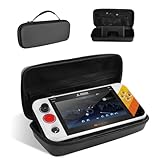
- 【Compatible Models】Designed for My Arcade Atari Gamestation Go Retro Video Games Console, ensuring a perfect fit for your device and accessories.
- 【Shockproof Protection】Durable EVA hard shell and soft interior lining protect your console from bumps, impacts, and scratches during transport.
- 【Built-in Stand】Includes a convenient stand feature, allowing you to set your console down for easy viewing or gaming on the go.
- 【Convenient Design】 Top mesh pocket provides organized storage for cables, chargers, and accessories, keeping everything neatly in place.
- 【Portable & Lightweight】The lightweight design of the travel case and nylon handle make it easy to carry, perfect for travel, storage, or daily commuting.
How long does the battery last?
Atari’s live product specifications list “4–5 hours playtime” per charge. This is the manufacturer’s estimate, not a controlled runtime result from an independent test. Actual time can vary with use, and the reviewed sources do not establish a comparable measured figure. The included AC adapter and charge cable are listed in the box contents.
Is the Atari Gamestation Go worth considering?
The strongest reason to choose it is its combination of licensed games and specialized physical controls. A conventional handheld pad cannot reproduce the same paddle, Trak-Ball or keypad experience, while SmartGlow makes the control variety easier to understand. That makes the Go most relevant to players who specifically want Atari’s library and arcade-style input options.
The trade-off is that the experience depends on how well the particular controls, mappings and software work for you. WIRED rated the device 6/10 in November 2025 and criticized ergonomics, build and software; Tom’s Hardware found the D-pad and buttons adequate but criticized the specialized controls’ feel and the fixed mappings on its tested firmware. Notebookcheck likewise identified the clearest audience as people who value the licensed Atari library and varied controls. These reviews offer different subjective assessments, not a uniform verdict. Check current firmware and the game list against the titles you intend to play before buying.
Quick Recap
Product prices and availability are accurate as of the date/time indicated and are subject to change. Any price and availability information displayed on Amazon at the time of purchase will apply.
What’s actually slowing this PC down?
Pick the symptom - the matching free tool is one click away.




