Recommended Free Tools
atlibusbdfu.dll is a 32-bit library used by Atmel FLIP, the legacy firmware-programming tool for Atmel AVR microcontrollers. It is not a Windows system file, Microsoft runtime, or standalone USB driver.
The safest repair is to reinstall FLIP from Microchip’s official FLIP product page, then install the matching FLIP USB driver while your board is in DFU or bootloader mode. Do not download the DLL from a random file site or copy it into System32.

Fix 1: Repair or reinstall Atmel FLIP
Time needed: 10–20 minutes
This is the most likely solution when FLIP itself reports that atlibusbdfu.dll is missing or cannot be loaded. The file is normally installed inside FLIP’s bin folder, commonly similar to:
C:Program Files (x86)AtmelFlip 3.4.7bin
The exact folder can differ depending on the installation package and Windows configuration.
#1 Best Overall

- Supports all AVR devices with ISP or PDI interface, and certain 51 Devices
- Programs both Flash and EEPROM,Supports Fuses and Lock Bit Programming
- Based on AT AVRISP mkII firmware,Upgradable to Support Future Devices
- Adjustable ISP programming speed up to 8M frequency,USB 2.0 compliant (full speed, 12Mbps)
- 3 optional cables to target board,Powered from USB bus, does not require external power supply
Uninstall the damaged installation
- Press Windows key + R.
- Type:
text

   appwiz.cpl
- Press Enter.
- Select Atmel FLIP or the relevant FLIP entry.
- Choose Uninstall.
- Restart Windows when the uninstall finishes.
If FLIP is not listed, continue with the official installer. Do not delete unrelated Atmel or Microchip software.
Install FLIP from the official source
Microchip still provides FLIP for Windows, including the FLIP package and a Java-integrated installer. FLIP supports firmware programming over USB, RS232, and CAN.
Download FLIP only from Microchip’s official FLIP product page. Choose the Java-integrated package if Java is not already available on the computer. Follow the installer prompts and retain the default installation location unless you have a specific reason to change it.
After installation:
- Open the Start menu.
- Search for FLIP.
- Launch FLIP from the installed shortcut.
- Open File Explorer.
- Browse to the FLIP installation folder.
- Open its
bindirectory. - Confirm that
AtLibUsbDfu.dllis present.
Windows is not case-sensitive for this filename, so AtLibUsbDfu.dll and atlibusbdfu.dll refer to the same file. If the file is present, do not download another copy. Continue to the driver repair below.
Do these 3 things before closing this tab:
1Scan for outdated or missing drivers - takes under a minute2Clear out junk files and repair common Windows errors3Fix the driver behind crashes, sound loss and screen glitchesIf the file is still absent after installation, uninstall FLIP again, restart Windows, and reinstall using the other official FLIP package. A third-party firmware updater may also have its own FLIP dependency, so reinstall that updater if it is the program displaying the error.
Fix 2: Install the FLIP USB/DFU driver
Time needed: 5–15 minutes
atlibusbdfu.dll is a user-mode library. It is separate from the USB or DFU device driver that lets Windows communicate with the board. Installing FLIP does not always mean that the correct driver is already assigned to the device.
Microchip’s driver files are normally under FLIP’s usb directory, similar to:
Rank #2

- Atmel-ICE-C is the cost effective solution for the powerful Atmel-ICE it adopts the original ATMEL-ICE-PCBA and comes with a durable aluminium alloy enclosure.
- Atmel-ICE-C delivers the same functionality and usability just as the ATMEL-ICE Full Kit it is capable of debugging and programming Atmel ARM Cortex-M based Atmel SAM and AVR microcontrollers with on-chip debug capability.
- Supports JTAG SWD PDI TPI aWire SPI and debugWIRE interfaces; Supports all built-in hardware breakpoints in the target microcontroller (number depends on the OCD module in the target)
- Full source-level debugging in Atmel Studio; Up to 128 software breakpoints; 1.62 to 5.5V target operation; USB powered
- Provides both ARM Cortex Debug Connector (10-pin) pin-out and AVR JTAG connector pin-out
C:Program FilesAtmelFlip 3.x.xusb
The folder name may include the installed FLIP version.
Put the board into DFU mode
The board must expose its DFU or bootloader interface before Windows can install the relevant driver. The procedure depends on the hardware. It may involve a reset, bootloader button, jumper, or a board-specific sequence.
A normally running Arduino serial device is not necessarily in DFU mode. ATmega8U2, ATmega16U2, ATmega32U4, XMEGA, and other compatible devices may appear under a different name when their bootloader is active.
Assign the FLIP driver in Device Manager
- Connect the board while it is in DFU or bootloader mode.
- Right-click the Start button.
- Select Device Manager.
- Look under Other devices, Universal Serial Bus devices, or a similarly named category.
- Find the newly appearing unknown, DFU, or bootloader device.
- Right-click it and choose Update driver.
- Select Browse my computer for drivers.
- Browse to FLIP’s
usbfolder. - Enable Include subfolders.
- Select Next and allow Windows to install the driver.
- Disconnect and reconnect the board, or reset it into DFU mode again.
- Open FLIP and select the USB interface.
A successful repair usually changes the device name in Device Manager and allows FLIP to open the USB connection. If Windows reports that the best driver is already installed but FLIP still cannot communicate, remove the incorrect device entry and repeat the installation while the board is visibly in DFU mode.
When hunting through several driver versions is slowing you down, Outbyte Driver Updater can scan for stale or mismatched drivers; its free scan shows what needs attention, while driver installation is handled by the full version. Reinstalling FLIP and assigning its USB driver remains the definitive fix for this application.
The Tool Desk
Outbyte Driver Updater FREEFix the driver behind crashes, sound loss and screen glitchesFind Drivers →Outbyte PC Repair FREEClear out junk files and repair common Windows errorsFree Scan →Fix 3: Launch the installed program, not a copied executable
Time needed: 5 minutes
A copied flip.exe, portable folder, shortcut with an invalid working directory, or third-party updater can prevent Windows from finding libraries that are correctly installed elsewhere.
Try this:
- Close FLIP and the firmware updater.
- Open the Start menu.
- Search for FLIP.
- Launch the installed shortcut.
- In FLIP, select the correct device and communication interface.
- Try the USB connection again.
If the error comes from another application:
- Open Settings.
- Select Apps.
- Select Installed apps.
- Find the firmware updater.
- Choose its menu button and select Uninstall.
- Download that updater again from its own developer.
- Install it normally.
- Start it from the Start menu rather than from a copied folder.
As a narrowly targeted fallback, a vendor may instruct you to place the matching DLL beside its own executable. Only use a copy taken from the matching official FLIP installation. Do not place it in System32, SysWOW64, or both folders.
Fix 4: Check antivirus quarantine
Time needed: 5–10 minutes
If FLIP worked previously and the DLL disappeared after a security scan, check whether antivirus software quarantined it.
Rank #3

- [PROFESSIONAL PROGRAMMER]: Production of high-density SMD technology, a unified user interface, easy to use, fully functional, program running of application software, ultra-small code -runs faster, supports bilingual (English and Chinese), it can automatically identify the operating system to install and run under 2000/WIN XP/WIN 2003/WIN 2008/WIN VISTA/WIN7/WIN8/WIN10 (32BIit/64Bit).
- [HIGH SPEED PROGRAMMING]: This programmer has built-in MCU with high-performance and high-capacity USB interface at the communication speed of 12Mbps (up to 2x)being in line with ( For each chip) well-designed programming algorithm and USB high-speed communications. It supports simultaneously burn with 4 programmers each computer. Chip auto serial number is the most complete and practical.
- [ ULTRA-LOW POWER CONSUMPTION]: It is comprehensive programmer to program all the chips without an external power supply. The low power consumption of its own to ensure that the USB port can provide enough power. The minimum volume and the lowest power consumption and do not feel any heat in process.
- [BEST OVERVOLTAGE, OVERCURRENT ]: VCC, VPP power supply of the Programmer is furnished with the independent Grade 4 overcurrent and the of automatically cutting off power supply. Each pin of 40-pin programming socket has VPP overvoltage . The short-circuit do not reset the PC.
- [ SERIAL ICSP INTERFACE]: Supporting the serial download and high-speed parallel high voltage programming. Wide range of chip 15000+ support, support for serial and parallel series 40/44/48PIN large capacity FLASH. Test CMOS4000 74/54 series integrated circuit. Can be located in the gate circuit error. Original chip encryptionoperation on AVR microcontroller with internal RC Calibration byte. The Decrypt software can not be directly run on another same type of chip.
- Open Windows Security.
- Select Virus & threat protection.
- Choose Protection history.
- Look for an entry involving FLIP or
AtLibUsbDfu.dll. - Verify that FLIP was installed from Microchip’s official package.
- Restore the file only if its origin is clear.
- Reinstall FLIP if you are uncertain about the quarantined file.
Do not restore or whitelist a DLL downloaded from an unknown source. If several unrelated files have disappeared, run a full security scan and reinstall FLIP from the official installer instead.
Fix 5: Check 32-bit and 64-bit compatibility
Time needed: 5–15 minutes
The commonly catalogued atlibusbdfu.dll file is 32-bit. A 32-bit application can use a 32-bit DLL on 64-bit Windows, but the old FLIP USB driver and device-installation process may still have compatibility problems on newer systems.
Check the following:
- Use the official 32-bit FLIP package and its matching files.
- Keep the DLL inside FLIP’s installation directory.
- Do not use a 64-bit replacement from another source.
- Do not copy the file into
System32as an architecture fix. - Check Device Manager for a driver warning icon.
- Note whether Windows rejects the driver during installation.
Microchip lists FLIP for Windows and documents Windows 10 support, but current compatibility with every Windows 11 configuration is not guaranteed. If Windows blocks the legacy driver, do not casually disable security protections. Check whether the board vendor provides a supported modern flashing tool or driver.
Fix 6: Understand the exact error
Time needed: 2–5 minutes
Different messages point to different parts of the FLIP chain.
“AtLibUsbDfu.dll not found”
FLIP or another updater cannot locate the library. Repair or reinstall the program that produced the message, then confirm the file exists in that program’s expected directory.
“The program cannot start because atlibusbdfu.dll is missing”
The application was launched, but Windows could not resolve the application-local dependency. Start with a normal reinstall rather than downloading a replacement DLL.
“Could not load dynamic library”
The file may exist but still cannot be loaded. Possible reasons include a wrong architecture, a missing dependent library, a copied executable, or a damaged installation. Reinstall the matching FLIP package and launch the installed executable.
Rank #4
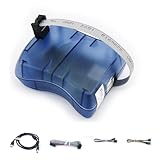
- Supports AVR Studio 4/5/6 or higer version(delivered with firmware for AVR Studio 5, can be updated to support other AVR Studio versions)
- Supports all AVR devices with ISP or PDI interface, and certain 51 Devices
- Supports Fuses and Lock Bit Programming
- Upgradable to Support Future Devices,adjustable ISP programming speed up to 8M frequency
“Could not open USB device”
This usually means the DLL-loading problem has been passed. Check DFU mode, the Device Manager driver, the USB cable, the USB port, board power, and the selected device in FLIP.
FLIP detects the device but flashing fails
Check that the selected microcontroller matches the board, the firmware file is intended for that device, and the bootloader remains active during the operation.
Free tools Windows power users keep installed
One-click scans. No signup required.
Fix 7: Do not register this DLL with regsvr32
Time needed: 1 minute
regsvr32 is intended for DLLs that provide registration entry points such as DllRegisterServer. AtLibUsbDfu.dll is a program library, not a documented COM or ActiveX component.
Do not run:
regsvr32 atlibusbdfu.dll
Registering it will not install the FLIP USB driver and may produce an entry-point or architecture error. The correct repair is to restore the library through the official application installer and assign the USB driver through Device Manager.
Fix 8: Use SFC and DISM only for broader Windows corruption
Time needed: 15–30 minutes
SFC and DISM repair Windows components. They do not normally restore atlibusbdfu.dll, because this is not a Windows-protected system file.
Use them only if Windows has other repair symptoms, such as damaged built-in applications, update failures, or repeated system-file errors.
What’s actually slowing this PC down?
Pick the symptom - the matching free tool is one click away.
- Right-click Start.
- Select Terminal (Admin) or Command Prompt (Admin).
- Run:
text

   DISM.exe /Online /Cleanup-Image /RestoreHealth
Best Value
- Wait for it to finish.
- Run:
text

   sfc /scannow
- Restart Windows.
- Repair or reinstall FLIP afterward.
Microsoft documents DISM image repair and System File Checker through its official support documentation.
If you are repeatedly running SFC and DISM without knowing what changed, Outbyte PC Repair can show issues during its free scan, while repair is performed by the full version. It is not a substitute for reinstalling FLIP, which remains the definitive repair when this application file is missing.
Why random DLL downloads are unsafe
A downloaded DLL can have the wrong version, architecture, dependencies, or file origin. It may also leave the FLIP installation incomplete, fail to solve the missing USB driver, or introduce malware.
Never copy a random atlibusbdfu.dll into:
C:WindowsSystem32
Do not place copies in both System32 and SysWOW64. Use the official Microchip FLIP installer and the bin and usb folders it supplies.
Likely causes and matching repairs
| Cause | Best repair |
|---|---|
| FLIP was never installed or is damaged | Reinstall FLIP from Microchip |
| A copied updater cannot find the file | Reinstall and launch the installed application |
| DLL exists but USB still fails | Install the FLIP driver through Device Manager |
| Board is not in DFU mode | Use the board-specific bootloader procedure |
| Antivirus removed the file | Check quarantine and reinstall if needed |
| Legacy driver is blocked | Check compatibility and seek a supported vendor tool |
| Broader Windows corruption exists | Run DISM and SFC, then repair FLIP |
FAQ
Is atlibusbdfu.dll part of Windows?
No. It belongs to Atmel FLIP or software that uses FLIP’s DFU functionality.
Is it a USB driver?
No. It is a user-mode library. The associated USB or DFU driver is installed separately from FLIP’s usb directory.
Which boards use it?
It is associated with Atmel AVR USB DFU bootloaders and compatible devices, including hardware based on ATmega8U2, ATmega16U2, ATmega32U4, and supported XMEGA devices.
Quick wins for a faster PC:
Fix the driver behind crashes, sound loss and screen glitchesFind Drivers →Clear out junk files and repair common Windows errorsFree Scan →Scan for outdated or missing drivers - takes under a minuteDriver Scan →Why does FLIP report the DLL as missing when it exists?
The application may be running from the wrong directory, using the wrong architecture, missing a dependency, or unable to communicate through the required DFU driver.
Should I use System Restore?
Only as a last resort for a recently broken installation that previously worked. Reinstalling FLIP from Microchip is the preferred source.
What information should I collect if nothing works?
Record the firmware updater name, FLIP version, Windows version, application path, DLL path, Device Manager device name and error code, and whether the board is actually in DFU mode.
Quick Recap
Product prices and availability are accurate as of the date/time indicated and are subject to change. Any price and availability information displayed on Amazon at the time of purchase will apply.



