
Short answer: Valve documents only one genuine alternative to the Steam Frame wireless adapter: stream over your home Wi‑Fi network. For the most reliable version of that fallback, use a nearby 6 GHz Wi‑Fi 6E or Wi‑Fi 7 access point and connect the SteamOS or Linux host PC to the router by Ethernet whenever possible. This still is not equivalent to the adapter’s dedicated direct link.
A USB‑3 extension cable or powered hub can improve placement of the included adapter, but it does not replace it. A generic USB Wi‑Fi dongle may provide ordinary network access on SteamOS, yet Valve has not certified arbitrary Wi‑Fi 6, Wi‑Fi 6E or Wi‑Fi 7 dongles for the Frame’s paired direct-link protocol. If you need a drop-in replacement for the Valve adapter, there is no documented option.
As an Amazon Associate I earn from qualifying purchases.
What the Steam Frame adapter actually does
The Steam Frame is a SteamOS PC and headset with built-in Wi‑Fi and Bluetooth radios. Its separate wireless adapter is intended to create a paired, direct connection between the Frame and a host PC for PC-VR streaming. Valve’s setup instructions describe a specific sequence: connect the included adapter to the host computer, preferably through USB‑3, start SteamVR, install the supplied driver, and pair the headset.
That pairing matters. The adapter is not described as a conventional Wi‑Fi network card that can be swapped for any USB radio. Valve’s documentation covers its own adapter, its driver and its pairing process. It does not publish a compatibility list for third-party USB Wi‑Fi hardware or state that a generic dongle can speak the same direct-link protocol.
#1 Best Overall
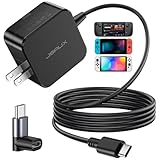
- Intelligent Output Adjustment: The JSAUX 45W USB C Power Delivery charger passed the UL 62368-1 test, with intelligent output adjustment function, support 45W 36W 27W 15W output, has the power to charge your steam deck, phone, tablet, and MacBook
- Fast Charge for Steam Deck & Switch: Equipped with 45W output, this USB C fast charger fully replaces the original Steam Deck charger and charges the device to 100% in about 2.5 hours. Also supports full-speed charging for Steam Frame / Nintendo Switch / Switch OLED models (up to 39W), ensuring fast, reliable power for uninterrupted gaming
- 5FT USB C Charging Cable: Come with an extra-long 5 Feet type C Integrated cable giving you plenty of cord to reach an outlet. Passed 10000+ times swing tests, the built-in USB C cable is more durable & flexible to bend at any angle and withstand daily wear. No low-power issue while you playing time
- Universal Compatibility: High-speed charging, compatible with Steam Frame, Steam Deck, Nintendo Switch 2, Switch, Switch OLED/Lite, iPhone 18 Pro/18 Pro Max/Air/17/16/15 Series, Samsung Galaxy S26/S25/S24/S23/S22/S21/S20 Series, Galaxy Note 10/Note 20, Google Pixel 2/3/4/5/6/7/8/9, Pixel XL, LG G5/G6/G7, LG V20/V30, iPad Pro 11"/12.9", Galaxy Tab S8 S7, MacBook Pro/Air and more USB C devices. Note: Does not support the Switch 2 console mode, does not support full-speed charging for Switch 2.
- Universal Compatibility: High-speed charging, compatible with Steam Deck, Nintendo Switch 2, Switch, Switch OLED/Lite, iPhone 18 Pro/18 Pro Max/Air/17/16/15 Series, Samsung Galaxy S26/S25/S24/S23/S22/S21/S20 Series, Galaxy Note 10/Note 20, Google Pixel 2/3/4/5/6/7/8/9, Pixel XL, LG G5/G6/G7, LG V20/V30, iPad Pro 11"/12.9", Galaxy Tab S8 S7, MacBook Pro/Air and more USB C devices. Note: Does not support the Switch 2 console mode, does not support full-speed charging for Switch 2.
Valve also documents a second path: the Frame can stream from the host through the home network. The Frame joins Wi‑Fi, the host PC is reachable on that network, and the Steam library is streamed through the normal network path rather than through the dedicated adapter. Valve warns that home Wi‑Fi is generally more congested and less reliable than the adapter’s direct connection.
“También puedes transmitir a través del Wi‑Fi de tu casa, pero eso tiende a estar más congestionado y ser menos fiable que la conexión directa que te ofrece el adaptador inalámbrico.”
In practical terms, the home-network method is the supported fallback; the other choices below either improve that fallback or help you keep using the included adapter.
What’s actually slowing this PC down?
Pick the symptom - the matching free tool is one click away.
Alternatives ranked by what they really replace
| Method | Is it documented by Valve? | What it replaces | Congestion and latency expectation | Host requirements | Extra hardware and cost | Setup complexity |
|---|---|---|---|---|---|---|
| Home Wi‑Fi through a 6 GHz Wi‑Fi 6E/7 router | Yes, as the home-network streaming path | The adapter connection, but not its dedicated-link behavior | More susceptible to congestion and interference than the direct adapter; no published latency figure | SteamOS or Linux host on the same home network; exact version requirement for network streaming is not stated | A suitable router or access point may be needed; model prices were not stated | Moderate: join the same network and configure Steam streaming |
| Ethernet from the host to the router or access point | Recommended as a network setup, not specified as a separate Valve feature | Nothing by itself; it removes the host PC’s Wi‑Fi leg | Can reduce host-side wireless contention, but Valve publishes no guaranteed latency improvement | Host PC needs an Ethernet connection and the Frame still needs Wi‑Fi | Ethernet cable and an available router port; cost not stated | Low if cabling is convenient |
| USB‑3 extension cable or powered hub for the included adapter | Consistent with Valve’s USB‑3 recommendation | Nothing; it is an adapter-placement accessory | May make antenna placement easier, but no performance gain is guaranteed | The same adapter, driver and pairing requirements | USB‑3 extension or powered hub; price not stated | Low |
| Generic USB Wi‑Fi adapter | No certification or direct-link compatibility statement | Nothing reliably; ordinary network connectivity is a different use case | Unknown for Frame direct streaming because the protocol and driver support are unverified | Device-specific Linux/SteamOS driver support would be required for ordinary networking | Adapter cost varies; no verified model list or price comparison | Uncertain and potentially high |
1. Home Wi‑Fi with a 6 GHz Wi‑Fi 6E or Wi‑Fi 7 router
This is the best true alternative because it uses the only non-adapter streaming route Valve explicitly describes. A 6 GHz-capable router is the most relevant class of equipment: it gives the Frame a separate, higher-frequency network band that can be used for the wireless leg while leaving older 2.4 GHz and 5 GHz devices on their existing networks.
Do not read “6 GHz” as a promise that every room, router or firmware configuration will outperform the dedicated adapter. Radio range, walls, neighboring networks and the host’s connection still determine the result. Valve has not published a target latency, minimum throughput, supported router model, firmware list or retail price for this setup.
Rank #2
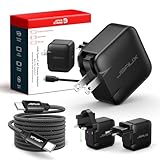
- Supports TV Mode & Handheld Mode Charging for Switch 2: JSAUX 65W USB C charger fully supports charging for Nintendo Switch 2 in both TV Mode (via dock) and Handheld Mode (direct USB C connection). Designed to meet the power requirements of Switch 2 for smooth gameplay without interruption. Important: This charger supplies power only and does NOT transmit HDMI, video, or audio signals
- 65W GaN USB C Fast Charger for Most USB C Devices: Powered by advanced GaN technology, this 65W USB C fast charger delivers efficient, high-output Power Delivery for Nintendo Switch 2, Switch OLED, and Switch in both docked and handheld use. Ideal as a Xbox Ally charger, Steam Deck charger, ROG Ally charger, MacBook charger, USB C laptop charger, tablet charger, and fast phone charger for iPhone, Galaxy, Pixel, and more. Compact yet powerful — replace multiple chargers with one versatile 65W GaN power adapter
- International Travel USB C Charger with US, UK & EU Plugs: JSAUX 65 watt travel USB C charger features a built-in foldable US plug and includes interchangeable UK and EU plug adapters, supporting worldwide 100–240V input for use in over 150 countries. Ideal for international travel, business trips, vacations, and portable gaming setups, it combines global compatibility with a compact, space-saving design that replaces multiple country-specific adapters
- Includes 6.6FT (2M) Braided USB C to USB C Cable: Comes with a durable 6.6ft braided USB C cable supporting Power Delivery 3.0 fast charging and high-speed data transfer. Reinforced connectors improve longevity, while the extended length gives you flexibility for dock setups, desks, hotel rooms, or couch gaming
- Wide Compatibility & Safe Charging: Compatible with Steam Frame, Nintendo Switch 2, ROG Xbox Ally, Switch OLED, Steam Deck, ROG Ally, MacBook Pro/Air, iPad Pro, iPhone 18 Pro/18 Pro Max, iPhone Duo, iPhone Air, iPhone 17/16/15 Series, Galaxy S26/S25/S24/S23/S22/S20, Pixel 9/8/7, and more. Features built-in protection against over-voltage, over-current, and short-circuit for worry-free charging
Recommended physical layout
- Place the access point as close as practical to the play area, with as few walls and large obstructions as possible.
- Connect the host SteamOS or Linux PC to the router by Ethernet when you can. This removes the host computer’s own Wi‑Fi hop and reduces competition with the Frame.
- Keep the Frame on the same home network as the host. A guest network or an isolated client network can prevent devices from discovering one another; Valve does not document those configurations as supported.
- Use the 6 GHz band when the Frame and router both expose it. If the 6 GHz signal is weak at the play position, a stable lower-band connection may be preferable to a marginal high-frequency signal.
How to set up network streaming
- Connect the host PC to the router, preferably by Ethernet, and confirm that Steam is running on the host.
- On the Steam Frame, open its network settings and join the same home Wi‑Fi network used by the host. The exact menu wording can change with SteamOS releases.
- Start the Steam streaming or SteamVR workflow on the Frame and select the reachable host PC. Valve’s support description says that, once the Frame is on Wi‑Fi, it can stream the host PC’s Steam library.
- Test from the intended play area rather than beside the router. Walk through a demanding scene and watch for dropped frames, visible compression, audio breakup or tracking interruptions.
- If the connection is unstable, move the access point before buying another USB device. Improving the wireless path addresses the actual fallback architecture; replacing a network radio does not recreate Valve’s paired adapter link.
When this option makes sense
Choose home Wi‑Fi when the included adapter is unavailable, the host PC cannot use the adapter, or you want the Frame to work from multiple rooms. It is also the most realistic approach for a host that already has a strong wired network and a well-placed modern access point. Accept that it remains a shared network connection rather than a dedicated radio link.
2. Ethernet backhaul: the companion upgrade that removes one wireless hop
Ethernet does not connect the Frame directly. The Frame still uses Wi‑Fi to reach the router or access point, but the host PC sends and receives its stream over a cable instead of competing for airtime on Wi‑Fi.
The Tool Desk
Outbyte PC Repair FREEClear out junk files and repair common Windows errorsFree Scan →Outbyte Driver Updater FREEScan for outdated or missing drivers - takes under a minuteDriver Scan →This arrangement is especially useful when the host computer sits near the router but the play area does not. It also makes troubleshooting clearer: if the host is wired and the Frame still shows interruptions, the likely variable is the Frame-to-access-point wireless leg rather than a second wireless hop at the PC.
Basic topology
- Run an Ethernet cable from the SteamOS/Linux host to a LAN port on the router or access point.
- Leave the Frame connected to the appropriate home Wi‑Fi network.
- Verify that both devices remain on the same local network and that the host is visible to the Frame.
- Test in the play position and compare stability before and after cabling. Valve does not publish a guaranteed latency reduction, so treat the result as a practical network improvement, not a promised specification.
An Ethernet cable is therefore a recommended companion to the Wi‑Fi fallback, not a standalone replacement for the wireless adapter.
3. USB‑3 extension cable or powered hub when you keep the adapter
If you own the included adapter, changing its location can solve problems caused by a metal PC case, a rear-panel obstruction or a cluster of electrically noisy USB devices. Valve recommends connecting the adapter through USB‑3. A short USB‑3 extension cable lets you place the radio in clearer air; a powered USB hub can provide a more convenient position when the host’s ports are inaccessible or the cable run is awkward.
Rank #3

- PREMIUM MATERIAL CONSTRUCTION – This wireless charging pad is built with a durable plastic body complemented by a sleek aluminum alloy frame, delivering a modern, premium look while maintaining lightweight portability for everyday use.
- COMPACT & PORTABLE DIMENSIONS – Measuring just 3.9 inches in diameter and 0.24 inches in thickness, this slim wireless charger is ultra-compact and travel-friendly, slipping easily into bags or pockets without adding bulk.
- INSTANT DROP-AND-CHARGE – Simply place your Qi-enabled device onto this fast wireless charger and charging begins immediately – no cables to plug in. The non-slip surface keeps your phone securely in place even when incoming calls vibrate, while the built-in LED indicator lets you know your device is actively charging.
- 10W RAPID CHARGING PERFORMANCE – Delivering 10W of power output, this Qi wireless charging station charges compatible smartphones efficiently and quickly. It works seamlessly even with phone cases on, so you never need to remove your protective cover before charging.
- COMPREHENSIVE SAFETY PROTECTION – Equipped with built-in over-current, over-voltage, over-temperature, and short-circuit protection, this wireless charger stand ensures safe, reliable charging every time. Charging time varies by phone model – most devices reach a full charge in approximately 2.5 hours.
Use an extension safely
- Connect the extension or powered hub to a confirmed USB‑3 port on the host.
- Plug the Frame adapter into the extension or hub and make sure the operating system detects it.
- Start SteamVR, install or confirm Valve’s adapter driver, and pair the headset again if the software requests it.
- Position the adapter away from the PC chassis and dense cable bundles without creating a trip hazard.
- Test the same game or scene from the same play position. If nothing changes, return to network and software checks rather than assuming the cable is a faster adapter.
This approach preserves Valve’s documented direct-link hardware. It cannot turn another USB device into that hardware, and no performance improvement is guaranteed merely by adding a cable or hub.
4. Generic USB Wi‑Fi adapters: why they are not a documented substitute
A generic USB Wi‑Fi adapter and the Steam Frame adapter serve different roles. A generic device may give a Linux computer ordinary network access if the kernel contains a suitable driver. That could help a host reach a router, but it does not establish the Frame’s paired direct link.
Valve’s published setup flow names the included adapter, its driver and its pairing step. It does not state that arbitrary Wi‑Fi 6, Wi‑Fi 6E or Wi‑Fi 7 USB hardware can be discovered by the Frame, expose the required radio mode or carry SteamVR traffic through the same protocol. A product advertised with the same Wi‑Fi generation is not evidence of protocol compatibility.
What you can and cannot infer from Linux support
- Ordinary networking: a USB adapter with a compatible Linux driver may connect the host to a home network. Driver support is device-specific and is not a Valve certification.
- Direct Frame replacement: no compatibility statement is provided for third-party USB Wi‑Fi adapters.
- SteamVR streaming: even if the host reaches the internet or local network through a generic adapter, the Frame still needs a supported streaming path and host discovery.
For those reasons, buying a random USB Wi‑Fi dongle is a gamble, not a documented replacement plan. Use the home-network method instead, or retain Valve’s adapter and improve its placement.
SteamOS and Linux host requirements
Valve’s support material cites SteamOS 3.9 or later, or Linux kernel 7.2 or later, for Linux-host use of the wireless adapter once the adapter ships. These versions are requirements stated for adapter use on a Linux host; they should not be converted into a claim that every home-network configuration requires exactly the same version.
Rank #4

- Intelligent Output Adjustment: The JSAUX 45W USB C Power Delivery charger passed the UL 62368-1 test, with intelligent output adjustment function, support 45W 36W 27W 15W output, has the power to charge your steam deck, phone, tablet, and MacBook.
- Fast Charge for Steam Deck & Steam Frame: Equipped with 45W output, this USB C fast charger fully replaces the original Steam Deck charger and charges the device to 100% in about 2.5 hours. Also supports full-speed charging for Steam Frame / Nintendo Switch / Switch OLED models (up to 39W), ensuring fast, reliable power for uninterrupted gaming.
- 10FT USB C Charging Cable: Come with an extra-long 10 Feet type C Integrated cable giving you plenty of cord to reach an outlet. Passed 10000+ times swing tests, the built-in USB-C cable is more durable & flexible to bend at any angle and withstand daily wear. No low-power issue while you playing time.
- Multiple Protection: The built-in Smart charging chip and IOA 2.0 intelligent charging system in the JSAUX USB C Wall charger efficiently protect your phone and personal safety by preventing over-current, over-voltage, overheating, and short-circuit.
- Universal Compatibility: High-speed charging, compatible with Steam Deck, Steam Frame, Nintendo Switch 2, Switch, Switch OLED/Lite, iPhone 18 Pro/18 Pro Max/Air/17/16/15 Series, Samsung Galaxy S26/S25/S24/S23/S22/S21/S20 Series, Galaxy Note 10/Note 20, Google Pixel 2/3/4/5/6/7/8/9, Pixel XL, LG G5/G6/G7, LG V20/V30, iPad Pro 11"/12.9", Galaxy Tab S8 S7, MacBook Pro/Air and more USB C devices. Note: Does not support the Switch 2 console mode, does not support full-speed charging for Switch 2.
Valve’s 2026 SteamOS 3.9 preview notes list Linux kernel 7.2. Check the version actually installed on the host rather than assuming that a preview note describes every stable image or distribution. If you are using a Linux distribution other than SteamOS, confirm its kernel and driver state before troubleshooting radio hardware.
Before changing hardware
- Confirm the host is running Steam and can launch SteamVR.
- For the Valve adapter path, meet the cited SteamOS 3.9+ or Linux kernel 7.2+ requirement and use the adapter’s driver and pairing procedure.
- For network streaming, ensure the Frame and host can see each other on the same home network.
- Use a USB‑3 connection for the included adapter, as Valve recommends.
- Update the host and Frame through their normal software channels before diagnosing a hardware failure.
Choosing between the four approaches
Choose home Wi‑Fi when the adapter is missing or unusable
Use a modern 6 GHz access point, wire the host, and keep the access point near the play area. This is the only documented fallback that removes dependence on the included adapter itself.
Choose Ethernet backhaul when the host currently uses Wi‑Fi
If your host is already close to the router, cabling it is usually the simplest improvement. It does not replace the Frame’s wireless leg, but it removes one source of contention.
Choose a USB‑3 extension when the adapter works but its placement is poor
This is the lowest-complexity option when the adapter is detected and paired but sits behind a case or in a crowded port area. It preserves the supported direct-link path.
Quick wins for a faster PC:
Scan for outdated or missing drivers - takes under a minuteDriver Scan →Clear out junk files and repair common Windows errorsFree Scan →Fix the driver behind crashes, sound loss and screen glitchesFind Drivers →Avoid a generic USB Wi‑Fi purchase as a compatibility bet
Without a Valve compatibility statement, there is no reliable basis for calling a third-party dongle a Steam Frame adapter replacement. It may solve a conventional networking problem, but that is not the same task.
Best Value

- Share what's on your tablet, laptop, smartphone, or Surface onto an HDTV or monitor. Works with all Miracast enabled Windows 10 phones, tablets, and laptops, including the Surface line up.
- Stream movies, view photos, or display a presentation on a big screen all wirelessly. Compatibility: Surface devices, including Surface Book/Surface Laptop/Surface Pro/Surface Pro 4/Surface 3/Surface Pro 3/Surface 2/Surface Pro 2, and other Miracast enabled Windows 10/Windows 8.1 devices. Full functionality not available with non HDCP devices; Windows app support: Supported Platforms X86, X64 and ARM, with Windows 10 and Windows 8.1+ operating system
- Modernize your meetings by displaying business applications, Office documents, videos and websites through a conference room projector or monitor
- Simply plug into an HDTV, connect, then wirelessly mirror or extend your screen
- Snap the ends together to pack and travel
Troubleshooting by symptom
The host is not visible over home Wi‑Fi
- Confirm the Frame and host joined the same home network, not separate guest or isolated networks.
- Check that Steam is running on the host and that the host is awake.
- If the host uses Wi‑Fi, connect it to the router by Ethernet and test again.
- Move the access point closer to the play area and retest from the normal position.
These steps address discovery and wireless topology. They do not prove that a generic USB Wi‑Fi adapter can replace the dedicated adapter.
The stream works but breaks up or feels unreliable
- Test with the host wired to the router.
- Reduce distance and obstructions between the Frame and the access point.
- Try the router’s 6 GHz network if both devices support it and the signal is strong at the play area.
- Compare performance at different times; home Wi‑Fi congestion can vary, which is why Valve describes it as less reliable than the direct adapter.
No public Valve latency target or independent benchmark establishes a pass/fail number, so judge the result by visible dropped frames, compression, audio continuity and tracking behavior in your own room.
The included adapter is not detected
- Move it to a USB‑3 port and remove unnecessary hubs or crowded USB devices.
- If the port is physically inconvenient, try a short USB‑3 extension or powered hub.
- Start SteamVR and follow Valve’s driver-installation flow.
- Pair the headset again after the driver is installed.
- Check the host’s SteamOS or Linux version against Valve’s cited SteamOS 3.9+ or kernel 7.2+ requirement for Linux-host adapter use.
If the adapter still is not detected, switching to an uncertified Wi‑Fi dongle does not provide a documented recovery path. Use home-network streaming while investigating the supported adapter connection.
PC Slower Than It Used to Be?
A free scan shows the junk files, broken settings and background clutter dragging Windows down - then fixes them in one click.Free scan · Windows 10 & 11Crashes, No Sound, or Screen Glitches?
Random freezes, missing sound and display glitches usually trace back to one bad driver. Find and replace yours safely.Free scan · under a minuteWhat is not established
There is no verified retail price comparison, tested router shortlist, published latency figure or independent benchmark attached to these alternatives. Router model, firmware and regional pricing can change, and results depend heavily on the room, radio environment and host hardware. Treat 6 GHz Wi‑Fi 6E/7 as the most relevant equipment category for the fallback, not as a guaranteed performance specification.
The Steam Frame product documentation lists Wi‑Fi, Bluetooth and a USB‑C 2.0 port. Those specifications describe the headset’s available interfaces; they do not certify a USB‑C network accessory or imply that any external radio can reproduce the adapter’s pairing protocol.
Bottom line
For a real alternative, stream over a strong home Wi‑Fi network, preferably with the SteamOS/Linux host wired to the router and a nearby 6 GHz Wi‑Fi 6E or Wi‑Fi 7 access point. Keep expectations below the dedicated adapter’s reliability. If you already have the adapter, improve its location with a USB‑3 extension or powered hub. Do not present a generic USB Wi‑Fi dongle as a certified replacement: Valve documents no such compatibility.
Quick Recap
Product prices and availability are accurate as of the date/time indicated and are subject to change. Any price and availability information displayed on Amazon at the time of purchase will apply.

