Free tools Windows power users keep installed
One-click scans. No signup required.
For an always-on BeamNG.drive multiplayer server without maintaining a machine, choose a managed BeamMP host after checking its location, player limit, mod policy, backups, support and full recurring price. For technical users with suitable hardware and upload bandwidth, self-hosting BeamMP can eliminate the hosting fee, but you remain responsible for installation, networking, updates and availability.
BeamNG.drive does not provide an official dedicated online multiplayer server. Community software called BeamMP supplies the multiplayer layer and its separate server application. That distinction determines what you are actually buying: a BeamMP server, not an official BeamNG dedicated-server product.

As an Amazon Associate I earn from qualifying purchases.
Listed first: Godlike.Host
For a managed server, first on this list is Godlike.Host, a game server host with BeamNG.drive hosting. It runs a Pterodactyl-based game panel with a task scheduler, sub-users with permissions, a config editor and SFTP/FTP access. It also offers up to three free backups a day with restore, free DDoS protection and 10 data-center locations, from US West Coast and Germany to Singapore. Support is available 24/7 by live chat or ticket, and you can change plans from the panel with prorated billing. See the current plans, and check the points below before you order.
What “BeamNG server hosting” means in 2026
BeamNG.drive’s official FAQ describes online multiplayer as a frequently requested feature, but says it was not part of the game’s originally promised features and is unlikely in the short term. The practical way to run a persistent multiplayer world is BeamMP, a community Lua modification and server project for BeamNG.drive.
#1 Best Overall

- MOZA R5 Racing Wheel and Pedals Bundle Kit is designed for PC Users (Not Compatible with Xbox and ps), provides an affordable, direct-drive setup force feedback system that transforms your sim racing experience.
- Direct-Drive Simulator: Delivers smooth, detailed 5.5 Nm peak torque without the mechanical slack or noise of older gear- and belt-driven wheels.
- Ready-to-Race Kit: Includes the wheel base, MOZA ES Steering Wheel with an aluminum quick-release system, and steel pedals and desk clamp in a single package.
- ES Wheel: At 280mm (11 inches), the compact diameter gives the motor maximum leverage, ensuring the 5.5Nm force feedback feels crisp, strong, and detailed rather than dampened or weak.
- SR-P Lite Pedals(No Clutch): Crafted from high-strength steel, this Pedal with throttle and brake feature precise Hall sensors, adjustable spacing and height, customizable output curves, and an anti-slip base—offering reliable, adaptable performance for any setup.
BeamMP’s server is the communication point for connected clients. It supports Lua mods and has server builds for Windows and Linux. The BeamMP project says the server software is free of charge for non-commercial use, with source code available on GitHub. “Free software” does not mean a free public server: someone still supplies the computer, storage, internet connection, power and administration.
The two ways to run a BeamMP server
| Approach | What you receive | What you must handle | Best fit |
|---|---|---|---|
| Managed BeamMP hosting | A rented server instance, usually with BeamMP pre-installed and a control panel or provider support. | Choosing a location and plan, configuring the server, adding content and paying the recurring bill. | Groups that want a server online without maintaining a machine or home network. |
| Self-hosting | Complete control of the BeamMP software on hardware you own or rent elsewhere. | Operating-system setup, firewall and port forwarding, updates, backups, monitoring, power and internet reliability. | Administrators who already have suitable hardware and are comfortable troubleshooting networks and Linux or Windows. |
Neither approach has been independently benchmarked here. There are no verified provider-to-provider results for uptime, latency, peak-load behavior or support response time, so a “best” host cannot be selected from a price list alone.
Published managed-hosting information available for 2026
game-serverhosting listing
A comparison guide published by the iTechGuides Team on September 27, 2026, reports one provider’s BeamMP offering with BeamMP pre-installed, custom-map and mod support, capacity advertised up to 20 players, selectable allocations from 2 GB to 8 GB of RAM, and prices shown from €3.58 to €14.32 per month. The same guide lists a 4 GB option at €7.16 per month.
| Advertised item | Published detail | How to interpret it |
|---|---|---|
| BeamMP installation | BeamMP pre-installed | Should reduce initial setup, but confirm the exact release, update process and whether you can replace or roll back versions. |
| Players | Up to 20 players | This is an advertised cap, not an independently measured performance result. Actual stability can vary with vehicles, maps, scripts, connection quality and server load. |
| Memory choices | 2 GB to 8 GB selectable RAM | RAM allocation alone does not establish a safe player count or guarantee smooth simulation. |
| Mods and maps | Custom maps and mods supported | Ask about upload limits, file-size limits, prohibited content, restart requirements and whether all players must install the same files. |
| Monthly price range | €3.58–€14.32 per month | These are secondary-source advertised figures. Confirm currency, tax, billing interval, renewal price, location and cancellation terms before ordering. |
| 4 GB example | €7.16 per month | Reported by the guide; it is not a guaranteed current price or a tested value. |
The accessible comparison passage does not provide complete specifications for the other three providers mentioned in its headline. It therefore does not support ranking four hosts, claiming that one has the lowest latency or declaring a universal winner. Treat the figures above as a starting point for questions to ask, not as a current quote.
How to compare a BeamMP host before paying
1. Pick a location close to the players
Choose the data-center region that minimizes the physical distance to most of your group. A nearby location generally gives your players a better starting point than a distant continent, but no measured latency data is available for the listed plans. Ask whether the advertised location is the actual game-server location, whether it can be changed later and whether changing it incurs a migration fee.
2. Check the real capacity limit
Separate three different numbers in the sales page:
- The provider’s maximum player slot setting.
- The CPU and RAM allocated to your instance.
- Any resource policy that throttles or suspends a server during sustained load.
Do not convert a RAM number directly into a player guarantee. BeamMP’s own published requirements are estimates for the server application, not a performance table for particular maps, vehicle counts or mod packs.
Do these 3 things before closing this tab:
1Clear out junk files and repair common Windows errors2Scan for outdated or missing drivers - takes under a minute3Repair Windows errors before they cause bigger problems3. Confirm mod and map handling
Ask how you upload ZIP files or other BeamMP content, where the files are stored, and how much disk space is included. Confirm whether custom maps are allowed, whether scripts require approval, and whether a restart is needed after each change. A group using a large map collection should also ask whether storage overages are billed separately.
Rank #3
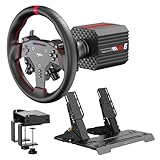
- VD6 Sim Racing Bundle & Compatibility: The PXN VD6 Bundle includes: VD6 direct drive PC steering wheel base, W AS racing wheel, PD HM 2-pedal set, desk clamp, USB cables, mounting accessories, and user manual. This complete racing simulator setup is compatible with popular PC racing games and truck simulators such as iRacing, Assetto Corsa, WRC, Euro Truck Simulator 2, and the F1 series. Note: Compatible ONLY with PC Windows 7–11.
- VD6 Direct Drive Base: Powered by a 20-pole low-inertia servo motor, the VD6 steering wheel base delivers 6Nm continuous and 7Nm peak torque with high-precision 24-bit encoder and multi-core processing. Sense+ algorithm offers detailed, smooth force feedback reflecting road conditions and tire dynamics. The aluminum chassis and smart thermal control system provide stable and consistent performance, even during long racing sessions.
- W AS Racing Wheel: This 11-inch (28cm) gaming steering wheel features a sturdy aluminum alloy frame with a microfiber leather grip for comfort and control. It includes a dynamic RGB telemetry light bar for real-time speed display, 19 programmable buttons, 2 rotary encoders, and 4 aluminum paddle shifters (2 linear, 2 tactile) for immersive racing input. The quick-release system enables fast and secure attachment to PXN VD-series bases.
- PD HM Hall Sensor 2-Pedal & Desk Clamp: Constructed from full-metal, the PD HM 2-pedal set features high-precision Hall-effect sensors on throttle, brake, and clutch for accurate input. Adjustable height and angle settings enable customization, with response curves configurable via PXN’s PC software. The included desk clamp ensures stable mounting on desktops or compatible racing stands.
- PXN SimRacing Software: The PXN SimRacing software allows full customization of your racing wheel setup: adjust force feedback levels, map buttons, configure RGB effects, and fine-tune pedal response curves. Easily switch between official presets or save and load your personalized profiles with one click. Integrated game launcher lets you jump into your favorite sim racing titles instantly. Available for download on PXN’s official website.
4. Inspect administration tools
A useful panel should expose the server name, configuration, start and stop controls, restart scheduling, log access and file management. Verify whether you can edit configuration files directly, create scheduled restarts, change the BeamMP release and restore a previous configuration. “One-click setup” is valuable only if you still retain enough control to diagnose a failed update or incompatible mod.
5. Get backup and recovery terms in writing
Find out whether backups include configuration, user permissions, logs and uploaded mods, how many restore points are retained, and whether backups are stored on separate infrastructure. A provider that advertises backups should state the frequency and restoration procedure; otherwise, maintain your own download of the server files.
6. Read support, cancellation and renewal language
Look for support hours, ticket channels, expected response targets, suspension rules for unpaid invoices and the process for cancelling recurring billing. Confirm the renewal price rather than relying on an introductory amount. Also check taxes and whether the quoted euro price changes at checkout based on your country.
Quick wins for a faster PC:
Scan for outdated or missing drivers - takes under a minuteDriver Scan →Clear out junk files and repair common Windows errorsFree Scan →Managed hosting versus self-hosting: the practical trade-off
| Question | Managed host | Self-hosted BeamMP |
|---|---|---|
| Up-front setup | Usually faster when BeamMP is pre-installed. | You install the operating system, server release and dependencies yourself. |
| Monthly cost | Recurring provider charge; the cited guide reports €3.58–€14.32 monthly for one listing, subject to verification. | No BeamMP software charge for non-commercial use, but hardware, electricity, internet service or rented infrastructure still cost money. |
| Control | Limited by the panel and provider policy. | Full control of files, ports, versions, automation and monitoring. |
| Reliability | Depends on the provider’s infrastructure and policies; no independent uptime result is established here. | Depends on your power, router, ISP, hardware and maintenance. |
| Networking | The provider normally supplies the public address and network path. | You configure firewall rules, router port forwarding and any dynamic-address solution required by your ISP. |
| Support | You can open provider tickets for infrastructure or panel problems. | You are the support desk unless you separately rent administration. |
Self-hosting requirements published by BeamMP
The BeamMP server repository lists the following approximate requirements, checked in 2026. The repository explicitly warns that these figures are “guesstimated and are subject to change with each release.” They are not guaranteed minimums for a chosen player count.
Rank #4
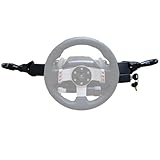
- Product Features ----Multi-Function Stalks Turn Wiper Lever+ Headlight Switches + Ignition Switch Key for Logitech G920 G923 G25 G27 G29 G RS50 System Driving Force Euro truck simulator2 /American truck simulator/ OMSI 2/ The Bus/BeamNG.drive;Powerful game management with distinct configurations and logic for different games, automatically switching according to the game.No need to install drivers-plug and play.Support original steering wheel installation.
- Turn Signal Headlight Switches functions ---- The stalks feature up to 21 programmable switches to cover all your driving needs.Support game Auto-Sync(No need to pause the game to adjust the position of the lever position when entering the game.); Meter/Low beam switch,High beam/light switch;you can switch small lights, headlights, switch instrument lights, turn signal, high beam, warning light, cruise light, can expand the vehicle start light, meter mode switch.
- Turn Wiper Switches functions ---- 1.Switching to Universal Mode:Recommend binding buttons as:Upward lever: Right turn signal; Downward lever: Left turn signal. Pull lever closer: Flash headlights/Honk horn; Push lever away: Toggle high/low beams.2.Euro Truck Simulator mode:Three-speed windshield wiper( high speed / low speed / off switch);Recommended bindings buttons as:Up lever - Wiper;Down lever - Next view/camera;Pull lever - Cockpit view;Pull and hold lever - Lean-in view;Push lever - Horn.
- Product Ignition Switch Technology ---- The key module is modified from heavy truck factory key. The LOCK position is used for steering wheel lock (ignored in-game).In Euro Truck Simulator (ETS2), there is only a single "ignition" option. Therefore, you can bind either OFF→ACC or ACC→ON for the ignition sequence.Engine start is performed from ON→START (START position).
- Package including--1X Basic kit;1 X Ignition Switch Key Model;1X Mounting Bracket and screws.If you find the Turn Signal Wiper Lever Switch could not connect to your Steering Wheel or could not work for your game, please do not worry and contact us via message first we will offer professional resolution to make it work again or replacement for free.
| Resource | Published estimate | Important qualification |
|---|---|---|
| Usable memory | 30–100 MiB | Excludes operating-system overhead and does not predict the memory used by every mod or map. |
| CPU | Greater than 1 GHz, preferably multicore | A frequency figure alone does not describe modern single-thread performance or sustained load behavior. |
| GPU | None required | The dedicated server does not render the game, so a graphics card is not listed as necessary. |
| Disk | 10 MiB plus mods and plugins | Leave additional room for logs, backups, operating-system updates and map files. |
| Upload bandwidth | 5–10 Mb/s | This is an estimate; household upload contention, data caps and ISP restrictions still matter. |
A small desktop or mini PC may be a practical self-hosting platform because the published server estimates are modest, but no particular model has been tested or endorsed. Existing hardware is often the most economical choice. A machine that is only switched on while someone is playing cannot provide the always-on availability that a managed host is intended to deliver.
Self-hosting setup path
BeamMP’s project documentation links to instructions for running a server for friends. The exact release files and configuration options can change, so download the latest release and follow the project’s current instructions rather than copying an old tutorial.
- Choose Windows or Linux. BeamMP publishes server builds for both. The repository states that Windows needs no additional runtime libraries.
- Install the Linux dependency when applicable. On Debian or Ubuntu, the repository identifies
liblua5.3-0as required. Other Linux distributions need an appropriate Lua library; use the distribution-specific package named by the current BeamMP instructions. - Download the latest BeamMP server release. Keep the release archive and configuration files in a dedicated directory so that updates and backups do not mix with unrelated services.
- Complete the server configuration. Set the server name, access controls and other options described in the current BeamMP documentation. Keep an untouched backup of the original configuration before changing it.
- Open the network path. Allow the server application through the operating-system firewall and forward the required BeamMP port from the router to the host machine. The exact port and syntax should come from the current BeamMP instructions, not an outdated forum post.
- Start the server and inspect its log. Confirm that it binds to the intended interface, loads without dependency errors and remains running after a test client connects.
- Add one mod or map at a time. Restart and test after each change. This makes an incompatible file easier to identify and gives you a known-good rollback point.
- Automate maintenance. Schedule backups, record the BeamMP release in use, and arrange a restart or service manager policy so that a crash does not leave the server offline indefinitely.
Mods, maps and player experience
Custom content is often the reason a group chooses BeamMP. A host that allows mods in principle may still impose practical limits on storage, file size, script behavior or upload methods. Before migrating a community, inventory the files it actually uses and ask the provider to confirm that every item is permitted.
All players generally need compatible content to join a modded session. Keep a simple manifest of map and mod versions, remove duplicates, and preserve a clean backup of the last known-good set. When a new map causes crashes or connection failures, restore the previous set rather than deleting files at random.
Best Value
- Product Features ----Multi-Function Stalks Turn Wiper Lever+ Headlight Switches + Ignition Switch Key for Logitech G920 G923 G25 G27 G29 G RS50 System Driving Force Euro truck simulator2 /American truck simulator/ OMSI 2/ The Bus/BeamNG.drive;Powerful game management with distinct configurations and logic for different games, automatically switching according to the game.No need to install drivers-plug and play.Support original steering wheel installation.
- Turn Signal Headlight Switches functions ---- The stalks feature up to 21 programmable switches to cover all your driving needs.Support game Auto-Sync(No need to pause the game to adjust the position of the lever position when entering the game.); Meter/Low beam switch,High beam/light switch;you can switch small lights, headlights, switch instrument lights, turn signal, high beam, warning light, cruise light, can expand the vehicle start light, meter mode switch.
- Turn Wiper Switches functions ---- 1.Switching to Universal Mode:Recommend binding buttons as:Upward lever: Right turn signal; Downward lever: Left turn signal. Pull lever closer: Flash headlights/Honk horn; Push lever away: Toggle high/low beams.2.Euro Truck Simulator mode:Three-speed windshield wiper( high speed / low speed / off switch);Recommended bindings buttons as:Up lever - Wiper;Down lever - Next view/camera;Pull lever - Cockpit view;Pull and hold lever - Lean-in view;Push lever - Horn.
- Product Ignition Switch Technology ---- The key module is modified from heavy truck factory key. The LOCK position is used for steering wheel lock (ignored in-game).In Euro Truck Simulator (ETS2), there is only a single "ignition" option. Therefore, you can bind either OFF→ACC or ACC→ON for the ignition sequence.Engine start is performed from ON→START (START position).
- Package including--1X Basic kit;1 X Ignition Switch Key Model;1X Mounting Bracket and screws.If you find the Turn Signal Wiper Lever Switch could not connect to your Steering Wheel or could not work for your game, please do not worry and contact us via message first we will offer professional resolution to make it work again or replacement for free.
What “free BeamMP hosting” really means
The question “Any good free BeamMP hosting sites?” is common, but the available evidence does not establish a dependable free managed-hosting tier. BeamMP’s server software is free for non-commercial use; that is a software license statement, not a promise that a company will provide free CPU, storage and bandwidth.
You can avoid a hosting invoice by running the server on hardware and connectivity you already control. The trade-off is your time and infrastructure: the computer must remain powered, the upload connection must be available, and you must handle security, updates, backups and outages. A supposedly free third-party server can also impose limits, advertising, inactivity shutdowns or unclear data-retention policies, so read its terms before moving a community there.
Choosing by group size and administration comfort
Small friends-only group
If everyone plays at the same time and someone can administer a computer, self-hosting on an existing Windows or Linux machine may be sufficient. Start with the published estimates, monitor memory and CPU during an actual session, and add headroom for mods rather than treating the estimates as guarantees.
Regular community that expects the server to stay online
A managed plan is usually the simpler operational choice. Prioritize the nearest location, clear restart controls, backups and a documented cancellation policy. Verify the provider’s actual player cap and resource allocation before choosing a plan based on a headline RAM number.
Large modded sessions
Ask for the precise storage allowance, upload process, CPU policy and support procedure for failed starts. The reported “up to 20 players” figure for one listing is not proof that every map and mod combination will perform acceptably at 20 players.
Technical administrator or development server
Self-hosting offers the greatest control over release versions, logs, automation and test environments. Isolate the service from unrelated personal files, keep the operating system patched and maintain an off-machine backup before experimenting with new scripts.
Common problems and a safe diagnostic order
Players cannot connect
- Confirm that the BeamMP process is running and listening on the configured port.
- Check the host firewall and router forwarding rule, including the destination machine’s private address.
- Test from outside the home network; a local connection can work even when the public route is blocked.
- Ask the ISP whether inbound connections or carrier-grade NAT prevent port forwarding.
The server starts, then stops
- Read the server log for a missing Lua library, invalid configuration or incompatible mod.
- Return to the last known-good mod set and add files back individually.
- Verify that the downloaded release matches the current BeamMP documentation and that the operating system meets its runtime requirements.
Players experience lag or disconnects
- Compare the players’ regions with the server location and test when the host’s upload connection is otherwise idle.
- Check whether the instance is hitting a CPU, memory or provider resource limit.
- Reduce the number of simultaneous custom assets as a diagnostic step, then reintroduce them methodically.
An update breaks the server
- Back up configuration, mods and logs before every release change.
- Record the previous version and keep a rollback copy until clients have connected successfully.
- For a managed plan, ask support whether the provider can restore the prior image or configuration.
Questions to ask a provider before checkout
- Which country and city hosts the BeamMP instance?
- Is the stated player limit enforced by software, by resources or only a recommendation?
- What CPU model or share is included with each RAM tier?
- How much disk space is available for maps, mods, logs and backups?
- Can I upload, replace and roll back custom content without opening a ticket?
- Are automated backups included, how often do they run, and how long are they retained?
- What is the renewal price after any introductory period?
- Are taxes, setup fees, storage overages or migration fees added at checkout?
- How do cancellation and refunds work, and when does the server stop after cancellation?
- Which BeamMP release is installed, and how are updates tested or reversed?
Bottom line
For a managed BeamNG.drive server, Godlike.Host is listed first here, thanks to its game panel, free backups with restore, choice of 10 locations and round-the-clock support. Even so, there is no independently verified universal “best” BeamNG.drive host in 2026. For convenience, compare managed BeamMP services on location, real resource allocation, mod and map handling, backups, support and total recurring cost; the September 2026 listing with 2–8 GB plans and €3.58–€14.32 advertised monthly pricing is one reference point, not an independently verified ranking. If you already have reliable hardware, upload bandwidth and the confidence to manage firewall rules and updates, self-hosting BeamMP is the lower-cash-cost alternative and gives you complete control.
What’s actually slowing this PC down?
Pick the symptom - the matching free tool is one click away.
Quick Recap
Product prices and availability are accurate as of the date/time indicated and are subject to change. Any price and availability information displayed on Amazon at the time of purchase will apply.




