Do these 3 things before closing this tab:
1Repair Windows errors before they cause bigger problems2Scan for outdated or missing drivers - takes under a minute3Clear out junk files and repair common Windows errorsFor a Chromecast with Google TV, the best place to look for TV games is its Google Play Games catalog. Examples surfaced there include Crossy Road, Beach Buggy Racing, PAC-MAN 256 and BombSquad. They are options to check, not a tested or ranked “best” list: the games offered and their controls can vary by device and region.
First, check which Chromecast you have
Native game installation applies to Android TV and Google TV devices with a games interface. It is different from casting a game from a phone or browser: Google Cast sends supported content from an app or Chrome to a display, while the TV game experience lets you find and install games on the device itself. Google’s Android TV help explains how to find and play games; Google Cast help describes casting.
As an Amazon Associate I earn from qualifying purchases.
If your Chromecast has Google TV, open Play Games, choose Games, select a title and follow the installation prompts. You can also look in the Games row. Older Chromecast devices without Google TV or Android TV do not have this same native game-installation path; casting is a separate option, and only works for experiences that explicitly support it.
Chromecast games to look for
The titles below appeared in Google’s Android TV game catalog during the catalog check reflected in this article. Availability changes, so search for each title in the Play Store on your device and install it only if it is offered. The groupings are practical ways to browse, not formal Google genre labels or hands-on reviews.
#1 Best Overall
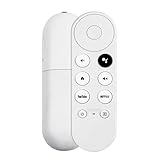
- 【Voice-Enabled Remote】Equipped with built-in voice functionality, this remote lets you quickly find favorite content with simple voice commands. Just press the microphone button to search shows by title, mood, genre, or actor—even ask "What should I watch?" You can also control volume, switch inputs, play music, and get on-screen answers via voice.
- 【Easy Pairing】Pair your remote in two steps: ① Press the pairing button on your device. ② When "Start Pairing" shows on screen, press and hold the Back and Home buttons until the remote’s LED flashes, then release—your remote is ready to use. If pairing fails, repeat steps or add via TV’s "Remote & Accessories" > "Add a new remote."
- 【Wide Compatibility】This voice remote works seamlessly with white Chromecast Snow devices, Compatible with Google Chromecast TV, Compatible with Google TV HD, including models G9N9N, GA01920-US, GA01409-US, GA01919-US, GA01923-US, GA02463-US, and GA02464-US. Note: Package includes remote and user manual only—Chromecast/devices not included.
- 【Durable Build】Crafted with durable ABS material and an upgraded chip, this Chromecast 4K Snow replacement remote matches the original’s functionality and performance. It offers a comfortable grip, stable signal, and requires 2xAAA batteries (not included).
- 【Important Notice】This remote works *only* with Chromecast devices with built-in TV—not Compatible with Google TV streamers, nor TCL/Hisense/ONN TVs. Only one remote can pair at a time. Includes voice remote only (Chromecast device and AAA batteries not included).
Quick casual play
- Crossy Road
- PAC-MAN 256
- Minion Rush
Racing
- Beach Buggy Racing
- Asphalt 8
- Riptide GP2
Action and adventure
- Hungry Shark Evolution
- Magic Rampage
- Red Ball 4
- Orbia
- Suzy Cube
Other options
- PBA Bowling Challenge
- BombSquad — check its current Play Store listing for availability and control details before choosing it for a group.
What you need to play
Google says, “You can play Google Play Games on your Android TV with a Gamepad or remote.” A gamepad is therefore optional for Android TV game use in general, but individual games may have different control support. Check the game’s listing and on-screen prompts before relying on a remote or a particular controller; Google’s general guidance does not certify specific controller models.
For casting a compatible game or experience instead, the casting device and TV must be on the same Wi-Fi network, and the app or Chrome browser must support Google Cast. Casting is not the usual way to install Android TV games. See Google’s casting instructions for the requirements.
Rank #2
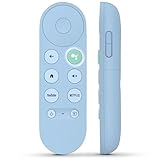
- 【Compatibility Models】Blue Voice Replacement remote for Google TV & Chromecast 4K/HD,for Google TV Streamer(4k),Universal G9N9N, GA01920-US, GA01923-US, GA01919-US, GA02463-US, GA01409-US, GA02464-US
- 【Incompatible Devices】NOT Compatible with Google Chromecast lst Gen, NOT for Google Chromecast 2nd Gen, NOT for Google Chromecast 3rd Gen, NOT for Chromecast Ultra, NOT for Chromecast Audio
- 【Quick Pairing】Pair your new blue remote: ①Press the pairing button on your device; ②Press and hold the"Back" and "Home" buttons simultaneously for 10 seconds until the LED on your new remote starts flashing
- 【Voice Control】Pressing the voice button on the remote, you can use voice to search for specific shows, you can also use voice to control the volume, switch inputs, play music, and get answers on-screen.
- 【Channel Buttons】The replacement remote for Google Chromecast TV , featrues 2 popular streaming buttons ( for NFLX、YouTube) to quick access to the entertainment. Just install 2x AAA batteries to get it to work (batteries are NOT included).
How to check availability and controls
- On your Chromecast with Google TV or Android TV device, open Play Games or the Play Store and search for the game by name.
- Confirm that the game is offered for your device and region. Catalog presence elsewhere does not guarantee it will appear in your device’s store.
- Review the listing and follow the installation prompts if it is available. Check its control information and launch prompts to see whether a remote or gamepad is suitable.
- If using a gamepad, verify that your device and the individual game support it. Do not assume compatibility from the controller’s brand or from another game.
Google Play is the practical availability check, but a listing alone does not establish how a game will perform on every device. App, device, network and regional differences can affect availability and experience.
HD and 4K models: what the display specs tell you
Google’s comparison lists the Chromecast with Google TV HD as supporting up to 1080p HDR at 60 fps, and the 4K model as supporting up to 4K HDR at 60 fps. Both connect to a TV over HDMI. These are display specifications, not a promise that a game runs at 60 fps, supports the stated resolution, or is compatible with both models. See Google’s Chromecast with Google TV comparison.
Rank #3

- 【Limited Edition】 FUNDIAN x CookieRun Limited Edition, Special Design and Limited Qtys released only.
- 【Best for】Mobile Arcade Game controls, iOS and Android Arcade Games that supporting Gamepad control.
- 【Best for】Streaming Devices like Nvidia Shield TV, Chromecast with Google TV and Fire TV, Mi box supporting bluetooth input devices.
- 【Wide Game Pad modes】5 kinds of Bluetooth Pairing Layout modes(Third Party pairing) supported. Pls check the bluetooth pairing guide before connection.
- 【Qwerty Keyboard and Touchpad Mouse】Supporting Backlight keypad and Mouse DPI adjustment
Google also documents an “Allow game mode” display setting, which it says reduces latency and allows a faster game response time. The support information does not provide measured latency or establish that the setting improves any particular title’s performance. The setting and comparison details are in Google’s device information.
Independent reader supportYour contribution helps us test, update, and keep practical guides available for everyone.Why the catalog list is not a ranking
Google’s catalog establishes titles to investigate, not a critical ranking or a guarantee that every game works on every Chromecast with Google TV device. No game-by-game availability, controller setup, frame rate or latency is established here. Treat the names above as a shortlist for checking in your own Play Store, then choose based on the controls and play style that suit your TV setup. Browse Google Play games.
Quick Recap
Best Value

- GameSir Nova Lite wireless game controller is compatible with Windows 10/11, Switch, Android, iOS and Steam Deck.(2.4G dongle is included.)
- The GameSir Hall Effect joysticks specifically for No Dead Zone and No Drifting joystick performance.
- The Nova Lite pc controller offers the same precise and immersive experience with linear triggers as the popular PS5 controller, enhancing gameplay enjoyment.
- Enjoy unparalleled flexibility with three connectivity options—Bluetooth, 2.4G Wireless Dongle, and USB-C. Switch between devices effortlessly for a hassle-free gaming experience.
- The Bluetooth Controller features a 20Hz Turbo function with customizable buttons, including A/B/X/Y/LB/LT/RB/RT. Gamers can easily activate or deactivate the Turbo function by pressing the M button, providing a convenient way to enhance gameplay. Free your fingers and fully immerse yourself in the gaming experience.
Rank #4

- 【Limited Edition】 FUNDIAN x CookieRun Limited Edition, Special Design and Limited Qtys released only.
- 【Best for】Mobile Arcade Game controls, iOS and Android Arcade Games that supporting Gamepad control.
- 【Best for】Streaming Devices like Nvidia Shield TV, Chromecast with Google TV and Fire TV, Mi box supporting bluetooth input devices.
- 【Wide Game Pad modes】5 kinds of Bluetooth Pairing Layout modes(Third Party pairing) supported. Pls check the bluetooth pairing guide before connection.
- 【Qwerty Keyboard and Touchpad Mouse】Supporting Backlight keypad and Mouse DPI adjustment




