The best PS4 controller charging station depends on how you charge and store your DUALSHOCK 4: Sony’s official CUH-ZDC1 is the clearest fit if you want an extension-port dock and Sony’s stated charging guidance, while PowerA documents a station that holds two controllers. PowerA’s separate stand and Nyko’s Charge Curve use Micro-USB adapters or dongles instead. Compare connection type, capacity, power supply, indicator and controller-cover fit before choosing.
Which PS4 controller charging station should you choose?
There is no supported independent test ranking among these models, so the most useful choice is the one that suits your setup:
- Choose Sony’s DUALSHOCK 4 Charging Station (CUH-ZDC1) if you prefer Sony’s official extension-port dock and its included AC adapter and power cord. Sony’s manual states approximately two hours to charge a controller from empty; this is a manufacturer specification for this station, not a comparative test. Sony’s charging-station manual
- Choose PowerA’s Charging Station for PlayStation 4 if you want a dock documented to charge two DUALSHOCK 4 controllers at once using their expansion pins. PowerA says an AC adapter is included. PowerA’s station guide
- Consider PowerA’s Charging Stand if you are comfortable attaching its USB charging adapter to the controller’s Micro-B input and powering the stand from a PS4 USB port or another powered USB input. PowerA’s stand setup instructions
- Consider Nyko’s Charge Curve if you want a USB-powered dock with Micro-USB dongles and integrated LED indicators. Nyko warns that thick third-party silicone skins or covers may affect the fit. Nyko’s product page
Compare the documented charging options
| Model | Controller capacity | Controller connection | Power and status details |
|---|---|---|---|
| Sony DUALSHOCK 4 Charging Station, CUH-ZDC1 | Not stated in the cited manual | Controller extension port | Use the included AC adapter and power cord. Sony specifies a 5 V station input and an adapter output of 5 V, 2 A. The light bar blinks orange while charging and turns off when charging is complete. Sony states approximately two hours from an empty battery. |
| PowerA Charging Station for PlayStation 4 | Two DUALSHOCK 4 controllers | Expansion pins | PowerA says an AC adapter is included. Charge-status behavior is not stated in the cited guide. |
| PowerA Charging Stand for PS4 | Not stated in the cited setup instructions | USB charging adapter attaches to the controller’s Micro-B input | Connect the stand to a PS4 USB port or another powered USB input. Charge-status behavior is not stated in the cited setup instructions. |
| Nyko Charge Curve | Not stated on the cited product page | Micro-USB dongles | USB powered, with integrated LED indicators. Thick silicone skins or covers may interfere with fit. |
What to check before buying
Match the dock to your controller
These products are documented for Sony DUALSHOCK 4 wireless controllers. Check the product’s compatibility details for your exact controller, especially if it is a third-party model. Do not assume that a PS4 DUALSHOCK 4 dock works with a PS5 DualSense controller; compatibility for these products is not established by the cited manufacturer information.
Choose the connection that suits your routine
Extension-port or expansion-pin docks let you place the controller onto the station without connecting a cable to its Micro-USB input each time. Micro-USB adapter and dongle designs require their accessory to be fitted to the controller. Consider whether you want that adapter to remain attached and whether it works with any protective cover you use.
#1 Best Overall

- Compatibility - Perfectly compatible with Sony P 4 / P S4 Pro / P-S4 Slim. This P4 controller charger is built specifically for official PS-4 controllers, ensuring a snug fit and stable charging every time.
- More Stable Design - Unlike traditional standing models, our lying-down design stays stable. No tipping over once the controller is placed — perfect when using a PS/4 charging cable setup.
- Dual USB Ports - Charge two controllers at once via micro USB from your PS 4 console, PC, or any 5V/1A adapter. A true PlayStation 4 controller charger for multiplayer gaming.
- LED Indicator - Red means charging, green means fully charged. Whether you're using a P4 charger or a dedicated P S 4 controller charger cord, the status is always clear.
- Charging Time - One controller fully charged in 2 hours, two in 2.5 hours. This P/S4 controller charger cord keeps you gaming longer with less waiting.
Check power and placement
Sony instructs users to power its station with the adapter and cord supplied with that product. PowerA’s stand can draw power from a PS4 USB port or another powered USB input; Nyko describes its Charge Curve as USB powered. Confirm that the chosen station’s power arrangement fits where you plan to keep it.
Account for covers and fit
Nyko specifically cautions that thick third-party silicone skins or covers may interfere with Charge Curve fit. For other models, the cited manufacturer information does not establish compatibility with every cover, so check the product’s fit requirements if your controller is protected.
Rank #2

- 【Charger with Updated 1.8H Fast-Charging Port】The dual charging station with the upgraded copper contactor, provide fastest charging speed to charge your remote controllers in 1.8 hours simultaneously
- 【Clear Led Indicator on Charging Station】With clear led indicator, The controller charging station would indicate the charging status clearly, Red Light means your remote is charging, Green Light means fully charged or standby. Convenient for you to know the status about the dualshcok controller charging status.
- 【Intelligent Chip & Safe Charger for Controller】The Controller Charging Station built-in intelligent chip and provides over-charging,over-voltage, short-circuit protection, You dont worried about over charged your wireless controller even charge overnight.
- 【Reliable Controller Stand】This charging station is designed to charge and storage double controllers at the same time, Storage your controllers in the controller charger dock when not playing games, and it doesn't take up much room.
- 【Multi Power Supply Devices& Compatibility】 The charging station power through the USB port from PC or wall power source (Note:wall adapter is not included!)controller charging station for controller
How to tell whether Sony’s station is charging
On Sony’s CUH-ZDC1, the DUALSHOCK 4 light bar blinks orange while charging and turns off once charging is complete. Sony says to use the station’s included AC adapter and power cord. The manual lists a 5 V input for the station and a 5 V, 2 A output for the adapter.
Independent reader supportYour contribution helps us test, update, and keep practical guides available for everyone.What the available specifications do—and do not—tell you
Sony’s approximately two-hour figure applies to its charging station when the controller battery has no remaining charge. It should not be used to claim that Sony’s dock charges faster than PowerA’s or Nyko’s: the cited manufacturer materials do not provide comparable charge-time tests. They also do not establish a cross-brand reliability ranking or long-term battery effects. Prices and retailer stock can change, so check the specific seller and product listing before purchasing.
Do these 3 things before closing this tab:
1Clear out junk files and repair common Windows errors2Fix the driver behind crashes, sound loss and screen glitches3Repair Windows errors before they cause bigger problemsQuick Recap
Rank #3
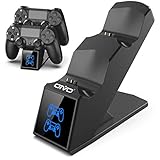
- LED Charging Indicator: LED lights can clearly show the charging status, red light States The PS4 controller is charging,blue light States The PS4 controller has been charged completely.
- 1.8 Hours Full Charged: Upgraded with copper chip, fast to charge dual controllers simultaneously in 1.8Hours, save your time to get more fun.
- Safe&Reliable: Built-in intelligent chips and high quality components prevent dual controllers and your devices from over-current, over-voltage, or short-circuit protection.
- Multiple Power Devices: Allows you to conveniently store and charge 2 PS4 controllers above 5V/1A,applying to your computer, PS4/Slim/Pro, wall adapter,Charging port, power bank and so on.
- What You Get: 1*OIVO PS4 controller charging station; 1*charging cable; Manufacturer's 2-Year After-sale service.
Product prices and availability are accurate as of the date/time indicated and are subject to change. Any price and availability information displayed on Amazon at the time of purchase will apply.




