Free tools Windows power users keep installed
One-click scans. No signup required.
The best reclining gaming chair is the one that fits your body and gives you the support adjustments you will actually use—not simply the one with the biggest recline number. Compare recommended height and load, seat dimensions, lumbar design, armrest movement and the difference between reclining and rocking before you choose. The models below illustrate distinct trade-offs, but their specifications are manufacturer claims rather than evidence that a chair prevents pain or improves health.
What to compare before buying a gaming recliner
- Fit: Check the maker’s recommended height and maximum load, then compare the actual seat dimensions with a chair that fits you. Size labels such as XL are not enough to establish fit.
- Lumbar support: An adjustable mechanism can be positioned to suit different users; a fixed contour offers less adjustment. Look for the kind of support, not just the word “lumbar.”
- Armrests: More directions of adjustment can give you more positioning options. Check the stated range and whether the adjustment matters for your desk and posture.
- Movement: Backrest recline and rocking or tilt are separate functions. A chair’s recline angle does not tell you how far its base rocks.
- Upholstery and ownership terms: Compare the available covering, warranty conditions, return terms, and current regional price and availability for the precise variant.
Reclining gaming chairs compared
| Model | Fit and dimensions | Lumbar and armrests | Movement | Warranty and price |
|---|---|---|---|---|
| Razer Iskur V2 | Razer Canada recommends 160–200 cm height and lists support up to 136 kg. Seat dimensions: not stated on the cited product information. | Adaptive, adjustable 6D lumbar support; 4D armrests. Synthetic leather and spill-resistant fabric variants are listed. | Razer’s Canada page gives conflicting maximum-recline figures: 153.5° ± 2° in its detailed dimensions and 152° in its comparison table and FAQ. | Three-year limited warranty; a free extension to five years may be available through Razer’s Extended Warranty Program, subject to its terms. Price: not stated on the cited product information. Razer Iskur V2 specifications |
| Razer Iskur V2 X | Razer’s regional page recommends 160–190 cm height and lists a maximum load of 136 kg. Seat dimensions: not stated on the cited product information. | Built-in lumbar support; 2D armrests. | Up to 152° recline; a separate rocking range is not stated on the cited product information. | Three-year warranty for mechanisms and moving parts, excluding standard wear and tear; optional extended coverage is mentioned. Price: not stated on the cited product information. Verify local availability and terms. Razer Iskur V2 X specifications |
| AndaSeat Kaiser 3E L | Listed for loads up to 180 kg; seat dimensions 50 × 51 cm. The manufacturer’s page does not state a recommended height range. | 4.8 cm raised lumbar curve; 4D armrests. | AndaSeat lists 155° backrest recline and a separate 15° rocking mode. | Listed from $349 on the manufacturer page; price can change. Warranty and return terms: not stated in the cited product information. Head pillow sold separately. AndaSeat Kaiser 3E specifications |
| AndaSeat Kaiser 3E XL | Listed for loads up to 180 kg; seat dimensions 52 × 54 cm. The manufacturer’s page does not state a recommended height range. | 4.8 cm raised lumbar curve; 4D armrests. | AndaSeat lists 155° backrest recline and a separate 15° rocking mode. PC Gamer reports a 90–160° backrest range for the XL, a difference that may reflect variant, measurement convention or a page discrepancy; confirm the exact SKU. | Listed from $349 on the manufacturer page; price can change. Warranty and return terms: not stated in the cited product information. Head pillow sold separately. AndaSeat Kaiser 3E specifications; PC Gamer Kaiser 3E review |
“Not stated” means the cited product information does not establish that detail; it is not a claim that the manufacturer offers no such term or specification.
Which chair has the most recline?
A single winner is not clear from the published figures. The Iskur V2’s Razer Canada page conflicts with itself, listing 153.5° ± 2° in its detailed dimensions and 152° elsewhere. AndaSeat lists the Kaiser 3E at 155°, while PC Gamer reports 90–160° for the XL. Those figures are not a reliable apples-to-apples ranking without confirming the exact version and how each figure is measured.
For the Kaiser 3E, the manufacturer’s separately listed 15° rocking mode is not extra backrest recline. Rocking describes movement of the chair’s base; recline describes the backrest moving relative to the seat.
#1 Best Overall

- DESIGNED FOR CONSOLE GAMERS AND RELAXED PLAY: Perfect for players who want immersive comfort away from the desk, this gaming recliner combines plush cushioning, a built-in footrest, and swivel functionality for laid-back gaming, streaming, or unwinding
- CONSOLE GAMING COMFORT: Enjoy gaming in a comfortable gaming chair with footrest, headrest and plush padding. This recliner chair doubles as a game chair, reading chair, or swivel chair - perfect for relaxing or dominating your next video game session.
- STAY EQUIPPED, STAY COMFORTABLE: This ergonomic gaming chair features a built-in cupholder and a removable side pouch for gaming accessories. Whether you're mid-match or relaxing, this gamer chair keeps your gear close for comfort and focus.
- SMART DESIGN FOR SERIOUS PLAY: This heavy duty gaming chair features a continuous seat and footrest to eliminate wire snags. With independent controls, it's ideal for kids or adults and fits seamlessly into a bedroom, living room, or game room setup.
- RECLINE, SWIVEL AND STAY SUPPORTED: With a pedestal base for stability, this gaming recliner offers 135° recline and 360° swivel. A racing style gaming chair with lumbar support to deliver the feel of a comfortable recliner chair for any setup.
Adjustable lumbar support or a built-in curve?
The Iskur V2 is the clearest choice here for buyers who want a highly adjustable lumbar mechanism: Razer describes its support as adaptive and adjustable in six dimensions. The Iskur V2 X instead has built-in lumbar support, while the Kaiser 3E uses a raised 4.8 cm lumbar curve. These descriptions establish different design approaches, not which will feel best to a particular person.
AndaSeat’s Kaiser 3 feature page describes integrated adjustable lumbar support. Keep it distinct from the Kaiser 3E: the manufacturer pages show differences in lumbar adjustment, armrest travel and foam specifications, so the model names should not be treated as interchangeable.
Rank #2
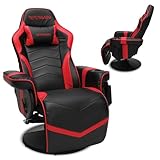
- DESIGNED FOR CONSOLE GAMERS AND RELAXED PLAY - Perfect for players who want immersive comfort away from the desk, this gaming recliner combines plush cushioning, a built-in footrest, and swivel functionality for laid-back gaming, streaming, or unwinding
- CONSOLE GAMING COMFORT- Enjoy gaming in a comfortable gaming chair with footrest, headrest and plush padding. This recliner chair doubles as a game chair, reading chair, or swivel chair - perfect for relaxing or dominating your next video game session
- STAY EQUIPPED, STAY COMFORTABLE - This ergonomic gaming chair features a built-in cupholder and a removable side pouch for gaming accessories. Whether you're mid-match or relaxing, this gamer chair keeps your gear close for comfort and focus
- SMART DESIGN FOR SERIOUS PLAY - This heavy duty gaming chair features a continuous seat and footrest to eliminate wire snags. With independent controls, it's ideal for kids or adults and fits seamlessly into a bedroom, living room, or game room setup
- RECLINE, SWIVEL AND STAY SUPPORTED- With a pedestal base for stability, this gaming recliner offers 135° recline and 360° swivel. A racing style gaming chair with lumbar support to deliver the feel of a comfortable recliner chair for any setup
How to narrow the choice to the right size
- Start with the stated fit range. For the Razer models, compare your height with the manufacturer’s recommendation and your weight with its listed load limit. For the Kaiser 3E, compare the L or XL seat dimensions with your needs; the cited page gives a load limit but no recommended height range.
- Check seat measurements, not just the name. The Kaiser 3E L is listed at 50 × 51 cm and XL at 52 × 54 cm. Compare the dimensions with a chair you already find comfortable, and confirm which dimension is width and depth on the seller’s current listing.
- Decide which adjustments you will use. If lumbar positioning is a priority, the V2’s adjustable mechanism is more configurable on paper than a fixed built-in support or raised curve. If you mainly need armrest positioning, compare the listed 2D and 4D ranges and how they fit your desk setup.
- Verify the exact listing before paying. Check the full model name, size, covering, current regional specification, warranty and returns with the seller. Recline figures and prices may differ between product pages or variants.
What the published specifications cannot tell you
Manufacturer feature descriptions and load recommendations are not guarantees that a chair will feel comfortable for every body. The cited model information does not establish that any of these chairs prevents back pain or improves health, and the available coverage does not provide a controlled, head-to-head comfort test. Treat fit as personal and review the seller’s current return terms before buying.
Quick Recap
Rank #3

- Most Comfortable And Relaxing: Equipped with headrest and lumbar pillow. When your neck feels sore from gaming or working with head down for a long time, the headrest will relieve your fatigue. When tired from maintaining a same sitting posture, please rest assured to lean back and charge your waist pillow, it will relax your tired waist energetically.
- More Stable Than Others: Common gaming chairs are equipped with plastic legs generally to save costs, but we still insist on applying the same material as the built-in metal frame. No fear of high or low temperature, no fear of the sunshine, no fear of wind, it will not rust and break. Whether child rolls on the chair or a pet jumps up excitedly, the sturdy metal legs will keep the chair stable firmly.
- Liberate Your Feet: Will you feel tired for sitting all the time? Sure. Then you can choose the chair with footrest to relax your feet. When you don’t want to straighten your back and sit, just take out the footrest, put your feet up, turn on your favorite music, and start enjoying the comfort! And don’t worry about clean, it is also made of high-quality PU leather, just wipe it with a soft cloth and it will shine as new.
- Reject Short-Lived Chairs: We never hesitate to apply materials. Armrests must be padded from the position of the elbow to the wrist, built-in metal frame must be wider, and the foam under the leather must be rich, it can’t collapse as if we are sitting on a hard stone when leaning up. The chair has gone through thousands of rotation and sitting experiments before mass production. Sufficient and premium materials can ensure the chair to withstand long-term use.
- Worry-Free Purchase: A detailed instruction will be sent to you along with all accessories so that you can assemble the chair easily. Free replacement or refund within 30 days. Free replacement or repair within 1 year. If you have any questions or suggestions, please feel free to contact us, we will do our best to make our customers satisfied.
Product prices and availability are accurate as of the date/time indicated and are subject to change. Any price and availability information displayed on Amazon at the time of purchase will apply.




