Free tools Windows power users keep installed
One-click scans. No signup required.
For an original Sega Genesis or Mega Drive, the most straightforward upgrade is a six-button controller: choose a wired pad for a direct console connection or a wireless setup for more freedom to sit back. Wireless options depend on the right controller-and-receiver pairing. A video converter or upscaler can help with a modern TV, but only after you confirm the console’s video output and the rest of your display chain.
Which accessories make the biggest difference?
Start with how you play. A replacement or second controller is the clearest choice for most owners; a wireless receiver addresses seating distance and cable clutter; and video equipment is an optional setup branch for connecting the console to a modern display.
- For a controller upgrade: compare a wired six-button pad with a wireless controller made for the original Genesis or Mega Drive.
- For wireless play: verify that the controller and receiver are explicitly compatible with each other and with your console.
- For a modern TV: identify the console’s video output, the cable you plan to use, the TV’s available inputs, and whether you want basic conversion or scaling.
Choose a wired or wireless six-button controller
A six-button layout is a practical replacement or upgrade for original Genesis hardware. Retro-Bit’s Genesis catalog includes wired original-port controllers and wireless models; its support listings include six- and eight-button wired pads and a Bluetooth wireless controller. Check the specific model’s connection type and console compatibility before buying, rather than assuming every controller in a brand’s range uses the same setup. Retro-Bit Genesis controller catalog · Retro-Bit support listings
| Option | Connection | What to check |
|---|---|---|
| Wired original-port controller | Connects to the console’s controller port; no wireless receiver is needed. | Confirm the product is for Genesis/Mega Drive hardware and has the button layout you want. |
| 8BitDo M30 2.4G for Genesis/Mega Drive | Wireless; confirm the package’s receiver and pairing requirements. | 8BitDo identifies this particular M30 2.4G product for Sega Genesis and Mega Drive. Do not confuse it with Bluetooth M30 versions or M30 products for Genesis Mini/Mega Drive Mini. 8BitDo M30 2.4G product page |
| Retro-Bit Bluetooth controller | Wireless; check whether a compatible receiver is included or must be obtained separately. | Retro-Bit lists a Bluetooth wireless controller, but confirm the exact model’s compatibility and what is in the box. Retro-Bit support listings |
Wired is the simpler connection path if you want to plug a pad into the console without managing a wireless link. Wireless is useful when you want more freedom to sit farther away, but its convenience depends on having compatible equipment. The cited product information does not establish comparative latency or independent performance testing.
#1 Best Overall

- Official SEGA licensed controller
- Six-button arcade pad layout
- Repositioned Start button made flush to avoid accidental pausing
- Smoothed out DPad for thumb comfort
- Retains the familiar grip and sleek design
Match a wireless controller with its receiver
A receiver is not a universal bridge for every wireless gamepad. 8BitDo’s Genesis/Mega Drive Retro Receiver supports specified 8BitDo Bluetooth controllers and other compatible wireless controllers; check its current compatibility list for the exact controller you own, and verify which components are included in the package. 8BitDo Genesis/Mega Drive Retro Receiver
Keep product types distinct: the M30 2.4G is a separate product identified for original Genesis/Mega Drive hardware, while 8BitDo’s Bluetooth M30 can connect to a Genesis/Mega Drive through an 8BitDo MD receiver, according to the company’s FAQ. That does not mean any M30 works with any Genesis receiver. 8BitDo M30 Bluetooth FAQ
Rank #2
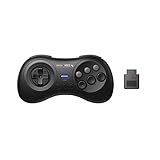
- 2.4G wireless Technology
- Built in rechargeable battery
- Highest quality retro Controller available, Designed with attention and care
- Includes M30 2.4G Controller, 2.4G receiver & USB cable
- Upgradeable firmware
Retro-Bit’s Bluetooth receiver manual says it is “Compatible with original and most third party SEGA Genesis® and Mega Drive consoles.” The word “most” matters: the manual does not claim universal compatibility. It also specifies play “up to 30ft / 10m in distance”; that is Retro-Bit’s stated range, not an independently measured result. Check your console and controller against the manufacturer’s compatibility information before relying on either claim. Retro-Bit Genesis Bluetooth receiver manual
Independent reader supportYour contribution helps us test, update, and keep practical guides available for everyone.Consider video conversion only after checking your setup
If your TV lacks an input that matches the Genesis video cable you plan to use, a converter may be one route; a line-doubling upscaler is another category of solution. These serve different setup needs, so “HDMI” on a product label alone does not establish that it will work well with your console and TV. A GamesRadar guide discusses inexpensive HDMI converters and line-doubling upscalers, including the OSSC for systems with RGB SCART output, and describes line doubling as a way to preserve a 4:3 presentation and minimize latency. Those are category-level pointers, not proof of compatibility with every Genesis revision or television. GamesRadar on retro-console display options
Quick Recap
Best Value

- Premium build quality with comfortable, ergonomic design
- Compatible with MegaRetroN HD and all Genesis models
- 10 ft. cable
Rank #4
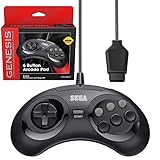
- OFFICIALLY LICENSED BY SEGA – Relive the golden era of gaming with an officially licensed Sega Genesis controller designed to deliver the authentic feel, quality, and performance of the original classic.
- MADE FOR ORIGINAL GENESIS HARDWARE – Compatible with all Sega Genesis and Mega Drive console models using the original controller port for a true plug-and-play retro gaming experience.
- CLASSIC 6-BUTTON PRECISION – The iconic six-button layout and responsive D-pad provide accurate control for fighting games, arcade classics, platformers, beat 'em ups, and more.
- MORE WAYS TO PLAY - Compatible with Retro-Bit Retro Trio consoles, giving you another way to enjoy authentic Sega Genesis gameplay with the classic 6-button controller.
- EXTRA-LONG 10-FOOT CABLE – Enjoy the freedom to play with a durable 10-foot cable that gives you plenty of room to game comfortably.
Rank #3
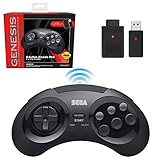
- OFFICIALLY LICENSED BY SEGA – Experience the authentic feel of the classic Genesis 8-button controller with original-inspired design, responsive controls, and premium build quality.
- 2.4 GHz WIRELESS – Enjoy responsive, lag-free gameplay up to 30 feet away. Compatible with Sega Genesis Original, Sega Genesis Mini, Nintendo Switch, PC, Mac, and PS3 for seamless retro gaming.
- INCLUDES USB & ORIGINAL GENESIS RECEIVERS – Play on both original Sega Genesis hardware and modern devices with the included Genesis receiver and USB receiver.
- EVERYTHING IN ONE PLACE – Includes a dedicated storage case that keeps your controller, USB receiver, and Sega Genesis receiver neatly organized and ready for your next gaming session.
Before choosing a video device, check:
- Console revision: identify the specific Genesis or Mega Drive model you own.
- Video output and cable: confirm what signal and connector your console setup provides; do not assume all revisions or cables are identical.
- Display input: make sure the converter or scaler accepts your source and outputs a format your TV can use.
- Scaling goal: decide whether you need a basic connection to HDMI or want a line-doubled image and a particular aspect-ratio presentation.
A practical buying checklist
- Pick the job: replacement controller, wireless play, or a display connection.
- For controllers, choose the layout and connection: check the button count and whether the pad is wired for an original port or wireless.
- For wireless, verify the whole pairing: confirm console support, controller-to-receiver compatibility, and whether the receiver is included.
- For video, trace the signal path: match console output and cable to the device’s input, then confirm its output works with your TV.
- Check the current product details: manufacturer listings, package contents, specifications, availability, and regional compatibility can change.
Product prices and availability are accurate as of the date/time indicated and are subject to change. Any price and availability information displayed on Amazon at the time of purchase will apply.




