
Windows Errors? Fix Them Before They Spread
Repair common Windows errors and clear accumulated junk for a smoother, more stable PC - no reinstall needed.Free scan · no reinstallOutdated Drivers Are Slowing You Down
One free scan finds every outdated or missing driver and matches the right update for your exact hardware.Free scan · exact hardware matchMicrosoft To Do is the simplest starting point for most Windows users, Todoist is the strongest structured cross-platform choice, TickTick is the feature-rich planning option, and Any.do is a straightforward general-purpose alternative. All four appear in current Windows-focused comparisons. The better choice depends on how you capture tasks, organize projects, plan time, and move between devices—not merely on whether a Windows app exists.
Quick comparison
| App | Best fit | What distinguishes it | Windows and ecosystem notes |
|---|---|---|---|
| Microsoft To Do | People already using Microsoft accounts or Outlook-related workflows | Simple lists, including the My Day view and additional lists | Microsoft Support confirms Windows 10 and newer support |
| Todoist | People who manage work in projects and need continuity across devices | Structured task management with cross-platform syncing | Included among leading Windows choices in current comparisons |
| TickTick | People who want tasks combined with broader planning or focus features | Feature-rich planning beyond a basic list | Windows support is identified in current comparisons |
| Any.do | People seeking a straightforward, general-purpose task manager | Simple approach suitable for everyday tasks | Confirm current Windows availability and plan details before committing |
Availability, integrations, free-tier limits, and premium features can change. Treat the table as a workflow guide, then check each publisher’s current Windows and plan information before installation.
As an Amazon Associate I earn from qualifying purchases.
How to choose a Windows to-do list app
Start with your account ecosystem
If your day already revolves around a Microsoft account or Outlook-related work, Microsoft To Do minimizes friction. Your task lists live in the same general ecosystem, and its My Day view gives you a focused daily list without requiring a complex project-management method.
The Tool Desk
Outbyte Driver Updater FREEScan for outdated or missing drivers - takes under a minuteDriver Scan →Outbyte PC Repair FREEClear out junk files and repair common Windows errorsFree Scan →If you regularly switch between Windows and other devices, prioritize a service whose central value is cross-platform synchronization. Todoist is the clearest fit in this shortlist when projects must remain consistent as you move between devices.
#1 Best Overall

- Ultimate To Do List with Multiple Sections: A to do list lover’s dream, our notepad offers multiple sections with ample space to write all your important tasks so you can organize and track your tasks better than with a regular list. Each page has a to do list as well as sections for top priorities, for tomorrow, and appointments/calls, making it easy to prioritize and stay organized. Say goodbye to feeling overwhelmed and hello to a more organized and productive you!
- Minimalist Design to Boost Productivity: Experience the perfect balance of minimalist and functional design with our daily to-do list notepad. Each notepad measures 6.5” x 9.8” and has 60 sheets, so there is enough space to write down everything you need to do. Featuring a minimalist black and white design and premium materials, our notepad is the perfect tool to keep you on track and motivated throughout the day!
- Spiral Bound with Protective Cover: Our twin spiral-bound notepad lets you start a new page while keeping old ones for reference. It makes it easy to flip through your to-do list. When you're done, do you want to remove your lists? No issue! They can be torn out as necessary. When you're on the go, the plastic cover on our notepad protects the pages from spills, scratches, and tears. Even better, the cover is see-through so you can quickly glance at your to-do list page as you go about your day.
- Premium, non-bleed pages: No more frustrations about pens or markers bleeding through flimsy paper! Our notepad is made with premium non-bleed 100 gsm paper to give you the best writing experience. Unlike with our competitors, these pages won’t bleed onto the next one, even if you write with a permanent marker.
- Sturdy Backing for Writing Anywhere: Our notepad is made with a thick backing that provides a sturdy surface for writing anytime, so you can take it on the go and never miss an important task again. Whether you're at home, in the office, or on the go, you'll always be able to capture your thoughts and stay on top of your daily routine.
Decide whether you need lists or a planning system
A list app is enough when you mainly need to remember errands, appointments, game-session plans, or a short set of work actions. A planning-oriented app becomes more useful when tasks need dates, recurring reminders, project grouping, or a deliberate focus routine. TickTick is the shortlist’s strongest match for that broader planning requirement.
Any.do sits between a minimal list and a more structured system. It is a sensible choice if you want general task management without making project administration the center of your workflow.
Use the comparison axes that affect your day
Before choosing, assess each candidate on the same questions:
Quick wins for a faster PC:
Scan for outdated or missing drivers - takes under a minuteDriver Scan →Clear out junk files and repair common Windows errorsFree Scan →- How quickly can you capture a task from the Windows desktop?
- Can you create reminders and recurring tasks in the way you actually need?
- Will projects, areas, or lists remain understandable after several months?
- Does the app include the calendar, planning, or focus support you want?
- Do you need to share tasks with another person?
- Will synchronization cover every device you use?
- Does the app fit accounts and services you already use?
Current comparisons show all four as viable candidates. Windows availability alone therefore does not separate them; the depth of the workflow does.
Microsoft To Do: the simplest Microsoft-centered starting point
Microsoft Support describes To Do as a simple list app built around My Day and additional lists. That makes it a natural first choice for someone who wants a low-maintenance Windows to-do list app rather than a full planning system.
Rank #2

- Easily Stay On Track & Make The Most Of Your Time: ZICOTOs’ daily planner makes it easier than ever for you to stay organized, reduce stress & enjoy more free time! Arrange your schedule, priorities, to do’s and jot down plans & ideas on the daily notes section
- Smartly Plan Ahead & Boost Your Productivity: Absolutely clever & efficient! With the to do list notebook / notepad you can break down your daily tasks into half-hourly focus blocks and map out priorities & follow-up duties to keep your day on track and enhance productivity
- Plenty Of Space For Efficient Planning: Stay focused & manage your time wisely! The 8.4x6.1” work planner & organizer notebook offers ample space for 105 days of life-changing planning with each day being spread across 2 pages - set yourself up for purposeful days
- Now Is The Best Time To Start: The daily planner is undated so you can start to add structure to your schedule and cultivate new planning habits right away! Beat procrastination, boost happiness & make each day count with the hourly planner
- Adds Beauty To Daily Planning: A gorgeous dark green linen cover, chic golden letters, a gold ring wire and a clean, easy-to-use layout, elastic band - enjoy the lovely and modern design of the undated daily planner!
Choose it when
- You already use a Microsoft account for personal or work tasks.
- You want a short daily view instead of a large project dashboard.
- You prefer separate lists for areas such as errands, work, and gaming.
- You want confirmed support for Windows 10 and newer.
What the structure means in practice
Use additional lists for stable areas of responsibility, then select only today’s actionable items for My Day. For example, a “Game backlog” list can hold titles you may play later, while My Day contains the concrete action “Install the weekend co-op update.” Keeping the backlog separate prevents a long-term wish list from overwhelming today’s work.
Where to be cautious
To Do is intentionally simple. If you need extensive planning or focus functionality, compare it with TickTick rather than assuming more lists will solve the problem. If your priority is a consistent project system across several platforms, evaluate Todoist’s structured approach.
Todoist: the strongest structured, cross-platform option
Current Windows-focused comparisons emphasize Todoist’s cross-platform synchronization and structured task-management strengths. It is the best fit here for people who think in projects and need their task system to continue across devices.
Choose it when
- Your tasks belong to ongoing projects rather than isolated lists.
- You regularly move between a Windows PC and other devices.
- You want a durable organizational structure for work, study, or a large gaming backlog.
- You are willing to maintain projects and organization deliberately.
A practical project model
Create projects around outcomes, not every individual action. A “Build a streaming setup” project might contain “check capture-card compatibility,” “route audio,” and “test recording.” A separate “Games to finish” project can contain one task per title, with the next physical action in each task’s details or subtasks if the current plan supports them.
Trade-off
Structure is useful only when it remains current. If you rarely review projects, a simpler list may serve you better. Test how quickly you can capture an unscheduled idea and how easily you can find it later; those two actions reveal whether the organization is helping or creating overhead.
Rank #3

- Efficient Weekly Planning - Utilize the 52 Weeks Undated Planner to articulate and prioritize weekly goals and to-do lists. Assign specific tasks to each week for optimal efficiency while allowing flexibility without guilt if a week is missed.
- Elegant and Compact Design - Enjoy a thick cover with gold coil, offering a romantic and gentle aesthetic. The weekly planner notebook's perfect size at 6.1'' x 8.2'' ensures easy portability, making it convenient for daily use.
- Cultivate Healthy Life Habits - Undated weekly planners, weekly goals, To Do list, and habit tracker together for daily affairs. Track healthy habits for each week and use the checkbox as a visual reminder.
- Premium Paper Quality - Experience a smooth writing surface on thick, 100gsm paper that prevents bleed-through. The planner ensures a high-quality feel and enhances the overall writing experience.
- Versatile Usage - Ideal for managing daily affairs, cultivating healthy life habits, and maintaining overall progress. A quick glance provides a comprehensive overview of chores, making it the perfect companion for effective time planning.
TickTick: the feature-rich planning choice
Comparative coverage identifies TickTick as a feature-rich option with Windows support and broader planning functionality than a basic list app. It suits readers who want tasks connected to planning or focus-oriented routines.
Choose it when
- You want task management and planning in one workspace.
- Dates, recurring work, and focus habits are central to your method.
- A plain list feels too limited, but a heavyweight project system feels excessive.
Use its breadth intentionally
Begin with a small set of lists or areas, then add planning and focus elements only when they solve a demonstrated problem. For a gaming schedule, you might separate “Tonight,” “Weekly multiplayer,” and “Backlog,” then use planning features for sessions that have a fixed time. Do not create a separate list for every game unless that distinction helps you make a decision.
Trade-off
More functionality means more settings to maintain. Check which planning and focus capabilities are included in the current plan you intend to use; premium gates and limits can change.
Any.do: a straightforward general-purpose alternative
Any.do is best presented as a general-purpose option for people who want everyday task management without making a detailed project method the main event. Its current comparison coverage places it among the major task apps, but Windows availability and plan details should be verified immediately before adoption.
Choose it when
- You want a familiar task list for personal or household responsibilities.
- You prefer a direct workflow over extensive project configuration.
- You need a general alternative to Microsoft-centered or project-centered tools.
Verify before migrating
Confirm that the current Windows app or web experience meets your needs, then check the limits on reminders, recurring tasks, synchronization, collaboration, and any features you consider essential. Those details are volatile and are not safe to infer from an older comparison.
Rank #4

- To Do List Notepad: Three 52-sheet daily planner notepads ensure that you will have enough pages for your daily planner, and this notepads feature a simple design that allows you to write your plans on the left side, such as breakfast at eight o'clock, and on the right side you can write whether to eat bread or sandwiches or what kind of milk to drink, which will keep your plans in order!
- Undated Daily Planner: Each daily planner notepad is undated and there are enough of notepads so you don't have to buy them too often, give them to friends is also a good choice! You can start your goal planner whenever you want, and this spiral notepad makes it easier for you to turn pages without getting in the way.
- High Quality Guarantee: The waterproof PVC front cover provides good protection for this daily notepad, while the hard back base can give you a better writing experience, and the double coil spiral design makes it so it won't leave traces when you tear off the completed plan pages, all of which will give you a better using experience.
- Improve Efficiency: This undated to do list notepad can effectively improve the efficiency of your daily life, you can write down the important things you want to do today and tomorrow, refuse procrastination and enjoy the pleasure of completing your plans!
- Suitable Occasions & Service Guarantee: These daily planner notepads can be used in a variety of places, home, school, office, meetings, library, or also simply to list things you want to do. Also we will offer free returns for our products, if you have any questions about this product feel free to ask!
A setup process that works with any of the four
- Define one capture point. Decide where every new task goes first. Use the Windows app, its desktop or web entry point, or the method you can reach fastest. Avoid splitting new tasks among sticky notes, chat messages, and several apps.
- Separate projects from areas. Make lists or projects represent meaningful boundaries: “Work,” “Home,” “Game backlog,” or a defined outcome such as “Prepare LAN weekend.” Do not create categories merely because the app offers them.
- Write the next physical action. Replace “sort setup” with “label the HDMI cables.” A concrete action is easier to schedule and complete.
- Add dates only when they matter. Use a due date for a real deadline, a reminder for a time-sensitive prompt, and a recurring task for a behavior that genuinely repeats. Artificial dates turn a task list into noise.
- Build a daily view. Microsoft To Do provides My Day; other apps may use different names. Select a small set of actions that can realistically fit the day instead of copying your entire backlog.
- Review weekly. Remove obsolete tasks, clarify vague wording, and move unfinished work to a realistic date. A five-minute review is more valuable than continually adding organizational layers.
- Test synchronization. Add a harmless test task on Windows, then confirm it appears on every other device you depend on. Do this before migrating an important backlog.
- Recheck plan boundaries. Before relying on a premium feature, verify the current plan, limits, and supported integrations from the publisher.
Workflow examples for Windows users
Gaming backlog
Keep the backlog as a reference list, not a daily queue. Add a separate actionable task such as “choose one game for Friday night” or “finish the tutorial chapter.” This preserves choice while preventing dozens of titles from competing for attention.
Recurring maintenance
Use recurring tasks for controller charging, backing up save files, checking storage space, or renewing a subscription only when the action truly repeats. If a task happens irregularly, a single reminder followed by a fresh decision is less likely to create stale repetitions.
Shared plans
For a LAN event or household purchase, identify which tasks require another person and confirm that the chosen app’s current collaboration features support that arrangement. Do not assume that every Windows app offers the same sharing model.
Common mistakes and fixes
Choosing by Windows support alone
All four candidates are represented in current Windows comparisons, so platform presence is not a sufficient reason to choose one. Match the app to your organization style and the devices you actually use.
Free tools Windows power users keep installed
One-click scans. No signup required.
Making every task recurring
Recurring tasks are useful for stable routines but become clutter when used as a substitute for review. Keep a recurring item only if its timing is predictable and its wording still makes sense each cycle.
Best Value
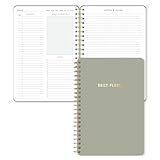
- Undated and Flexible – Start using this planner any day of the year without wasting a single page. Whether you're goal-setting in January or regrouping mid-year, it adjusts to your flow. Great for students, professionals, or anyone building routines on their own terms.
- Two-Page Daily Layout – Each day is thoughtfully spread across two pages with space to plan hourly schedules, set priorities, check off to-dos, and jot down ideas. It’s a layout that gives you room to breathe, reflect, and take action – one day at a time.
- Hourly Scheduling Made Easy – Use the dedicated time-blocking column to structure your entire day, from early meetings to evening workouts. Ideal for time-sensitive goals, appointment tracking, and productivity planning without digital distractions.
- Clean and Spacious Design – Includes clearly marked spaces for priorities, task checklists, notes, and follow-ups. The open layout keeps you visually organized so you can focus on what matters, without flipping back and forth or feeling boxed in.
- Thick Paper, Elegant Finish – Features 100gsm paper that resists bleed-through, paired with soft neutral pinstripes and a sturdy gold spiral binding. A pleasure to write on and beautiful enough to leave out on your desk or bring on the go.
Overbuilding projects
If you spend more time nesting lists than completing actions, reduce the number of categories. Start with one inbox, a few areas, and a short daily selection.
Trusting old pricing or feature information
Free-tier limits, premium gates, integrations, and Windows feature availability change. Recheck them immediately before publication or purchase, and again if a feature is critical to your workflow.
Ignoring migration risk
Export or preserve important information before moving a large backlog. Migrate a small sample first, verify dates and recurring behavior, and only then transfer everything.
What’s actually slowing this PC down?
Pick the symptom - the matching free tool is one click away.
Which app should you pick?
- Pick Microsoft To Do for a simple Windows list centered on a Microsoft account, Outlook-related work, My Day, and separate lists.
- Pick Todoist when structured projects and cross-device continuity are your priorities.
- Pick TickTick when you want planning and focus-oriented functionality alongside tasks.
- Pick Any.do when you want a straightforward general-purpose alternative and have confirmed its current Windows and plan details.
Install the candidate that matches your workflow, create a small test system, and run it for a week before migrating everything. The best task manager for Windows is the one that makes capture, review, and completion easier without adding more administration than your tasks require.
Quick Recap
Product prices and availability are accurate as of the date/time indicated and are subject to change. Any price and availability information displayed on Amazon at the time of purchase will apply.

