The Tool Desk
Outbyte PC Repair FREERepair Windows errors before they cause bigger problemsFix Now →Outbyte Driver Updater FREEFix the driver behind crashes, sound loss and screen glitchesFind Drivers →For a wired controller explicitly listed as compatible with Nintendo Switch 2, the HORIPAD Turbo is the clearest alternative to PowerA’s Advantage: it adds programmable rear buttons, turbo and adjustable stick dead zones, and uses a 9.8-foot USB-A cable. The 8BitDo SN30 Pro Wired Gamepad is another option if you prefer a compact retro layout, but 8BitDo specifies Switch 2 compatibility only from system version 20.1.1. If you already own Nintendo’s original Switch Pro Controller, Nintendo also documents how to use it wired with Switch 2.
The comparison below is based on published specifications and support information, not hands-on tests of comfort, latency, durability or button feel.
Wired Switch 2 controllers at a glance
| Controller | Connection and compatibility | Notable features | Important limitations |
|---|---|---|---|
| PowerA Advantage Wired Controller for Nintendo Switch 2 | Wired; PowerA lists compatibility with Switch 2, Switch and Switch OLED. PowerA says to use it with Switch 2 only while the console is docked. | Hall Effect modules, two mappable buttons and a C Button. | No HD rumble, IR camera, motion controls or amiibo NFC; not for Joy-Con-only games. The manual says a USB-C-to-USB-C cable for direct console-port connection is not included, and a cable used that way must meet or exceed its electrical specifications. |
| HORIPAD Turbo for Nintendo Switch 2 | Wired USB-A; HORI lists Switch 2, Switch and Switch OLED compatibility and a 9.8-foot cable. | C Button, programmable rear buttons, turbo and three selectable dead-zone settings; officially licensed. | Confirm the exact regional SKU and listing. The product listing does not establish comparative performance or durability. |
| 8BitDo SN30 Pro Wired Gamepad | Wired USB; 8BitDo specifies Switch 2 compatibility from system version 20.1.1 onward. | Compact retro-inspired layout, zinc-alloy construction and vibration, as listed by 8BitDo. | Check the console system version and exact edition. Its compact layout is a specialized fit; published information here does not establish comparative comfort or latency. |
| Nintendo Switch Pro Controller (existing owners) | Nintendo lists it as compatible with Switch 2 and provides instructions for wired use. | A wired-use option if you already own the first-generation Pro Controller. | It is not a newly purchased wired-only model. Nintendo notes that some games have unique compatibility requirements. |
Which PowerA alternative should you choose?
Choose HORIPAD Turbo for a full-size wired alternative
HORI’s listing describes the HORIPAD Turbo as a wired Switch 2 controller with a USB-A cable measuring 9.8 feet. Its C Button, programmable rear buttons, turbo function and three selectable stick dead-zone settings give it a feature set aimed at players who want extra controls as well as a wired connection. HORI lists it as compatible with Switch 2, Switch and Switch OLED. The published listing supports those specifications, but it does not show that the controller is more comfortable, responsive or durable than PowerA’s.
Choose 8BitDo for a compact retro layout
The SN30 Pro Wired Gamepad is a smaller, retro-inspired option rather than a conventional full-size pad. 8BitDo lists wired USB connectivity, vibration and zinc-alloy construction, and specifies Switch 2 support beginning with system version 20.1.1. Check that requirement before buying or troubleshooting; compatibility should not be treated as unconditional.
PC Slower Than It Used to Be?
A free scan shows the junk files, broken settings and background clutter dragging Windows down - then fixes them in one click.Free scan · Windows 10 & 11Crashes, No Sound, or Screen Glitches?
Random freezes, missing sound and display glitches usually trace back to one bad driver. Find and replace yours safely.Free scan · under a minute#1 Best Overall

- Hall Effect Modules: Say goodbye to stick drift with contract-free magnetic sensors in the thumbsticks giving you smoother control, enhanced precision, and increased longevity
- Advanced Gaming Buttons: Get an edge over the competition with mappable Advanced Gaming Buttons you can program on-the-fly, mid-game—no system settings to configure
- C Button: Easily activate fun GameChat features
- On-board Audio Controls: Quickly adjust the volume of your headset, mute your mic and change the EQ mode for a more immersive gaming experience using the audio button on the back of the controller. EQ Modes: Standard, Bass Boost, Immersive.
- Wired Control: No batteries? No problem. The PowerA Advantage Wired Controller for Nintendo Switch 2 system includes a detachable 10 ft. USB-C cable, giving you plenty of space to get to your favorite spot in the room and play for hours
Keep PowerA in the comparison if its features suit you
PowerA lists Hall Effect modules, two mappable buttons and a C Button on the Advantage Wired Controller for Switch 2. Those features distinguish it from the cited alternatives, but its docked-use restriction and the functions it omits matter if you need handheld play, motion controls, HD rumble, IR camera support or amiibo NFC.
How to connect them to Switch 2
PowerA Advantage
PowerA’s manual says the included cable connects the controller, but a USB-C-to-USB-C cable for connecting directly to the Switch 2 console’s USB-C ports is not included. If you intend to use a direct console-port connection, follow the manual’s electrical specifications rather than assuming any USB-C cable is suitable. PowerA also says the controller should be used with Switch 2 only while the console is docked. See the PowerA product information and manual.
Rank #2
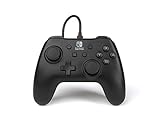
- Matte black design
- Ergonomic controller shape with Nintendo Switch button layout
- Instant plug and play connection (no sync required)
- Detachable 10ft (3m) USB cable with Velcro strap
HORIPAD Turbo
The cited HORI model is a USB-A wired controller. If the console does not recognize it, HORI’s troubleshooting guidance includes checking that the console and software are updated and reconnecting the cable. Refer to HORI’s Switch 2 controller troubleshooting instructions.
8BitDo SN30 Pro Wired Gamepad
Before relying on this controller, check that Switch 2 is running system version 20.1.1 or later, the minimum version specified by 8BitDo’s product listing.
Do these 3 things before closing this tab:
1Clear out junk files and repair common Windows errors2Fix the driver behind crashes, sound loss and screen glitches3Repair Windows errors before they cause bigger problemsRank #3

- Works with Nintendo Switch 2. C button not available
- 3.5mm audio jack , On guard against the fiercest attacks, Link is ready to take on the most fearsome of Hyrule’s enemies.
- Mappable Advanced Gaming Buttons
- Detachable 10ft (3m) USB Cable
- No batteries required
Nintendo Switch Pro Controller
Nintendo provides steps for wired use of the first-generation Switch Pro Controller on Switch 2. Its compatibility page also cautions that individual games can have unique compatibility requirements. Follow Nintendo’s wired-controller instructions and check Switch and Switch 2 compatibility information for the game you plan to play.
Independent reader supportYour contribution helps us test, update, and keep practical guides available for everyone.What features might be missing?
PowerA expressly says its Advantage Wired Controller lacks HD rumble, IR camera, motion controls and amiibo NFC, and is not suitable for Joy-Con-only games. The cited HORI and 8BitDo product listings do not establish that either alternative supports every one of those functions, so check the exact product listing and game requirements if a particular feature is essential. Likewise, the available specifications do not justify ranking these controllers by latency, comfort or durability.
Quick Recap
Best Value

- Officially Licensed Nintendo Product - Officially licensed by Nintendo for Nintendo Switch, Nintendo Switch Lite, and Nintendo Switch - OLED Model. Also works with Nintendo Switch 2 - C Button not available.
- Custom RGB Lighting - Glow up your setup with eight RGB zones and four preset modes, creating vibrant color combinations to light up your game like never before!
- Mappable Quick-Action Buttons - Re-map functions to the two programmable back buttons for faster reactions and a more personalized, customized gameplay experience.
- Built-in Audio Controls - Stay fully immersed with D-pad audio controls, a 3.5mm headset jack, and USB-chat compatibility, giving you seamless sound and communication without interrupting gameplay.
Rank #4
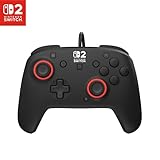
- Hall-Effect thumbsticks for greater precision and durability
- C Button for GameChat features
- 10ft / 3m USB cable for wired gameplay
- 3.5mm jack for audio and USB-chat
- D-pad audio controls
What to check before buying
- Connection: Check whether the model is USB-A or USB and whether your intended setup uses the dock or a direct console connection.
- Compatibility: Confirm explicit Switch 2 support, the exact model or regional SKU, and—in the SN30 Pro’s case—the system version requirement.
- Controls: Compare the specific features you will use: Hall Effect modules, programmable buttons, turbo, dead-zone adjustment or the C Button.
- Play style: The 8BitDo’s compact retro shape differs from a conventional full-size controller. Choose based on the layout you want rather than assuming the shapes feel alike.
- Game requirements: Verify support for motion, rumble, NFC, IR or Joy-Con-specific play if your games depend on them.
- Current listing: Product versions, availability and system requirements can change. Check the manufacturer’s current product page before purchase.
Product prices and availability are accurate as of the date/time indicated and are subject to change. Any price and availability information displayed on Amazon at the time of purchase will apply.




