Free tools Windows power users keep installed
One-click scans. No signup required.
The best first accessories for the ROG Xbox Ally X are protection and extra storage. Add a USB-C dock only if you plan to play on a TV or monitor, and buy another charger only if you need one for a second location or a higher-output docking setup. The Ally X already includes a 65W charger and stand, so a dock, controller, keyboard, and mouse are upgrades—not necessities for handheld play.
Quick picks
| Accessory | Best for | Why buy it | Main drawback | Price note |
|---|---|---|---|---|
| dbrand Killswitch | Everyday protection | Slim shell, kickstand, and travel cover | May not fit every carrying case | Listed at $59.95 USD ERP/pre-order in 2025; verify the current price |
| ROG Xbox Ally 2-in-1 Premium Carrying Case | Travel | Hard protection, charger pouch, stand function, SD-card storage | Bulkier than a shell | Listed from $69.99 in 2025; verify current pricing |
| ROG 100W Gaming Charger Dock | Portable TV setup | HDMI, two USB-A ports, and USB-C charging | Confirm whether the current package includes a power adapter | Listed at $99.99 USD ERP in 2025 |
| ROG Bulwark Dock 2025 DG300 | Permanent desk | HDMI 2.1, Ethernet, three USB-A ports, USB-C, and audio | Larger and more expensive | Listed at $139.99 USD ERP in 2025 |
| SanDisk microSD for ROG Xbox Ally | Easy storage expansion | Removable capacity up to 2TB | Not as convenient or consistently fast as internal SSD storage | Listed from $69.99 in 2025 |
| WD_BLACK SN7100X NVMe SSD | Large permanent library | PCIe 4.0 M.2 2280 upgrade, up to 4TB | Requires opening the handheld and reinstalling or cloning Windows | Listed from $159.99 in 2025 |
| ROG Raikiri II Xbox Wireless Controller | Docked play | Tri-mode connectivity and rear buttons | Unnecessary if you play handheld or already own a controller | Availability and price require confirmation |
| SteelSeries Arctis GameBuds for Xbox | Premium wireless audio | 2.4GHz wireless, Bluetooth, ANC, and Xbox compatibility | Expensive compared with wired headphones | Listed at $199.99 USD ERP in 2025 |
Historical prices above come from Xbox Wire’s October 2025 accessory announcement and its December 2025 Designed for Xbox guide. They are not guaranteed September 2026 prices.
As an Amazon Associate I earn from qualifying purchases.
What the ROG Xbox Ally X already includes
The ROG Xbox Ally X is an ASUS-made Windows 11 Home gaming handheld developed with Microsoft. Its specification determines which accessories are useful: an AMD Ryzen AI Z2 Extreme processor, 24GB of LPDDR5X-8000 memory, a 1TB M.2 2280 SSD, a 7-inch 1080p 120Hz IPS display, an 80Wh battery, Wi-Fi 6E, Bluetooth 5.4, a 3.5mm combo headset jack, and an included 65W charger and stand. The complete specification is on Xbox’s official ROG Xbox Ally page.
It has two USB-C ports. One is USB4 with DisplayPort 2.1, USB Power Delivery 3.0, and Thunderbolt 4 compatibility. The other is USB 3.2 Gen 2 Type-C with DisplayPort 2.1 and Power Delivery 3.0. It also has a UHS-II microSD reader supporting SD, SDXC, and SDHC cards; UHS-I cards are supported in DDR200 mode.
#1 Best Overall

- Modular Protection for ROG Xbox Ally and ROG Xbox Ally X: This ModCase is designed for ROG Xbox Ally and ROG Xbox Ally X. It includes a protective back shell, detachable front cover, detachable stand, and expansion strap, giving your handheld a more flexible setup for travel, play, and everyday use
- All Around Protection for Daily Carry: The back shell and front cover work together to help protect your handheld from everyday drops, pressure, and scratches. Built with rigid and flexible materials for balanced protection and comfort, the front cover also adds extra protection for the screen, joysticks, and L and R buttons during storage and travel, and includes 4 built in Micro SD card slots to keep spare memory cards organized and easy to carry
- Detachable Stand and Expansion Strap: Attach the stand for hands free tabletop gaming, or use the expansion strap for a more flexible setup on the go. It can help secure slim accessories such as a power bank for charging while you play. Power bank not included
- Precise Cutouts and Easy Access: Precisely aligned cutouts keep buttons, ports, and vents easy to access. You can charge without removing the case, and built in pull tabs make installation easier and more convenient
- Ergonomic Anti Slip Grip: The ergonomic handle shape and textured anti slip surface provide a more comfortable and steady grip during extended play. It helps improve comfort, control, and stability for everyday handheld gaming
That means the sensible buying order is different from that of a traditional console. A case solves physical risk, storage solves the limited size of a modern PC-game library, and a dock solves the need for external displays and peripherals. A second controller or keyboard does not improve ordinary handheld play.
What to buy first
Essential for most owners
- A model-specific screen protector.
- Either a slim protective shell or a hard travel case.
- Extra storage if you install several large PC games.
Buy for a specific use case
- Travel: a charger pouch or premium case, a high-output USB-C power bank, and a short, properly rated USB-C cable.
- TV or monitor play: a USB-C dock, HDMI cable, and controller.
- Desktop Windows use: a dock, Ethernet connection, keyboard, and mouse.
- Large libraries: a 2TB or 4TB internal SSD, with a complete backup and recovery plan.
You can usually skip a dock, external controller, keyboard, and mouse if you primarily play in your hands.
Best cases: shell or travel case?
dbrand Killswitch: best attached protection
The Killswitch is the better choice when the Ally X needs protection during everyday use. Xbox describes it as Designed for Xbox-certified, made from impact-resistant thermoplastics, approximately 2.5mm thick, and equipped with an integrated kickstand and crush-resistant Travel Cover. It is a shell that stays on the handheld, not a storage case for your entire kit. See dbrand for the current model and compatibility list.
Choose it for drop protection, a slim profile, and a kickstand. Check that the current revision explicitly supports the ROG Xbox Ally X; do not assume a case made for the older ROG Ally X fits. Also check whether the shell fits inside your chosen travel case. It should not be described as waterproof unless the manufacturer specifically makes that claim.
ROG Xbox Ally 2-in-1 Premium Carrying Case: best for travel
The official ROG case is the more practical option for flights, commuting, and carrying the included charger. It has a hard shell, fleece lining, water-repellent fabric, reinforced edges, a detachable charger pouch, SD-card storage, and a stand function. “2-in-1” means protective carrying case plus portable stand; it is not a USB-C dock.
Its trade-off is size. Before buying, check the internal dimensions if you use a shell, thumbstick caps, or plan to pack a dock or power bank. The official ASUS store is at rog.asus.com/us.
Third-party cases
Third-party options such as the Tomtoc Arccos Travel Bag and JSAUX cases can make sense when you need more room or a lower price. Secondary buying guides such as Windows Central’s accessory guide are useful starting points, but retailer prices and compatibility can change.
PC Slower Than It Used to Be?
A free scan shows the junk files, broken settings and background clutter dragging Windows down - then fixes them in one click.Free scan · Windows 10 & 11Outdated Drivers Are Slowing You Down
One free scan finds every outdated or missing driver and matches the right update for your exact hardware.Free scan · exact hardware matchCheck trigger and stick clearance, shell compatibility, charger capacity, and whether the case closes with a screen protector or thumbstick caps installed. A case that fits an older ROG Ally model is not automatically compatible with the Xbox Ally X.
Rank #2
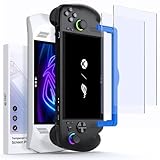
- Perfect Fit for ROG Ally & ROG Xbox Ally Series: This 7-inch screen protector is designed specifically for ROG Xbox Ally (2025), ROG Xbox Ally X (2025), ASUS ROG Ally and ROG Ally X (2024), and is also compatible with MSI Claw A1M. It ensures a precise fit and full-screen coverage
- Anti-Glare: Take advantage of the matte anti-glare tempered glass to enjoy a comfortable visual experience. Whether you’re using the ROG Ally indoors or outdoors, it reduces glare and reflections while maintaining screen clarity for better play in all lighting conditions. Note: As a matte anti-glare surface, it may slightly soften image sharpness versus glossy HD glass; for maximum clarity, please choose GP0111A (HD version)
- Easy Installation: Two guiding frames for a perfect fit across models. Use the blue frame for ROG Xbox Ally X and ROG Xbox Ally, and the yellow frame for ROG Ally X and ROG Ally. Fast, precise alignment with fewer bubbles for a smoother first try.
- Armor-like Protection: Like a solid shield, 9H hardness tempered glass protects your ROG Ally screen from scratches, smudges and daily wear and tear. The oleophobic coating covering the surface reduces fingerprints
- Highly Sensitive: JSAUX ROG Ally screen protector is only 0.33mm ultra-thin and maintains the sensitivity of the device's touch controls. Experience the joy of using the Rog Ally touchscreen without any compromise
Best docks for TV and desk play
ROG 100W Gaming Charger Dock: best portable dock
This is the better dock for a simple TV or travel setup. It provides HDMI output, two USB-A ports, and USB-C charging, enough for an external display, controller, and one additional peripheral. ASUS describes it as a portable way to connect the Ally to another screen and use a mouse, keyboard, or controller.
The “100W” label describes the dock’s maximum Power Delivery passthrough capability—not necessarily the power reaching the handheld. The charger, cable, dock electronics, and device negotiation all determine the actual result. The Ally X’s included charger is 65W, so do not assume this dock turns it into a 100W charging system. Confirm the current package contents before purchase.
ROG Bulwark Dock 2025 DG300: best desktop dock
The Bulwark is the stronger desk solution. Its listed features include HDMI 2.1, USB-C, three USB-A ports, Ethernet, an audio jack, up to 4K at 144Hz or 8K at 30Hz, up to 100W USB-C Power Delivery, and Aura Sync RGB lighting. It is suitable for a monitor, wired network, keyboard, mouse, storage, and audio device connected at once.
For a 1080p TV and one controller, those extra ports add cost without much benefit. It is also less convenient to pack. Check current availability and pricing on ASUS ROG’s store, since the $139.99 ERP reported in October 2025 was a historical launch reference.
Choosing a third-party USB-C dock
JSAUX, UGREEN, Anker, and similar docks may offer different port layouts or lower prices, but compatibility should be confirmed for the exact Xbox Ally X. A dock working with a Steam Deck or an older ROG Ally is not proof that it will work perfectly here.
- Look for USB-C Power Delivery passthrough rated for at least 65W input if you intend to game while charging.
- Match HDMI capability to the display’s resolution and refresh rate.
- Check Ethernet speed, USB port count, USB speeds, cable length, and connector orientation.
- Confirm whether a power adapter is included.
- Check physical fit and the seller’s return policy.
Some users have reported black screens, unstable USB connections, or insufficient charging with particular docks and the standard 65W charger. These are anecdotal reports, not evidence that every third-party dock fails.
Dock troubleshooting checklist
- Connect the charger to the dock’s PD input.
- Connect the dock to the Ally X using the correct USB-C port.
- Attach HDMI and USB peripherals.
- Confirm that Windows detects the display and devices.
- Start a demanding game while charging.
- Check whether the battery continues to drain.
- Test sleep, wake, unplugging, and reconnecting.
If HDMI works but charging or USB devices do not, suspect power delivery, cable capability, dock firmware, or Windows device negotiation rather than the display alone.
Quick wins for a faster PC:
Scan for outdated or missing drivers - takes under a minuteDriver Scan →Clear out junk files and repair common Windows errorsFree Scan →Fix the driver behind crashes, sound loss and screen glitchesFind Drivers →Best storage: microSD or internal SSD?
microSD: easiest capacity expansion
A microSD card is the simplest way to add removable storage without opening the handheld. Xbox promotes a SanDisk card for the ROG Xbox Ally range in capacities up to 2TB, with claimed sequential speeds of up to 200MB/s read and 140MB/s write. These are manufacturer claims, not independent game-loading results. See SanDisk’s store for current models and prices.
Rank #3

- [Compatibility] Only compatible with ROG Xbox Ally and ROG Xbox Ally X (2025)
- [Tailored Protection for ROG Xbox Ally (X)] This double-decker carrying case is custom-built for ROG Xbox Ally/Ally X, giving your console a perfect fit. It shields your handheld from daily bumps, scratches, and dust
- [Dual Layer Storage] Top layer securely holds your console while the bottom layer provides flexible space for the original charger, original stand, HDMI cable, USB C cable, and earphones
- [Felt Exterior & Soft Inner] The outer shell combines durable felt, a reinforced laminated layer, and stitched fabric detailing for protection against scratches and daily wear. Inside, the soft lining fits the console snugly, with a hook-and-loop strap that keeps it stable
- [Thoughtful Details] Raised zones protect the joysticks, while a shoulder strap and smooth zipper make it easy to carry and use. Inside, dedicated slots hold your SD and microSD cards, keeping everything organized wherever you go
Use microSD for a secondary library, emulators, downloads, and games you want to move between devices. Do not expect every game to load as quickly as it does from the internal SSD. Launchers may handle removable installation differently, and some games are more sensitive to storage performance than others. Never remove the card while it is active.
Buy from an authorized seller to reduce counterfeit risk. If Windows does not recognize a new card correctly, back up anything important and format it through Windows Disk Management or File Explorer as appropriate. The “up to 50 games” estimate associated with the official card depends on an assumed average game size.
Internal SSD: best for a permanent large library
The Ally X ships with a 1TB M.2 2280 SSD, and Xbox describes the format as easier to upgrade. A compatible PCIe 4.0 NVMe drive such as the WD_BLACK SN7100X is the higher-capacity route, with capacities up to 4TB. The manufacturer claims up to 7,250MB/s read and 6,900MB/s write for its 2TB model; those figures are not independent test results.
The Tool Desk
Outbyte Driver Updater FREEFix the driver behind crashes, sound loss and screen glitchesFind Drivers →Outbyte PC Repair FREEClear out junk files and repair common Windows errorsFree Scan →An SSD upgrade is preferable when you want one large, fast, permanent library. It is less convenient than a card because it requires opening the handheld and reinstalling or cloning Windows. Back up personal files, confirm the official ASUS service and recovery procedure, and prepare recovery media before opening the device. Cloning can fail if boot, encryption, or recovery partitions are not handled correctly. Avoid oversized heatsinks unless clearance has been confirmed. Warranty and service consequences should be checked against the current ASUS terms.
Choose microSD for low-friction expansion and portability. Choose an SSD for maximum permanent capacity and fewer storage-management compromises.
Independent reader supportYour contribution helps us test, update, and keep practical guides available for everyone.Charging accessories and power banks
The included 65W charger is sufficient for many owners, so another ordinary charger should not be an automatic purchase. A second charger is useful for keeping one at home and one in a travel bag, charging multiple devices, or supplying a dock.
For a power bank, prioritize sustained USB-C Power Delivery output rather than the headline wattage. Compare:
- Capacity: Wh is more informative than mAh unless voltage is also specified.
- Continuous output: determines whether the Ally can charge while gaming.
- Peak output: may be brief and less useful in practice.
- Cable rating: an inadequate cable can limit charging or data bandwidth.
- Travel rules: high-capacity batteries may be restricted by airlines.
There is no responsible universal “best” power bank without current testing. For flights, commuting, camping, or long periods away from outlets, select a reputable USB-C PD model whose sustained output is clearly documented and whose capacity complies with your transport rules.
Rank #4

- NOTE: When the ROG Xbox Ally / ROG Xbox Ally X is connected to the dock, part of the input power is consumed by the dock itself. Using the original 65W or lower PD charger may trigger the message “Not enough power to charge efficiently.” This does not affect gameplay, but charging speed may be slower and overall charging time may be longer. For optimal performance, a PD 100W charger is recommended
- 6-in-1 Docking Station for Handheld: Experience enhanced gaming with 4K@120Hz HDMI output, Gigabit Ethernet, USB C PD charging, USB C 3.2 Gen 1, and dual USB A 3.2 Gen 1 ports. Enjoy crisp 4K@120Hz or 1080@240Hz HDMI output for vivid gaming visuals
- Modular Docking Station: The JSAUX docking station provides dual functionality. Use it with the gaming console directly on the dock, or detach the base for standalone use as a stand, offering flexibility for both desktop and portable setups. The extra silicone pad ensures a perfect fit, enhances stability, prevents slipping, and improves support angles for a better gaming experience
- DIY Customize Your Docking Station: Easily personalize your docking station by adding a custom card between the front cover and the dock. Just remove the cover, insert your card, and snap the cover back on. NOTE: Recommended card size is 3.00" x 1.13" x 0.01" (76.3mm x 28.7mm x 0.3mm). Custom cards NOT included
- Perfect Compatibility: Compatible with ROG Xbox Ally X (2025), ROG Xbox Ally (2025), ROG Ally X, ROG Ally, Steam Deck, Legion Go, Legion Go S, Razer Edge, AYA NEO, AYA ODIN, Logitech G Cloud, and ONEXPLAYER. Supports 100W max power delivery, which is enough to charge your ROG Ally X, ROG Ally, Steam Deck LCD/OLED, or Legion Go at full speed when paired with the original charger
Controllers for docked play
The Ally X’s built-in Xbox-style controls are already substantial. An external controller mainly helps with TV play, two-player gaming, or long sessions where a conventional controller is more comfortable.
The ROG Raikiri II Xbox Wireless Controller is the ecosystem option. Xbox lists 2.4GHz RF, Bluetooth, USB-C, four programmable rear buttons, TMR joysticks, a stated 1000Hz PC polling rate, up to 50 hours of wireless play, and a protective case/charging stand. The October 2025 announcement marked it as coming soon, so confirm current availability on ASUS ROG.
If you already own an Xbox Wireless Controller, use it before buying another. A wired USB controller is the simplest option on a docked desk. Bluetooth is convenient but can involve Windows pairing and latency differences. Do not assume every Xbox controller supports every wireless mode on Windows without the appropriate adapter.
What’s actually slowing this PC down?
Pick the symptom - the matching free tool is one click away.
Audio accessories
The built-in 3.5mm combo jack makes a wired headset the lowest-complexity choice. It avoids pairing, dongles, Bluetooth codec limitations, and Windows audio-device switching. Bluetooth 5.4 is available, but wireless audio can introduce latency or microphone and output-selection problems.
The SteelSeries Arctis GameBuds for Xbox are the premium portable option. Xbox lists active noise cancellation, 2.4GHz wireless, Bluetooth 5.3, Xbox compatibility, up to 40 hours of total battery life, up to 10 hours per charge, IP55 water/dust resistance, and a Qi-compatible charging case. The reported $199.99 USD ERP is a historical reference. Verify the current product and confirm how its Xbox wireless dongle connects to the Ally X on Windows before buying from SteelSeries.
Choose the GameBuds for wireless convenience, ANC, and portability. Choose wired headphones for lower cost and simpler compatibility.
Keyboard and mouse
Keyboard and mouse are useful for Windows desktop work, strategy games, shooters, browser use, launcher troubleshooting, and productivity. They are not required for normal Xbox-style handheld gaming.
Recommended Free Tools
A compact Bluetooth set saves dock ports and is convenient for travel. Wired peripherals or a USB receiver are generally more predictable on a desk, but a receiver consumes one of the dock’s USB ports and can suffer interference in a crowded 2.4GHz environment. Check how many ports remain after connecting storage, a controller, or a headset, and make sure the dock can charge the handheld at the same time.
Recommended setups
Minimal handheld setup
- Screen protector.
- Slim model-specific case.
- microSD card only if the internal 1TB is not enough.
Travel setup
- ROG Premium Carrying Case or another hard case with confirmed fit.
- Included 65W charger.
- High-output USB-C PD power bank.
- Short, properly rated USB-C cable.
- Wired or low-latency headset.
TV setup
- ROG 100W Gaming Charger Dock.
- HDMI cable rated for the desired display mode.
- Existing Xbox Wireless Controller or wired controller.
- Optional headset.
Desk setup
- ROG Bulwark Dock.
- Ethernet connection.
- External monitor.
- Keyboard and mouse.
- External controller.
Large-library setup
- 2TB or 4TB compatible M.2 2280 PCIe 4.0 NVMe SSD.
- Full backup and recovery media.
- microSD card for removable or secondary storage.
Compatibility warnings
- Check the exact model: the Xbox Ally X is not the same device as the 2024 ROG Ally X. Differences in chassis, controls, ports, and triggers can make accessories incompatible.
- Separate dock rating from charger output: a 100W dock cannot supply 100W if the connected charger provides only 65W.
- Match display hardware: resolution and refresh-rate claims depend on the Ally configuration, dock, HDMI cable, and display.
- Check case clearance: shells, thumbstick caps, screen protectors, chargers, and docks can prevent a case from closing.
- Check SSD dimensions: a standard M.2 2280 drive does not guarantee that an oversized heatsink will fit.
- Check wireless protocols: Bluetooth, 2.4GHz USB receivers, Xbox Wireless, and USB connections are not interchangeable.
The Ally X is a Windows handheld PC with Xbox-focused software, not a conventional Xbox console with a single accessory standard. That is why compatibility claims based only on “ROG Ally,” “Steam Deck,” or “Xbox” branding deserve scrutiny.
Quick Recap
Product prices and availability are accurate as of the date/time indicated and are subject to change. Any price and availability information displayed on Amazon at the time of purchase will apply.




