The right Xbox Series X accessories depend on what your setup is missing. For more storage at internal-SSD performance, choose a Series X|S Storage Expansion Card; for a separate USB storage option, consider an external hard drive. A headset, display, charging solution or accessibility control can help with other specific needs. Start with the compatibility and feature you need, then check the exact accessory’s specifications and current availability.
Choose accessories by the problem you want to solve
There is no single accessory upgrade that suits every player. Xbox’s official catalog covers storage, headsets, charging, displays, cables and networking, and assistive technology. Check the product listing for your region and verify compatibility for the specific model you plan to buy.
- Running out of game space: compare a Storage Expansion Card with a USB external hard drive.
- Need clearer private audio or voice chat: check a headset’s connection, comfort and audio features.
- Want to use your screen’s video features: confirm that the TV or monitor supports the capabilities you want.
- Want less battery swapping or different controls: look at compatible charging accessories or accessibility devices.
Storage: expansion card or USB hard drive?
Xbox identifies the Storage Expansion Card as the option that matches the internal SSD’s performance. The official Series X product page says it can “Add more storage and match internal storage performance of the internal SSD with the Storage Expansion Cards for XBOX Series X|S.” Xbox’s accessory catalog names Seagate and WD_BLACK cards. Check the current capacity options, price and regional availability before choosing.
A USB external hard drive is another way to add storage. Xbox specifies support for USB 3.1 external HDDs, and its setup guidance describes an external hard drive as an added-storage option. It is not the performance-matching expansion card: check the requirements for each game to learn whether it can run from the drive or must be transferred to console storage or an expansion card.
Do these 3 things before closing this tab:
1Clear out junk files and repair common Windows errors2Fix the driver behind crashes, sound loss and screen glitches3Repair Windows errors before they cause bigger problems#1 Best Overall

- 【Necessary for Xbox Series X】---- This product integrates many functions, such as top cooling fan, dust-proof, light strip, USB interface for data transmission and USB port for charging. It helps to prevent for Xbox Series X console from over-heating and dust to extend the life of your console. (NOTE:When the console is working, the dust cover of the fan can be removed to speed up the heat dissipation effect. Alige the two holes under the dust cover first, then cover the dust cover.)
- 【Efficient Fan System】---- A high-speed large fan are built in the colorful dust-proof cooling fan,which can accelerate the hot air exhausted from the top of the console and reduce the temperature for Xbox series X console. The cooling fan stand with 3 gears and is a touch switch. The low gear is orange, the second gear is blue, and the high gear is green.The heat dissipation effect is more obvious, and the noise is very low, which you can hardly feel.
- 【Colorful Light Strip】---- The cooling bracket for Xbox seris X supports colorful lights and can change the light color with an independent touch switch. The light strip contains 6 monochromes and 1 mixed color. You can use the independent touch switch to change your favorite colors and own a more atmosphere in the process of the game. (NOTE: pressing the light switch for the 7th time will turn light off.)
- 【3.0 USB & USB Charge Port】---- There are 2 USB interfaces in total, one blue 3.0 USB interface supports 3.0 data transmission, another white 2.0 sub interfaces ONLY can charge more products, such as controller, mobile phones, small desk lamps, etc.It is convenient to provide USB interface in the process of your game.
- 【Dust Cover Filter】---- The cooling top bracket for Xbox seris X supports top dust proof,At the same time, the product contains 2 sets * dust cover compatible with Xbox Series X, 1 set * silicone dust plugs,which have accurate size and easy to install and replace without additional tools. Prevent dust from entering the USB and HDMI ports for Xbox Series X, extend the life of your console.
| Option | What the official information establishes | What to check before buying |
|---|---|---|
| Series X|S Storage Expansion Card | Xbox says it matches internal SSD performance; its catalog names Seagate and WD_BLACK. | Capacity, price, stock and regional listing. |
| USB external HDD | Xbox specifies USB 3.1 external HDD support for added storage. | Drive compatibility and the storage requirements of the games you want to use. |
For Xbox’s storage and console specifications, see the Xbox Series X product page, Xbox accessory catalog and Xbox setup guidance.
Headsets: match the connection and audio features to your use
The Xbox Stereo Headset is a wired option specified for Xbox Series X|S. It connects through the Xbox Wireless Controller’s 3.5 mm audio jack, so check that your controller and preferred seating arrangement work with a wired connection. Xbox lists Windows Sonic, Dolby Atmos and DTS Headphone:X support; some features may require additional purchases, downloads or supported hardware.
Rank #2

- 【Accessories for Xbox Series X Gaming Lover】This multifunctional cooling fan for xbox series x will become a must-have accessory for xbox series x owners. Featuring a cooling fan, dust prevention, charging, and lighting effects, it not only provides cooling for your xbox series x console, but also offers various cool lighting effects, creating a richer atmosphere for your gaming desktop.Batteries & Chargers Compatible with Xbox
- 【11 LED Light Modes for Customization】The top of the Xbox series X cooling fan has 11 adjustable lighting modes: 7 solid colors (red, green, deep blue, yellow, purple, light blue, white).Long press the light button to turn off all lights, short press to switch colors. Built in intelligent chip, which can improve security even after long-term use
- 【Temperature Detector & Anti Touch Device】Built in temperature detector, when you select automatic mode, our cooling system series x can automatically adjust the fan speed according to the temperature of the host, constantly reducing the internal temperature of the host. Even during long-term gaming, you don't have to worry about the host overheating and affecting the gaming experience. The anti touch device can prevent your hands from being scratched by the rotating fan
- 【Efficient Cooling System for Series X with 3 Level Fan】Equipped with a high-speed 3-level adjustable fan, it can quickly exhaust hot air according to the temperature of the series x console, keeping the Xbox series x console cool. The 1 level speed is 1600rpm, the 2 level speed is 2000rpm, and the 3 level speed is 2400rpm. The 9 blades have a more obvious heat dissipation effect, avoiding console overheating .Helps extend the lifespan of the console
- 【LED Temperature Display】The LED display screen can clearly see the temperature of your Xbox Series X console and the current fan level at all times. There are also two touch buttons on the LED screen, one can control the lighting effect and the other can adjust the fan gear
When comparing other headsets, decide whether you prefer wired or wireless use, need a microphone for chat, and value spatial-audio support. Check comfort and connection details in the individual listing rather than assuming that every headset uses the same connection or supports the same features. See the Xbox Stereo Headset specifications.
Displays: verify the screen, not just the console
Xbox specifies the Series X for 4K gaming and up to 120 FPS, and lists HDMI 2.1, variable refresh rate (VRR) and Auto Low Latency Mode (ALLM). Those are console capabilities, not a guarantee that a particular television or monitor supports them. Before buying a display or relying on a feature, check the screen’s own specifications for its resolution, refresh rate and relevant HDMI features. The official Series X specifications describe the console; the display manufacturer’s listing establishes what the screen supports.
Rank #3

- 🎮SIMPLE BUT POWERFUL🎮Control and navigate the game consoles, TV, Blu-ray and apps at the touch of a button via a traditional & compact remote with soft rubberized texture
- 🎮SECURE BATTERY COVER🎮It’s attached firmly on the remote with the improved hook design to avoid the sliding off issue
- 🎮PRESS BUTTONS ANYTIME EASIER🎮Motion activated backlighting helps you locate buttons in the dark
- 🎮PLUG AND PLAY🎮Install the batteries in the remote control and it can function well without setting (However, TV control function depends on the setting and TV itself - Please refer to the user manual)
- 🎮WHAT ELSE🎮Offer the replacement without charge within the warranty period & helpful customer service anytime
Charging and accessibility accessories
If you would rather recharge than replace controller batteries, Xbox’s accessory catalog includes charging solutions. Compare the exact product’s controller fit, included battery and cable, and how it charges; category listings alone do not establish that every accessory works with every controller.
For players who need alternative ways to control games, Xbox identifies assistive controllers, compatible switches and foot pedals in its assistive technology category. Compatibility depends on the individual device and setup, so confirm the exact product’s support before purchase. The Xbox accessories catalog lists these categories alongside charging and other accessory types.
Rank #4
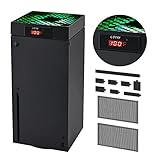
- 🍃LED Temperature Display-You can always know the temperature of your Xbox Series X console. It helps to prevent your Xbox Series X console from over-heating to extend the life of your Xbox Series X.
- 🍃Intelligent Control & Custom fan speed-[Automatic Mode]: The chip of G-STORY Xbox Series X cooling fan can automatically sense the temperature to adjust the fan speed, you can just enjoy the game and leave the heat to our cooling fan. (when the temperature is <35℃/95℉, it will stop working.) [Manual Mode]:Press the button to select the 3 speed you need, the LED will change color with the speed. (Note: Press down the button for 3s to switch between manual and automatic mode.)
- 🍃Three Level Fan Speed: Depends on the temperature of your xbox console, the Xbox Series X fan cooling system has 3 levels of fan speed(1500/1750/2000RPM) with RGB LED (Green light: 35~43℃/95~109℉; Blue light: 44~48℃/110~118℉; Red light: >48℃/119℉), it can cool your console at the most appropriate speed to protect your console.
- 🍃Low Noise & Light Weight: The Xbox Series X cooling fan is low noise and light-weight, it's powered by your xbox console, it's super portable and won't take too much space.
- 🍃Easy to Install: Just simply place the cooling fan on your console, and connect the cable to your xbox console, it will start to work. If you have any questions about using our product, please feel free to contact us. G-STORY is always here for you.
Check existing accessories before replacing them
You may already own usable equipment. Xbox says Xbox One accessories, including controllers and headsets, work with Series X. Confirm the specific accessory’s connection and features if you rely on a particular function; compatibility does not mean every model has the same capabilities.
Quick Recap
Best Value

- ONLY FOR XBOX SERIES X- Specially designed for Xbox Series X Console. The dust filter kit helps to prevent the dust from entering your game console, keep your Xbox Series X dust free.
- CLEAN AND ENJOY THE XBOX SERIES X GAMES- Anti-dust plug can prevent dust from entering the USB and HDMI ports of the game console, and the PVC fan dust mesh filter can effectively reject the entry of dust when inhaling cold air to prolong the life of the fan. Better dust-proof effect.
- EASY TO INSTALL- Just tear off the protective film on the dust-proof net, and then align the corresponding space of the Xbox Series X. Dust plug installation need to remove 8 dust plugs, and then just find the corresponding USB, HDMI, power and other interfaces to install.
- DURABLE MATERIAL- High Quality Rubber Covers for Xbox Series X Can be used for unused slots in the back of the system. The dust mesh covers endure high temperature. They can be reused, and will not be deformed after long-term use.
- WHAT YOU GET- 8pcs Dust Plugs, 4pcs Dust Mesh covers, 6pcs thumb grips. (Please Note: The console are not included) Trust us to keep your Xbox Series X running smoothly and looking great.
Product prices and availability are accurate as of the date/time indicated and are subject to change. Any price and availability information displayed on Amazon at the time of purchase will apply.
Recommended Free Tools



