Yes. Microsoft supports using the Xbox Series X either horizontally or vertically. When laying it on its side, rest it on the small feet intended for that position and keep its ventilation openings clear.
How to set the Xbox Series X on its side
- Power down the console and remove any disc. Microsoft advises doing both before changing its position.
- Lay it gently on a stable, level surface. Use the small feet that apply to the horizontal position.
- Check ventilation and access. Keep the openings unobstructed, and make sure the disc slot and ports remain accessible.
Microsoft’s Xbox Series X|S safety and setup manual explicitly says the console may be used in either vertical or horizontal position. Microsoft Design also describes it as designed for both orientations without a stand (Microsoft Design).
Where to place it for safe ventilation
- Do not set the console on a bed, sofa, or another soft surface that could block its openings.
- A bookcase, rack, or stereo cabinet is suitable only if it is well ventilated.
- Keep the console away from heat sources and avoid crowding its ventilation openings.
The manual does not specify a numeric clearance distance, so leave enough open space to avoid obstructing the vents rather than relying on an unsupported measurement.
Horizontal or vertical: which should you choose?
Both orientations are supported; Microsoft’s consumer guidance does not say that one performs better. Choose the position that fits your shelf or desk while keeping the console stable, the vents clear, and the disc slot and ports easy to reach.
Crashes, No Sound, or Screen Glitches?
Random freezes, missing sound and display glitches usually trace back to one bad driver. Find and replace yours safely.Free scan · under a minutePC Slower Than It Used to Be?
A free scan shows the junk files, broken settings and background clutter dragging Windows down - then fixes them in one click.Free scan · Windows 10 & 11#1 Best Overall

- 【Multifunctional Charging Dock】Charging stand for your game console compatible with XBOX Series X/S and controller, built in 2 cooling fans, charging dock for controllers, 3 USB hubs to expand the USB function. Great way to organize and charge your gaming system at the same time. Anti-slip rubber bottom design will keep the vertical stand tightly and stable. By holding them in a vertical position, the stand minimizes the space taken up by the console for XBOX Series X and controllers.
- 【2x1100mAh Rechargeable Batteries】We adopt premium & high-budget battery, which features miniaturization, ultra-thin and lightweight. More than anything, its excellent performance in safety and stability makes you charge your controllers with total peace of mind. (NOT fit for One S/X or Elite Series controller).
- 【Adjustable Fan Speed】Dual high-speed (First level: 3500 RPM, Second level: 5000 RPM) cooling fans can be adjusted in 2 levels by a switch button for better heat dissipation efficiency and environmental-friendly. High efficiency & low noise design. No need to worry about your console overheating. With ON/OFF fan button, keeps it working functionality and improves the operational life span.
- 【3 Extra USB Hub Ports & Clear LED indicator】There are three USB ports allow you to connect different devices such as mouse, keyboard, phones, tablets and other USB ports. Also can be for data syncing and charging. When there is no controller in the charging slot (standby mode), or if the battery pack is fully charged, a green indicator light will remain on. When the controller is charging, the controller indicator light will alternate blinking red and green.
- 【What You Get】You will get: 1 * Vertical stand with dual controller charger ports, 2 * 1100mAh Rechargeable Batteries, 1* User Manual. NOTE: console, controller, batteries, headset, games, storage expansion card are NOT included. NOTE: The stand NOT work for XBOX ONE controller.
If you need to move the console to another location, Microsoft advises removing any disc, powering it down, and disconnecting all cables before moving it.
Quick Recap
Best Value

- [Multifunctional RGB Charging Station for Xbox X]:-----Upgraded cooling fan stand for Xbox Series X comes with console cooling fan, dual controller charger, 15 RGB lighting effects, 2 expansion card slots & 8 game card slots, headset hanger & extra USB port, integrating organizer, charging, cooling and gaming lighting ambiance. Ideal accessory for Xbox X gaming enthusiasts. (You will get: 1* RGB Charging Station for Xbox X; 1* Cooler Fan Stand; 1* Headset Hanger; 1*Use Manual.)
- [Upgraded Rear Fan Efficient Cooling System]:-----MENEEA charging station is specially for Xbox series X with rear dual suction cooling fans, and with a metal bottom with 4 vents reserved for Xbox X console, helping to accelerate the hot airflow from the top of console out without blocking the natural circulation of airflow inside the console, effectively giving the console for Xbox X to achieve more efficient cooling. Equipped with fan on/off button, 3 adjustable fan speed with LED indicator.
- [Dual Controller Charger Station with LED Indicator]:-----ONLY work for Xbox Series X official original controller rechargeable battery. With built-in over current/over voltage/over heat protection, it can fully charge 2 controllers for Xbox Series X at the same time within 3.5 hrs, and with Separate LED indicator: Fully charged/standby - green light; in charging - red light. Organize your accessories for Xbox Series X when not in use to make your gaming space neat and orderly. (NOTE: Battery pack is not included!!!!)
- [15 Kinds of Cool RGB Game Lights for Xbox X]:-----MENEEA upgraded charging station with cooling fan for Xbox series X adds RGB LED light strip design with 15 lights, creating gaming atmosphere for Xbox Series X gamers, providing the best gaming experience. And the RGB charging station for Xbox X has memory mode: long press light button for 3 seconds to archive the light mode and turn off the light. Not only makes your game space more organized, but also adds more fun to the game.
- [Excellent Space Management & No Cable Required]:------Perfect accessories for Xbox Series X gaming enthusiasts! By keeping in a vertical position, the stand minimizes the space taken up by accessories for Xbox Series X. Simply install the cooling fan's male USB ports aligned with the charger dock's USB port and the console USB port. (NOTE: Please install the cooling fan in place, otherwise the fan will not work; Remove the fan first when disassembling the console. And the extra USB port supports charging.)
Rank #4
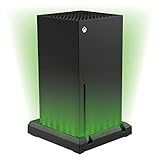
- Stylish multi-colour light-up LED stand for your Xbox Series X console
- Illuminate your console with a choice of seven different colours with adjustable brightness
- USB powered - simply connects to the rear of your console
- Retains access to all ports, buttons, vents and other console functionality
- Features 32 individual LED lights to add a stunning effect to your gaming setup.The base has an independent on/off button at the rear which can be used to power down the lights. Alternatively, the user can adjust their console settings to stop power being supplied to USB ports when in standby
Rank #3

- 【Multifunctional Xbox series X/S Stand】Our xbox stand compatible with XBOX Series X/S and controller. It's with RGB light effect,built in 2 cooling fans,charging dock for controllers,3 USB hubs to expand the USB function. It can meet all your needs: console cooling,controller charging, stunning light atmosphere,5Gbps ultra-fast data transfer, Xbox SeriesX/S gaming accessories storage.
- 【Fast Dual Fan Cooling System】Designed with dual high speed fans at the bottom of this Xbox Series X/S cooling stand. This Xbox Series S cooling fan stand has 2 gears adjustable fan speed (3500 /5000 RPM). It can effectively cool down the temperature of your Xbox and extend its lifespan.
- 【16 RGB Light Modes& Bluetooth APP】The lighting mode can be set through the Bluetooth App Control and manually. 7 Static modes, 5 Dynamic modes, 4 Musical modes, This Xbox Series X/S cooling station with RGB light will provide you with the best gaming experience.
- 【Dual Controller Charging Ports】Type C ports are set up to charge 2 controllers, with corresponding LED charging display lights in front of the charger stand. When the controller is fully charged or in standby mode,a green light is shown, and a red light is shown when it is charging, so you can clearly see the charging status of controllers.
- 【Best Gift & Quality guarantee】This xbox series x cooling fan is perfect for people who like to play Xbox games. You can give it as a gift to your friends, lovers, sons, relatives, fathers. KEPLUG provides a 2 year quality guarantee. If you have any problem with product quality, you can contact us for a return or replacement, or a refund.
Rank #2

- 5 in 1 Design for Xbox X: Cooling fan stand for Xbox Series X Console, built-in powerful cooling fan , dual controller charger, 2 x 1400mAh rechargeable battery, headset Stand, 10 game disc storage. which greatly saves the space for gaming equipment for Xbox Series X Case. (Note: Extended USB port doesn’t support data transmission. The stand not work for xbox one ). Charger will stop working when console off, but the sleep mode can charge.
- Cooling System for Console: Different from the design of the fan at the bottom, the fan on the side can accelerate the air circulation inside the console system to cool it better. The button can control the fan operation at any time. The metal base also can effectively cool for Xbox Series X console, which improve the operational life span. Anti-slip rubber bottom design will keep the vertical stand tightly and stable.
- Convenient Quick Charging: You just install the battery into for Xbox Series X Controller, align the type-C interface on the battery pack with the type-C plug in the base. 2x1400mAH Rechargeable Batteries: Snap down charging design, Eliminates the need for costly replacement batteries. The charging station provides up to 24 hours of standby time.
- Clear LED indicator: Let you know the charging status at a glance. When the indicator is green, means fully charged; If the indicator is red, means charging now. Notes: When the XBX Controller is nearly fully charged, the charging indicator of this product does not conform to the prompt of XBX controller, which is a normal phenomenon.
- Excellent Space Management: By holding them in a vertical position, the stand minimizes the space taken up by the console for Xbox Series X and controllers, headset and 10 game cds and keeps the gaming area neat. There are two USB ports, one for connecting console, another for helping you charging keyboard, phones, tablets and other USB ports. Extended USB port doesn’t support data transmission.
Product prices and availability are accurate as of the date/time indicated and are subject to change. Any price and availability information displayed on Amazon at the time of purchase will apply.
Independent reader supportYour contribution helps us test, update, and keep practical guides available for everyone.



