
Yes, many original Nintendo Switch controllers still work with Nintendo Switch 2, but accessories are not universally interchangeable. Original Joy-Con pair wirelessly but cannot attach to Switch 2 or charge from it. The original Switch dock is incompatible, the original AC adapter can charge Switch 2 only outside TV mode, and Switch 2 requires microSD Express for game storage. Check each accessory by model and by controller generation before assuming it will carry over.
Switch and Switch 2 compatibility at a glance
Compatibility has three separate meanings: a device may pair wirelessly, connect through USB, or physically attach to the console. Those are not interchangeable. A controller can function while an attachment does not, and a peripheral can work only with a particular game. The table below separates Nintendo’s stated compatibility from the limitation that matters in practice.
As an Amazon Associate I earn from qualifying purchases.
| Existing accessory | Switch 2 compatibility | Practical limitation |
|---|---|---|
| Original Joy-Con | Compatible by wireless pairing | Cannot attach to Switch 2; charging requires a Switch console or compatible charging accessory |
| Nintendo Switch Pro Controller | Compatible by wireless pairing | Can charge through a USB cable connected to the Switch 2 dock |
| NES controller | Compatible for compatible games | Wireless pairing; charging requires a Switch console or compatible charging stand |
| SNES, Nintendo 64 and SEGA Genesis controllers | Compatible for compatible games | Wireless pairing; charge through the Switch 2 dock with a USB cable |
| Original Switch dock | Not compatible | Use the Switch 2 dock |
| Original Switch AC adapter | Limited compatibility | Can charge Switch 2 directly but cannot provide TV mode |
| Original Switch included HDMI cable | Not compatible | Use the HDMI cable included with Switch 2 |
| Conventional microSD card | Limited compatibility | Can display screenshots and videos captured on original Switch; Switch 2 game storage is designed for microSD Express |
| GameCube Controller Adapter | Compatible in TV mode | Connect it to a USB port on the Switch 2 dock |
| Legacy Joy-Con grip, strap, wheel, charging grip, battery pack and charging stand | Not compatible with Joy-Con 2 | These are for the original Joy-Con generation, not Joy-Con 2 |
| Ring-Con and Leg Strap | Not compatible with Joy-Con 2 | They remain useful in specific games when original Joy-Con are paired wirelessly |
Original Joy-Con: usable wirelessly, not as side-mounted controllers
How the connection works
Original Joy-Con can be paired with Switch 2 over a wireless connection. They do not slide onto, lock to, or otherwise physically connect to the sides of the new console. This distinction matters if you use handheld mode: the old controllers can serve as detached wireless controllers, but they cannot become the console’s attached controls.
Quick wins for a faster PC:
Fix the driver behind crashes, sound loss and screen glitchesFind Drivers →Clear out junk files and repair common Windows errorsFree Scan →Scan for outdated or missing drivers - takes under a minuteDriver Scan →When pairing fails, first treat the Joy-Con as a wireless controller rather than trying to mount it. Put the controller into pairing mode using its controller controls, then use Switch 2’s controller-pairing screen. The exact menu wording or sequence can change with system software, so follow the on-screen instructions for the current console version. A successful wireless connection does not mean every old attachment will work.
#1 Best Overall
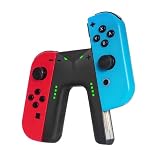
- WIDE COMPATIBILITY: This charging grip is perfectly compatible with Nintendo Switch NS / OLED model Joy-Con controllers serving as an ideal replacement for your original or damaged joy-con charging accessories (Note: Joy-cons, protective case and charging cable are NOT included)
- UNINTERRUPTED GAMING EXPERIENCE: Built-in dedicated charging ports support charging your Joy-Con controllers while gaming. It effectively eliminates low-power interruptions, allowing you to immerse yourself in long-hour gameplay without pause.
- PREMIUM SAFETY & DURABILITY: Equipped with intelligent control circuit, resettable fuse and flame-retardant outer shell, this joy-con charging grip provides stable, over-current and over-heat protected charging. It ensures safe daily use and extends the service life of your controllers.
- PLUG & PLAY OPERATION: Features a user-friendly sliding rail design for quick and stable Joy-Con installation. Simply slide in your controllers and connect a Type-C cable for power supply. Clear LED indicator shows red for charging status and green for fully charged for easy monitoring
- LIGHTWEIGHT & RELIABLE AFTER-SALES: Ultra-portable and lightweight design fits easily in bags for home and travel use. We provide 12-month professional warranty and 24-hour online email customer service to solve your usage problems in time.
Charging original Joy-Con
Switch 2 does not charge original Joy-Con while they are connected, because they cannot attach to it. Nintendo says charging requires a Nintendo Switch console or a compatible legacy Joy-Con charging accessory. That includes a charging grip or a two-way charging stand designed for the original Joy-Con generation.
Do not confuse a charging grip for original Joy-Con with an accessory intended for Joy-Con 2. Nintendo’s compatibility guidance says the old charging grip, battery pack and charging stand cannot be used with Joy-Con 2. If you own both controller generations, check the product label before buying or plugging in a charger.
Which old attachments still have a use?
The legacy grip, wrist strap, wheel, charging grip, battery pack and charging stand are not compatible with Joy-Con 2. That does not make every old attachment useless: it means the original Joy-Con must be the controller inside it, and the Joy-Con must be paired wirelessly with Switch 2.
What’s actually slowing this PC down?
Pick the symptom - the matching free tool is one click away.
Nintendo identifies two game-specific exceptions. Ring-Con can be used with Ring Fit Adventure when original Joy-Con are paired wirelessly, and the Leg Strap can be used with Nintendo Switch Sports under the same arrangement. These are not general Joy-Con 2 compatibility claims, and they do not turn the old attachments into universal Switch 2 accessories.
Pro Controller and retro controllers
Original Switch Pro Controller
The original Nintendo Switch Pro Controller remains useful on Switch 2. It can pair wirelessly, so it does not depend on the new console’s side rails or on a physical controller mount. Nintendo also lists charging it through a USB cable connected to the Switch 2 dock.
This makes the Pro Controller a simpler hand-me-down than original Joy-Con: its main connection is wireless, and its listed charging method works through the new dock. You still need to pair it with Switch 2, and game support depends on the title’s controller options.
NES controller
The Nintendo Entertainment System controller is listed as compatible for compatible games. It connects wirelessly, but Nintendo says charging requires a Switch console or a compatible charging stand. In other words, Switch 2 can use the controller without necessarily being the device that recharges it.
The Tool Desk
Outbyte Driver Updater FREEScan for outdated or missing drivers - takes under a minuteDriver Scan →Outbyte PC Repair FREERepair Windows errors before they cause bigger problemsFix Now →Rank #2

- For Switch Joy-Con: This charger is compatible with Nintendo Switch NS/OLED Joy-Con controller. (Joycon, protective case and charging cable are not included.)
- Play while Charging: Game playing will not be affected while charging the Joycon and the power of Joycon continues to increase.
- Safe and Durable: The Joy-Con charging grip adopts intelligent control circuit technology, resettable fuse, and flame retardant shell. The charger continuously and safely charges joycons.
- Easy to Use: Slide the Joycon into the rail and connect to a power source with a type-C charging cable. Red light indicates charging, green light indicates fully charged.
- Convenient to Carry: Lightweight and portable, it is very convenient to use at home or on the go. We offer 12 months warranty and 24 hour email service. If you have any questions, please feel free to contact us.
SNES, Nintendo 64 and SEGA Genesis controllers
These retro controllers are also listed as compatible for compatible games. They pair wirelessly and can be charged through the Switch 2 dock with a USB cable. The phrase “compatible games” is important: a controller being recognized by Switch 2 does not guarantee that every game accepts its button layout or features.
Dock, power and TV-mode accessories
The original Switch dock
The original Nintendo Switch dock is not compatible with Switch 2. Nintendo’s official guidance states plainly: “The Nintendo Switch dock is not compatible with Nintendo Switch 2.” Use the Switch 2 dock for docked play, dock-based controller charging, and the console’s TV output.
This is a hardware compatibility boundary, not merely a question of firmware. Moving the old dock between consoles will not provide a supported way to use Switch 2 on a television.
The original AC adapter
The original Switch AC adapter has limited use. It can charge Switch 2 directly, but it cannot provide TV mode. Connect it to the console for charging when needed; do not rely on it as a replacement for the Switch 2 dock’s power setup when you want television output.
The original HDMI cable
Nintendo lists the HDMI cable included with the original Switch as incompatible. Use the cable included with Switch 2 for its docked TV connection. The fact that an HDMI cable uses a familiar plug does not establish that Nintendo supports it for this console generation.
GameCube Controller Adapter
The GameCube Controller Adapter is listed as compatible in TV mode. Plug it into a USB port on the Switch 2 dock. This is a docked-use accessory: the stated compatibility does not describe a direct handheld connection.
Storage cards: the microSD Express boundary
Switch 2 is designed for microSD Express cards for game storage. A conventional microSD card from the original Switch cannot be treated as a drop-in game-storage upgrade for the new console. Nintendo’s stated limited use is viewing screenshots and videos captured on the original Switch.
Rank #3
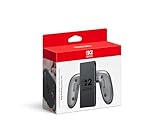
- Attach the Joy-Con 2 controllers (sold separately) to the Joy-Con 2 Charging Grip to use as a classic-style controller—or a handy charging station with the included USB charging cable.
- Includes the GL/GR Buttons, which can be mapped to whatever buttons you like.
- Only for use with the Nintendo Switch 2 system.
Before moving a card, identify whether it is a conventional microSD card or a microSD Express card. If it is the older conventional type, expect access to original Switch screenshots and videos only, not Switch 2 game installation or general storage. Do not erase the card until you have copied any captures you want to keep.
Do these 3 things before closing this tab:
1Repair Windows errors before they cause bigger problems2Scan for outdated or missing drivers - takes under a minute3Clear out junk files and repair common Windows errorsHow to evaluate an accessory before reusing it
1. Identify the controller generation
Start with the controller, not the accessory. Original Joy-Con and Joy-Con 2 are different generations. An old grip or charging stand may be perfectly suitable for original Joy-Con and completely unsuitable for Joy-Con 2. The same naming pattern applies to straps, wheels, battery packs and other pieces that depend on a controller’s physical shape.
2. Separate physical attachment from wireless pairing
Ask whether the item must slide onto the console, hold a controller in a molded slot, connect by USB, or simply pair wirelessly. Original Joy-Con pass the wireless test but fail the physical-attachment test on Switch 2. The original dock fails the console-connection test, while the Pro Controller passes its wireless-connection test.
3. Check the charging path
A working controller still needs a supported way to recharge. Original Joy-Con need a Switch console or compatible charging grip or two-way charging stand. NES controllers need a Switch console or compatible charging stand. Pro Controller and the listed SNES, Nintendo 64 and SEGA Genesis controllers can use a USB cable connected to the Switch 2 dock. A device’s ability to pair does not tell you how it charges.
4. Confirm game-specific support
Retro controllers are listed for compatible games, and Ring-Con and Leg Strap have named game uses with original Joy-Con. Check the game’s controller requirements before assuming that a paired accessory will work in every mode. A peripheral can be electrically compatible with the console but unsupported by a particular title.
5. Treat third-party claims as model-specific
Nintendo’s compatibility guidance names specific Nintendo accessories; it does not establish that third-party accessories work as a category. For a third-party dock, charger, case, grip, adapter or storage product, check the exact model’s current compatibility statement and return policy. Do not generalize from one accessory’s success to an entire brand or product family.
Independent reader supportYour contribution helps us test, update, and keep practical guides available for everyone.Common upgrade scenarios
Keeping an original pair of Joy-Con
Keep the controllers if you are comfortable using them wirelessly and already have a supported charging method. Retain a compatible original Switch console, charging grip or two-way charging stand for recharging. Do not plan to use them as attached handheld controls on Switch 2.
Rank #4

- Ergonomic Design: Featuring a sleek and sturdy construction, this grip provides a comfortable and secure hold for your Joy-Con controllers.
- Charging Capability: Integrated charging ports allow you to charge your Joy-Con controllers while playing, ensuring uninterrupted gameplay.
- LED Indicators: Intuitive LED lights indicate the charging status, letting you know when your controllers are fully powered.
- Universal Compatibility: Designed to work seamlessly with the Switch console, this grip offers a versatile gaming experience.
- Lightweight and portable, it is very convenient to use at home or on the go. We offer a 12-month warranty and 24-hour email service. If you have any questions, please feel free to contact us.
Moving from a Pro Controller
The Pro Controller is a straightforward carryover: pair it wirelessly and charge it from the Switch 2 dock with a USB cable. Its usefulness still depends on whether the game accepts that controller.
Building a retro-controller setup
NES, SNES, Nintendo 64 and SEGA Genesis controllers can remain part of a Switch 2 setup for compatible games. Confirm each controller’s charging method, then pair it wirelessly. For the SNES, Nintendo 64 and SEGA Genesis models listed by Nintendo, dock USB charging is available; NES charging has the separate Switch-console or compatible-stand requirement.
Replacing a television setup
Plan on using the Switch 2 dock, its included HDMI cable and the appropriate power arrangement. The original dock and original included HDMI cable are not supported, and the original AC adapter can charge the console but cannot provide TV mode.
Troubleshooting compatibility problems
The controller pairs but an attachment does not fit
That is expected when original Joy-Con are being used with Joy-Con 2 accessories or when you are trying to mount original Joy-Con to Switch 2. Remove the physical-attachment requirement and use wireless pairing, or return to the controller generation for which the attachment was designed.
The controller works but will not charge
Check the controller’s generation and its listed charging route. Original Joy-Con need a Switch console or compatible charging grip or two-way stand. NES controllers need a Switch console or compatible charging stand. Pro Controller and the listed SNES, Nintendo 64 and SEGA Genesis controllers can charge through the Switch 2 dock with USB.
The console will not display on a television
Use the Switch 2 dock rather than the original dock, and use the HDMI cable included with Switch 2. The original AC adapter can charge the console directly but is not a substitute for the dock’s TV-mode power setup.
Recommended Free Tools
An old microSD card is rejected for game storage
Verify the card type. Switch 2 is designed for microSD Express. A conventional microSD card has the limited supported role of displaying screenshots and videos captured on the original Switch.
What to keep and what to replace
- Keep: original Joy-Con for wireless play, provided you have a supported charging method.
- Keep: the original Pro Controller for wireless play and dock USB charging.
- Keep: NES, SNES, Nintendo 64 and SEGA Genesis controllers for games that support them, with their respective charging requirements in mind.
- Keep for named uses: Ring-Con and Leg Strap when using original Joy-Con with their supported games.
- Replace: the original Switch dock for Switch 2 TV mode.
- Replace: the original included HDMI cable with the cable included with Switch 2.
- Replace for game storage: a conventional microSD card with a microSD Express card.
- Verify by exact model: every third-party accessory, because Nintendo’s named list does not establish class-wide third-party compatibility.
Nintendo’s compatibility guidance can change with system software or support-list updates. The information summarized here reflects the Nintendo of America guidance checked on October 13, 2026; consult Nintendo’s current compatibility list for the specific accessory you plan to reuse.
Quick Recap
Product prices and availability are accurate as of the date/time indicated and are subject to change. Any price and availability information displayed on Amazon at the time of purchase will apply.

