Recommended Free Tools
The Corsair Virtuoso RGB Wireless SE is still a well-built wireless gaming headset with a strong detachable microphone, but it is a buy only at the right price. Its Gunmetal aluminum finish feels premium, and its wireless USB connection and wired fallback suit PC and PlayStation users. The drawbacks matter more in 2026: it has no Bluetooth, its comfort depends heavily on fit, and independent testing found less battery life than Corsair’s “up to 20 hours” claim. Choose it discounted and in good condition; otherwise, compare the standard Virtuoso or the Bluetooth-equipped Virtuoso XT.
What is the Virtuoso RGB Wireless SE?
The SE is the Gunmetal premium variant of Corsair’s Virtuoso RGB Wireless headset. Corsair’s product listing highlights its additional aluminum treatment on the ear cups, microphone head and connector, and wireless transmitter accents. Its core wireless, software, and battery platform is closely related to the less elaborately finished standard Virtuoso.
Keep the names straight: the Virtuoso RGB Wireless SE is the aluminum-accented model reviewed here; the standard Virtuoso RGB Wireless shares much of its platform with a simpler exterior; the later Virtuoso RGB Wireless XT adds Bluetooth and other improvements. The Virtuoso Max is a different product generation, not another name for the SE.
The SE’s premium is primarily about materials and appearance. The evidence does not establish a proportionate improvement in sound, battery life, or microphone quality over the standard model.
#1 Best Overall
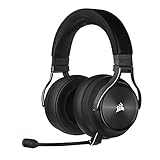
- Simultaneous Dual-wireless Connections: Get high-fidelity 24bit/48KHz game audio with hyper-fast, ultra-long range SLIPSTREAM CORSAIR WIRELESS TECHNOLOGY, plus Bluetooth with Qualcomm aptX HD.
- Uncompromising Sound Quality: A matched pair of precisely tuned 50mm high-density neodymium speaker drivers deliver impeccable sound with a frequency range of 20Hz-40,000Hz – double that of typical gaming headsets.
- Comfort is King: Premium memory foam earpads that conform to the shape of your head, along with a lightweight headband deliver pillow-soft, long-lasting comfort, enabling you to play for hours on end.
- Broadcast-Grade Detachable Microphone: A 9.5mm omnidirectional, high-bandwidth microphone provides wide dynamic range and superb vocal clarity with excellent low-end response.
- Premium Lightweight Construction: Built with machined aluminum throughout, from the headband to the ear cups, ensuring both maximum comfort and long-term durability.
Design and build: premium materials, with a weight trade-off
The aluminum details give the SE a more substantial, polished look than an all-plastic gaming headset. It has physical controls, RGB lighting on the ear cups, a detachable boom microphone, and status lighting on the mic. Independent coverage describes the headset as sturdy, but metal construction does not automatically make it more comfortable or a better choice for long sessions. SoundGuys’ review discusses its construction and fit.
The detachable microphone is useful for storage or listening without the boom attached. For travel, remember that wireless use depends on the proprietary USB transmitter; keep it, the microphone, and any needed cables together. A used headset missing its original transmitter may be a poor wireless purchase.
Comfort and fit: try before committing if you can
The Virtuoso SE has memory-foam ear pads and a padded headband, but comfort is a significant uncertainty rather than a guaranteed strength. Its ear openings are relatively round and can feel shallow, so larger ears may touch the inner surfaces. Clamp pressure, heat buildup, and pressure at the top of the head can also become more noticeable in multi-hour sessions. Glasses wearers should pay particular attention to pressure at the temples.
Rank #2

- State-of-the-Art 50mm Graphene Drivers: 50mm Graphene drivers elevate audio to state-of-the-art quality, rendering clear, precise sound. Become obsessed with the richness and range your games have to offer
- Immersive Dolby Atmos Spatial Audio on PC*: Experience a new dimension of in-game immersion as Dolby Atmos positions game audio all around you with 3D staging, allowing you to detect every sound cue and hear every intonation of dialogue with multi-directional theater-grade sound *Only on PC
- Sonarworks SoundID Technology: Compose your own sound world. Use Sonarworks SoundID on PC and Mac* to tune headset settings to your preferences, giving you full control over audio calibration *With RGB off
- Omni-Directional Microphone: An omni-directional microphone captures your voice with broadcast-grade clarity, so you can stay connected with your team, no matter the platform
- Active Noise Cancellation: Sustain your in-game immersion with active noise cancellation, silencing outside noise and distractions for unbreakable concentration
RTINGS considers the headset well built and usable for gaming, while its comparisons favor some alternatives for comfort. User reports include ear contact and top-of-head pressure, illustrating how much fit can vary by head shape and ear size. A headset that feels fine in a short shop demo may become uncomfortable over a long session; if return terms allow, test it for your normal play duration.
How does it sound for games and music?
Default tuning
Independent coverage describes the default sound as warm or somewhat bass-emphasized rather than strictly neutral. That character can add weight to explosions and cinematic game sound, and can work well for video, podcasts, and casual music. Listeners seeking a flatter, more studio-like balance may prefer a different headset or use equalization in iCUE. RTINGS’ testing and review provides a more useful basis for understanding its sound than broad “audiophile” marketing language.
Gaming, stereo, and virtual surround
The headset can handle general gaming, but competitive players should judge positional cues with the games they actually play. Corsair’s iCUE software offers a virtual 7.1 mode; this is software processing, not hardware-native 3D audio. Virtual surround can change the presentation without improving placement for every listener or game. Start with stereo, then compare the 7.1 mode in the same game and keep whichever makes important cues easier to locate.
Rank #3

- 【Perfect Compatibility】 Our upgraded thicker replacement ear pads are compatible with Virtuoso RGB Wireless SE / XT Gaming Headset.
- 【Cooling Materials】The replacement ear cushions for the Virtuoso RGB Wireless SE headphones is made of softer memory foam and durable protein leather, and the foam is topped with a cooling gel liquid that keeps you cool.
- 【Noise Isolation】The thickened and upgraded premium ear cushions can perfectly insulate your ears from the inside of the headphones, enhancing noise blocking and creating an important acoustic seal to bring you more silence.
- 【Easy Installation】No special tools are needed with a easy installation. Just remove the broken earpads, then put new earpads inside the headphone ear cups, snap the ear cushion easily into place.
- 【Package Contents】 1 pair of headphone earpads (4.43in x 3.94in x 1.1in), 2 x Alcohol wipe pad.
For music and general use, the warm balance may be enjoyable, but it is not a neutral reference tuning. EQ can help tailor it, though those advanced controls depend on Corsair’s software.
Microphone: a major strength, but not automatically best in the range
The SE’s detachable omnidirectional boom mic is one of its strongest reasons to consider the headset. Corsair lists a wide-bandwidth microphone with a status LED; the company’s support page also describes its mute behavior and headset controls. In independent reviews, the mic is regarded as strong for a gaming headset, making it a practical option for Discord, game chat, and streaming when a separate microphone is unwanted.
The Tool Desk
Outbyte Driver Updater FREEScan for outdated or missing drivers - takes under a minuteDriver Scan →Outbyte PC Repair FREEClear out junk files and repair common Windows errorsFree Scan →Do not take “broadcast quality” to mean a replacement for a dedicated microphone in every setup. Room noise and mic placement still affect calls and streams. Also, SoundGuys reports that the standard Virtuoso’s microphone can provide more treble clarity than the SE’s, whose voice presentation may sound more bass-heavy. The SE is not therefore an automatic microphone upgrade over its sibling.
Rank #4

- 🎧【Perfect Compatibility】Our upgraded thicker replacement ear pads are compatible with Virtuoso RGB Wireless SE / XT Gaming Headset.
- 🎧【Added Thickness】The corsair virtuoso earpads designed with a thicker style and the thickness of memory foam has reached 1.3 inch. Make your ears no longer able to reach the inside of the headset.
- 🎧【Premium Material】Replacement ear cushion kit for Virtuoso RGB Wireless SE Headset is made of breathable fabric and softer memory foam, more comfortable after long term use.
- 🎧【Noise Isolation】Virtuoso RGB Wireless XT Ear Pads can insulate your ears with a perfect fit, enhance noise blocking, forms an important acoustic seal, which brings you more quietness.
- 🎧【Easy to Install】No special tools are needed with a easy installation. Just twist the stock pads off in the proper rotation, then put new earpads inside the headphone ear cups, line up the slots and twist.
Before relying on it for regular calls or streams, make a short recording with the mic close to your mouth, then listen for keyboard, mouse, fan, and room noise. Compare your usual voice-chat noise suppression settings, test physical mute and unmute, and confirm the mic stays seated securely after removal and reattachment.
Wireless, wired use, and battery life
The SE is best understood as a 2.4GHz gaming-wireless headset with wired fallback, not as a multipurpose Bluetooth headset. Its included USB transmitter provides wireless connectivity for supported setups; USB wired use and additional wired connectivity are also reported in independent testing. Corsair lists a mobile-compatible use case, but the connection method or adapter depends on the specific device. Check that before buying for a phone or tablet.
Corsair advertises up to 20 hours of wireless battery life, while RTINGS found more than 13 hours of continuous playback in its testing. Those are different kinds of figures: the first is the manufacturer’s maximum claim, and the second is an independent test result, not a guarantee for every user or unit. Lighting, volume, microphone use, wireless conditions, and battery age can affect actual runtime.
Best Value

- What You Will Get: A pair of ear pads and a headband, making your headphones brand new again.
- Compatibility: Fit perfectly on Virtuoso RGB Wireless XT SE Gaming Headset. Do not fit Virtuoso Max. Please confirm your headsets' model before purchase.
- Premium Material: Crafted from premium protein leather and expert stitching, our headband cover ensures both durability and comfort, making your headphones feel brand new again.
- Revitalize Your Headphones: Transform them with a fresh, standout look and turn your headphones into brand - new ones.
- Committed to Innovation: We create professional-grade headphone accessories. Contact us anytime for any issues.
The battery is internal, so condition is particularly important when buying an older used unit. Ask the seller for the headset’s age and approximate runtime after a full charge; check whether it works while charging and whether its battery indicator behaves normally. Do not assume a used SE will still match the endurance of a newer test sample.
Independent reader supportYour contribution helps us test, update, and keep practical guides available for everyone.iCUE: useful controls, with a software dependency
Corsair’s iCUE software provides EQ presets and custom equalization, RGB lighting controls, sidetone, firmware and device settings, and software-based 7.1 surround. Corsair’s product information and support page documents these features. Basic audio can work without using iCUE, but the advanced controls are a reason to install it.
That reliance is a drawback for people who dislike desktop peripheral suites or want settings managed entirely on the headset. Community reports describe pairing, firmware, mute, and iCUE problems; these are anecdotal failure reports, not evidence that every unit has a defect. For current firmware instructions or lost pairing, use Corsair’s current support workflow rather than relying on button sequences from old reviews.
Setup checklist
- Charge the headset over USB before extended wireless use.
- Connect the USB wireless transmitter to the PC or supported PlayStation setup you plan to use.
- Install Corsair iCUE if you want EQ, RGB, sidetone, virtual surround, firmware management, or other software controls.
- Select the headset as the operating system’s playback and communications device.
- Set microphone input level and sidetone, then check the mic’s status light and mute behavior.
- Listen in stereo first; compare iCUE’s virtual 7.1 mode only if you prefer its presentation.
- If wireless audio fails, reconnect the transmitter, restart iCUE, and try another USB port.
- If pairing is lost or firmware needs attention, follow Corsair’s current support instructions for the headset and transmitter.
Platform compatibility
Corsair’s official listing names PC, Mac, PlayStation, and mobile compatibility. It does not identify Xbox as supported, so do not assume that the SE will work with an Xbox or that every listed platform receives every PC software feature.
Do these 3 things before closing this tab:
1Clear out junk files and repair common Windows errors2Scan for outdated or missing drivers - takes under a minute3Repair Windows errors before they cause bigger problems| Platform or connection | What to expect | Qualification |
|---|---|---|
| Windows PC | Supported | iCUE provides the fullest feature set. |
| Mac | Listed by Corsair | Confirm the current iCUE controls available on your Mac before relying on a specific feature. |
| PlayStation | Listed by Corsair; wireless USB use is supported | Console audio support does not guarantee PC-only iCUE features such as software EQ or surround. |
| Mobile | Listed by Corsair | Check the specific device’s connection method and any adapter requirement; the SE has no Bluetooth. |
| Xbox | Not identified as supported in Corsair’s listing | Do not buy on an assumption of universal console compatibility; confirm support for the exact console and connection mode. |
| Bluetooth devices | Not supported by the SE | The Virtuoso XT is the later model identified as adding Bluetooth. |
How it compares with alternatives
| Model | Why choose it over the SE | Trade-off or best fit |
|---|---|---|
| Corsair Virtuoso RGB Wireless | It shares a closely related core platform and may be the better-value buy if substantially cheaper. | The SE’s main distinction is its additional aluminum treatment. SoundGuys reports that the standard model’s mic can have more treble clarity. |
| Corsair Virtuoso RGB Wireless XT | It adds Bluetooth, with RTINGS’ comparison also reporting better battery life and microphone performance than the SE. | More compelling for phone use and all-purpose connectivity; compare actual prices and do not assume it is universally better in sound or comfort. |
| Logitech G Pro X Wireless LIGHTSPEED | RTINGS’ comparison favors it for comfort, lower wireless latency, longer battery life, and a more neutral default profile. | Choose it when those qualities matter more than Corsair iCUE or the SE’s metal construction. |
| Corsair HS70 Wireless | RTINGS’ comparison favors it for comfort, stability, balance, and battery life. | The SE has the stronger microphone and more wired options in that comparison. |
These comparisons are based on the cited independent testing, not current pricing. Prices, stock, warranty, and refurbished availability vary by market and date, so there is no defensible universal price cutoff here. Compare the total cost and condition of the exact listings available to you.
Should you buy the Virtuoso RGB Wireless SE in 2026?
- Buy it discounted and in excellent condition if you mainly use PC or PlayStation, want a detachable mic, value the aluminum finish, and will use the wired fallback or iCUE controls.
- Choose the standard Virtuoso if it is meaningfully cheaper and you do not care about the SE finish; its microphone may also suit voices that benefit from more treble clarity.
- Choose the Virtuoso XT if Bluetooth is essential, you expect to connect a phone or tablet, or its reported battery and microphone improvements justify the price difference.
- Look elsewhere if Xbox support, longer battery life, light weight, comfort-first fit, or fewer software dependencies is a priority. The Logitech G Pro X Wireless is a stronger comparison candidate when comfort, latency, endurance, and a more neutral default profile take precedence.
- Be cautious with used listings: verify that the original wireless transmitter and microphone are included, ask about battery runtime, and inspect ear pads and the microphone connection before paying a premium.
The SE’s premium construction and capable microphone still have appeal, but its older feature set makes price and condition decisive. At a high price, its aluminum finish alone is not enough to justify choosing it over more versatile newer options.
Quick Recap
Product prices and availability are accurate as of the date/time indicated and are subject to change. Any price and availability information displayed on Amazon at the time of purchase will apply.




