
Verdict: The Creative Sound Blaster GC7 is a desktop USB DAC/amp built around physical control rather than wireless convenience. Its standout feature is the GameVoice Mix dial, which lets you balance game and chat audio without opening a software mixer. It also offers optical, USB-C, line and microphone connections, programmable buttons, and Creative’s processing modes. The important limits are equally clear: Bluetooth is not available for audio playback, PS5 GameVoice Mix needs an optional HDMI-to-SPDIF converter, and the published 32–300-ohm amplifier figure is a specification—not independent proof that every headphone in that range will perform well.
What the Sound Blaster GC7 is
The Sound Blaster GC7 is an external USB digital-to-analog converter and headphone amplifier designed for desktop gaming, streaming and content creation. Instead of putting every function behind a keyboard shortcut or an operating-system mixer, it places the most-used controls on the unit: master volume, a separate GameVoice Mix control, microphone adjustments, processing toggles and four reassignable buttons. Creative positions it as a control hub for game audio, voice chat and a connected microphone, rather than as a general-purpose wireless speaker or headset.
As an Amazon Associate I earn from qualifying purchases.
The product was announced on 1 April 2021 as the first premium gaming DAC/amp in a new Sound Blaster series. Creative’s launch description names Sound Blaster Acoustic Engine, Super X-Fi, Scout Mode, SXFI BATTLE Mode, customizable sound profiles and GameVoice Mix. Those are manufacturer-described functions and intended benefits; the published material does not provide independent listening tests, latency measurements, positional-audio tests or microphone benchmarks.
Recommended Free Tools
Creative’s current US product page lists the GC7 for PC and Mac, PS4 and PS5, and Nintendo Switch. Its FAQ also names Android phones. Compatibility depends on the connection and feature being used, so “works with” should not be read as every GC7 function being available on every platform.
#1 Best Overall
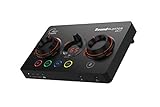
- ON-THE-FLY CONTROLS WITH PROGRAMMABLE BUTTONS - The Sound Blaster GC7 is ergonomically designed with simple and intuitive one-handed controls for quick adjustments on the fly. It also comes with 4 fully programmable buttons that you can customize with your favorite audio profiles, or program your own macros for some quick maneuvers during a live stream. You can even customize it further with your preferred RGB lighting colors to match the device colors with the rest of your setup
- DUAL DSP WITH INCREDIBLE AUDIO PROCESSING - Equipped with both Super X-Fi and Sound Blaster audio technologies, the Sound Blaster GC7 offers you top-tier audio processing capabilities. Immerse in the realistic audio holography from Super X-Fi that recreates the soundstage of a multi-speaker system in your headphones; or experience Sound Blaster’s full suite of audio enhancements that has been fine-tuned over 30 years, and customize your audio to your liking for both speakers and headphones
- HUNT DOWN YOUR ENEMIES - Sound Blaster GC7 comes with both SXFI BATTLE Mode and Scout Mode, so you can choose the best weapon for your gameplay. BATTLE Mode makes perfect use of Super X-Fi technology to bring you realistic audio cues with both direction and distance, allowing you to pinpoint the exact position of a sound source. Scout Mode focuses on detection--enhancing audio cues and bringing them closer to your ears so you can pick up the faintest sounds made by your enemies instantly
- BALANCE GAME AND CHAT AUDIO - Increase your chat volume during the strategy meeting on discord, then turn it back down to focus on the game without leaving your game screen. Simply turn the GameVoice Mix control knob to adjust the game and chat volume when you need to! The Sound Blaster GC7 is angled at the perfect position to facilitate one-handed control from any gaming setup, so you can make adjustments without even looking away from your screen
- AUDIOPHILE-CLASS DAC FOR PRISTINE AUDIO - At the core of the Sound Blaster GC7 is the AKM4377 Audiophile-class DAC which offers lower noise floor, lower distortion, and more distinct individual sound effects. Stream at up to 24-bit / 192 kHz PCM playback and enjoy high-quality audio regardless of which source you’re using. On top of the solid audio playback, you can also indulge yourself in a cinematic experience with up to 7.1 virtual surround on both headphones and speakers, and Dolby Audio
Key specifications and what they mean
| Specification or feature | Published value | How to interpret it |
|---|---|---|
| Digital playback | Up to 24-bit/192 kHz PCM | Creative’s maximum playback specification; it does not establish audible superiority over lower rates. |
| Dynamic range | 116 dB | Manufacturer specification on the current product page; no independent measurement is supplied here. |
| Headphone amplifier range | 32–300 ohms | Creative’s stated supported impedance range. It is not a guarantee of loudness, bass control or suitability for every model. |
| Headphone output impedance | 10 ohms | A published electrical specification that can interact with headphone impedance curves; headphone-specific behavior still needs verification. |
| Computer connection | USB-C; USB 2.0/3.0 operation; USB bus powered | The GC7 can draw power over USB rather than requiring a separate power brick, according to Creative’s specifications. |
| Digital connections | Optical input and optical output | Useful for consoles, televisions or other digital sources that provide optical audio. The exact feature set depends on the source and routing. |
| Analogue connections | Line input, line output, 4-pole combo jack and external microphone input | Allows analogue sources and a headset or separate microphone to be connected; the included cable set is listed below. |
| Included cables | USB-C-to-USB-A, optical and 3.5 mm AUX-in cables | Creative lists these in the package contents. An HDMI-to-SPDIF converter for PS5 is not listed as included. |
The figures above come from Creative’s current GC7 product and specifications page and, for the 24-bit/192 kHz figure, Creative’s 1 April 2021 launch announcement. They describe the hardware on paper, not an independently measured performance result.
The control surface is the GC7’s main reason to exist
GameVoice Mix for game and chat balance
The large GameVoice Mix dial adjusts the relative level of game audio and voice chat. Creative describes it as a way to change the balance without leaving a game or opening mixer settings. That is a different workflow from a conventional volume knob: turning it toward one side prioritizes the game, while turning it toward the other prioritizes chat, assuming the platform and connection are supplying separate game and voice paths.
The distinction matters. The dial does not create a separate chat stream by itself, and it cannot compensate for a console or application that sends only one mixed signal. On supported setups, however, it puts a frequent adjustment on the desk where you can reach it without searching through menus.
Master, microphone and processing controls
Creative lists a master-volume dial, microphone controls, a rotary dial, a platform switch, a headphone-gain switch and dedicated buttons for SXFI, Surround, Bass and Treble. The physical controls let you change the active setting while playing or recording. The gain switch is relevant when changing headphones; use the lower setting first and increase it only when the available level is insufficient.
Four buttons can be reassigned. Creative says profiles and controls can be customized, so the buttons can serve as shortcuts for the functions you use most often rather than being locked to one factory layout. The practical benefit is reduced dependence on a mouse, keyboard overlay or a phone after setup.
Sound modes and profiles
The launch material lists Sound Blaster Acoustic Engine, Super X-Fi, Scout Mode and SXFI BATTLE Mode, along with customizable sound profiles. These are processing options, not separate hardware outputs. A processing mode can alter tonal balance, virtualization or other aspects of the signal, but the available evidence does not establish that any mode improves aim, reveals footsteps reliably or makes one headset objectively better. Treat them as optional tuning tools and compare them with processing disabled for your own games and recordings.
Connections, ports and package contents
The GC7’s connection set is unusually broad for a small desktop controller. Creative lists USB-C, optical input and output, line input and output, a 4-pole combo jack and a separate external microphone input. The box includes a USB-C-to-USB-A cable, an optical cable and a 3.5 mm AUX-in cable. Creative does not list a power adapter, which matches the specification that the unit is USB bus powered.
Rank #2

- VERSATILITY REDEFINED. – Sound Blaster G8 is the first DAC to feature dual USB-C inputs and mixing. Stream audio from two USB devices simultaneously and experience seamless connectivity and jaw-dropping audio fidelity.
- ULTRA HIGH-RESOLUTION. ULTRA HIGH PERFORMANCE. – Featuring playback up to 32-Bit / 384 kHz high resolution files natively, delivering you unparalleled audio fidelity. Hear every nuance, feel every beat. Your music and games have never sounded better.
- THE X FACTOR – Powered by our custom-designed Xamp discrete bi-amplifier, the left and right channels of headphones are driven individually, bringing you silky smooth audio with exceptional clarity and precision. DISCRETE AMPLIFIER – Powered by our custom-designed Xamp discrete bi-amplifier, the left and right channels of headphones are driven individually
- UNMATCHED DYNAMIC RANGE. Breathe life into your games, music, and movies with an exceptional dynamic range of 130 dB. Hear the quietest nuances and the loudest expressions, deeply immersing you in the action and delivering unparalleled realism.
- SOUND BLASTER ACOUSTIC ENGINE - Full suite of Sound Blaster Acoustic Engine’s audio enhancements at your fingertips. Dominate the battlefield and hear what you’re missing to gain a competitive edge and fully immerse yourself in every sound.
- USB-C: The computer or compatible host connection and the source of bus power in Creative’s specification.
- Optical input/output: Digital connections for equipment with optical audio. Console feature support depends on the platform’s audio path.
- Line input/output: Analogue connections for an external source or onward connection to another device.
- 4-pole combo jack: A headset-style connection that can carry headphone audio and a compatible microphone connection.
- External microphone input: A separate mic path for a standalone microphone, useful when a headset microphone is not desired.
Plan the cable route before buying. A desktop installation can use USB for a computer, while a console arrangement may require optical or an adapter path. The GC7’s flexibility is an advantage only if the source provides the signal you need.
Does the GC7 work with PS5?
Yes, Creative lists PS5 compatibility, but the GameVoice Mix feature has a specific condition: Creative says PS5 use requires an optional HDMI-to-SPDIF converter. The converter is not included in the package contents listed on the product page.
What the PS5 requirement means
For a PS5 setup that uses GameVoice Mix, the console’s HDMI audio path must be converted to optical SPDIF before reaching the GC7. The GC7 then receives the optical signal while the chat and control behavior must be configured according to the console, converter and GC7 instructions. Do not assume that plugging in the included optical cable alone supplies the required PS5 path; the converter is the extra piece Creative identifies.
PS5 setup checklist
- Confirm that your HDMI-to-SPDIF converter supports the audio format and console arrangement you intend to use.
- Place the converter between the PS5’s HDMI connection and the display path as directed by the converter manufacturer.
- Run the converter’s optical output to the GC7’s optical input with the included optical cable.
- Connect your headset to the GC7’s 4-pole combo jack, or connect a separate microphone to the external microphone input if that matches your setup.
- Set the PS5 audio output and chat options to the path required by the converter and the GC7, then test game and voice levels separately.
- Use the GameVoice Mix dial only after both signals are present. If the dial changes nothing, the console is probably delivering a single mixed stream or the optical/chat routing is incomplete.
Creative’s support portal is the appropriate place to check current firmware and platform-specific instructions: GC7 support. The converter requirement is also stated on the product page.
PC and Mac setup
USB is the simplest route for a computer because it carries digital audio and powers the unit. Creative lists Windows 10 and Windows 11, and macOS 10.15 or later, in the GC7 specifications.
- Connect the GC7 to the computer with the included USB-C-to-USB-A cable, or an equivalent compatible USB connection.
- In the operating system’s sound settings, select the GC7 as the output device and choose it as the input device when using an attached microphone.
- In each game or chat application, verify that output and microphone devices are assigned as intended. A system-level selection does not always override an application’s saved device choice.
- Connect the headset to the combo jack or the microphone to the external input, then start with the headphone gain at its lower setting.
- Set a comfortable master level before adjusting the GameVoice Mix dial. The mix control is for relative game/chat balance, not a substitute for a sensible overall volume.
- Install or open Creative’s GC7 software only when you need profile editing, button reassignment, mobile management or firmware functions. Save a simple default profile before experimenting with processing modes.
If a game ignores the GC7, check the game’s own audio-device menu, reconnect the USB cable and confirm that another application has not taken exclusive control. If chat is silent while game audio works, inspect the application’s chat output and microphone permissions before blaming the GameVoice Mix control.
Does the GC7 have Bluetooth audio?
No. The GC7 includes Bluetooth Low Energy (BLE) for mobile control functions, profile transfer and firmware tasks, but Creative’s FAQ explicitly says BLE cannot connect Bluetooth headphones for wireless audio playback. You cannot pair the GC7 with wireless headphones and expect it to transmit game sound over Bluetooth.
Rank #3

- POWERFUL AUDIO WITH REDESIGNED COMPACT SUBWOOFER – Enjoy stunning audio clarity with the Sound Blaster Katana V2X’s game-changing tri-amplified amps, powered by our proprietary multi-core DSP chip. For those with space constraint, the discreet subwoofer is 40% smaller than Katana V2 and is an ideal choice for smaller rooms without compromising audio quality
- 5.1 MULTI-CHANNEL IMMERSIVE AUDIO PLAYBACK – Experience crystal clear and impressive room-filling sound with its 5.1 channel playback and peak power up to 180W. The Sound Blaster Katana V2X is also a certified Dolby Audio decoder via HDMI ARC and optical connection, so it can recreate the all-familiar cinematic experience in the comfort of your own home from a Dolby-certified source
- AWARD-WINNING SUPER X-FI TECHNOLOGY AND SXFI BATTLE MODE VIA HEADPHONES – Personalize your headphone experience with Super X-Fi for the most optimized and realistic listening experience. Gain competitive advantage in FPS games with SXFI BATTLE Mode and have the upper hand by accurately pinpointing your enemy’s location just by hearing the sound of their footsteps
- VERSATILE CONNECTIVITY AND BUILT-IN MICROPHONE – Enjoy seamless connectivity options, including USB, HDMI ARC, optical port, as well as wireless Bluetooth 5.0. It works with various platforms, from gaming consoles as well as PC, Mac and mobile devices too. It also incorporates a built-in beamforming microphone for you to jump on calls directly from the soundbar
- CUSTOMIZABLE CONTROLS AND RGB LIGHTING – Besides the basic audio controls, access custom functions saved onto one of the six customizable buttons on the remote control. You can also further tune the soundbar’s audio performance to suit your liking with Sound Blaster's processing technologies, RGB presets, and EQ settings via the Creative app
The mobile link is therefore an accessory control channel. Use it to manage supported settings or transfer profiles, not as a replacement for the USB, optical or analogue audio connections. Creative’s explanation is available in the GC7 FAQ.
The Tool Desk
Outbyte PC Repair FREEClear out junk files and repair common Windows errorsFree Scan →Outbyte Driver Updater FREEFix the driver behind crashes, sound loss and screen glitchesFind Drivers →Can the GC7 power your headphones?
Creative specifies a headphone amplifier range of 32 to 300 ohms and a 10-ohm headphone output impedance. That makes the GC7 relevant to both common low-impedance gaming headsets and some higher-impedance wired headphones on paper.
Impedance alone does not tell you whether a particular headphone will be loud enough or sound as intended. Sensitivity, impedance changes across frequency, desired listening level and the recording itself also matter. The material available for this review contains no independent output-power test, voltage or current measurement, frequency-response interaction test, or headphone-by-headphone evaluation. The honest conclusion is that Creative publishes a 32–300-ohm target range, but you should verify the specific headphone model through its sensitivity and reputable measurements rather than treating the range as a universal guarantee.
A sensible gain-setting procedure
- Connect the headphones with the gain switch at the lower setting.
- Set the source and master controls to a moderate level.
- Increase the master volume gradually while listening for adequate headroom and unwanted noise.
- Move to the higher gain setting only if the lower setting cannot provide the level you need.
- After changing headphones, repeat the process; do not carry over a high-gain setting automatically.
This procedure avoids assuming that every 300-ohm headphone needs high gain or that every 32-ohm model will behave identically. It also reduces the chance of an unexpectedly loud signal after a profile or source change.
Using the GC7 for streaming and content creation
The GC7’s separate microphone input, line connections, programmable buttons and physical level controls suit a desk where game audio, voice chat and a microphone must be managed quickly. A streamer can keep a hand on the controls while recording; a creator can route an analogue source through the line input or output; and a headset user can avoid reaching for a software mixer for routine adjustments.
Those are workflow advantages, not evidence of broadcast-grade conversion or microphone quality. The published specifications do not include independent noise, latency or recording measurements. For a production setup, check how your capture software sees the selected input and whether your desired monitoring path introduces a duplicate or delayed signal.
Independent reader supportYour contribution helps us test, update, and keep practical guides available for everyone.Software, profiles and firmware
Creative describes customizable sound profiles and app-based management. The physical buttons become most useful after you assign them to the profiles or processing functions you actually use. Keep one neutral profile with processing disabled, then create separate profiles for games, movies or voice work if you prefer different settings.
Rank #4
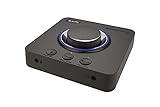
- 7.1 DISCRETE SURROUND WITH SUPER X-FI AND DOLBY DIGITAL LIVE - Supports up to 7.1 discrete for multi-channel speakers and virtual for headphones
- IMPROVED COMMUNICATION WITH SMARTCOMMS KIT AND CRYSTALVOICE - Features our SmartComms Kit, a suite of smart communication features that simplify the way you take work calls on Windows 10 platform. Turn on VoiceDetect to auto mute and unmute your mic, or get rid of static background noise in your own environment as well as the other parties' via our two-way noise cancellation feature NoiseClean. In tandem, CrystalVoice technology enhances voice for clear recordings and in-game communications
- CONNECT WITH EVERYTHING - With a newly added optical-in port, it is now much easier to connect multiple audio devices, from external microphones and headsets, to platforms like your PC, Mac, gaming consoles, and even your multi-channel speaker systems. Just power up the Sound Blaster X4 via the USB-C port, and enjoy high-quality audio with everything. The Sound Blaster X4 is also a headphone amplifier that is capable of driving studio-grade headphones of up to 600Ω
- EASY ACCESS TO ALL CONTROLS - Pick between three EQ modes or re-program them, and save your settings on the device. There are also the Direct Mic Mute, Direct Mode, Super X-Fi and SXFI BATTLE Mode on/off buttons, as well as a speaker (Line-out) and headphones switch button. After a one-time setup, instantly adjust the volume levels between two audio sources (SPDIF / Optical / USB) with the Audio Balance feature via the volume knob, perfect for communicating with music on
- GAME AND HEAR YOUR WAY – Choose between SXFI BATTLE Mode or Scout and get to winning your FPS game. Configure each element of your audio settings or switch them off completely via the Creative app. Access the full range of audio adjustments via the PC app, or make quick adjustments to your EQ settings from your phone. All these are powered by our Sound Blaster’s audio promise with 114 dB audio clarity and hi-res 192 kHz/24-bit playback
- Start neutral: Confirm that basic USB or optical audio works before enabling virtualization, bass, treble or other processing.
- Change one setting at a time: This makes it possible to identify which option changes the sound or chat behavior.
- Label profiles clearly: Names such as “PC voice,” “console optical” and “music neutral” reduce mistakes when switching sources.
- Check firmware support: Use Creative’s official support portal for current firmware instructions rather than relying on an old setup guide.
- Remember the BLE boundary: Mobile management does not turn the GC7 into a Bluetooth audio receiver or transmitter.
What the GC7 does well
- Fast physical game/chat adjustment: GameVoice Mix is the clearest differentiator for anyone who regularly changes the balance between a game and teammates.
- Many connection options: USB-C, optical, line and headset/microphone connections cover more desk and console arrangements than a USB-only controller.
- Programmable access: Four reassignable buttons and profiles can put recurring actions within reach.
- Broad stated headphone range: The 32–300-ohm specification gives buyers a defined compatibility target, even though it is not an independent drive test.
- Bus-powered design: Creative lists USB bus power, avoiding a separate power supply in a computer setup.
Where the GC7 needs caution
- PS5 complexity: GameVoice Mix requires an optional HDMI-to-SPDIF converter, adding hardware, cabling and another potential failure point.
- No Bluetooth playback: BLE supports control and maintenance tasks only; wireless headphones cannot receive audio from it.
- Specifications are not measurements: The published dynamic range, output impedance and impedance range come from Creative. No independent laboratory results are supplied here.
- Feature availability varies by platform: PC, Mac, consoles and Android may expose different controls or routing options. Compatibility with the unit does not mean identical functionality.
- Processing is subjective: Sound modes may suit one game or listener and distract another. Claims about competitive advantage remain manufacturer positioning rather than independently demonstrated outcomes.
- Current value is unsettled: The only price in the supplied official material is a historical Singapore launch price of S$219 from 2021. It is not a current worldwide price.
Is the Sound Blaster GC7 worth it?
It is easiest to justify when your priority is hands-on control of a mixed gaming and chat setup. The GC7 gives that workflow a dedicated dial, physical microphone and master controls, programmable buttons and multiple inputs and outputs. It is a stronger fit for a desk or streaming station than for someone seeking a simple wireless headphone adapter.
The purchase decision is less clear if you only need a basic USB headphone output, if your console setup cannot accommodate an HDMI-to-SPDIF converter, or if you specifically want Bluetooth audio. In those cases, the GC7’s extra controls and ports may add complexity without solving your main problem.
Free tools Windows power users keep installed
One-click scans. No signup required.
Price also needs a current regional check. Creative’s 1 April 2021 announcement records S$219 as a Singapore launch price, but that historical figure should not be used as today’s street price or converted into a current value judgment. Compare the live price in your market with the cost of any PS5 converter and with alternatives that offer the physical controls, platform support and measured headphone performance you require.
Practical buying checklist
- Do you need a physical game/chat balance control, or is a software mixer enough?
- Will your main source be a Windows PC, Mac, PS5, PS4, Switch or Android phone?
- If PS5 is central, have you budgeted for an HDMI-to-SPDIF converter?
- Are you expecting Bluetooth headphone playback? If so, the GC7 is not the right type of device.
- What are your headphones’ impedance and sensitivity, and is the published 32–300-ohm range sufficient for your model?
- Do you need a separate microphone input, optical output, line routing or programmable buttons?
- Have you checked the current price and warranty terms for your region rather than relying on the 2021 Singapore launch price?
Common problems and fixes
Game audio works, but GameVoice Mix does nothing
Check that the platform is supplying separate game and chat paths. A single mixed signal cannot be rebalanced by a hardware dial. On PS5, verify the required HDMI-to-SPDIF converter and optical route first.
The GC7 is detected, but the microphone is silent
Confirm that the microphone is plugged into the intended combo or external input, that the operating system or console has granted microphone access, and that the game or chat app selects the GC7 input. Check the physical microphone controls before changing processing profiles.
Headphones are too quiet
Start with the source and master volume at safe levels, then test the higher gain position. If output remains inadequate, check the headphone’s sensitivity as well as impedance; the 32–300-ohm figure alone does not establish the required drive level.
Do these 3 things before closing this tab:
1Fix the driver behind crashes, sound loss and screen glitches2Repair Windows errors before they cause bigger problems3Scan for outdated or missing drivers - takes under a minuteThere is no sound over Bluetooth
That behavior is expected. BLE on the GC7 is for mobile management, profile transfer and firmware tasks, not wireless audio playback. Use USB, optical or an analogue connection instead.
Audio is distorted after changing a profile
Return to the neutral profile, reduce the master level and disable processing modes one at a time. Then re-enable only the options you want. A profile can change several controls at once, so isolating settings is faster than guessing.
Bottom line
The GC7’s value is its desktop control workflow: a dedicated GameVoice Mix dial, programmable buttons, microphone controls and broad wired connectivity in one USB DAC/amp. Creative’s specifications support use with 32–300-ohm headphones and list PC, Mac, PS4/PS5, Switch and Android-related compatibility, but they do not replace independent testing. Buy it for fast physical game/chat management and flexible connections, and go in with two clear qualifications: PS5 GameVoice Mix needs an optional HDMI-to-SPDIF converter, and BLE does not carry headphone audio.
Quick Recap
Official information
- Creative Sound Blaster GC7 product page and specifications
- Creative GC7 support portal
- Creative GC7 FAQ
- Creative Technology launch announcement, 1 April 2021
Product prices and availability are accurate as of the date/time indicated and are subject to change. Any price and availability information displayed on Amazon at the time of purchase will apply.
What’s actually slowing this PC down?
Pick the symptom - the matching free tool is one click away.

