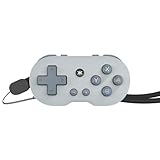
CRKD’s ATOM is a working Bluetooth game controller small enough to carry on a keyring or bag. Its 2.7-inch length and full set of basic gamepad inputs make it a clever travel or retro-gaming accessory, but the controls are far too compact to replace a standard controller for every game. It is best treated as a portable spare, not a tiny all-purpose gamepad.
What is the CRKD ATOM?
The ATOM is a miniature, rechargeable controller with a directional pad, face buttons, shoulder buttons and system controls. It connects wirelessly over Bluetooth, and its included wrist strap lets you carry it on keys, a backpack or other gear. It is a functional controller, not just a decorative key fob; for play, remove it from the keyring or reposition it rather than trying to use it while attached to keys.
CRKD lists compatibility with Nintendo Switch, PC and Mac, compatible iOS and Android devices, tablets and smart TVs. USB wired connection is also documented in the setup guide. Bluetooth support does not guarantee that every game or television will recognize the controller, so compatibility depends on the device, operating system, input mode and game.
CRKD’s original ATOM page lists Switch, but not Switch 2. Do not assume Switch 2 support for this model; CRKD explicitly lists both generations for the different ATOM+ controller.
Quick wins for a faster PC:
Clear out junk files and repair common Windows errorsFree Scan →Fix the driver behind crashes, sound loss and screen glitchesFind Drivers →Repair Windows errors before they cause bigger problemsFix Now →#1 Best Overall

- POCKET-SIZED MINI CONTROLLER WITH FULL GAMING CONTROLS, COMPATIBLE WITH NINTENDO SWITCH 2 Most portable controllers cut corners. The ATOM+ doesn't. At 90mm x 48mm, smaller than most phones, it fits in your pocket, your bag, anywhere. But it has everything: dual analog sticks, digital triggers, bumpers, and a full face button layout. Real controls. Real games. No bulk.
- NO STICK DRIFT TMR THUMBSTICKS. ZERO-CONTACT MAGNETIC TECHNOLOGY The ATOM+ uses TMR (Tunneling Magnetoresistance) thumbsticks, the same zero-contact magnetic technology found in CRKD's full-sized pro controllers. Better precision and linearity than Hall Effect, with lower power draw and no physical wear over time. Drift-free from the first session to the thousandth.
- BLUETOOTH WIRELESS CONTROLLER COMPATIBLE WITH NINTENDO SWITCH 2, SWITCH OLED, PC, iOS, ANDROID & SMART TV Pair via Bluetooth to Nintendo Switch 2, Nintendo Switch, Switch OLED, PC, PC handhelds, iPhone, iPad, Android, tablets, and Smart TVs. No dongle needed. Built-in rechargeable battery charges via USB-C. Take it anywhere, play on everything
How small is it, and how long does the battery last?
| Specification | CRKD’s published detail |
|---|---|
| Dimensions | 2.7 × 1.4 × 0.5 inches (68 × 35 × 12 mm) |
| Battery life | Approximately 8–10 hours per charge |
| Full charge time | Approximately 2 hours |
| Charging | Rechargeable battery; USB-C cable |
These dimensions are CRKD’s specifications. TechRadar described the controller as about three inches across in its review, an approximate description rather than the manufacturer’s measured specification. The battery figures are manufacturer claims, not independent runtime test results.
Its compactness is also a practical trade-off: a controller exposed on a keyring can be scratched, pressed or accidentally activated. Carrying it like an accessory makes more sense than leaving it loose among keys during play.
Are the controls enough for real games?
The ATOM’s layout includes a D-pad, standard face buttons, Home and system buttons, and four shoulder buttons that can serve as bumper and trigger inputs. The manual also describes button combinations that make the D-pad emulate a left or right stick, plus a Switch screenshot shortcut. In XInput mode, a shortcut can swap X/Y and A/B mappings. These options add input flexibility, but they do not make the ATOM feel or handle like a full-size controller with two analog sticks.
Rank #2

- WIRELESS CONNECTION - Bluetooth allows for seamless wireless connection compatible with Nintendo Switch, PC/Mac, Mobile/Tablet or Smart TV.
- EASILY ATTACHABLE - Whether it’s your keys, backpack, or any other accessory, ATOM adds a touch of individuality and style to your lifestyle.
- IMPOSSIBLY SMALL - Yet fully functional and packed with features. ATOM is the ideal travel companion for any gamer on the go, ready to play in an instant across a wide variety of gaming platforms.
- 10 HOURS OF PLAY - Featuring a rechargeable battery, the ATOM delivers up to 10 hours of gaming on a single charge & comes with a USB-C charging cable.
- COLLECTIBLE DESIGNS - Select from 8 unique editions compatible with the True Collection System, allowing you to tap your mobile device to the product revealing its product number & rarity rank.
Games and situations that suit it
- Retro and emulated games that rely mainly on directional and face-button inputs.
- Turn-based games, menus and other less time-sensitive play.
- Short casual sessions, travel, or use as a compact spare or secondary-player controller.
Where its size is a disadvantage
- Competitive play or long sessions where a conventional grip matters.
- Games that depend on precise camera movement or frequent dual-stick use.
- Games that require extensive trigger use or a full modern-controller layout.
TechRadar found it surprisingly usable for a novelty-sized controller and particularly suited to retro gaming, while emphasizing just how small it is. That is a reviewer’s assessment, not a comfort, latency or durability measurement.
How to pair the ATOM
Choose the pairing mode for the device you are connecting. The name shown in Bluetooth settings varies by mode: it may appear as Xbox Wireless Controller, Pro Controller or Gamepad.
Nintendo Switch
- On the Switch, open Settings > Controllers and Sensors > Change Grip/Order.
- Hold the ATOM’s CRKD/Home button for about three seconds to enter pairing mode.
- Wait for the controller to appear and connect on the Switch screen.
Windows PC
- Turn on Bluetooth on the PC.
- For XInput mode, hold Up on the D-pad + CRKD/Home for three seconds.
- In the Bluetooth device list, select Xbox Wireless Controller. For Pro Controller mode, hold CRKD/Home for three seconds and select Pro Controller.
iPhone, iPad and Mac
- Turn on Bluetooth on the device.
- For the guide’s recommended XInput mode, hold Up on the D-pad + CRKD/Home for three seconds.
- Select Xbox Wireless Controller in Bluetooth settings. Pro Controller mode is also available.
Android
- Turn on Bluetooth on the device.
- Hold Down on the D-pad + CRKD/Home for three seconds.
- Select Gamepad from the Bluetooth device list and confirm pairing.
If the ATOM will not pair
The controller may be trying to reconnect rather than entering fresh pairing mode. Use the guide’s reset-and-retry sequence:
Rank #3
- WIRELESS CONNECTION - Bluetooth allows for seamless wireless connection compatible with Nintendo Switch, PC/Mac, Mobile/Tablet or Smart TV.
- EASILY ATTACHABLE - Whether it’s your keys, backpack, or any other accessory, ATOM adds a touch of individuality and style to your lifestyle.
- IMPOSSIBLY SMALL - Yet fully functional and packed with features. ATOM is the ideal travel companion for any gamer on the go, ready to play in an instant across a wide variety of gaming platforms.
- 10 HOURS OF PLAY - Featuring a rechargeable battery, the ATOM delivers up to 10 hours of gaming on a single charge & comes with a USB-C charging cable.
- COLLECTIBLE DESIGNS - Select from 8 unique editions compatible with the True Collection System, allowing you to tap your mobile device to the product revealing its product number & rarity rank.
- Hold CRKD/Home for 10 seconds to turn the controller off.
- Make sure the target device’s Bluetooth is on, then repeat the pairing steps for the correct platform mode.
- If it keeps connecting to an old device entry, remove the old ATOM, Pro Controller, Xbox Wireless Controller or Gamepad listing from that device’s Bluetooth settings, then pair again.
The guide says the ATOM can remember multiple devices, but it cannot maintain two connections at once using the same connection method. To change connection mode, use the relevant D-pad-plus-Home combination rather than repeating the same pairing attempt. Special D-pad-as-stick and mapping settings reset when the controller is powered off.
Independent reader supportYour contribution helps us test, update, and keep practical guides available for everyone.What does the collectible system do?
The ATOM supports CRKD’s True Collection System in the CRKD app. With a compatible mobile device, users can tap the controller to reveal product details such as its product number and rarity rank, then add it to a digital collection. Rarity rank is a collection feature, not evidence of resale value or a promise that an edition will appreciate.
Free tools Windows power users keep installed
One-click scans. No signup required.
CRKD announced eight editions at launch, but the current store lists additional colors, so the range is better described as multiple editions rather than a fixed total. The original ATOM supports collection registration, but CRKD CTRL customization is not available for it; do not expect the remapping and firmware features offered for ATOM+.
Rank #4

- WIRELESS CONNECTION - Bluetooth allows for seamless wireless connection compatible with Nintendo Switch, PC/Mac, Mobile/Tablet or Smart TV.
- EASILY ATTACHABLE - Whether it’s your keys, backpack, or any other accessory, ATOM adds a touch of individuality and style to your lifestyle.
- IMPOSSIBLY SMALL - Yet fully functional and packed with features. ATOM is the ideal travel companion for any gamer on the go, ready to play in an instant across a wide variety of gaming platforms.
- 10 HOURS OF PLAY - Featuring a rechargeable battery, the ATOM delivers up to 10 hours of gaming on a single charge & comes with a USB-C charging cable.
- COLLECTIBLE DESIGNS - Select from 8 unique editions compatible with the True Collection System, allowing you to tap your mobile device to the product revealing its product number & rarity rank.
ATOM or ATOM+: which one should you choose?
| Feature | ATOM | ATOM+ |
|---|---|---|
| Carry style | Keyring-oriented miniature | Larger, palm-sized design with wrist strap |
| Controls | D-pad, face and shoulder buttons; no thumbstick system listed | Dual thumbsticks, bumpers and triggers |
| Switch 2 compatibility | Not listed on the original ATOM page | Explicitly listed alongside Switch 1 |
| Additional features | True Collection System; CRKD CTRL unavailable | TMR sticks, vibration, programmable controls and customization features |
| Official U.S. price observed August 16, 2026 | $17.99 sale price; $19.99 regular price | $29.99 preorder |
The two are different designs, not merely color or size variants. The ATOM+ is the more capable choice for modern games and Switch 2; its trade-off is losing the original’s tiny keyring format. CRKD’s listing showed ATOM+ as a preorder with a 2026 shipping estimate, so it was not presented as an immediately available alternative at the time of the price observation.
Price and who should buy it
On August 16, 2026, CRKD’s official U.S. store listed the original ATOM at $17.99 on sale, reduced from $19.99, with multiple colors shown and the general product page in stock. Promotions and color-specific availability can change. See the official ATOM store page for current listings.
- Choose ATOM if you value keyring-sized portability, collectible editions, retro or casual games, or a low-cost backup controller.
- Consider ATOM+ if you need Switch 2 support, dual-stick controls, a more complete modern layout or customization.
- Skip both as your main controller if full-size ergonomics and a conventional grip are priorities; the ATOM’s miniaturization is the point, but it is also its central limitation.
The ATOM is a useful little controller for the right job: carrying a basic gamepad wherever you go and using it for games that suit its compact controls. It is not a substitute for a standard controller in games that demand precision or extended play.
What’s actually slowing this PC down?
Pick the symptom - the matching free tool is one click away.
The ATOM’s official product details are at CRKD’s ATOM page. Pairing steps and button combinations are in the controller guide; ATOM+ specifications are on CRKD’s ATOM+ product page.
Quick Recap
Product prices and availability are accurate as of the date/time indicated and are subject to change. Any price and availability information displayed on Amazon at the time of purchase will apply.




