Quick wins for a faster PC:
Clear out junk files and repair common Windows errorsFree Scan →Fix the driver behind crashes, sound loss and screen glitchesFind Drivers →No—the PlayStation Portable (PSP) used a TFT LCD, not an OLED screen. Sony specified a 4.3-inch widescreen display with a resolution of 480 × 272 pixels for the original PSP, and its later PSP-2000, PSP-3000, and E-1000 materials also identify LCD/TFT displays.
What screen did the original PSP use?
Sony’s May 11, 2004 product specifications describe the original PSP display as a “4.3 inch, 16:9 widescreen TFT LCD.” The panel had a resolution of 480 × 272 pixels and could display 16.77 million colors. Sony’s original PSP specification announcement identifies the technology directly.
Did later PSP models switch to OLED?
No. Sony’s materials for the PSP-2000 describe a 4.3-inch display with TFT drive and the same 480 × 272 resolution. For the PSP-3000, Sony promoted an advanced LCD screen and listed a 4.3-inch TFT display. The PSP E-1000 instruction manual also specifies an LCD screen driven by TFT. These cited revisions therefore remained LCD/TFT rather than switching to OLED.
What do “TFT” and “LCD” mean here?
LCD names the display type; TFT describes the thin-film-transistor drive technology used for the panel. Sony’s phrase “TFT LCD” is not another way of saying OLED: the PSP’s screen was an LCD.
Free tools Windows power users keep installed
One-click scans. No signup required.
#1 Best Overall

- 🌸Compatible Model with PSP 1000/1001 series, NOT fit for PSP 2000, 3000 series.
- 🌸Note: Need to short the two pads above the 34pin of the connector. In fact, all PSP 1000 motherboard have these two pads, but these two pads are not connected. Connect directly with solder
- 🌸High quality Full-view IPS replacement LCD. 100% brand new. No need ribbon cable adapter!. No need to cut the shell. Just drop in the IPS LCD. Very easy to install. High brightness.
- 🌸Same display size as the original LCD. Same display resolution as the original LCD. 480*272. This IPS LCD No Smeared when playing games. (Play Action Games And Emulator Games Without Smearing)
- 🌸Package Intents:1x IPS LCD,1x Dustproof cotton .( Not includes the console )
Did PSP revisions have the same screen resolution?
Sony’s announcements give the original PSP, PSP-2000, and PSP-3000 a 4.3-inch display at 480 × 272 pixels. The PSP-3000 was described as an improved LCD, but Sony’s cited materials do not identify it as OLED or give it a different resolution.
| Model or revision | Screen technology in Sony material | Size and resolution stated |
|---|---|---|
| Original PSP | TFT LCD | 4.3 inches; 480 × 272 pixels |
| PSP-2000 | TFT, described as full-transparent type with TFT drive | 4.3 inches; 480 × 272 pixels |
| PSP-3000 | Advanced LCD; TFT display | 4.3 inches; 480 × 272 pixels |
| PSP E-1000 | LCD screen with TFT drive | Not stated in the cited manual details |
Sources: Sony’s 2004 original PSP specifications, Sony’s 2007 PSP-2000 announcement, Sony’s 2008 PSP-3000 announcement, and the PSP E-1000 instruction manual.
Quick Recap
Best Value

- LCD Screen Backlight Display Replacement - This is an high qua lity LCD screen replacement part, It is used to repair faulty screen, this will also cure: display problems, dead pixels, cracked LCD screens, wrong color issues
- Compatible for Sony PSP 2000 Series systems; for Sony PSP 2000 2001 Slim
- Screen size: 4.3 inches; The LCD panel is still protected by a protective film
- Note: Equipped with a disassembly tool, if you have good hands-on ability, you can install and disassemble it yourself. If you have not done this before, a technician or professional installation is highly advised. Due to the light and screen setting difference, the item's color may be slightly different from the pictures
- AFTER-SALE Customer Service: If you have any questions or concerns, please do not hesitate to contact us. We will back to you ASAP with a satisfactory shopping experience
Rank #4
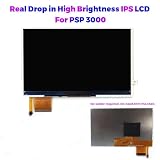
- 🌸Compatible with PSP 3000 series, NOT compatible with Toshiba 07g Motherboard. 🌸We had updated the software , it support for PS1 games well.
- 🌸High Brightness. Full-view IPS replacement LCD. 100% brand new. Same display size as the original LCD. Same display resolution as the original LCD.
- 🌸No need to cut the shell! No need solder! Just drop in the IPS LCD. Very easy to install. Backlight is pure white without aging. Play games without ghosting.
- 🌸No 'Horizontal lines' issue.(Many original PSP 3000 LCD have 'Horizontal lines' issue, especially during high motion scenes/sequences.)
- 🌸Package Intents:1x IPS LCD,1x Foam tape ( not includes the console or motherboard.)
Rank #3
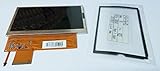
- LCD Screen Display for SONY PSP 1000 SERIES Only ( 1000, 1001, 1002 series)
- Brand New PSP LCD Screen replacment with Backlight
- Replace your broken, damaged, cracked, unusable PSP 1000 LCD screen
- Carefully packaged in foam + box
- Cushion Gasket - Made in Japan
Rank #2
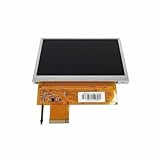
- COMPATIBILITY: Specifically designed as a direct replacement screen for PlayStation Portable PSP-1000 series gaming consoles. Original made by Sharp
- DISPLAY QUALITY: Crystal clear LCD screen provides sharp visuals and vibrant colors for an optimal gaming experience
- DIMENSIONS: Perfect fit with exact measurements matching the original PSP-1000 screen specifications
- INSTALLATION: Comes with pre-applied adhesive strips for secure mounting and proper screen alignment
- FUNCTIONALITY: Fully supports all PSP-1000 features including brightness adjustment and power-saving modes
Product prices and availability are accurate as of the date/time indicated and are subject to change. Any price and availability information displayed on Amazon at the time of purchase will apply.
Independent reader supportYour contribution helps us test, update, and keep practical guides available for everyone.



