
Yes. A dedicated server is never automatically free to operate. Renting one creates a recurring hosting bill; buying a machine replaces rent with hardware, electricity, internet, maintenance and possibly facility costs. Colocation—putting your equipment in a data center—adds a monthly charge for space and services.
For a video-game community, the useful question is not only “how much per month?” but “what exactly am I paying for, for how long, and under what conditions?” Provider prices below are current examples accessed in October 2026, not a universal market average.
As an Amazon Associate I earn from qualifying purchases.
What a dedicated server is—and what you are paying for
A dedicated server is a physical computer reserved for one customer or workload. In game hosting, that machine runs the server process for a title such as a survival, shooter or role-playing game instead of sharing CPU and memory with unrelated customers. You control the operating system, server software and configuration within the provider’s rules.
Crashes, No Sound, or Screen Glitches?
Random freezes, missing sound and display glitches usually trace back to one bad driver. Find and replace yours safely.Free scan · under a minutePC Slower Than It Used to Be?
A free scan shows the junk files, broken settings and background clutter dragging Windows down - then fixes them in one click.Free scan · Windows 10 & 11“Dedicated” does not mean free, and it does not necessarily mean you own the hardware. Most people asking about a dedicated game server mean a rented machine in a provider’s data center. The provider purchases and replaces hardware, supplies a network connection and power, and charges you for access. Your game-server software or a community’s launcher may be free; the computer and facility running it are not.
#1 Best Overall

- Durable Carbon Steel: Rack mount screws and cage nuts are made of high-quality carbon steel with a black finish for high strength and dependable durability.
- Easy Installation: Clear metric threads and uniform pitch for better grip. Nylon washers help secure screws and protect equipment surfaces.
- Organized Storage: All parts are packed in a portable storage box for easy organization and access.
- Wide Compatibility: Fits most square-hole racks and cabinets—ideal for server racks, network cabinets, equipment enclosures, and A/V gear.
- 20-Set Kit: Includes 20 mounting screws with nylon washers (M6 x 20 mm) and 20 square cage nuts—40 pieces in total—meeting daily install and replacement needs.
A dedicated IP address, a virtual private server, and a dedicated physical server are different things. A virtual server can have its own IP while still sharing a physical host. Ask the seller whether the quoted plan is an entire physical machine, a virtual slice, or a managed game-server package.
Published price examples (accessed in 2026)
The following figures are listed offers, not typical costs or independent market statistics. “Starting at” prices may apply only to selected configurations, regions, payment terms or availability. Currencies are not directly comparable without exchange rates and local taxes.
| Provider and link | Displayed price | What the listing establishes | How to use the number |
|---|---|---|---|
| Dedicated.com | US$35.75 per month | The page advertises dedicated servers “Prices starting from $35.75/mo” and says pricing is subject to change. | Use it as a low-end listed starting point, not a guaranteed quote for a game-ready configuration. |
| Dedicated.com colocation | US$115 per month | The device-colocation listing starts at this amount and describes rack space, power, remote hands and facility access. | This is a facility-service example for equipment you supply or own; it is not a general colocation benchmark. |
| Namecheap | US$44.88 per month | A search result presents this as a starting price for a dedicated-server price list. | The result does not expose every condition, so confirm the live plan, hardware and billing terms before relying on it. |
| Cherry Servers | €159 per month | The displayed configuration has 8 cores, 64 GB RAM and two 1 TB NVMe drives. | It illustrates how a specified hardware build can cost more than a bare starting offer; availability and location vary. |
These offers were observed on October 13, 2026. The year is the access year, not a claimed publication year for the prices. A quote can change with stock, exchange rates, taxes, region and the agreement you sign.
Billing cadence changes the real answer
Hourly billing
Hourly pricing is useful for tournaments, testing, migrations or a server that runs only part of a month. Multiply the published hourly rate by the hours the resource is billable, then check whether storage, addresses, traffic or support are billed separately. “Stop” can mean different things: shutting down a game process may leave the rented machine allocated, while releasing the machine may delete it or make it unavailable.
Rank #2

- Expanding your network setup? These 10/32 rack mount screws work with any standard networking rack, cabinet, or enclosure.
- These screws are built from high-grade steel and coated with black zinc to prevent stripping. Because nothing will ruin your day faster than stripped screws.
- Rack rash? No thanks. Pre-attached nylon washers save time and keep your rack looking nice. Just bring a Philips screwdriver and let's get to it.
- Sometimes it's hard to get the screw in the hole. That's why we added self-guiding pilot points to speed up installation and prevent curse words.
- Big project? We've got groups of 25, 50, and 100 screws to choose from. Run into an issue with your rack? We've got ECHOGEAR pros available 7 days a week to help out.
Monthly billing
A monthly plan is easier to budget for a 24/7 community server. Confirm whether the first month is prorated, when renewal occurs, and whether the advertised amount is a recurring rate or an introductory promotion. A monthly label alone does not tell you what bandwidth, backups, management or licenses are included.
Annual and reserved commitments
Longer commitments can have a lower effective rate but reduce your flexibility. Read the cancellation, refund and hardware-change terms before paying for a year. Cloud products can bill a reservation even when a game instance is idle. AWS states: “When you purchase a Dedicated Host Reservation, you are billed for every hour during the entire term that you select, regardless of whether the instances are running or not.” See the AWS Dedicated Host pricing documentation. That rule is specific to that reservation product, not a universal rule for every host.
Microsoft’s Azure Dedicated Host pricing page cautions that actual pricing can vary with your agreement, purchase date and currency exchange rate. Treat any reservation or commitment as a contract to inspect, not as a promise that an idle server costs nothing.
Free tools Windows power users keep installed
One-click scans. No signup required.
What determines a dedicated game-server quote?
CPU, memory and storage
Game-server processes differ sharply in their resource needs. A lightly populated title may care most about fast single-thread CPU performance, while a modded survival world or several simultaneous instances needs more cores and memory. Storage capacity matters for worlds, mods, logs, snapshots and backups; NVMe storage can be offered at a premium. Compare the exact processor model, core count, RAM, drive type, usable capacity and whether storage is redundant rather than comparing “dedicated” labels.
Rank #3

- High Resolution & HDR Dual Advantages: Activates GPU virtual display, supporting up to 4K@60Hz and 22 customizable resolutions; enhanced with HDMI HDR, it delivers brighter, clearer visuals with richer shadow details for superior remote control image quality
- Advantages:No need to purchase physical monitors, easily enabling headless HDMI setups for computer headless operation. It features low energy consumption and electrostatic protection, making it an ideal solution for server room operation, home remote devices, and GPU mining clusters, providing a low-cost, highly adaptable option
- Convenience:With plug-and-play functionality, no drivers, software, or additional power supply is required, and it works seamlessly with hot-swapping. Low energy operation ensures no lag, perfectly suited for GPU mining, video rendering, HDMI display simulation, and other applications
- Compatibility:Compatible with various HDMI output devices, including dedicated graphics cards, laptops, and mini-PCs. Supports Windows, Mac Mini OSX, and Linux operating systems. Whether it's Luna Display, multi-screen gaming, streaming, VR setup, or displayport dummy plug for mining servers, it provides stable compatibility
- Premium Quality:Equipped with gold-plated connectors, ensuring stable signal transmission, and built with high-durability materials to maintain consistent performance over time, even in high-demand work environments
Location and network quality
A data center close to most players usually reduces latency, but a nearby region can cost more or have limited stock. Check the country and city, included monthly traffic, port speed, transfer overage policy and number of IPv4 or IPv6 addresses. A high port speed does not guarantee low latency to every player, and an apparently cheap region may be unsuitable for your community.
Management, support and security
Unmanaged hosting generally leaves operating-system updates, firewall rules, game updates, backups and incident response to you. Managed service can include a control panel, patching, monitoring or human support, but the scope must be written in the plan. DDoS filtering, automated backups, restoration testing and remote hands may be included, optional or unavailable. Do not assume that a provider’s use of the word “managed” covers game configuration.
Licenses, setup and taxes
Some games require a commercial server license, a subscription or a separate entitlement for additional instances. Ask whether the quoted price includes an operating-system license, control-panel license, backup storage and setup fee. Taxes and regional currency conversion can change the amount charged to your card. The cited pages do not establish a universal list of add-on fees, so treat each item as a quote-checking question rather than an assured charge.
Renting, owning and colocating: three different cost structures
| Arrangement | Upfront cost | Recurring costs | Operational responsibility | Best fit |
|---|---|---|---|---|
| Rent a hosted dedicated server | Usually low or limited to setup and deposits, if any | Hosting rate, plus any stated traffic, license, backup or support charges | Provider handles facility, power and hardware replacement; you manage the server unless the plan includes management | Communities wanting predictable deployment without buying equipment |
| Buy and run hardware yourself | Full purchase price of the server, drives, networking gear and possible UPS | Electricity, internet service, maintenance, replacement parts, cooling and backups | You handle hardware failures, security, connectivity and physical access | Owners with suitable space, reliable connectivity and technical skills |
| Colocate your equipment | Hardware purchase and transport | Facility fee, power and the services specified by the colocation contract | You maintain the machine; the facility supplies rack space and agreed services | Owners needing data-center connectivity without buying a complete hosted machine |
Colocation is still a paid service. One current listing starts at US$115 per month and names rack space and power among its features, but that single offer cannot represent every facility or region.
Rank #4
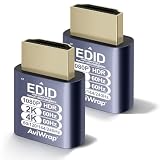
- High Resolution & HDR Dual Advantages: Activates GPU virtual display, supporting up to 4K@60Hz and 22 customizable resolutions; enhanced with HDMI HDR, it delivers brighter, clearer visuals with richer shadow details for superior remote control image quality
- Advantages:No need to purchase physical monitors, easily enabling headless HDMI setups for computer headless operation. It features low energy consumption and electrostatic protection, making it an ideal solution for server room operation, home remote devices, and GPU mining clusters, providing a low-cost, highly adaptable option
- Convenience:With plug-and-play functionality, no drivers, software, or additional power supply is required, and it works seamlessly with hot-swapping. Low energy operation ensures no lag, perfectly suited for GPU mining, video rendering, HDMI display simulation, and other applications
- Compatibility:Compatible with various HDMI output devices, including dedicated graphics cards, laptops, and mini-PCs. Supports Windows, Mac Mini OSX, and Linux operating systems. Whether it's Luna Display, multi-screen gaming, streaming, VR setup, or displayport dummy plug for mining servers, it provides stable compatibility
- Premium Quality:Equipped with gold-plated connectors, ensuring stable signal transmission, and built with high-durability materials to maintain consistent performance over time, even in high-demand work environments
Can running a server at home be free?
No. A home machine can avoid a hosting invoice, but it still consumes resources that have a cost. A defensible estimate requires your server’s average power draw, local electricity rate, hours powered on, internet plan, hardware price and expected maintenance.
For electricity, use this calculation: (average watts ÷ 1,000) × hours running × your price per kilowatt-hour. Add the portion of your internet bill attributable to the server, hardware replacement, storage for backups, cooling and a UPS if you need resilience. Residential connections may have upload limits, changing public IP addresses, carrier-grade NAT, usage caps or terms that restrict servers. A home outage also takes the game offline, and exposing a machine to the internet increases the importance of patching and firewalling.
Because those inputs differ by country, house and machine, there is no reliable universal “home server monthly cost” to quote. Calculate it from your own utility tariff and equipment rather than treating a hosted provider’s starting price as a comparison.
Game-specific costs people overlook
- Player count and simulation load: More concurrent players, entities, plugins and mods can require a faster CPU or more memory even when storage use is small.
- Multiple worlds or titles: Running several instances on one physical machine may need extra cores, memory, ports, IP addresses and licenses.
- Backups and recovery: World backups consume storage and bandwidth. Verify retention, restore time and whether backups survive cancellation.
- DDoS protection: A game server’s public address can attract attacks. Confirm capacity, mitigation scope and whether protected traffic has a separate charge.
- Latency and routing: Choose a region based on your actual player geography. A cheaper distant region can produce an inferior experience.
- Administration time: Updates, mod compatibility, moderation tools, logs and security patches are labor costs even when no invoice lists them.
How to compare offers without being misled by the headline price
- Write down the workload. Record the game, expected peak players, mod or plugin set, number of instances, required regions, backup retention and uptime target.
- Normalize the hardware. Compare processor model and clock behavior, cores, RAM, usable storage, drive type, network port and traffic allowance—not just “dedicated” in the product name.
- Normalize the billing period. Convert hourly, monthly and annual offers to the same currency and time span. Mark whether a rate is promotional, reserved or subject to a minimum term.
- List every included service. Ask about operating-system and game licenses, management, control panel, backups, DDoS filtering, IPv4 addresses, setup, support and remote hands.
- Check stop and cancellation behavior. Determine what happens when you shut down the game, power off the server, release a resource, miss payment or end a reservation. Confirm data-retention and export procedures.
- Verify the actual quote. Select the intended region and configuration in the provider’s current checkout or sales quote. Record taxes, currency conversion, renewal price and any agreement-specific terms.
- Test before committing. If possible, run a short paid trial or hourly deployment from the target region, measure player latency and observe CPU, memory, storage I/O and network use under peak-like load.
Common pricing traps and how to avoid them
Confusing a starting price with a usable configuration
A “from” figure may describe the least expensive hardware in one location. A modded game, large world or high player count can require a different build. Treat the starting number as the entry point for a conversation, not your final budget.
Best Value

- 🚚8K and 4K Resolution Support: Achieve stunning 8K 3840x2160@120Hz visuals and true 4K 4096x2160 with 24/30/60/100/120Hz refresh rates, offering vibrant, detailed images ideal for high-definition video playback, gaming, and GPU tasks.
- 🚚48Gbps High Bandwidth for Flawless Performance: With 48Gbps bandwidth, this plug ensures that the highest video resolutions run without any lag, delivering exceptional clarity and real-time response for fast-paced applications.
- 🚚Advanced EDID Emulator for Headless Systems: The EDID emulator technology enables systems to detect an active display even when no monitor is connected, allowing for smooth headless operation and enabling remote desktop access, server management, and other applications requiring virtual displays.
- 🚚Enhanced Compatibility with High-Performance Systems: Perfectly suited for systems running GPU-intensive tasks, such as cryptocurrency mining and video rendering. The plug also ensures high compatibility across various operating systems, including Windows, macOS, Linux, and others.
- 🚚Plug-and-Play with Energy Efficiency: No drivers required—simply plug it into your HDMI port, and it’s ready to go. Designed for low power consumption, it’s an eco-friendly solution for extended use, delivering stable performance while minimizing energy use.
Comparing unlike currencies or regions
US dollars and euros cannot be ranked by the printed number. Convert them on the date you budget, then add local taxes and payment fees. Keep the region attached to every figure because location affects both price and latency.
Assuming an idle server stops billing
Reservations and committed resources can remain billable while no players are connected. Read the provider’s definition of release, suspension and termination, and set a calendar reminder before a commitment renews.
Forgetting data after cancellation
A server that is terminated may lose its local world, logs and backups. Export worlds and configuration, and keep an independent backup before changing plans or disputing a bill.
Do these 3 things before closing this tab:
1Scan for outdated or missing drivers - takes under a minute2Clear out junk files and repair common Windows errors3Fix the driver behind crashes, sound loss and screen glitchesA practical budgeting formula
For a rented machine, estimate your monthly total as:
base server rate + licenses + backup storage + traffic or address charges + management/support + taxes and payment fees.
For owned hardware, replace the base rate with an amortized hardware cost and add electricity, internet, maintenance, replacement parts, cooling and backup storage. For colocation, add the facility’s recurring fee and every service listed in its contract. Keep one line for your own administration time so a low cash price does not hide a high operational burden.
Bottom line for a gaming community
Dedicated servers cost money in every practical arrangement. Current published examples range from low-end “starting at” offers such as US$35.75 per month to a specified 8-core, 64 GB, dual-1 TB NVMe configuration listed at €159 per month; a colocation listing starts at US$115 per month. Those are provider-specific offers accessed in 2026, not a market average. Choose by matching hardware, player location, billing commitment, included services and failure-recovery needs to your game, then verify the final quote and renewal terms before committing.
Recommended Free Tools
Quick Recap
Product prices and availability are accurate as of the date/time indicated and are subject to change. Any price and availability information displayed on Amazon at the time of purchase will apply.

