Do these 3 things before closing this tab:
1Clear out junk files and repair common Windows errors2Scan for outdated or missing drivers - takes under a minute3Repair Windows errors before they cause bigger problemsNo. The Wii and Wii U use different console AC adapters: the Wii adapter is model RVL-002, while the Wii U console adapter is WUP-002. Use the adapter intended for your console, and check its regional label. The Wii U GamePad has a separate adapter, WUP-011; it is not the adapter for the Wii U console.
Which power adapter does each system use?
| Device | Adapter model | What it powers |
|---|---|---|
| Wii | RVL-002 (USA) | Wii console. Nintendo’s Wii support instructions identify this model marking on the adapter: How to Reset a Wii AC Adapter. |
| Wii U console | WUP-002 (USA) | Wii U console. Nintendo lists it in the Basic and Deluxe set contents: Getting Started: Check Set Contents. |
| Wii U GamePad | WUP-011 (USA) | GamePad charging only; it is a separate adapter, not the Wii U console adapter. Nintendo lists it in the same set-contents guide: Getting Started: Check Set Contents. |
Although the question is often phrased as whether a “power cable” will work, the relevant part is the AC adapter or power brick. A Wii adapter marked RVL-002 is not the specified replacement for a Wii U console; look for WUP-002 instead.
How to identify the right Wii U adapter
- Check the underside label on the adapter. Nintendo says the Wii U console adapter’s model number starts with “WUP”: How to Find the Model Number of the Wii U Console and Accessories.
- For the console, look for model WUP-002. Do not mistake WUP-011 for it: WUP-011 is the GamePad adapter.
- Check the regional marking and electrical compatibility before plugging it in. The model examples above are marked for the USA; an adapter from another region may have different requirements.
Why the region matters
Nintendo says the Wii U console and GamePad adapters covered by its regional guidance are intended for a standard 110V wall outlet. Check the adapter label and the mains supply where you live rather than assuming a U.S. model is suitable everywhere: Will Accessories or AC Adapters Purchased Overseas Work with the Wii U Console?
Nintendo also advises against using universal adapters with the Wii U. It warns that even a universal adapter with apparently suitable current and voltage may work or may eventually damage the system, and that damage would not be covered under warranty. For North America, Nintendo recommends licensed products specifically designed for that region: Can I use a universal AC adapter with the Wii U?
#1 Best Overall
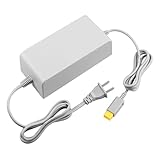
- 【POWER SPECIFICATION】:Input: 110V-240V; Output DC: 15V/5A; Cable Length: 6.5 feet. flame resistance shell
- 【HIGH QUALITY】: Made from durable material for a long time use. With a sophisticated circuit design with over-heated, over-current, over-charging protection.
- 【PRODUCT COMPATIBLE】:Specially Made for Nintendo Wii U Console. Ideal quality replacement or backup power AC adapter for your Wii U Console.
- 【EASY TO USE】:Simple plug and play setup, allow you to charge and play at the same time from up to 6.5ft away.
- After Sales Support】:Our product 100% extremely strictly before selling, You can give it as a gift to your family, friends, classmates and anyone, especially your children.If you have any issues for this product, please contact us by Amazon message, we will provide you satisfied solution at first time.Content:1 X Charger.
Replacing a missing or damaged adapter
For a Wii U console replacement, search for a Wii U Console AC Adapter marked WUP-002, then verify the model and regional label on the actual item or its packaging. A listing that merely says “Wii” or “Nintendo power adapter” is not enough to establish that it is the right part. Nintendo’s documentation identifies the model but does not establish the stock, condition, or authenticity of any current seller’s listing.
If you need power for the GamePad instead, identify the separate WUP-011 adapter. A console adapter and a GamePad charger serve different devices; match the replacement to the component you need to power.
Quick Recap
Best Value
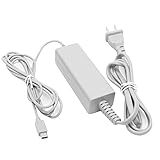
- 【POWER SPECIFICATION】:Input: 100-240V 50/60Hz; Output: 4.75V/1.6A; Cable Length: 7 feet. flame resistance shell
- 【HIGH QUALITY】: Made from durable material for long time use, and with auto voltage feature that allows the adapter to be used worldwide. against Over-Heated/Over-Current/Over-Voltage/Short-Circuit
- 【PRODUCT COMPATIBLE】:Specially Made for Nintendo Wii U GamePad. Ideal quality replacement or backup power AC adapter for your Wii U GamePad.
- 【EASY TO USE】:Charger small size and light make it easy for WiiU carry or travel.
- 【After Sales Support】:Our product 100% extremely strictly before selling, You can give it as a gift to your family, friends, classmates and anyone, especially your children.If you have any issues for this product, please contact us by Amazon message, we will provide you satisfied solution at first time.Content:1 X Charger.
Rank #4

- ✅【Compatible with Wii U Console Charger】 Only Compatible with Wii U Console Power Supply Charging Cable (NOT for Wii, Wii U GamePad, Remote or other models). Please carefully check the model before purchasing.
- ✅【POWER SPECS】Output: DC 15V/ 5A ; Input: 100 - 240V/ 50 - 60Hz; Cable length: 6.5 Feet; universal voltage (100-240V) for worldwide use
- ✅【What You Get】1 x DONGNI AC Adapter Compatible with Wii U Console Charger + 1 x User Manual
- ✅【Security Protection】 The charger has been rigorously tested for durability and safety, passing 1.2-meter drop test, 120-minute 110V aging test, 2000-cycle DC plug swing test, and 3000V high-voltage test, and housing constructed with flame-retardant material (fire resistance test)
- ✅【Durable & Reliable】 This replacement charger features reinforced wires and strain-resistant connectors for long-lasting use; and designed with numerous safety mechanisms, safeguarding your device against over-charge, over-current, over-voltage, short-circuiting, and overheating
Rank #3

- 【COMPATIBLY】 This AC adapter is Compatible with Nintendo Wii U console ONLY!!!
- 【SPECIFICATION】 Input: 100V-240V, 50/60 Hz; Output DC: 15V -- 5A; Cable length: 6.5 Feet.
- 【AUTO VOLTAGE】 This Power supply supports 100-240 auto voltage and is suitable for any place.
- 【SAFE TO USE】 This console charger was circuitry and built-in safeguards to protect your Nintendo gamepad against over-heating, over-currents, and overcharging.
- 【HIGH-QUALITY】 It is an advanced AC power adapter with many innovative design. Don't worry about power interruption when enjoying the game.
Rank #2
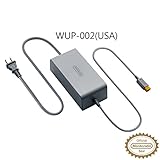
- ORIGINAL NINTENDO WII U POWER ADAPTER
Product prices and availability are accurate as of the date/time indicated and are subject to change. Any price and availability information displayed on Amazon at the time of purchase will apply.



