Dolphin Emulator is free, open-source software for playing legally dumped Nintendo GameCube and Wii games on Windows, macOS, Linux-related setups, and compatible 64-bit Android devices. To get started safely, download Dolphin only from the official download page, add a dump made from a game you own, configure the correct controller, and begin testing at native resolution before enabling enhancements.
This guide covers installation, game files, GameCube and Wii controls, graphics settings, save migration, Android limitations, and recovery steps for common crashes, stutter, missing DLLs, and detection problems.
As an Amazon Associate I earn from qualifying purchases.
What Dolphin Emulator does
Dolphin emulates Nintendo GameCube and Wii hardware. It is an emulator, not a game store: it does not include commercial games, ROMs, ISOs, BIOS files, or a Nintendo license. Dolphin’s FAQ explains that users should obtain games legally and dump them from their own discs.
You usually do not need a BIOS to launch ordinary GameCube or Wii games. Specialized uses involving Wii system data, NAND backups, channels, or other console files may require data dumped from your own hardware. Legal rules for copying and downloading vary by country, so treat Dolphin’s documentation as technical guidance rather than jurisdiction-specific legal advice.
#1 Best Overall
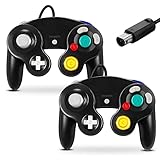
- 【Wide Compatibility & Plug and Play】Fiotok GameCube controllers are compatible with GameCube and Nintendo Wii. Note: Wii support is limited to GameCube games only, and plug and play requires a built-in GameCube port on your Wii console. Just plug in and play, no extra drivers or complicated setup required
- 【Upgraded Analog Stick & Rumble Feedback】Fiotok wired gamecube controller retains smooth performance of original controller. It features refined analog joystick design that minimizes stick drift and button sticking, paired with upgraded dual analog joysticks and responsive D-pad. Built-in vibration feedback provides automatic vibration adjusted according to games to enhance your gaming experience. Perfect for Melee and Smash series games
- 【4-Player Multiplayer Ready】GameCube controllers are designed for Nintendo GameCube/Wii and fully support Super Smash Bros. Equipped with fully analog pressure-sensitive action buttons & D-Pad for precise in-game inputs. With a controller adapter, Fiotok game cube wired controllers work with Switch, PC and Wii U. Up to 4 controllers can be connected to the console at once, ideal for multiplayer party games to enjoy game time with your friends (Note: Adapter is not included)
- 【Christmas Gift For Family】The gamecube controller is a nice holiday gift for kids to boost parent-child interaction. This game cubes controller fits all ages to unwind and escape daily pressure, bringing relaxing and joyful gaming time for family and friends
- 【Durability Support】We've worked hard to improve product quality and customer service. If you have any questions about our Fiotok brand products, please let us know. We will reply to you within 24 hours and provide support for you.
Dolphin is not RetroArch, a ROM-download service, cloud gaming, or automatically a Wii-specific fork such as PrimeHack. Compatibility and speed vary by game: one title may run perfectly while another needs a newer build or a game-specific setting from the Dolphin Wiki.
Check your hardware first
Windows PC requirements
- 64-bit Windows 10 version 1903 or newer.
- A CPU with SSE2 support; a modern dual-core processor is a practical starting point.
- A graphics processor supporting at least Direct3D 11.1 or OpenGL 3.3 for basic compatibility.
- At least 2 GB RAM is listed in Dolphin’s FAQ. In practice, 8 GB or more is more comfortable on a modern Windows system.
- An SSD is preferable for large libraries and shader-cache activity, but it is not mandatory.
For enhanced-resolution play, modern CPU performance matters more than simply having many cores. GPU drivers, the graphics backend, internal resolution, thermals, and the particular game all affect results. No single PC specification guarantees 60 FPS in every title.
Android requirements
- Use a current 64-bit Android build and follow the requirement shown by the current official APK.
- ARMv8/AArch64 or x86-64 support is required.
- OpenGL ES 3.0 or newer is a baseline listed in Dolphin’s project materials.
- GPU-driver quality, sustained cooling, CPU single-thread performance, and thermal throttling often matter more than RAM.
Android compatibility is device- and game-dependent. A phone that opens Dolphin may still struggle with demanding Wii games. Test a representative GameCube game before judging the whole device.
What’s actually slowing this PC down?
Pick the symptom - the matching free tool is one click away.
Download Dolphin safely
- Open the official Dolphin download page.
- Choose Windows x64 for a normal Intel or AMD PC, or Windows ARM64 for a compatible ARM Windows device.
- Choose the official Android APK only from Dolphin’s own source if you understand Android sideloading.
- For a first installation, choose the current stable or beta release shown on the live page. Use a development build only when you need a documented game fix or newer optimization.
Do not use pages advertising “Dolphin Pro,” preloaded ROM collections, modified premium APKs, or unofficial game downloads. Release numbers and Android requirements change, so do not rely on an old guide’s claim about the “latest” version.
Install Dolphin on Windows
- Download the appropriate official Windows archive.
- Extract it completely to a permanent folder such as
C:GamesDolphin. Do not run the executable from inside the compressed archive or leave the installation in a temporary Downloads folder. - Launch the Dolphin executable and allow it to create its user directory.
- Open Dolphin’s configuration and add the folder containing your legally dumped games under the paths or storage section.
- Start one unmodified game to establish a clean baseline.
Windows launch errors
If Dolphin reports a missing MSVCP*.dll or VCRUNTIME*.dll, install or repair the current Microsoft Visual C++ Redistributable. Never download individual DLL files from random websites.
Rank #2
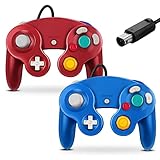
- 【Wide Compatibility & Plug and Play】Fiotok GameCube controllers are compatible with GameCube and Nintendo Wii. Note: Wii support is limited to GameCube games only, and plug and play requires a built-in GameCube port on your Wii console. Just plug in and play, no extra drivers or complicated setup required
- 【Upgraded Analog Stick & Rumble Feedback】Fiotok wired gamecube controller retains smooth performance of original controller. It features refined analog joystick design that minimizes stick drift and button sticking, paired with upgraded dual analog joysticks and responsive D-pad. Built-in vibration feedback provides automatic vibration adjusted according to games to enhance your gaming experience. Perfect for Melee and Smash series games
- 【4-Player Multiplayer Ready】GameCube controllers are designed for Nintendo GameCube/Wii and fully support Super Smash Bros. Equipped with fully analog pressure-sensitive action buttons & D-Pad for precise in-game inputs. With a controller adapter, Fiotok game cube wired controllers work with Switch, PC and Wii U. Up to 4 controllers can be connected to the console at once, ideal for multiplayer party games to enjoy game time with your friends (Note: Adapter is not included)
- 【Christmas Gift For Family】The gamecube controller is a nice holiday gift for kids to boost parent-child interaction. This game cubes controller fits all ages to unwind and escape daily pressure, bringing relaxing and joyful gaming time for family and friends
- 【Durability Support】We've worked hard to improve product quality and customer service. If you have any questions about our Fiotok brand products, please let us know. We will reply to you within 24 hours and provide support for you.
If XINPUT1_3.dll is missing, repair or update the appropriate Microsoft DirectX and controller runtime components. Re-extracting Dolphin to a normal folder can also resolve incomplete archive installations.
Install Dolphin on Android
- Confirm that the phone meets the current 64-bit requirement shown with the official release.
- Download the APK from Dolphin’s official download page.
- If Android requests permission to install from the browser or file manager, enable it only for that app, install Dolphin, then disable the permission again if you no longer need it.
- Launch Dolphin and grant file access when prompted.
- Create or select a games folder in internal storage or on a compatible, sufficiently fast microSD card.
- Add that folder to Dolphin’s game search paths.
- Pair a Bluetooth or USB controller before mapping controls.
- Test a GameCube title before moving to a demanding Wii game.
Android storage labels differ by manufacturer and Android version. If Dolphin cannot see a folder, use its system file picker and grant access to the exact directory containing the games. If removable storage is restricted, copy one test game to internal storage to separate a permission problem from a performance problem.
Game files: legal dumps and formats
Use games dumped from discs you own. Dolphin’s ripping guide describes using a Wii or vWii with CleanRip. Do not download someone else’s ISO simply because you own the disc; whether that is lawful depends on your jurisdiction.
Dolphin supports formats including GCM/ISO, GCZ, CISO, WBFS, WIA, NFS for certain Wii U eShop-derived Wii content, and RVZ. ISO is straightforward and widely recognized. RVZ is generally the preferred compressed format in Dolphin’s documentation because it saves space without the same lossy behavior associated with some older compression workflows.
Approximate uncompressed disc capacities are:
| Disc | Approximate capacity |
|---|---|
| GameCube | 1.36 GiB |
| Single-layer Wii | 4.38 GiB |
| Dual-layer Wii | 7.93 GiB |
FAT or FAT32 storage may split files at approximately 4 GiB. NTFS avoids that single-file limitation. Dolphin 5.0-18861 and later can read multipart ISO files according to the ripping guide. These are disc-image capacities, not guaranteed compressed file sizes.
Rank #3

- 【Wide Compatibility & Plug and Play】Fiotok GameCube controllers are compatible with GameCube and Nintendo Wii. Note: Wii support is limited to GameCube games only, and plug and play requires a built-in GameCube port on your Wii console. Just plug in and play, no extra drivers or complicated setup required
- 【Upgraded Analog Stick & Rumble Feedback】Fiotok wired gamecube controller retains smooth performance of original controller. It features refined analog joystick design that minimizes stick drift and button sticking, paired with upgraded dual analog joysticks and responsive D-pad. Built-in vibration feedback provides automatic vibration adjusted according to games to enhance your gaming experience. Perfect for Melee and Smash series games
- 【4-Player Multiplayer Ready】GameCube controllers are designed for Nintendo GameCube/Wii and fully support Super Smash Bros. Equipped with fully analog pressure-sensitive action buttons & D-Pad for precise in-game inputs. With a controller adapter, Fiotok game cube wired controllers work with Switch, PC and Wii U. Up to 4 controllers can be connected to the console at once, ideal for multiplayer party games to enjoy game time with your friends (Note: Adapter is not included)
- 【Christmas Gift For Family】The gamecube controller is a nice holiday gift for kids to boost parent-child interaction. This game cubes controller fits all ages to unwind and escape daily pressure, bringing relaxing and joyful gaming time for family and friends
- 【Durability Support】We've worked hard to improve product quality and customer service. If you have any questions about our Fiotok brand products, please let us know. We will reply to you within 24 hours and provide support for you.
Convert an existing dump
In current Dolphin builds, select a game in the list and use the file-conversion command, commonly labelled Convert File. Verify the exact label in your build. Keep an archival source dump if long-term preservation matters before converting to RVZ.
Quick wins for a faster PC:
Clear out junk files and repair common Windows errorsFree Scan →Fix the driver behind crashes, sound loss and screen glitchesFind Drivers →Add games to Dolphin
- Put the game files in a dedicated folder.
- Open Dolphin’s configuration and find the paths or game-directory section.
- Add the folder containing the games.
- Enable subfolder scanning if each title is stored in its own folder.
- Refresh or reopen the game list.
If a game is missing, check that it is not still inside a ZIP or 7z archive, that every part of a split image is present, and that the extension is supported. Try Dolphin’s Open command to test the file directly. On Android, confirm that access was granted to the correct folder.
Configure controllers
Emulated GameCube controller
This is the easiest option for keyboard users, Xbox, PlayStation, Switch, Bluetooth, USB, and generic Android controllers.
- Open GameCube controller settings.
- Set the desired port to an emulated or standard controller.
- Select the correct input device.
- Map buttons, analog sticks, triggers, D-pad, and rumble.
- Save the profile with a descriptive name.
Map controls manually if automatic detection produces incorrect labels. A standard controller is excellent for most GameCube games, but it does not reproduce a real Wii Remote’s pointer and motion behavior by itself.
GameCube adapter
Dolphin supports the official GameCube Controller Adapter for Wii U and compatible hardware, subject to current operating-system and driver behavior. Generic USB adapters may expose buttons differently or require a different mode. The official controller guide has the current setup details.
The Tool Desk
Outbyte PC Repair FREERepair Windows errors before they cause bigger problemsFix Now →Outbyte Driver Updater FREEScan for outdated or missing drivers - takes under a minuteDriver Scan →Rank #4

- 【 Wide Compatibility and Plug and Play 】Fiotok Game Cubes Controllers compatible with Gamecube and Nintendo Wii (Note Plug and Play requires a gamecube port on your Wii console)
- 【 Enhanced Gaming Experience 】Same great fluent features as the original controller.Fiotok wired controller Upgraded Gamepad Analog Stick And D Pad button, provides rumble control and according to the game automatic vibration feedback to enhanced game experience and match your personal preference. If you want to start playing Melee Or any Smash game, these are a great place to start
- 【 Use up to 4 Controller 】Gamecube Controllers design for Nintendo Gamecube/Wii, perfect support Super Smash Bros. With a controller adapter, Fiotok game cube wired controllers compatible with S-witch / PC/ W-ii U controller, Up to 4 controllers can be connected to the console at once, perfect for use in multiplayer games, come into the game world with your friends (Note Adapter is not included)
- 【 Christmas Gift For Kids and Holiday Accompany 】Helps to establish a more intimate parent-child relationships.Take it to play with the children and enjoy relaxing and happy family time. Accessible to people of all ages and all abilities. Your family, your friends, let them enjoy totally relax at your free time to get rid of working fatigue, school unhappiness, daily trivia
- 【 Durability Support 】We've worked hard to improve product quality and customer service, so if you have any questions about our Fiotok Brand Related Product, please let us know, we will reply to you within 24 hours and provide support for you
Wii Remote options
- Emulated Wii Remote: maps motion and pointer actions to a keyboard, mouse, touchscreen, or conventional controller.
- Real Wii Remote: provides more authentic motion and pointer input but requires more complicated pairing and, for pointing, appropriate sensor hardware.
- Conventional controller: works for some Wii games but is a poor substitute for motion-heavy titles.
A Wii Remote connected to the operating system may still be unavailable to Dolphin because of Bluetooth permissions, exclusive-mode behavior, driver conflicts, or platform limitations. Android handling is not identical to Windows.
Independent reader supportYour contribution helps us test, update, and keep practical guides available for everyone.Safe baseline graphics settings
There is no universal best Dolphin preset. Start clean, change one setting at a time, and use per-game settings when possible.
PC
- Choose Vulkan, Direct3D 11, or Direct3D 12 according to your GPU and driver behavior.
- Start at native internal resolution, then try 2x or 3x after confirming full speed.
- Enable V-Sync only if tearing is a problem; disable it if it adds latency or causes half-speed behavior.
- Keep anti-aliasing and anisotropic filtering modest initially.
- Leave shader compilation at the default or hybrid option unless a specific game or GPU benefits from another mode.
- Avoid aggressive hacks until the unmodified game works.
Android
- Use the default backend first.
- Begin at native resolution or 1.5x.
- Test Vulkan and OpenGL separately if one produces glitches or poor performance.
- Reduce enhancements before reducing emulation accuracy.
- Keep the phone cool and remove battery-saver restrictions if they reduce sustained performance.
The Dolphin performance guide explains backend and shader trade-offs. Hybrid ubershaders can reduce visible shader-compilation pauses but may cost performance. Do not disable every accuracy feature: some games depend on settings that preserve effects, shadows, text, or correct rendering.
Fix slow emulation and stutter
- Check Dolphin’s emulation speed. Below 100% usually means the system is not keeping up.
- Lower internal resolution and anti-aliasing.
- Try another graphics backend.
- Close browsers, recording software, overlays, RGB utilities, and other background programs.
- On a laptop, force Dolphin to use the high-performance GPU and select a performance power profile.
- On Android, check heat and thermal throttling rather than judging performance immediately after heavy background activity.
- Check the game’s Dolphin Wiki entry for known settings.
- Try the current beta or a development build only when a known fix justifies it.
- Undo undocumented “FPS boost” hacks.
Audio crackling or stutter commonly indicates that emulation speed is below full speed, not that the audio hardware is defective. Time-stretched audio in some newer builds can mask speed variation but may add latency.
Fix graphics corruption and crashes
Missing effects, black screens, or corrupted graphics
- Try another backend.
- Return resolution, enhancements, and hacks to default.
- Check the game-specific Wiki entry.
- Review EFB, XFB, texture-cache, and accuracy-related recommendations before changing them.
- Clear shader caches only when diagnosing suspected cache corruption; rebuilding them can temporarily increase stutter.
Crashes
- Test a clean configuration and an unmodified dump.
- Disable cheats, texture packs, patches, widescreen codes, and custom INI files.
- Confirm that the dump is complete and valid.
- Try a different release channel if a documented fix exists.
- When reporting a bug, include the Dolphin version, game revision, operating system, backend, GPU, and exact symptom.
Saves, memory cards, and moving between devices
Dolphin can emulate GameCube memory cards and manage Wii save data through its user directory and NAND-related workflows. Use normal in-game saves as your primary backups. Save states are convenient snapshots, but they should not replace ordinary saves and may be less portable between builds, settings, or devices.
Best Value

- Dual analog joysticks
- Fully analog pressure-sensitive action buttons & D-Pad
- Vibration feedback
- Compatible with Wii and GameCube
- Wii support limited to GameCube games
Before migrating from PC to Android, close Dolphin and back up the complete user directory. Export or copy the relevant memory-card, Wii-save, and configuration data using the current official guides. Do not assume that every platform uses identical paths or that a development build will always interpret data exactly like a beta build. Keep the original backup until the new device has loaded and saved successfully.
Netplay and online features
Dolphin Netplay requires matching game revisions and synchronized settings, and every participant should use their own legally obtained copy. It is not the same as Nintendo’s original online service. The official Netplay guide has platform-specific requirements; verify its current Android support statement before relying on Netplay from a phone.
Wii online services and community replacement services require separate configuration and may have compatibility or availability limits.
Free tools Windows power users keep installed
One-click scans. No signup required.
When Dolphin is not the right tool
Choose a PC instead of Android when you need stronger cooling, easier file management, a GameCube adapter, or reliable Wii pointer hardware. Choose a real Wii Remote for games built around precise motion or IR pointing. A standard Bluetooth controller is the better-value purchase for mostly GameCube games. Storage upgrades help manage a legal library, but they cannot compensate for inadequate CPU/GPU performance or Android thermal throttling.
For developers building Dolphin from source, the project README includes git submodule update --init --recursive. Ordinary PC and Android users do not need build tools or this command.
Quick Recap
Product prices and availability are accurate as of the date/time indicated and are subject to change. Any price and availability information displayed on Amazon at the time of purchase will apply.




