Do these 3 things before closing this tab:
1Fix the driver behind crashes, sound loss and screen glitches2Clear out junk files and repair common Windows errors3Scan for outdated or missing drivers - takes under a minuteEducational games can make practice feel like play, while familiar games can encourage learning through building, exploration, strategy and discussion. The best fit depends on a child’s age, the skill they want to develop and whether they prefer guided lessons or open-ended play. These seven options have source-backed descriptions; not all are conventional console games, and the evidence here does not establish that playing them alone improves school performance.
How to choose a fun learning game
Start with the experience you want: direct practice in reading or math, a short game for younger children, or open-ended play that invites questions and experimentation. Common Sense Education recommends looking for learning potential in games children already play, rather than limiting choices to products marketed as educational (Common Sense Education).
- Match the age or grade guidance. Use ranges stated by the publisher or source, not a guess based on a game’s appearance.
- Decide how direct the learning should be. Some games center on curriculum practice; others create opportunities to learn through play and conversation.
- Check access before promising a game. Platforms, school access and optional paid features differ.
- Join in when useful. Adult discussion can help connect open-ended play to a subject or skill.
Seven educational games and learning experiences to consider
The table separates guided practice from open-ended play and distinguishes established access details from information not stated in the cited source. “Not stated” means the cited source does not establish that detail; check the current product listing before installing or buying.
| Game or resource | Age or grade guidance | Learning focus and style | Platform and access | Adult guidance |
|---|---|---|---|---|
| Khan Academy Kids | Ages 2–8, according to the publisher | Foundational literacy, reading, writing, language, math, creative activities and social-emotional growth; lessons and playful activities | Free mobile app; the publisher says there are no ads or subscriptions. Supported device details: check the current listing. | Not stated by the publisher page; a caregiver can help younger children navigate activities. |
| Prodigy Math | Grades 1–8, according to the provider | Standards-aligned math practice integrated into a game | Free student access to educational content; optional parent memberships. Current supported platforms: check the provider. | Optional parent features are available; the provider does not establish that adult guidance is required. |
| Prodigy English | Grades 1–6, according to the provider | Reading and writing practice integrated into a game | Free student access to educational content; optional parent memberships. Current supported platforms: check the provider. | Optional parent features are available; the provider does not establish that adult guidance is required. |
| PBS KIDS math games | Varies by title; no single age range is stated for the directory | Math games across a collection of activities | The official site maintains a games directory; check individual listings for current availability and device support. | Not stated for the directory; a parent can help choose an age-appropriate title. |
| PBS KIDS science and engineering games | PBS presents a selection for ages 2–5 | Science and engineering activities through games | PBS describes these games as free; check individual listings for current availability and device support. | Not stated for the selection; younger children may benefit from a caregiver playing alongside them. |
| Minecraft Education | No age or grade range stated in the cited parent guidance | Classroom-oriented learning through an in-game lesson library and coding tool; includes classroom management and assessment features | Educational version of Minecraft; access may be provided through a school. Ask the school whether it is included. | Designed for classroom use, with classroom management features. |
| Familiar games a child already plays | Depends on the game; check its rating and publisher guidance | Potential learning through exploration, building, strategy or discussion; not necessarily formal instruction | Depends on the specific game and platform; verify the current edition and availability. | Discussion can help make connections between in-game choices and real-world concepts. |
What to know about each option
Khan Academy Kids for early learning
Khan Academy Kids is a mobile learning app rather than a conventional console release. The publisher describes activities spanning foundational literacy, reading, writing, language and math, alongside creativity and social-emotional growth, for ages 2–8. Its page says the app is free, with no ads or subscriptions. For a preschooler or early elementary learner, its broad subject mix can suit short, varied play sessions.
What’s actually slowing this PC down?
Pick the symptom - the matching free tool is one click away.
#1 Best Overall

- Get IN the game! Explore 25 preloaded games and adventures where YOU are the controller with three learning levels that explore math, spelling, phonics and more.
- Flap wings to soar into numbers, catch glowing orbs to explore letters, race through an obstacle course to build words and so much more across 20+ school skills
- Plug in the LeapMove system using the included HDMI and USB cables to start playing right away
- Intended for ages 4-7 years; batteries not required; download additional games including two-player options for more excitement
- This active learning video game system is great for preschoolers and kindergarteners to explore math, spelling, phonics and more; makes an exciting unisex gift for holidays, birthdays or just because
Prodigy Math and Prodigy English for guided practice
Prodigy offers two distinct learning tracks: Math, described for grades 1–8, and English, described for grades 1–6. The provider says students can access educational content for free, with optional parent memberships. These are more directly practice-oriented than open-ended games. The provider’s descriptions and testimonials explain its intended approach, but they are not independent evidence that playing produces academic gains.
PBS KIDS for short math, science and engineering activities
PBS KIDS’ math directory collects math games, while its science games include a selection PBS presents for ages 2–5 and describes as free. These are collections, not a single game with one age range or device requirement. Open the individual game listing to confirm that a title remains available and works on the child’s device.
Rank #2
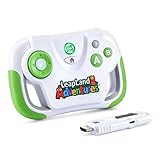
- This video game for early learners takes kids on a quest for keys to unlock Clever Castle while exploring letters, numbers, shapes and colors
- Insert the HDMI game stick and USB power cable into the TV and start playing immediately using the wireless controller; no downloads or account setup required
- Choose between two characters to explore replayable game levels; save unique game progress for up to 5 players
- Kids can explore 150+ learning items at their own pace by playing the educational content in the Learning Center
- Intended for ages 3+ years; requires 2 AA batteries; batteries not included
Minecraft Education for classroom projects
Minecraft Education is the educational version, not simply a label for consumer Minecraft. The publisher describes classroom management and assessment features, a lesson library and a coding tool. Because a school may already provide access, ask the teacher or school before purchasing a separate product. The parent guidance does not establish an age band, consumer-platform compatibility or a price for this version.
Games children already enjoy
Learning does not have to come from a game that markets itself as educational. Building, exploration and strategy can prompt useful questions, and a parent or teacher can help connect play to ideas beyond the screen. This is an opportunity for learning, not a guarantee that any particular entertainment game teaches a defined curriculum or produces measurable academic improvement. Check each game’s rating, platform and current edition before choosing it.
Rank #3

- 5 GAMES INCLUDED. UNLOCK MORE WITH PLAY PASS. Playground comes with Fruit Ninja, Starri, Whac-a-Mole, Go Keeper, and Party Fowl. A separate purchase of a 3-Month ($49) or 12-Month Play Pass ($89) is required to access the full catalog of games and get new games each month, including Barbie, Teenage Mutant Ninja Turtles, How to Train Your Dragon, Peppa Pig, Care Bears, Elmo, Miraculous Ladybug, Gabby's Dollhouse, Kung Fu Panda and more.
- GET MOVING WITH ACTIVE FAMILY FUN. Nex Playground is a new kind of video game console that gets your family moving. It easily connects to your TV, transforming your living room into an active play space. Within minutes, your family will be playing Fruit Ninja, Whac-a-Mole and more. Using a built-in camera to track motion and natural body movements, anyone in the family can jump right in.
- JUST USE YOUR BODY TO PLAY. Play naturally just by moving your body. Playground uses the magic of AI to follow your movements using the built-in wide-angle camera. No controllers or clunky trackers! Up to 4 players can play at the same time, so everyone can get moving together.
- GAMES YOU'LL LOVE MOVING TO. Playground is packed with interactive motion games, turning your living room into an arcade, theme park, gym, and more. There is something for everyone. It is perfect for indoor family game night, after school activities, or a playdate with friends.
- EASY SET UP. Playground connects to your TV or projector with a simple HDMI connection and gets everyone in on the fun. It's small and sits elegantly on any console or mantle, and can easily fit in a backpack for playdates and more. From ages 5 and up—Playground is the life of every party.
What these games can—and cannot—promise
The sources describe intended subjects and activities, not comparable independent learning outcomes across these games. Treat a game as one possible way to practice, explore or start a conversation, rather than as a substitute for instruction or a guaranteed route to better grades. For a child who wants structured repetition, choose a curriculum-practice option; for a child motivated by experimentation, try open-ended play and take time to discuss what happened.
Quick Recap
Best Value

- Packed with mini-games and music, this handheld video game toy introduces kids to numbers, letters, shapes and more
- Pop bubbles to dive into letter sounds or collect coins and count hearts to explore numbers
- Slide and jump to collect letters with Penguin, help a hungry bug chomp on numbers and catch shapes with an ape
- Intended for ages 2+ years; requires 3 AAA batteries; batteries included for demo purposes only; new batteries recommended for regular use
- This handheld gaming toy is great for kids to explore numbers, shapes, letters and more while playing exciting games; makes a great interactive unisex gift for holidays, birthdays or just because
Rank #4

- Encounter new friends with the colorful characters on LeapFriends Island and play games with them at places like the farm, airport and fire station
- Play right away with no internet connection, downloads or account setup required
- Enjoy 30+ bite-sized games that explore preschool and kindergarten skills; three skill levels keep kids challenged
- A bonus spinner and rotating screen add unique ways to play on a handheld system shaped like a grown-up controller
- Intended for ages 4+ years; requires 4 AA batteries; batteries included for demo purposes only; new batteries recommended for regular use
Product prices and availability are accurate as of the date/time indicated and are subject to change. Any price and availability information displayed on Amazon at the time of purchase will apply.




