
What’s actually slowing this PC down?
Pick the symptom - the matching free tool is one click away.
To complete Alloy, carry two WI-FI Cameras, plant one beside the antennas at Shoreline’s weather station, use the Shoreline-to-Lighthouse transit, then plant the second camera at the waterside cottage on Lighthouse. The task’s current availability is uncertain: the reference page marks it as removed, replaced or event-only, while a May 15, 2026 guide lists it as the third task in the Full Speed Ahead event chain. Check your in-game task list before spending raid time.
Check whether Alloy is active before entering a raid
Alloy is not reliably presented as a permanent quest. The Escape from Tarkov Wiki entry describes it as removed or replaced and available only during special events. A guide published by Insider Gaming on May 15, 2026 identifies it as the third step in the Full Speed Ahead event chain. Those records do not establish that the task was active on October 13, 2026.
As an Amazon Associate I earn from qualifying purchases.
Open the game’s task screen and confirm that Alloy appears with its objectives before buying or loading into a raid. If the task is absent, locked, or replaced by another event objective, the documented route below will not make progress until the event or quest is available again.
Free tools Windows power users keep installed
One-click scans. No signup required.
What you need
| Requirement | Documented detail | What to verify in your client |
|---|---|---|
| WI-FI Cameras | Two cameras are required for Alloy. | Bring both into the raid; item requirements can change between versions. |
| Camera source | Mechanic’s item reference says he sells a WI-FI Camera after you accept Informed Means Armed. | Check Mechanic’s current loyalty level, stock and unlock conditions. |
| Maps | Shoreline followed by Lighthouse. | Confirm that the task tracker still lists the same map sequence. |
| Transit | The documented objectives include Shoreline-to-Lighthouse transit. | Use the listed transit rather than treating the placements as unrelated raids. |
The acquisition details come from the WI-FI Camera item reference. It is an in-game quest item, not a real-world wireless camera, so consumer hardware cannot substitute for it.
#1 Best Overall

- Custom made based on beanie from Escape from Tarkov
- A great gift for the holidays or to add to your Tarkov collection
- Perfect for raiding!
Step 1: plant the first camera at Shoreline’s weather station
- Enter Shoreline with both WI-FI Cameras. Carrying only one leaves the Lighthouse objective impossible to finish in the same planned sequence.
- Navigate to the weather station. The Alloy objective identifies the antenna area beside the station as the first placement zone.
- Move into the antenna area and activate the placement prompt. The exact interaction marker can vary with game updates, so use the objective marker and the on-screen interaction text rather than relying on a fixed distance.
- Remain in the placement area until the interaction completes. Do not leave as soon as the prompt appears; wait for the task tracker to register the first camera.
The landmark is the weather station itself and, specifically, the antennas next to it—not a generic building or any other Shoreline antenna structure. The wiki’s Alloy instructions identify this antenna zone as the first camera location.
Step 2: use Shoreline-to-Lighthouse transit
After the Shoreline placement registers, follow the task’s next objective for Shoreline-to-Lighthouse transit. Alloy is documented as one sequence spanning both maps, so the transit is part of the route rather than an optional shortcut between two independent placement tasks.
- Check the objective tracker after the weather-station interaction and make sure the transit objective is active.
- Reach the Shoreline transit point named by your current game client.
- Complete that transit and load into Lighthouse.
- If the tracker does not advance, confirm that the first camera was actually recorded before attempting the transfer again.
Because event quests can be edited, use the current in-game objective text if it differs from the historical wording. The documented requirement is the Shoreline-to-Lighthouse transition itself.
The Tool Desk
Outbyte Driver Updater FREEFix the driver behind crashes, sound loss and screen glitchesFind Drivers →Outbyte PC Repair FREERepair Windows errors before they cause bigger problemsFix Now →Rank #2

- Card's inspiration comes from Game, high similarity to the original.
- The cards is made of PVC.And all cards have a card holder to protect them.
- Excellent material and thickness.A great replica!
- Best choice for game fans,halloween cosplay prop and even cards collectors.
- Include:7pcs cards
Step 3: plant the second camera at the Lighthouse waterside cottage
- Find the cottage on the Lighthouse shoreline. The documented destination is a waterside cottage rather than an inland Lighthouse structure.
- Use the western house directly on the shore. The wiki guide narrows the location to a western house standing directly on the water.
- Go to the second floor. The placement spot is described as a bed on that floor.
- Interact with the bed-area placement point. Stay at the location until the second WI-FI Camera is accepted by the task tracker.
If several houses look similar, use the shoreline position and the second-floor bed as the deciding landmarks. The objective is not complete merely by reaching the cottage; the camera must be planted at the specified interaction point.
Confirm completion before leaving
Once the second placement finishes, open the task tracker and verify that both camera objectives and the transit objective show completion. This is particularly important if Alloy has been reintroduced as an event task, because event versions can use different wording or state checks.
- Do not assume the first placement saved if the tracker still shows the Shoreline objective.
- Do not leave the Lighthouse cottage until the second placement has registered.
- If the task remains incomplete, compare the active objective text with the documented landmarks instead of repeating a random camera interaction.
The available references document the placement sequence but do not specify a special extraction condition beyond completing the listed objectives. Follow the extraction and raid-survival rules shown by your current client after the tracker confirms Alloy.
Rank #3
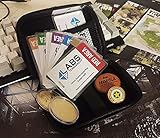
- Brand: Zhipengwen
- Included components: Cards
- Quantity: 1
Common problems and fixes
Alloy is missing from the task list
This is the most important current-status issue. The reference page flags Alloy as removed, replaced or event-only, and the 2026 guide ties it to Full Speed Ahead. If it is not listed, wait for the relevant event or a reissued version; loading the historical route will not create progress on an unavailable task.
Do these 3 things before closing this tab:
1Fix the driver behind crashes, sound loss and screen glitches2Repair Windows errors before they cause bigger problems3Scan for outdated or missing drivers - takes under a minuteYou brought one camera instead of two
The documented requirement is two WI-FI Cameras. Return to your stash or Mechanic before starting the route. The item reference says Mechanic sells the camera after accepting Informed Means Armed, but loyalty requirements and stock should be checked in the live trader screen.
The weather station interaction will not start
Re-check that you are at the antennas beside the weather station, not another Shoreline antenna or nearby building. Confirm that Alloy is active and that the tracker has selected the Shoreline placement as the current objective. If the event version uses a changed marker, follow the marker and wording displayed by the client.
Rank #4
![TOP CUSTOMS Escape from Tarkov - Tagilla Figurine Replica [Updated Packaging]- Collectible Figurine Statue- FactoryBoss - Gift Idea - Gamers](https://m.media-amazon.com/images/I/41EZSWsEqsL._SL160_.jpg)
- Exclusive Top Customs design – crafted to closely resemble Tagilla’s in-game appearance with premium attention to detail
- Made from durable hard PVC, NOT 3D printed, using high-quality injection molding for a clean, professional finish
- Perfect for collection and display alongside your Tarkov gear or gaming setup!
- Ideal gift for your squadmates, friends, boyfriends/girlfriends
- A must-have for Tarkov fans. Whether you’re messing around in the hideout or building the ultimate 'Chad' loadout, this collectible hits hard.
The Lighthouse cottage has no prompt
Verify all three location clues: the house is directly on the shore, it is the western house in the documented cottage group, and the target is a second-floor bed. Reopen the tracker to ensure the transit completed and that the Lighthouse placement is now the active objective.
You treated the maps as separate runs
Alloy is documented as a single Shoreline-to-Lighthouse sequence. Complete the first placement, use the listed transit, and then perform the Lighthouse placement. Starting an unrelated Lighthouse raid will not replace the required transit step.
Quick wins for a faster PC:
Fix the driver behind crashes, sound loss and screen glitchesFind Drivers →Repair Windows errors before they cause bigger problemsFix Now →The reward or objective text looks different
Reward details and event objectives are version-sensitive. If your client shows different text, treat the live task screen as authoritative and use the historical figures below only as the documented reference values.
Best Value

- Exclusive Top Customs design - Inspired by the iconic Customs boss from Escape from Tarkov, this Reshala figurine is designed for fans who want a piece of Tarkov on their shelf.
- Made using durable PVC injection molding for consistent detail and a clean finish — not 3D printed.
- Stands approx. 9 cm (3.54 inches) tall, ideal for desks, shelves, gaming setups, or collector displays.
- A unique collectible for Tarkov players, streamer fans, or anyone building a Tarkov-themed collection.
Documented Alloy rewards
The Alloy page lists the following rewards. Because the task may be event-only or changed, verify the reward panel in your current client before relying on any figure.
| Reward | Documented amount or item | Qualification |
|---|---|---|
| Experience | +10,000 EXP | Listed on the undated wiki task page. |
| Currency | $3,000 | The listed amount increases with Intelligence Center levels. |
| Weapon | HK MP7A2 | Version-sensitive task reward. |
| Magazines | Three MP7 magazines | Version-sensitive task reward. |
| Ammunition | Three packs of 4.6x30mm FMJ SX | Version-sensitive task reward. |
| Headgear | Ops-Core FAST MT Super High Cut helmet | Version-sensitive task reward. |
These values are attributed to the Alloy task reference, whose page does not provide a publication date. A live event implementation can alter the list, quantities or unlock conditions.
Quick Recap
Shortest reliable route
- Confirm Alloy is active in the task menu.
- Acquire two WI-FI Cameras; check Mechanic after accepting Informed Means Armed.
- Enter Shoreline and plant the first camera at the weather-station antennas.
- Complete the Shoreline-to-Lighthouse transit shown in the tracker.
- On Lighthouse, find the waterside cottage’s western shore house.
- Go to the second-floor bed and plant the second camera.
- Wait for every objective to show completion before leaving the raid.
Product prices and availability are accurate as of the date/time indicated and are subject to change. Any price and availability information displayed on Amazon at the time of purchase will apply.

