Quick wins for a faster PC:
Scan for outdated or missing drivers - takes under a minuteDriver Scan →Repair Windows errors before they cause bigger problemsFix Now →Fix the driver behind crashes, sound loss and screen glitchesFind Drivers →There is no proven universal “best” Football Manager 2024 training schedule. Build your week around the fixtures, the team’s current tactical or development needs, and the controls available in your edition. FM24 Console and Touch document weekly team focuses and ways to review training; schedule imports and some interface details are edition-specific, so check compatibility before following PC instructions.
Check your edition before changing training
FM24’s training controls differ by edition. Sports Interactive’s official descriptions confirm weekly team focus and recent-session visualisations for Console and Touch. Touch also shows unit workloads and the five attributes planned for development in the coming week. The official feature pages do not establish that these same controls or labels work identically on PC or every platform.


- Console: You can select a weekly attacking, technical, or physical focus and view day-to-day training activity, recent-session visualisations, and Attacking, Defending, and Goalkeeping units. See Sports Interactive’s FM24 Console feature overview.
- Touch: You can choose a weekly team focus, review recent training sessions, inspect unit workloads and the five attributes planned for the week, and move players between units. See Sports Interactive’s FM24 Touch feature overview.
- PC and other editions: Confirm the menu labels and schedule compatibility in your own edition. The import instructions later in this guide come from community creators and describe a PC folder path; they are not official instructions for every platform.
Sports Interactive describes training as the work that helps a manager’s plans come together: “While Matchdays are where you get the glory, the training ground is where your players put in the hard work to help your plans come together.”
Plan each week around the fixture calendar
Treat training as a set of choices to revisit, not a schedule to copy blindly. A practical weekly routine is to check the next match, decide what the team most needs, and then account for how much time players have between games.
Do these 3 things before closing this tab:
1Fix the driver behind crashes, sound loss and screen glitches2Clear out junk files and repair common Windows errors3Scan for outdated or missing drivers - takes under a minute#1 Best Overall
- Inspect the upcoming fixtures. Note the next match and the gaps between games. A week with several matches calls for different priorities from a week with a long training window.
- Choose a team emphasis. Select a focus that matches a current tactical or development need. Console’s documented choices include attacking, technical, and physical; Touch offers a weekly team focus. Names and options can vary by edition.
- Review recent sessions. Use the training activity or session visualisations available in your edition to see what the team has been working on, rather than repeating a focus automatically.
- Adjust for the next match. Consider match preparation when the priority is the upcoming opponent or a tactical need. RealSport101’s guide describes adapting training to fixtures and using preparation with that context in mind: FM 24: Master the art of training!
- Check player workload and individual needs. In Touch, inspect unit workloads and move players between units where appropriate. Revisit individual focuses in the controls available to your edition; do not assume every edition presents them the same way.
Handle congested weeks carefully
When games are close together, the fixture calendar should shape the week. If only two days separate matches, an independent training guide recommends focusing on recovery; treat that as practical guidance, not a universal in-game rule. A community schedule creator also suggests occasionally substituting recovery sessions. Neither recommendation establishes that a particular schedule prevents injuries or guarantees player availability.
Use the workload information your edition exposes and be ready to reduce or change the week’s emphasis when match spacing leaves little room to train. A schedule designed for a normal week may not suit a run of fixtures.
Rank #2
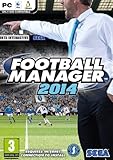
- Football Manager 2014 PC & Mac. *English game play, on disc manual included English, Czech, Danish, Dutch, French, Italian, Norwegian, Polish, Portuguese, Russian, Spanish, Swedish* Printed manual in French. Includes ONE user activation code. BRAND NEW Factory Sealed DVD Box by Sega UK for worldwide use. Ship daily via USPS 1ST CLASS(4 - 7 Business days)w/FREE delivery confirmation & Shipment Notification. Platform: Windows XP/Vista/7/8. MAC OS X 10.6.8. PEGI: 3. System Requirements: OS: Windows XP, Vista, 7, 8, Processor: Intel Pentium 4, Intel Core, AMD Athlon, Graphics: NVidia GeForce FX 5900 Ultra, ATI Radeon 9800, Intel GMA X3100, 128MB VRAM, Direct X 9.0c compliant Memory: 1GB RAM, 3GB HDD. For Mac: Mac OS X 10.6.8, 10.7, 10.8 Processor: Intel Core, 1.8GHz+. Graphics: NVidia GeForce 7300 GT, ATI Radeon X1600, Intel GMA X3100, 128MB VRAM, OpenGL 2.0 compliant. Memory: 1GB RAM, 3GB HDD Ubuntu 12.04 LTS Linux Processor: Intel Pentium 4, Intel Core, AMD Athlon, 1.8GHz+. Graphics: NVidia GeForce 7300 GT, AMD Radeon HD 2400 Pro, Intel HD 3000/4000, 128MB VRAM, OpenGL 2.0 compliant Memory: 1GB RAM, 3GB HDD. Earlier cards or laptop chipsets may only display the match in 2D and are not supported. Online play requires broadband connection. Note: Computers with high-performance hardware will provide the best game performance. Requires Internet Connection and free STEAM account to activate. NOTICE: Product offered subject to your acceptance of the Steam Subscriber Agreement ("SSA"). You must activate this product via the internet by registering for a Steam account and accepting the SSA. Please see steampowered agreement from their web site to view the SSA prior to purchase. If you do not agree with the provisions of the SSA, you should return this game unopened to your retailer in accordance with their return policy. Please check software compatibility before purchased. NO OPENED BOX RETURN(Please read Amazon Software/Video game's return policy)
- The best-selling, incredibly realistic football management drives on with over 1,000 improvements and enhancements in Football Manager 2014. The 3D match engine has seen extensive improvements, including enhanced AI, improved lighting and player animation, individual player character and kit models, more realistic player reaction to on-field incidents and a range of optimisations which combine to make this the best looking and fastest FM Match Engine yet. On the pitch, redesigned tactics management makes the player roles and team strategies even more prominent. Improvements to rival managers’ AI allow them to adapt their tactics more readily over time.
- FM 2014 features a revamped transfer module where opposing clubs and managers adopt a more realistic approach when making or responding to transfer offers. In addition, a number of new ‘real world’ transfer clauses have been added, such as the facility to loan a player back to the club he’s just been bought from and the option to offer a combination of cash and loan players, as well as new contract clauses such as a sub bench appearance fee. On top of this, the old ‘turn-based’ system of transfer negotiations can now be done two ways, the tried and tested system and a new ‘live’ system, similar to that used in FM’s contract negotiations.
- The 3D match engine has seen extensive improvements, including enhanced AI, improved lighting and player animation, individual player character and kit models, more realistic player reaction to on-field incidents and a range of optimisations which combine to make this the best looking and fastest FM Match Engine yet. Major changes have also been made to FM 2014’s user interface. Key areas have been redesigned – including the training overview page, the transfer centre and the news homepage – while widespread changes have been made across the game’s user interface. The language employed throughout the game has also enjoyed a major overhaul and now corresponds more closely to the language of real world football.
Understand FM24 schedule compatibility and set pieces
FM Scout community schedule creators reported changes to FM24’s training structure. One creator says teamwork, attacking movement, and defensive positioning were replaced by Match Focus, while set-piece routines were consolidated into a Set Piece Routines schedule alongside penalties. These are community-reported version notes, not a developer changelog. They help explain why an older schedule may fail to import or may not match the categories in your game.
RealSport101 describes FM24’s Set Piece Creator as using player attributes to help produce initial corner and free-kick routines. Exact workflows depend on edition, so check the menus in your game rather than carrying over a tutorial step from another platform.
Rank #3

- ULTIMATE FOOTBALL EXPERIENCE: Dive into the NFL Gameday board game, perfect for football enthusiasts. Enjoy strategic gameplay that brings the excitement of the field to your tabletop.
- FAMILY FUN FOR ALL: Designed for up to four players, this NFL board game is ideal for family game nights. Suitable for adults and kids, it offers engaging play for everyone.
- STRATEGIC PLAY: Test your skills with this NFL football board game. Plan your moves carefully to outsmart opponents and score touchdowns, making it a thrilling experience.
- PORTABLE DESIGN: With compact dimensions of 9.5 inches, this NFL game day board is easy to store and transport. Take it to gatherings or play at home for endless fun.
- SAFE AND DURABLE: Made from high-quality plastic, this NFL board game is built to last. It includes small parts, so it's recommended for ages twelve and up.
Import a custom schedule on PC
The following directions are from FM Scout community schedule pages, not official Sports Interactive documentation. The listed folder is for PC and may vary by system; confirm the location and that the schedule was made for FM24 and your edition.
- Place the schedule file in
Documents/Sports Interactive/Football Manager 2024/schedules. This is the folder path listed by an FM Scout creator. - In game, open Training > Schedules > Custom Schedules > Import Schedule.
- Select Choose File > Load > Confirm, then select Save.
These menu labels and steps are listed by an FM Scout creator on FM24 Balanced Training Schedules by FCC, dated 15 November 2023. Another creator’s Mike’s Best FM24 Training Schedules, dated 12 November 2023, also outlines importing and recommends adapting intensity and recovery. If an older-year file does not load, the reported FM24 changes to training categories and set-piece routines are one compatibility issue to check.
Independent reader supportYour contribution helps us test, update, and keep practical guides available for everyone.Choose between a default plan, a custom schedule, or delegation
There is no reliable comparative evidence establishing one option as universally superior. Choose based on how much control you want and how closely a plan fits the squad and calendar.
| Option | When it may suit you | What to check |
|---|---|---|
| Default plan | You want a starting point without importing a community file. | Review the week against fixture spacing and the tactical or development need. |
| Custom schedule | You want a specific weekly structure or are comfortable making manual changes. | Confirm FM24 and edition compatibility, then check workloads and recovery as fixtures change. |
| Delegated planning | You prefer less manual control over general training. | Review the resulting focus and sessions in your edition rather than assuming the plan matches every match or development priority. |
Community schedules are recommendations, not controlled evidence of attribute growth, injury reduction, or match performance. Downloads, views, and popularity do not establish that a schedule is effective. Use a shared schedule as a starting point and adapt it to your own fixtures, players, and edition.
Recommended Free Tools
Quick Recap
Best Value
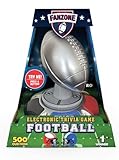
- A virtual game master does it all… It gives you the rules, manages the scores, and spices up the game. Keeps gameplay smooth and exciting with automatic rule explanations, real-time scorekeeping, and fun commentary.
- 500 Football Questions with True or False Answers: Packed with fast-paced trivia that’s easy to learn but tough to master - perfect for quick rounds and competitive play.
- Questions cover 5 topics: The Big Game, Legends of the Game, Franchise Fever, Monday Night Moments, and Draft Day Decisions! Explore a variety of football knowledge areas, from Super Bowl showdowns to legendary players and unforgettable plays.
- 2-5 players: Great for game nights, parties, or family gatherings - designed for small groups who love football and fun.
- Includes 7+ and 14+ modes with harder questions: Choose your challenge level, with easier questions for kids and tougher ones for die-hard fans and trivia pros.
Product prices and availability are accurate as of the date/time indicated and are subject to change. Any price and availability information displayed on Amazon at the time of purchase will apply.




