Garena Free Fire 1.27.0 is an archived Android build from January 2019, not the current release. If you want to play Free Fire normally, install the current official app through the Google Play listing. As of August 10, 2026, public version archives list Free Fire 1.130.1 as the current version line, although Google Play can deliver updates at different times depending on region and device.
The old 1.27.0 APK may be useful to collectors, researchers, or people trying to recreate the 2019 version. It is not a reliable recommendation for everyday play: the client is dependent on Garena’s online services, may require an update, may fail to log in, and is distributed outside Garena’s preferred authorized-store path when obtained from an APK archive.
As an Amazon Associate I earn from qualifying purchases.
Where to download Free Fire safely today
For ordinary Android users, the safest and most supportable installation method is:
The Tool Desk
Outbyte Driver Updater FREEScan for outdated or missing drivers - takes under a minuteDriver Scan →Outbyte PC Repair FREERepair Windows errors before they cause bigger problemsFix Now →- Open the Google Play Store.
- Search for Free Fire.
- Select the official Garena game and check that the package details, where shown, identify
com.dts.freefireth. - Check whether Google Play reports the app as compatible with your device and region.
- Tap Install.
- Allow Free Fire to download its additional game data, then sign in or create an account.
- Keep the game updated through Google Play.
Garena’s official FAQ directs Android users to Google Play. The official Free Fire website also links Android players to authorized distribution rather than presenting version 1.27.0 as a current download.
#1 Best Overall

- Made from the high quality tempered-glass for maximum scratch protection and no residue when removed
- 2.5D rounded edge glass for comfort on the fingers and hand
- 9H hardness, 99.99% HD clarity, and maintains the original touch experience
- Hydrophobic and oleo-phobic coating to reduce sweat and reduce fingerprints
- Include 3 pcs tempered glass screen protectors
Free Fire is free to download and play, but it is not completely free of charges: the game includes in-app purchases, including diamonds and other optional items. It is an online, mobile-only battle-royale game, so downloading the APK is not enough to create an offline experience. Normal login, matchmaking, game content, and updates depend on network access and live services.
What Free Fire 1.27.0 actually is
Version 1.27.0 is a historical Garena Free Fire package associated with version code 2019012301. APKMirror records the specific package as uploaded on January 24, 2019. That is an archive date for the listed file, not proof that every catalogue uses the same original-release date.
| Detail | Historical 1.27.0 information |
|---|---|
| App package | com.dts.freefireth |
| Version | 1.27.0 |
| Version code | 2019012301 |
| Archive file size | 61.98 MB, or 64,992,674 bytes |
| Minimum Android listed in the archive | Android 4.0.3, API 15 |
| Target Android API | API 26, Android 8.0 |
| Supported architectures | armeabi-v7a and x86 |
| DPI | nodpi |
| Languages listed | 75 |
| Package format | Conventional APK |
| Historical file name | com.dts.freefireth_1.27.0-2019012301_minAPI15(armeabi-v7a,x86)(nodpi)_apkmirror.com.apk |
Those are archive metadata values. The Android 4.0.3 minimum belongs to the old APK manifest; it does not mean that Garena’s current game service supports Android 4.0.3 or that the old client can still connect today.
Why some pages call it 9th Anniversary 1.27.0
Some old download pages attach a 9th Anniversary label to the 1.27.0 entry. That wording is misleading when applied to the file itself. The binary is associated with January 2019, while the anniversary branding refers to the 2026 app and archive-page presentation. Identify this build by its version code, package name, and archive date—not by the retrospective anniversary title.
There is also conflicting catalogue metadata. FileHippo’s version-history page lists 1.27.0 with an October 29, 2019 date, while APKMirror records the specific package on January 24, 2019. The dates may represent different catalogue or republishing events. It is safer to say that APKMirror records this particular file as uploaded on January 24, 2019 than to claim that October 29, 2019 is its definitive original release date.
Is 1.27.0 still the latest Free Fire version?
No. It is roughly seven years behind the current public version line. As of August 10, 2026, public archives list Free Fire 1.130.1, released or uploaded on August 5, 2026. The current 1.130.1 archive record lists 2026 anniversary content and a newer Android package configuration.
Google Play remains the authority for your particular phone. A third-party archive can document version history, but it does not determine whether a package is currently offered, compatible with your device, available in your country, or accepted by Garena’s live service. The version shown on the Play Store or in Android’s App info screen is the useful version for your installation.
Free tools Windows power users keep installed
One-click scans. No signup required.
| Category | Free Fire 1.27.0 | Current public 1.130.1 record |
|---|---|---|
| Era | January 2019 archive package | August 2026 public version record |
| Minimum Android listed | Android 4.0.3 / API 15 | Android 5.0 / API 21 |
| Architectures | armeabi-v7a and x86 |
arm64-v8a and armeabi-v7a |
| Distribution in public archives | Single conventional APK | Split/XAPK bundle with multiple components and an asset pack |
| Content | Historical 2019 features | 2026 anniversary events and current gameplay updates |
| Normal-play recommendation | No; archival or testing use only | Yes, installed through the official store |
One listed current XAPK package is approximately 389.5 MB. That is the download-package size, not necessarily the final amount of storage used after installation and additional content are downloaded.
Rank #2

- 【Confirm Your Model】(Please Check your model in:"Settings-About Phone-Model") This screen protector ONLY COMPATIBLE WITH Asus ROG Phone 9 5G 6.78".Not for Asus ROG Phone 9 Pro and any other model. if you need other models' protectors, please search in the brand store.
- [Easy Install Kit&Bubble-Free]Easy-installation frame help you install the screen protector easily without worrying about aligning the screen and cleaning kit ensure bubble-free application every time.Please watch our installation video tutorial before installation.
- [Case Friendly&screen Protection]:The screen protector leaves enough space for the installation of most phone cases.Maximum coverage of your Mobile without interfering with the phone Case.9H hardness tempered glass offers scratch resistance and drop protection for your phone
- [Product Features] 0.33mm ultra-thin screen protector maintains the original response sensitivity;Support fingerprint unlocking;2.5D rounded edges which feels smooth and never scratches;99.9% transparency preserving phone's original high-definition retina viewing experience.
- [Package Including]2Pcs Tempered Glass screen protector;1Pc Metal Camera Lens Protector("Hollow out" design);1Pc Back Carbon Fiber Skin Protector(transparet color);1Pc Easy Installation Frame; 2packs installation accessory kits,1Pc Installation Instructions
What Free Fire is
Garena describes Free Fire as an online mobile battle-royale shooter. Its official description includes matches of approximately 10 minutes, games with up to 50 players, four-person squads, voice chat, Battle Royale, and Clash Squad modes. The exact features, rating, and availability can vary by country, device, and product version.
The game’s online design matters when evaluating 1.27.0. Android can sometimes install an old APK while the service can no longer use it normally. In practice, an old client may display an update requirement, fail during login, be unable to download current data, or be rejected by a server. That is a reasonable compatibility inference from the age of the build and Free Fire’s live online design—not a verified Garena statement that every 1.27.0 installation has been specifically disabled.
What was included in the 1.27-era game?
The historical APKMirror listing attributes the following features to the update lineage from version 1.22.1:
What’s actually slowing this PC down?
Pick the symptom - the matching free tool is one click away.
- Reworked areas in the Purgatory and Bermuda maps.
- Miguel as a new character.
- A Solo Death Race mode available on weekends.
- Limited-time special offers after matches.
- Bonfire recovery of HP and EP at 10 points per second.
- Improved Gloo Wall coverage angles.
Garena’s September 12, 2018 historical announcement documents the same feature set, including the map changes, Miguel, Solo Death Race, special offers, Bonfire recovery, and Gloo Wall improvements. Because that announcement predates APKMirror’s January 2019 upload record, it does not independently prove that every feature first appeared specifically in version 1.27.0. These are best understood as features associated with the relevant 1.27-era update lineage, not a promise about what a modern server will display when an old client is installed.
Device requirements: old APK versus current game
Garena’s support material gives a generic minimum configuration of:
- Android 4.4
- Dual-core 1.2 GHz CPU
- 1 GB RAM
- At least 1.5 GB of storage
Its recommended configuration is:
- Android 7
- Octa-core 1.8 GHz CPU
- 3 GB RAM
- At least 3 GB of storage
See Garena’s minimum and recommended requirements page for the source of those figures. Garena also warns that a device meeting minimum specifications may run the game without delivering smooth performance.
There are three different facts that should not be confused:
- Manifest minimum: 1.27.0’s archived package lists Android 4.0.3/API 15.
- Garena’s generic support guidance: the published minimum is Android 4.4, with higher specifications recommended.
- Current package compatibility: the public 1.130.1 record lists Android 5.0/API 21 or later and newer architecture variants.
A phone that meets the generic Android 4.4 requirement may still be unable to install the current Play Store build because Google Play considers the exact device, operating system, architecture, region, and current package configuration. Google Play’s compatibility result for your phone should control the decision.
Rank #3
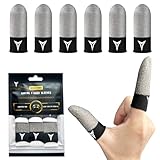
- IMPROVED VERSION&VISIBLE PURE SILVER FIBER FINGER SLEEVES - The reactive part is woven with visible pure silver fiber, and each yarn possesses excellent conductivity, approaching the limit of conductivity. It enables easy transmission of static electricity from the fingertips to smartphones, with high sensitivity even during continuous tapping. (Common silver finger sleeves are made with a mixture of conductive fibers and non-conductive yarn in the reactive part. )
- COMFORTABLE TO WEAR - Nuozme Professional Finger Sleeves combines "pure silver fiber and carbon fiber" using the latest pressure dispersion technology, providing ultra-high sensitivity while maintaining a high level of comfort. Nuozme Finger Sleeves replace the traditional rubber band at the bottom with a single piece of highly elastic yet comfortable carbon fiber to disperse the pressure evenly across the entire finger. It relieves finger pain and and the finger sleeves will not slip off.
- HIGH SENSITIVITY & RESISTING VARIOUS RESIDUES - With excellent absorption and diffusion properties, it ensures quick-drying performance. It rapidly absorbs sweat and dries, keeping the finger sleeve in a comfortable state. Furthermore, the touch area is woven with pure silver fiber, resulting in a lower friction coefficient compared to bare-handed operation. This ensures smooth on-screen movements without any lag, allowing for smooth operation of shooting games, sound-based games, and other game
- WIDE APPLICATIONS & FIT FOR MOST PEOPLE'S 5 FINGERS - Nuozme elastic finger sleeves can be adjusted and fit most people's 5 finger sizes. one-size Fit most people. Fit For All touchscreen Devices. They are lightweight and easy to carry, and come with our own uniquely designed bag, making them a highly convenient accessory for gaming as well as for storage.
- 【PACKAGE INCLUDE】6 pack 【MATERIAL】High-Quality Pure Silver Fiber( in the reactive part)+Carbon Fiber(at the bottom) 【WARM TIPS】Please note that the colors of the actual product may differ due to variations in your monitor settings and room lighting. You can achieve a similar effect to our main image by using a flashlight to illuminate the finger sleeve.
Why installing 1.27.0 can be risky
Old client and live-service failure
Installation is not the same as playability. A 2019 client may lack current authentication, content, security checks, or network compatibility. It may open to a title screen but fail at login or matchmaking. No article can honestly guarantee that 1.27.0 still works without testing the exact device, region, account, and server at the time you try it.
Account and guest-progress loss
Garena’s account-protection guidance explains the risk. Its guest-account binding instructions should be completed before testing an older build. Do not assume that guest progress is automatically shared between Free Fire and Free Fire MAX: Garena specifically warns that guest accounts are not interlinked between the two apps or across devices.
Unauthorized and modified packages
Garena tells players to use authorized stores and warns that unauthorized APKs can create account risks. Its anti-hack FAQ and related game-security policy prohibit unauthorized third-party programs, modified game clients, client or packet tampering, and software that adds functions not present in the official game.
Recommended Free Tools
An unmodified archived APK is not automatically the same thing as a cheat. However, installing it from outside an authorized store is still an unsupported distribution route, and its live-service compatibility is uncertain. Never use files advertised as MOD, unlimited diamonds, anti-ban, aimbot, free skins, or patched game data. Those files can expose credentials and personal data, damage the device, or lead to a permanent account ban. Garena states that cheating can also result in the device being blocked.
If you specifically need the 1.27.0 archive
Use it only for historical research, preservation, or an isolated compatibility test—not as your primary Free Fire installation.
- Bind your account first. Never risk an important unbound guest account.
- Use a secondary test device or an isolated test environment instead of the phone containing your main installation.
- Use an unmodified archive file. The APKMirror 1.27.0 record is useful for identifying the historical package, but it is not Garena’s current official distribution channel.
- Check the package metadata. The expected package is
com.dts.freefireth, version1.27.0, version code2019012301, witharmeabi-v7aandx86variants. - Compare file integrity data where possible. The archive reports certificate SHA-1
296a2d810a3e0024d90f4ca377afef1ba6406b93and APK SHA-256cc6ee662653ba349c07627422be052ac097dd3d41657c3fd05fae3b14849ce99. - Keep Google Play Protect enabled. Google explains how Play Protect evaluates apps installed from sources outside Google Play in its official documentation.
- Expect failure. The old client may install but require an update, fail to connect, or lack the data needed for current play.
- Remove the test installation afterward and reinstall the official current app from Google Play if you want to return to normal play.
A matching signature or hash helps establish that a file matches the archived file. It does not prove that the file is a current Garena distribution, that it is universally safe, or that Garena’s servers support it.
How Android installs an APK outside Google Play
Sideloading bypasses the normal trusted-store path, so Android blocks it by default. Menu names differ by manufacturer, but on Android 8.0/API 26 and later the permission belongs to the specific app opening the file:
- Open Settings.
- Go to Apps or Special app access.
- Choose Install unknown apps.
- Select the browser or file manager that will open the APK.
- Enable Allow from this source.
- Open the APK and follow the installer prompts.
- Disable the permission again after the test.
On Android 7.1.1 and earlier, the setting is generally Settings > Security > Unknown sources. Android’s official publishing documentation explains the source-specific permission model, while the exact menu label can vary on Samsung, Xiaomi, Motorola, and other devices.
Rank #4

- 1: For Rog Phone 8 6.78" Tempered Glass Screen Protector is highly durable, and scratch resistant - surface hardness 9H and topped with oleophobic coating to reduce fingerprints.
- 2:Excellent Design: Screen Protector is specifically designed For A S U S Rog Phone 8/ Rog Phone 8 PRO 6.78 inch .please check your model before ordering screen protector.
- 3. For Rog Phone 8 PRO 6.78" Tempered Glass Screen Protector is Ultra-clear High Definition with 99% transparency to allow anoptimal, natural viewing experience.
- 4. For Rog Phone 8 PRO 6.78" Tempered Glass Screen Protector is Ultra thin 0.3mm thickness ,reliable and resilient, and promises full compatibility with touch sensitivity.
- 5. Package Includes: 2 pcs Screen Protector ,2 Set Cleaning+Dust absorber+Guide Stickers tools.
APK, XAPK, and split APK: what is the difference?
The archived 1.27.0 entry is presented as a conventional single APK. Current Free Fire archive packages commonly use XAPK or split APK delivery, which can include a base package, architecture-specific splits, and an asset pack.
- APK: Usually one package that Android’s standard installer can open directly.
- XAPK or split APK bundle: A collection of components that may require a compatible bundle installer and the correct architecture and assets.
- Incomplete bundle: Installing only the base component can cause an App not installed error, missing assets, crashes, or an incomplete installation.
Google Play normally manages split delivery automatically. A sideloaded XAPK is different from installing the official Play Store app and should not be treated as a simple renamed APK. A large archive download size also does not necessarily equal the final installed footprint.
Independent reader supportYour contribution helps us test, update, and keep practical guides available for everyone.Troubleshooting common problems
Google Play will not download the current game
Before looking for an old APK, follow Google’s Play Store download troubleshooting steps:
Windows Errors? Fix Them Before They Spread
Repair common Windows errors and clear accumulated junk for a smoother, more stable PC - no reinstall needed.Free scan · no reinstallCrashes, No Sound, or Screen Glitches?
Random freezes, missing sound and display glitches usually trace back to one bad driver. Find and replace yours safely.Free scan · under a minute- Check Wi-Fi or mobile-data connectivity.
- Confirm that enough storage is available. Google notes that having less than 1 GB free can prevent downloads.
- Install pending Android system updates.
- Restart the phone.
- Check that automatic date and time are enabled.
- Clear the Play Store cache or data if necessary.
- Check for Play Store updates.
If Google Play says the app is incompatible, installing 1.27.0 is not a dependable workaround. The old build has different architecture and service requirements, and its low manifest minimum does not guarantee current playability.
The APK says App not installed
Common causes include:
- The file does not match the device’s CPU architecture.
- The Android version and package are incompatible.
- A newer version of
com.dts.freefirethis already installed and Android is rejecting a downgrade. - The downloaded file is incomplete or corrupted.
- An XAPK or split package is being opened as though it were a single APK.
- The device lacks sufficient storage.
- The package signature conflicts with the existing installation.
Do not immediately uninstall the working game to force the old package onto the phone. First bind the account, particularly if it is a guest account. Uninstalling, clearing local data, or changing installations can permanently remove unbound guest progress.
The game installs but will not log in
Possible explanations include a client that is too old for the current service, an unauthorized or modified package, unavailable additional game data, a region or device eligibility issue, or an account/device security restriction. The first explanation is a reasonable inference for a 2019 client, but it should not be described as a confirmed Garena policy that blocks every 1.27.0 installation.
Check the network connection, return to the official current app, and use Garena’s support channels for account-specific problems. Do not try to bypass an update or security check with an anti-ban patch.
Do these 3 things before closing this tab:
1Clear out junk files and repair common Windows errors2Fix the driver behind crashes, sound loss and screen glitches3Repair Windows errors before they cause bigger problemsAge rating, purchases, and child safety
The current Google Play listing identifies Free Fire as Teen and notes violence, blood, user interaction, and in-game purchases that may include random items. Ratings and availability can differ by country. Garena says users below the applicable age of majority may need parental consent.
Best Value

- 🎮 Improve every move with responsive finger sleeve support. Perfect for touchscreen gaming on mobile and tablet. A must-have for serious gaming accessories fans
- 🕹️ These finger sleeves for gaming offer better grip, faster reaction time, and smooth glide. Designed for high-performance mobile gamers who demand precision and comfort
- 🌟 Made from breathable, silver-infused fabric for long sessions without sweat or slip. These thumb sleeves are durable, comfortable, and ideal for any mobile gaming setup
- 🔥 Whether it’s swiping or aiming, each gaming finger glove gives you full control and smooth touch response on any screen. Works great with phones, tablets, or handheld consoles
- 🎁 The perfect gift for any mobile gamer — these high-quality finger sleeves combine comfort, precision, and style. Great for birthdays, Christmas, or gaming accessory bundles
Parents should discuss voice and text communication, make sure children do not share identifying information in chat, protect account credentials, and review purchases. Garena’s FAQ includes guidance on parental involvement and online communication.
Which version should you choose?
| Your goal | Best choice | Why |
|---|---|---|
| Play Free Fire normally | Current official Google Play installation | Best access to current compatibility, updates, account support, and live content. |
| Use an older phone | Check Google Play compatibility first | The 1.27.0 manifest minimum does not prove that the old client works with today’s service. |
| Recreate the 2019 experience | 1.27.0 on a secondary test device | It has historical value but significant service and compatibility limitations. |
| Protect a current account | Do not experiment on the primary installation | Uninstalling or updating can endanger unbound guest progress. |
| Get improved graphics | Free Fire MAX | Garena positions MAX as the higher-fidelity alternative with visual and gameplay upgrades. |
| Install without Google Play | Only for a legitimate device-store reason and a trustworthy, unmodified source | Sideloading adds security, compatibility, update, and account complications. |
| Get free diamonds or unlocked items | Do not install the file | It is likely to be a scam, modified client, malware risk, or ban risk. |
Garena presents Free Fire MAX as the premium-graphics alternative and describes Firelink compatibility between the products. Account protection still matters: bind the account before switching, and do not assume that an unbound guest account carries over between Free Fire and Free Fire MAX.
Bottom line
Free Fire 1.27.0 is a genuine historical version record—not the latest Android release. Its archive metadata identifies a January 2019 APK with package name com.dts.freefireth, version code 2019012301, Android 4.0.3/API 15 minimum, and ARMv7/x86 support. Those details describe the old file, not current Garena support.
If you want to play Free Fire, install the current version through Google Play. Use 1.27.0 only as a carefully isolated archival or testing build, after binding your account and avoiding every modified, cheat, free-diamond, and anti-ban package.
Frequently Asked Questions
Can Free Fire 1.27.0 run on Android 4.0.3?
The archived 1.27.0 manifest lists Android 4.0.3/API 15 as its minimum, but that does not guarantee installation, login, or live-service access today. Google Play’s compatibility result and the current game’s requirements are more relevant for normal play.
Is the Free Fire 1.27.0 APK safe?
The archive record includes a reported Garena certificate and file hash, which can help identify an unchanged file. That is not proof of current Garena support, universal safety, or official distribution. Avoid MOD, unlimited-diamonds, anti-ban, and patched APKs.
Can I play Free Fire 1.27.0 offline?
No. Free Fire is an online mobile game. The APK file can be downloaded separately, but normal login, matchmaking, content, and updates require live services and an internet connection.
Quick wins for a faster PC:
Repair Windows errors before they cause bigger problemsFix Now →Fix the driver behind crashes, sound loss and screen glitchesFind Drivers →Why does an old 1.27.0 page say 9th Anniversary?
That is a retrospective archive label associated with 2026 branding. The 1.27.0 file itself is a historical January 2019 build and should be identified by its version code and archive metadata.
Will uninstalling Free Fire delete my progress?
It can delete an unbound guest account because guest progress is stored locally. Bind the account to a supported platform before uninstalling, updating, changing devices, or clearing game data.
The Bottom Line
Recommendation: download the current Free Fire app from Google Play. Version 1.27.0 is useful only as a historical reference or isolated test build; it should not be treated as the current or safest Android download.
Quick Recap
Product prices and availability are accurate as of the date/time indicated and are subject to change. Any price and availability information displayed on Amazon at the time of purchase will apply.
What’s actually slowing this PC down?
Pick the symptom - the matching free tool is one click away.




