Do these 3 things before closing this tab:
1Repair Windows errors before they cause bigger problems2Fix the driver behind crashes, sound loss and screen glitches3Clear out junk files and repair common Windows errorsThe official way to contact Steam Support is help.steampowered.com. Choose the category that matches your problem, sign in when prompted, follow Steam’s troubleshooting wizard, and submit a support request if the suggested steps do not fix the issue.
Contact Steam Support in three steps
- Open https://help.steampowered.com/ and verify that the address ends in steampowered.com.
- Select the category that best describes the problem.
- Follow the help wizard. If self-service instructions do not solve the issue, complete the available support-request form.
Steam primarily uses an issue-based web wizard rather than a general “send us an email” page. Menu labels can change, so choose the closest match to the type of failure.
As an Amazon Associate I earn from qualifying purchases.
Choose the right support route
| Problem | Best starting point |
|---|---|
| Cannot sign in | Help, I can’t sign in |
| Stolen or hijacked account | My Account → stolen or hijacked account |
| Refund or purchase problem | Purchases |
| Unknown Steam charge | Purchases → charges you did not make |
| Game will not launch or crashes | Games, Software, etc. → select the game |
| Steam Client problem | Steam Client |
| Wallet code problem | Purchases or Steam Client |
| Trading, gifting, Market, or Steam Points | Trading, Gifting, Market and Steam Points |
| Steam Deck or other hardware | Steam Hardware |
If you cannot sign in
On the Steam Support homepage, select Help, I can’t sign in. The account workflow covers forgotten credentials, lost email access, Steam Guard problems, a lost phone or authenticator, suspicious account changes, and stolen or hijacked accounts. You can also use the account support page.
For a suspected hijacking, start recovery before creating another account. Use the original email address, phone number, payment information, or other ownership evidence only when the official form requests it. Change the Steam password and the associated email password, and revoke suspicious access where possible. Never give anyone your Steam password, Steam Guard code, or recovery code.
#1 Best Overall

- The 2.4 GHz wireless connection uses a tiny Plug-and-Forget Nano-receiver that stays in your USB port, even on laptops, for fast data transmission with minimal delays, dropouts, or interference.
- With broad game support, the Logitech Wireless Gamepad F710 works with old standbys to today's biggest titles, so it's easy to set up and use with your favorite games
- Profiler software allows the gamepad to be programmed to perform keyboard and mouse commands for games without gamepad support.* Requires software installation
- Dual vibration motors let you feel every hit, crash and explosion in games that support vibration feedback for a more realistic and immersive experience
- A familiar control layout that doesn't require a learning curve to be able to use, with all the same buttons as on game console controllers
How to request a Steam refund
- Open Steam Support and sign in.
- Select Purchases.
- Choose the relevant transaction.
- Select the product problem, then I’d like to request a refund.
- Choose Steam Wallet credit or the original payment method when offered, and submit the request.
Valve’s standard guideline for games and software is a request within 14 days of purchase and fewer than two hours of playtime. Requests outside those conditions can still be submitted for review, but approval is not guaranteed. See Valve’s refund instructions.
Other products have different rules. Eligible Valve-developed in-game purchases are generally refundable within 48 hours if the item was not consumed, modified, or transferred; third-party developers may enable similar refunds. Approved refunds can take up to seven days to appear, while Steam Wallet refunds may arrive within 24–48 hours. Valve’s refund FAQ covers additional exceptions.
If the purchase is missing, check that you are using the correct account. Steam also provides routes for guest purchases, pending transactions, older purchases, and charges made through another platform or publisher.
Reporting an unauthorized charge
Go to Purchase Support and select I have charges from Steam that I didn’t make. Preserve the transaction date, amount, payment-method details, and relevant bank or card statements.
Rank #2

- Compatible with Wide Range of Consoles: This controller works with consoles such as Switch 2, Switch, Switch Pro, Switch Lite, and Switch OLED. (Please note): The controller's “HOME” button cannot wake up the Switch 2 console and does not have the C button for voice chat functions. However, all other functions are fully usable, including: dual vibration, 6-axis gyroscope, screenshot function, Hall effect buttons, and turbo.
- Cool and Colorful Lighting Switch Controller Wireless: It features 7 colors of RGB lighting (Red - Orange - Yellow - Green - Cyan - Blue - Violet) and 4 light modes (Dazzle - Monochrome - Monochrome Breathe - Monochrome Breathe Cycle).
- Hall Effect Technology for Switch Pro Controller: Experience zero drift and unmatched accuracy with our Hall effect joystick switch. Adaptive trigger feedback with adjustable resistance levels lets you feel every action. With <0.1 ms response time and 256 levels of pressure sensitivity, enjoy instant trigger detection in FPS games. 3+ million clicks on the controller mean a long service life.
- Dual Motor Vibration, Turbo Function and 6 Axis Gyroscope: The switch 2 controller has two vibration motors with three intensity levels—off, low, and high—and provides exceptional haptic feedback to enhance the gaming experience. The controller also offers three adjustable turbo speeds (5-10-15 Hz), which are particularly suitable for first-person shooter games. In addition, it features a 6 axis gyroscope chip for precise motion control. The physical movements of the players are precisely matched to the actions of their game characters.
- Reliable After-Sales Support You Can Count On: Your satisfaction is our top priority. Should you experience any quality concerns with your gaming controller, simply reach out to us via our customer service email, and we’ll respond promptly. We stand behind our product with a hassle-free replacement policy—ensuring you’re back to gaming without worry, no questions asked.
Secure the Steam account and its email account immediately. If the charge is genuinely unauthorized, contact the bank or payment provider as well. Do not treat a bank chargeback as the normal first step for a wanted refund: payment disputes can affect the Steam account, so understand the consequences and contact Steam first when appropriate.
Steam Support or the game developer?
Use Steam Support for Steam purchases, refunds, payment, account access, licensing, downloads, library entitlements, and Steam Client problems. Use the developer or publisher for gameplay bugs, game servers, publisher accounts, and game-specific technical issues.
For a missing in-game purchase, Steam’s guidance says to contact the game’s support team first. If it cannot resolve the issue, attach that correspondence to your Steam support request.
For game help, use Games, Software, etc., select the product, and choose the specific issue. Steam’s Steam Client support covers crashes, login-server connection problems, Big Picture Mode, Steam Families, Family View, Offline Mode, Steam Cloud, and Wallet Codes.
Rank #3
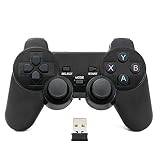
- Brand new and high quality.
- Wireless Game Controller for PC.
- 2.4GHz wireless.
- Powered by 2* AAA battery.
- This controller can't be used on the Raspberry Pi.
Information to include in your request
- Steam account name or identifier requested by the form.
- Account email address.
- Game or product name.
- Purchase date, amount, order number, or receipt when requested.
- The exact error message.
- Your device, operating system, Steam Client, or Steam Deck details.
- Steps you already tried.
- Useful screenshots or short videos.
- Approximate dates and changes noticed after unauthorized access.
Provide only what the official form asks for. Never publish or send your password, Steam Guard code, recovery code, or full card number.
What if Steam Support is not loading?
- Refresh the page.
- Try a private or incognito window.
- Disable browser extensions that may interfere with the page.
- Try another browser, device, or network.
- Check whether Steam’s store or client is also experiencing problems.
- Retry later.
If the page is unavailable, do not switch to phone numbers, Discord messages, Reddit accounts, Telegram contacts, or other “support” contacts found during an outage. Verify any contact through Steam’s official website.
Can I contact Steam by phone or email?
The normal official customer-support route is the Steam Support website. Steam’s support homepage does not present a general customer-support phone number or general-purpose support email. Do not rely on contact details in search results unless Steam’s own site provides them for your specific issue. Separate hardware, legal, payment-provider, publisher, or corporate channels are not substitutes for the ordinary Steam Support workflow.
The Tool Desk
Outbyte Driver Updater FREEScan for outdated or missing drivers - takes under a minuteDriver Scan →Outbyte PC Repair FREERepair Windows errors before they cause bigger problemsFix Now →After submitting a request
Monitor the support request and the email address connected to the Steam account. Steam may first provide an automated article or troubleshooting response; follow it and reply with the requested details if the problem remains. Steam does not promise one universal response time for every issue, so avoid sites claiming guaranteed instant human support.
Rank #4

- Compatible with Windows and Android.
- 1000Hz Polling Rate (for 2.4G and wired connection)
- Hall Effect joysticks and Hall triggers. Wear-resistant metal joystick rings.
- Extra R4/L4 bumpers. Custom button mapping without using software. Turbo function.
- Refined bumpers and D-pad. Light but tactile.
Frequently Asked Questions
How do I contact Steam if I cannot log in?
Open https://help.steampowered.com/ and select “Help, I can’t sign in.” Use the recovery options for forgotten credentials, Steam Guard, lost email access, or a hijacked account.
How do I contact Steam about a refund?
Sign in to Steam Support, choose Purchases, select the transaction, choose the product problem, and select “I’d like to request a refund.”
Can I request a refund after 14 days or two hours?
You can still submit the request, but Valve’s standard guideline is within 14 days and under two hours of playtime, and exceptions are not guaranteed.
How long does Steam Support take to reply?
There is no single guaranteed response time for every request. Monitor the ticket and the account email for updates.
Best Value

- Platform Compatibility: This PC controller is designed for Windows PC, Steam, Switch, Android, and iOS. Xbox-style asymmetric stick layout for PC gamers. Three modes cover all your devices. Please check your device compatibility before purchase
- Three Connection Modes: 2.4G wireless, Bluetooth, wired USB-C. PC gets native XInput/DirectInput. Switch pairs via Bluetooth, no adapter. This gaming PC controller switches devices seamlessly. Stable wireless minimizes random disconnects during gaming
- Hall Effect Precision: Hall effect joysticks and triggers eliminate stick drift. This gaming controller for PC delivers smooth, responsive input with no dead zones. Built for FPS, racing, and action games. Long-term precision for competitive PC gaming
- Back Buttons & Battery: Two programmable back buttons map combos and shortcuts. Textured grips with dual vibration. 1000mAh battery delivers up to 20H playtime. RGB can be turned off. A solid PC controller for gaming with custom back buttons
- ABXY Layout Switch: Press B + Minus + Plus to swap between PC and Switch modes. Features: 1000Hz polling rate, RGB lighting, turbo. Note: designed without mic jack or gyro sensor
Should I contact Steam or the game developer?
Contact Steam for purchases, refunds, accounts, licensing, and platform problems. Contact the developer for gameplay, server, and game-specific issues; for missing in-game purchases, Steam recommends contacting the game’s support team first.
How do I contact Steam about a Steam Deck problem?
Open Steam Support and choose Steam Hardware, then select the relevant Steam Deck or hardware issue.
The Bottom Line
Start at help.steampowered.com, choose the category matching the failure, and use “Help, I can’t sign in” for account-access problems. Keep passwords, Steam Guard codes, and full payment credentials private.
Free tools Windows power users keep installed
One-click scans. No signup required.
Quick Recap
Product prices and availability are accurate as of the date/time indicated and are subject to change. Any price and availability information displayed on Amazon at the time of purchase will apply.




