First check what is corrupted: a save file, downloadable content (DLC), cached data, or the console’s profile or storage. The fix depends on which one is affected. If it is a save file, Bethesda Support says corrupted Xbox 360 saves cannot be repaired; an earlier save or another slot may preserve your progress.
Identify what the Xbox 360 says is corrupted
- Save file: A particular save will not load or is marked corrupted. Try another slot or an earlier save.
- Downloadable content (DLC): A specific downloaded item is affected. Microsoft’s legacy troubleshooting guidance recommends deleting that item and downloading it again.
- Cache or loading issue: The problem appears during loading or after an update, rather than being limited to one save. Clearing the system cache may help.
- Profile or storage device: Multiple items or access to the profile or device seem affected. Preserve any accessible copies before troubleshooting further.
These categories are not interchangeable: clearing the cache is not a way to repair a corrupted save, and deleting DLC is not the same as deleting a game.
Protect working saves before troubleshooting
If another save slot or an earlier save loads, use it and make a backup of any working progress before deleting or moving content. Bethesda Support recommends frequent saves in alternate slots and copying working saves to removable storage. Xbox 360 storage guidance includes USB storage devices and memory units, but check that a device is compatible with and configured for your particular console before relying on it.
If a save file is corrupted
Try loading an earlier save or a different slot. Bethesda Support states: “Save games that are corrupted cannot be repaired.” Its guidance is to save frequently in alternate slots; cache clearing or re-downloading DLC should not be presented as a way to reconstruct a damaged save.
Recommended Free Tools
#1 Best Overall

- The tools is needed to open up the XBOX 360 case and remove
- This unlocking tool kit is the same that is supplied with the replacement cases specially designed to open up the console for Xbox 360 quickly and safely
- Using a high-quality steel for the screw driver (better than using a handle screw driver) and a special design metal opening tool
If the problem may be cached data
Clear the Xbox 360 system cache through the console’s storage or device options. Bethesda says this removes temporary game files and updates, not saved games, profiles, or DLC. Rockstar likewise says its cache-clearing steps do not delete save data or progress. A game may need to download updates again afterward.
If downloadable content is corrupted
Microsoft’s legacy Xbox 360 troubleshooting guidance recommends deleting the affected downloadable content and downloading it again. The article was reviewed in 2006 and is reproduced by an archive, so treat it as legacy guidance rather than a currently maintained Xbox procedure. Do not casually delete the whole game instead: that guidance warns that deleting a game also deletes associated saved content.
Rank #2

- VERSATILE COMPATIBILITY: Suitable for both Xbox 360 disk drive repairs and rock tumbler maintenance, these rubber belts ensure smooth operation
- QUANTITY: Kit includes 10 replacement rubber belts in black, providing multiple spares for future maintenance needs
- EASY INSTALLATION: Simple to replace worn-out belts - just remove the old belt and stretch the new one into position
- DURABLE CONSTRUCTION: Made from high-quality rubber material designed to maintain proper tension and prevent slipping
- PRECISE FIT: Manufactured to exact specifications required for Xbox 360 disk drives and standard rock tumbler models
If the profile or storage device seems damaged
Copy any saves or other content you can still access before making changes. The available support guidance does not establish a universal hardware repair method or a replacement drive compatible with every Xbox 360. Check the exact console model and seek model-specific support before replacing or reformatting storage.
Independent reader supportYour contribution helps us test, update, and keep practical guides available for everyone.Prevent another lost save
- Save regularly in more than one slot, following Bethesda Support’s advice.
- Copy working saves to removable storage as a backup.
- Verify a USB device or memory unit is compatible with and configured for your console before depending on it.
A backup can preserve a working copy; it does not repair a save that is already corrupted.
Quick wins for a faster PC:
Clear out junk files and repair common Windows errorsFree Scan →Scan for outdated or missing drivers - takes under a minuteDriver Scan →Repair Windows errors before they cause bigger problemsFix Now →Quick Recap
Best Value
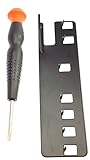
- The two tools needed to get into your XBox 360 (not slim)
- Special ergonomic T10 screwdriver with ergonomic handle and spin cap, security style with hole in tip
- Xbox 360 unlock key is powder-coated black for durability and longer life
- Screwdriver is high-quality chrome vanadium steel, less likely to strip or deform
- Ergonomic non-slip handle with spin cap for assistance in managing small screws
Rank #4

- VERSATILE USE: Compatible for Xbox 360 disk drives, rock , humidifiers, and other small appliances requiring rubber belt replacements
- PACKAGE CONTENTS: Set includes 10 high-quality black rubber drive belts for multiple replacements or different devices
- MATERIAL QUALITY: Made with durable black rubber compound designed for consistent performance and longevity
- EASY INSTALLATION: Simple to replace worn-out belts - remove old belt, clean surface, and stretch new belt into position
- PRECISE FIT: Manufactured to exact specifications ensuring proper tension and reliable operation in compatible devices
Rank #3

- 【Differences from other products】- Compared with other products, we have added a high-grade metal double-headed crowbar, which can be used in conjunction with a nylon double-headed crowbar, which greatly meets your various needs; we have improved the curved tweezers to make it easier for you to hold small tools.
- 【Function of screwdrivers】- PS3, PS4, PS5 controllers use T8 and PH0 (+ 2.5mm) screwdrivers, and handles use PH0. The XBOX controller uses T6 and T8 screwdrivers, the handle and the console use T8 and T10. PH0 (+ 2.5mm) can also be used in various household appliances, furniture and toys.
- 【Magnetic S2 steel screw head】 - All our screwdrivers are magnetically designed, which can fix small screws to avoid falling; and are made of high-quality S2 steel, after heat treatment, it is more accurate and durable than silver CRV bits.
- 【Slip-resistant flexible handle】- The screwdriver handle is made of TPR and PP materials, with a special non-slip design, easy to grasp and very comfortable; the flexible cover at the bottom of the screwdriver handle can rotate smoothly. When using the screwdriver vertically, press down and rotate it firmly. The screwdriver handle makes it easier to repair the instrument through force transmission, thereby making maintenance more effective.
- 【Package included】- This kit includes PH0 and Torx T6 /T8 /T10 screwdrivers, tweezers, brushes, 5 crowbars.
Product prices and availability are accurate as of the date/time indicated and are subject to change. Any price and availability information displayed on Amazon at the time of purchase will apply.




