Hold the PS button on your DUALSHOCK 4 and check the battery icon in the Quick Menu. The icon blinks while the controller is charging; when charging from a PS4 in rest mode, the light bar turns off when charging is complete.
Check the battery icon in the Quick Menu
Hold the PS button to open the Quick Menu, then look at the controller’s battery icon. Sony’s DUALSHOCK 4 support page says, “The battery icon will blink while the controller is charging.” The icon’s blinking indicates charging is in progress; use the rest-mode light-bar cue below when you need Sony’s documented completion signal.
What the light bar shows while charging in rest mode
When a DUALSHOCK 4 is charging from a PS4 in rest mode, its light bar slowly blinks orange. Once charging is complete, the light bar turns off. This completion cue is documented for rest-mode charging; do not treat the light bar as a universal full-charge indicator in every situation. See PlayStation’s charging guidance.
How long a full charge takes
Sony estimates about two hours to charge a controller battery with no remaining charge, according to its DUALSHOCK 4 support page. Treat that as an approximate manufacturer figure, not a guarantee: the source does not promise the same time for every used battery, cable, or power source. Sony’s DUALSHOCK 4 Charging Station manual also gives an approximate two-hour duration for an empty battery.
Free tools Windows power users keep installed
One-click scans. No signup required.
#1 Best Overall

- Compatibility - Perfectly compatible with Sony P 4 / P S4 Pro / P-S4 Slim. This P4 controller charger is built specifically for official PS-4 controllers, ensuring a snug fit and stable charging every time.
- More Stable Design - Unlike traditional standing models, our lying-down design stays stable. No tipping over once the controller is placed — perfect when using a PS/4 charging cable setup.
- Dual USB Ports - Charge two controllers at once via micro USB from your PS 4 console, PC, or any 5V/1A adapter. A true PlayStation 4 controller charger for multiplayer gaming.
- LED Indicator - Red means charging, green means fully charged. Whether you're using a P4 charger or a dedicated P S 4 controller charger cord, the status is always clear.
- Charging Time - One controller fully charged in 2 hours, two in 2.5 hours. This P/S4 controller charger cord keeps you gaming longer with less waiting.
Charge from the PS4, including in rest mode
You can charge the controller by USB from a PS4 while the console is on or in rest mode. For rest-mode charging, USB power must be enabled in the console settings. Go to Settings > Power Save Settings > Set Features Available in Rest Mode, then select Supply Power to USB Ports, as described in PlayStation’s charging instructions.
The DUALSHOCK 4 Wireless Controller Instruction Manual also permits charging through a USB-standard-compliant cable connected to a computer or another USB device. Sony cautions that some devices may not charge the controller.
Quick Recap
Rank #3
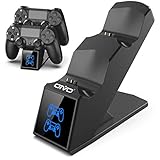
- LED Charging Indicator: LED lights can clearly show the charging status, red light States The PS4 controller is charging,blue light States The PS4 controller has been charged completely.
- 1.8 Hours Full Charged: Upgraded with copper chip, fast to charge dual controllers simultaneously in 1.8Hours, save your time to get more fun.
- Safe&Reliable: Built-in intelligent chips and high quality components prevent dual controllers and your devices from over-current, over-voltage, or short-circuit protection.
- Multiple Power Devices: Allows you to conveniently store and charge 2 PS4 controllers above 5V/1A,applying to your computer, PS4/Slim/Pro, wall adapter,Charging port, power bank and so on.
- What You Get: 1*OIVO PS4 controller charging station; 1*charging cable; Manufacturer's 2-Year After-sale service.
Rank #2

- 【Charger with Updated 1.8H Fast-Charging Port】The dual charging station with the upgraded copper contactor, provide fastest charging speed to charge your remote controllers in 1.8 hours simultaneously
- 【Clear Led Indicator on Charging Station】With clear led indicator, The controller charging station would indicate the charging status clearly, Red Light means your remote is charging, Green Light means fully charged or standby. Convenient for you to know the status about the dualshcok controller charging status.
- 【Intelligent Chip & Safe Charger for Controller】The Controller Charging Station built-in intelligent chip and provides over-charging,over-voltage, short-circuit protection, You dont worried about over charged your wireless controller even charge overnight.
- 【Reliable Controller Stand】This charging station is designed to charge and storage double controllers at the same time, Storage your controllers in the controller charger dock when not playing games, and it doesn't take up much room.
- 【Multi Power Supply Devices& Compatibility】 The charging station power through the USB port from PC or wall power source (Note:wall adapter is not included!)controller charging station for controller
If the controller does not seem to charge
- If the PS4 is in rest mode, check its USB power setting. Confirm that Supply Power to USB Ports is selected under Settings > Power Save Settings > Set Features Available in Rest Mode.
- If you are using another USB device, try a different charging source. Sony notes that some computers or other USB devices may not charge the controller.
- If it still does not charge properly, try resetting the controller. Sony recommends a reset in its DUALSHOCK 4 troubleshooting guidance.
Product prices and availability are accurate as of the date/time indicated and are subject to change. Any price and availability information displayed on Amazon at the time of purchase will apply.




