The Meta Quest 3S is advertised at approximately 2.5 hours per charge. In ordinary active use, plan for about two hours; demanding games, color passthrough and mixed-reality applications can reduce that to roughly 1.5–2 hours. Your result will vary with brightness, wireless activity, audio, temperature, battery condition and software settings.
Meta Quest 3S battery life at a glance
The figures below are practical guidance synthesized from the published estimate and independent testing, not a Meta-certified test chart.
| Use case | Realistic guidance |
|---|---|
| Published battery estimate | Approximately 2.5 hours |
| Typical active use | About 2 hours |
| Demanding games or mixed reality | Roughly 1.5–2 hours |
| Light media or simple applications | May approach or exceed the published estimate, depending on conditions |
| Battery strap or power bank | Varies by accessory, output, workload and battery condition |
Meta’s Quest 3S product material gives an approximate 2.5-hour figure, rather than a guaranteed minimum. UploadVR also lists approximately 2.5 hours in its specifications coverage (UploadVR). Meta’s announcement describes the headset and its mixed-reality features at about.fb.com.
What real-world gaming runtime should you expect?
For planning purposes, treat two hours as the safer expectation for an active session. WIRED reported approximately 1 hour 40 minutes while using Horizon Worlds and playing Beat Saber (WIRED). That is a reviewer’s result under particular conditions, not a universal average or laboratory standard, but it demonstrates why the 2.5-hour specification should not be read as a guaranteed gaming session.
#1 Best Overall

- Compatible with Meta Quest & Pico Headsets: The VR link cable is compatible with Meta Quest 3S / Quest 3 / Quest 2 / Quest Pro / Pico 4. Connect your headset to a gaming PC to unlock SteamVR and PC VR content for a stable, immersive wired experience. Note: This cable is NOT for charging—please do not use it to charge your headset!
- Designed for PC VR Gaming: Perfect for wired PC VR and room-scale VR gameplay, supporting seated, standing, or full-body movement. Keeps your VR experience stable and smooth during long gaming sessions, avoiding latency or signal issues associated with wireless streaming.
- USB 3.0 High-Speed Performance: Features a USB-A to USB-C connection with USB 3.0 support, providing up to 5Gbps data transfer (typical 2–3Gbps in real-world VR use). Ensures low latency and reliable signal. For best results, plug into a USB 3.0 / 3.1 / 3.2 port and keep your headset and PC Link software updated.
- Comfortable & Secure Design: The L-shaped USB-C connector reduces headset port strain and improves comfort during long VR sessions. Includes a Velcro strap to keep the cable in place and prevent disconnection. Flexible, tangle-free design allows smooth, unrestricted movement.
- Durable and Reliable Build: Constructed with flexible, abrasion-resistant materials and reinforced stress points for long-term use. Comes with a user guide, 18-month warranty, and dedicated Syntech customer support.
Lighter software, moderate brightness and downloaded media can produce a result closer to the published estimate. A graphically intensive standalone game, a passthrough-heavy title or wireless PC VR can bring the session below two hours.
Which activities drain the Quest 3S fastest?
Usually higher-drain workloads
- Mixed-reality games using color passthrough continuously.
- Graphically intensive standalone games.
- Applications that frequently use tracking, environmental scanning or cameras.
- Wireless PC VR or other sustained high-bandwidth streaming.
- High display brightness and loud audio.
- Recording video, casting or other simultaneous wireless activity.
The Quest 3S uses Qualcomm’s Snapdragon XR2 Gen 2 platform and supports full-color passthrough. Camera-intensive software therefore has more work to do than a simple menu or downloaded video. Meta’s developer documentation notes Passthrough Camera API support for Quest 3 and Quest 3S from Horizon OS v74 onward (Meta for Developers).
Usually lower-drain workloads
- Watching downloaded video.
- Simple games and basic menus.
- Light productivity tasks.
- Short periods of standby, although standby still consumes power and is not the same as switching the headset off.
Battery age, temperature and software behavior also matter. Two identical headsets can produce different results if one battery is worn, the devices are running different software or one is being used in a warmer environment.
Rank #2

- [Designed for Oculus Quest 3/2/Pro] Our 2023 version features a separate USB-C charging port, enabling rapid 3A power delivery for uninterrupted gameplay. Use with a PD/QC fast adapter for optimal charging speed. Please note: This is a VR link cable and DO NOT use it to charge your phone, tablet, laptop, etc.
- [SAFE Charging via SmartProtect2.0] Link cable built-in SmartProtect2.0 chip balances the electricity and data sync, controls the current for a safe battery range of around 78%, safe and sufficient power use is now in your Oculus.
- [16FT/5M for Wider Range of Motion] Reaching 16ft/5m long USB A to USB C cable, plus the anti-wear FLYWEAVE coat, never worry about your freedom of movement or if it is damaged by a stampede(Cable length slightly affects transfer speed).
- [Steady Your Game Connection] 90° USB-C hooks the VR glasses firmly, a flexible joint that is intact after 45000+ bend tests, plus a sticky buckle to secure the connection, all of these can up your game to the next level.
- [What You Get] INIU 16ft/5m USB 3.0 link cable*1, Quick Start Guide*1, user manual*1, INIU industry-leading 3-year iNiu Care and technical support.
Quest 3S versus Quest 3 battery life
| Headset | Commonly published estimate |
|---|---|
| Meta Quest 3S | About 2.5 hours |
| Meta Quest 3 | About 2.2 hours |
These are approximate published figures, not a guarantee that every Quest 3S will outlast every Quest 3. The headsets share the Snapdragon XR2 Gen 2 platform and 8 GB of RAM, while the Quest 3S uses a different display and lens arrangement. Comparisons from UploadVR list the approximate 2.2-hour Quest 3 and 2.5-hour Quest 3S figures (UploadVR).
Quick wins for a faster PC:
Clear out junk files and repair common Windows errorsFree Scan →Fix the driver behind crashes, sound loss and screen glitchesFind Drivers →Repair Windows errors before they cause bigger problemsFix Now →The Quest 3S’s slightly higher nominal runtime does not make it a long-endurance headset. The Quest 3 still offers superior optical and display hardware, so battery life alone should not decide between them.
Qualcomm’s device listing says “up to 5 hours” for the Quest 3S (Qualcomm). That figure conflicts with the Quest 3S specification sheets, independent testing and multiple comparison reports. Because the listing does not explain its test conditions, it should not be treated as a normal-use expectation.
Rank #3

- Compatible with Meta Oculus Quest 3 3S / Quest 2 Headsets
- USB C to USB C cable, silver mix white, made up of braided nylon, steady and unbreakable; Supports quick charging; 6.6 feet / 2 meters long
- White ABS wall charger, supports PD 20w fast-charging; Built-in smart IC chip-set to prevent short circuit, with over voltage and current protection
- For high power demand devices, connects the USB C to C cable only, supports a fast charging; USB A port also supports fast charging; USB A and Type-c dual ports charging set supports 2 lower power demand devices charging simultaneously - saving time
- You can get: 1 pcs dual-port charger, 1 pcs 6.6 feet long USB C to C cable
How long does a Quest 3S take to charge?
Tech Advisor reports approximately 1.6 hours for a full Quest 3S recharge using the included 18-watt adapter (Tech Advisor). This is a secondary estimate, not an official guaranteed charging time.
Actual charging can change with the charger and cable, starting battery level, temperature and whether you are using the headset while it charges. The final part of a charge commonly takes longer than the initial portion. A percentage that appears to pause briefly does not by itself prove that the battery is defective.
Is it safe to use the Quest 3S while charging?
A sufficiently capable USB-C power source can extend use while the headset is operating. During a demanding game, however, the headset may consume power as fast as—or faster than—the source supplies it. The battery percentage may therefore rise slowly, remain level or continue falling instead of staying at 100 percent.
Rank #4
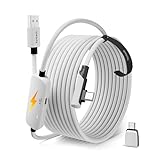
- From Syntech—Crafted for VR Enthusiasts: Join over 100 million users worldwide and elevate your PCVR experience. Syntech delivers industry-leading VR wired connection solutions with 24/7 support to maximize your gear's performance.
- Compatible with Meta Quest 3S/3/2 Accessories: The Syntech 2026 link cable is optimized for seamless compatibility with the latest VR headsets, ensuring a stable USB 3.0 PC connection while fast charging your Quest 3S/3/2. Note: This VR link cable is not designed for charging phones, computers, tablets, or other devices.
- 2-in-1 PC Link: Includes a USB 3.0 A to C adapter for flexible connection to both USB-A and USB-C ports on your PC. Achieve low latency streaming with stable data transfer of 1.9–3.2 Gbps across the full 16FT length—ideal for room-scale and seated experiences. For the best performance, plug into a USB 3.0 port.
- Next-Gen Charging Chip: Equipped with an advanced 2026 charging chip, the Syntech Link Cable delivers up to 18W PD charging power for uninterrupted gameplay. Compatible with Oculus/Meta Quest protocols, it ensures safe and efficient charging. When the VR headset battery reaches 65%, the cable automatically switches to trickle charging to minimize wear and extend battery life. For optimal performance, use with PD/QC fast charging adapters and connect to the USB-C port on the cable.
- Designed for PC VR Gaming: Our 16FT VR cable is built for durability and performance, offering the flexibility and reach needed for any VR setup. Its triple-layer protection shields against water, corrosion, and electrical leakage while maintaining flexibility. The included Velcro strap secures the cable to your headset, preventing accidental disconnection during intense gaming sessions.
A cable attached during active VR can snag, pull on the headset or create a trip hazard. For extended sessions, a rear-mounted battery strap or a power bank secured in a pocket or belt pouch is generally more practical than a loose cable.
How to make the Quest 3S battery last longer
- Lower display brightness. Use the lowest level that remains comfortable.
- Use Battery Saver when available. Open the headset’s Settings app and look under the power or battery section; labels can change between Horizon OS versions. Meta support says Battery Saver can extend runtime but may reduce graphical quality. The cited activity figures are for Quest 3, not verified Quest 3S measurements (Meta community support).
- Disable unnecessary wireless features. Turn off casting, recording or other functions when you are not using them.
- Download media when practical. Local playback avoids sustained wireless streaming.
- Close demanding applications. Do not leave a high-load game running in the background.
- Power the headset off for longer breaks. Standby is convenient but continues to use energy.
- Avoid excessive heat. Let the headset cool and keep it out of hot cars or direct sun.
- Keep Horizon OS updated. Updates can fix power issues, although they can also change power behavior.
Best ways to extend playtime
Battery head strap
A battery head strap adds capacity and usually shifts some weight to the back of your head. It is a good choice for frequent long sessions, but it adds weight and cost, and its advertised capacity does not translate into a guaranteed number of extra hours.
USB-C power bank
A suitable USB-C power bank is often the least expensive flexible option, especially if you already own one. Check its USB-C output, use a reliable cable and secure the bank so it cannot swing or snag. Stated milliamp-hour capacity does not convert directly into equivalent headset hours because of conversion losses and workload.
What’s actually slowing this PC down?
Pick the symptom - the matching free tool is one click away.
Best Value

- 20W USB – C Fast charging Power Adapter, with 6.6FT(2Meters) Type-C to Type-C USB cable included.
- Compatible with Shark CH701 CH701C CH700WM CH700, Oculus Meta Quest 3 Quest 2 Quest 2 Pro Quest 1, Pico 4 VR Pico 4 Pro, VR Headset Fast Charger Steam VR charger
- Ultra-compact, lightweight, sleek design,compact and easily portable, perfect for home, travel, office, and business trip
- adopt thickened PVC material, pass 1000+ bending test, Heat-resistant connectors ensure complete safety and reliability.The cable has tensile resistance, safety, long service life.MultiProtect safety system ensures complete protection for you and your devices.
- Input Voltage Range: AC 100V - 240V / Smart Power: 5V-3A ; 9V-2.2A ; 12V-1.67A (Also Compatible with 5V-1A, 5V-1.5A ,5V-2A etc)
Meta Elite Strap with Battery
Meta’s accessory material advertises up to two additional hours for the Elite Strap with Battery. That is a manufacturer estimate, not a guaranteed measured result. Check current compatibility and availability at Meta’s accessories store (Meta Quest accessories).
Swappable-battery straps
Third-party systems from companies such as BOBOVR and KIWI design can let heavy users rotate charged packs. They may support the longest sessions with the fewest interruptions, but add cost, weight, compatibility checks and another battery ecosystem.
Charging dock
A dock keeps the headset and controllers ready between sessions; it does not materially extend one continuous session. Choose it for storage and convenience rather than endurance.
Is 2.5 hours enough for your use?
- Short gaming sessions: Usually yes.
- A movie or several episodes: Often, depending on brightness, streaming and battery condition.
- Fitness: Commonly enough for one workout, although intensive apps may shorten runtime.
- Travel or long multiplayer sessions: Plan on a battery accessory or a charging break.
- All-day untethered use: The built-in battery is not designed for uninterrupted operation.
The important distinction is per-session runtime versus total daily use. You can recharge between sessions or continue while connected to power, but cable use introduces comfort and safety trade-offs.
What to do if the battery lasts only 45–60 minutes
A single short session does not prove the battery is failing. First rule out a demanding workload, high brightness, passthrough, incomplete charging, background activity, heat or an inaccurate percentage reading.
- Fully charge the headset with the included charger or a known-compatible USB-C charger.
- Restart the headset.
- Test a lighter workload, such as downloaded video at moderate brightness.
- Repeat the test across more than one session and compare different applications.
- Check whether the headset is unusually hot.
- Install any available system update.
- If it repeatedly shuts down far below the expected range during light use, contact Meta support before buying an accessory or replacement device.
Bottom line
Expect approximately two hours of normal active Quest 3S use, not a guaranteed 2.5 hours. Heavy games, mixed reality, wireless streaming and high brightness can reduce that to 1.5–2 hours. The headset is a sensible fit for one- or two-hour sessions; frequent longer sessions justify a battery strap or appropriately secured USB-C power bank.
Quick Recap
Product prices and availability are accurate as of the date/time indicated and are subject to change. Any price and availability information displayed on Amazon at the time of purchase will apply.




