What’s actually slowing this PC down?
Pick the symptom - the matching free tool is one click away.
There is no official fixed storage figure for a “full” Minecraft world. The word infinite describes how far the game can generate terrain in some editions—not a promise that a saved world has a set size or a defined maximum file size. To know how much space your world uses, check that save on your platform.
“Infinite” world size does not mean an infinitely large save
Minecraft’s Nintendo Switch FAQ says, “World size is infinite in Minecraft for Nintendo Switch.” It also explains that a transferred legacy world retains its existing area and can generate new chunks beyond it. This describes world generation, not the storage occupied by a save file or a numeric maximum.
A world save records game data; it is not a complete copy of every place the game could generate. The official sources cited here do not publish a universal “full world = X GB” figure, a representative typical size, or a growth-per-hour formula. A world’s size depends on the particular save, so an estimate without a specific edition, platform, and world would be misleading.
How to check a world’s storage use
Xbox cloud saves
Minecraft Help’s Xbox cloud-save instructions describe a storage summary showing cloud status and space used. Select a world’s information or details to see that world’s file size, last-played date, and storage location. This is a per-world view of Xbox cloud saves; it should not be assumed to apply to other platforms or to describe their local-storage accounting.
Outdated Drivers Are Slowing You Down
One free scan finds every outdated or missing driver and matches the right update for your exact hardware.Free scan · exact hardware matchPC Slower Than It Used to Be?
A free scan shows the junk files, broken settings and background clutter dragging Windows down - then fixes them in one click.Free scan · Windows 10 & 11#1 Best Overall

- ♥Best Gift:Catoon shape design different from traditional USB Flash Drive,cute and novelty,cheer up the working day.Cute outside but work well.It will be an amazing gift for your kid,friends and even significant others
- ♥ Easy to Use: No require for installing a driver.Only plug in and transfer your favorite music,applications,ringtones,pictures,images,ect
- ♥ Fast & Safe: USB 2.0 ensures high read/write speed for file transfer between devices.Electronic storage media,anti-vibration, anti-electromagnetic interference,waterproof,Safely storage of your files
- ♥Compatibility: Suitable in all USB 2.0 ports which is standard in computers Windows 98/98SE, Me/2000/XP, VISTA, 7; Mac: OS 9.0/ 10.0 or later; Linux: kernel 2.4 or later
- ♥ Warranty: 100% New; We pass a professional test on each USB before shipping to ensure you reach the quality usb flash drive and we provide with one year warranty.Contact us once you have any problem,we will provide you with a satisfactory service
Other platforms
For platforms without that documented per-world display, use the storage controls or backup guidance for your specific platform and edition. Minecraft’s Backup & Restore help section separates guidance for Java, Bedrock on Windows and Android, and console cloud saves. A device’s broader Minecraft storage allocation may include more than one world, so do not treat it as an individual save’s file size unless the interface identifies it as such.
Why edition and platform matter
Minecraft stores world data differently by edition: Microsoft Learn identifies LevelDB for Bedrock and Anvil for Java. Those format differences do not establish that one edition’s worlds are categorically larger.
Rank #2
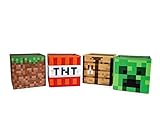
- Build Your Perfect Space: Add functionality to your gaming fandom and bring home this set of Minecraft storage organizers to your realm. These cubbies are the perfect cross between home decor and novelty collectibles.
- Wall To Wall Minecraft Fun: Set includes 4 Minecraft storage cubes, including Creeper, TNT, Grass Block, and Crafting Table. Create the environment you desire with game-authentic styles that level-up your home decor.
- Mined From Quality Materials: These 10-inch Minecraft storage cubes are the perfect solution for decluttering any closet, shelf, or other space in need of organizing. Helps gamers manage their messes one block at a time.
- A Block Of Minecraft Fandom: Each fabric bin is spacious enough to store common essentials. Keep stock of your inventory with these versatile baskets that can hold everything from Minecraft toys to clothing and more.
- Official Minecraft Collectible: Gamers will simply love these Minecraft storage bins. Brimming with style and decorative pixel fun, these functional pieces of home decor add a special touch of fandom to any collection.
The editions also run on different platforms. Minecraft’s Java or Bedrock guide lists Java for Windows, Mac, and Linux, and Bedrock for PC, console, and mobile. As a result, the way you inspect or back up a save depends on where and which edition you play. Do not assume a file path or a cloud-save size display transfers across platforms.
Java file locations can change between versions
If you are locating a Java world’s files to inspect or back them up, check instructions against your game version. The Java Edition 26.1 release notes describe changes to the world-folder structure, including dimension and player-data paths. A file-location instruction for an older release may not match the current layout.
Rank #3

- Dual-Purpose: Seamlessly blends a chair with smart toy storage, keeping your space tidy and stylish.
- Your Toys' Secret Hideout: This awesome chair hides a special spot to keep gaming gear and toys out of sight, making your kids room the neatest one around.
- Family-Proof Durability: Made with superhero-strong materials, this chair is ready for any gaming challenge.
- Flexible and Space-Saving: With a quick fold, this chair transforms any corner of your room into a gaming zone without gobbling up your play space.
- Designed for Family Homes: Ideal size (23” x 14” x 25”) for kids and adults alike, supporting up to 100kg, making it a versatile addition to your living space.
Backups and storage limits are separate questions
A backup gives you another copy of a world; it does not make the saved world smaller or establish how much space the game permits it to use. Minecraft’s backup guidance is platform- and edition-specific, so follow the instructions for your setup. PC players can choose a separate location, such as an external drive, for a backup; the cited guidance does not say that an external drive expands a console or mobile save’s storage quota.
Quick Recap
Rank #4

- Paying tribute to the iconic Creeper, this Minecraft Gaming Locker is the ultimate storage solution for gamers.
- This universal vertical gaming locker boasts the ability to hold up to 10 of your favourite games or Blu-Ray films. Hang up to 4 gaming controllers on the side of the locker
- Give your gaming headset the perfect home as this gaming locker includes a secure headphone holder on the top to save space
- Keep your gaming space tidy with extra compartments for all your gaming essentials. Store all your accessories, cables, remotes and other equipment securely in the bottom drawer
- Official Minecraft merchandise, designed and engineered by Numskull Designs
Product prices and availability are accurate as of the date/time indicated and are subject to change. Any price and availability information displayed on Amazon at the time of purchase will apply.




