Quick wins for a faster PC:
Fix the driver behind crashes, sound loss and screen glitchesFind Drivers →Repair Windows errors before they cause bigger problemsFix Now →Scan for outdated or missing drivers - takes under a minuteDriver Scan →You can find a recorded playtime estimate in Bungie account data, but you can’t get a reliable personal total without checking the account records tied to your characters and platforms. Bungie’s character-level minutesPlayedTotal field includes idle time, so it measures more than time spent actively playing missions.
What Bungie’s playtime figure counts
Bungie’s Destiny API schema includes a character-level field named minutesPlayedTotal. Bungie explicitly notes that it “includes idle time, not just time spent actually in activities shooting things.” It is therefore a measure of recorded time that can include periods when the game was running but you were inactive—not an active-play-only total. Bungie’s API schema describes the field.
Because the field is attached to a character, one character’s value should not be assumed to represent every Guardian or every Destiny account you have used. Bungie’s service documentation lists profile and character information, account-level and character-level historical stats, activity history, and aggregate activity statistics. Those are distinct data views, not proof that a particular third-party tracker combines every platform or historical record. Bungie’s Destiny 2 service documentation lists the available endpoint categories.
How to estimate your own total
- Check Bungie account data. Review the profile and statistics available for the Destiny game you mean, and look for the relevant character-level total. Bungie documents the data types and endpoints, but the exact current account-interface steps are not established here.
- Account for every character and account. Check the Guardians and platform accounts you have actually used. Do not treat a single character’s minutes as an account-wide lifetime number.
- Check platform playtime records separately. A platform counter may reflect a different scope or counting rule from Bungie’s character statistic. Record its source and what it appears to count rather than adding it automatically to Bungie’s figure.
- Compare coverage before combining anything. Check whether each number covers Destiny, Destiny 2, all relevant characters, linked platform accounts, and any platform transitions. If you cannot verify that the records cover distinct time periods, keep them separate rather than risking double-counting.
Why different counters may disagree
Two totals can differ because they may cover different games, characters, platforms, or portions of your history. They may also count different things: Bungie’s documented character field includes idle time, while another counter may use a platform-specific measure or report activity time. The available documentation does not establish a conversion that makes these figures directly interchangeable.
#1 Best Overall

- Real-Time GPS Tracker Device for Vehicles — Ideal for personal use or fleet management, this car GPS tracker provides up-to-the-minute location updates. Our car tracking device also provides unlimited trip history, including a detailed route history
- Driving Insights — Our OBD tracker for cars monitors speed, acceleration, hard braking, idle time, and more. This versatile family and fleet GPS tracker for cars also helps improve road safety by sending alerts in response to unsafe driving practices
- Vehicle Health — Unlike other vehicle tracking devices, our car tracker device continuously monitors diagnostic engine data, alerting you to potential maintenance issues, so you can avoid downtime and keep fleet and family vehicles in peak condition
- Geo-Fencing & Accident Detection — Set up geo-fences to receive notifications when your vehicle enters or exits designated areas; Equipped with advanced sensors and software, this vehicle tracker device instantly detects impacts and sends SMS alerts
- Easy To Install & Low Monthly Subscription — Our OBD GPS tracker for vehicles plugs directly into OBD2 ports and works on most vehicles 1996 and newer; $9.65 monthly subscription required - no hidden activation or return fees - cancel anytime
Bungie says Cross Save lets players access “the same set of Guardians on one Active Account wherever you play Destiny.” That explains access to characters across platforms; it does not establish that platform-local hour counters merge into one complete total. Bungie’s Cross Save support page describes the feature.
- Coverage: Which Destiny game, characters, accounts, and platform history are included?
- Counting rule: Does the number include idle game-running time, or only recorded activity?
- Completeness: Is it official Bungie account data, a platform’s own counter, or a third-party aggregation whose coverage you have not verified?
Does your first recorded game show when you started?
Not reliably enough to answer how many hours you played. In a Bungie help forum reply dated March 18, 2017, a user suggested checking the Bungie.net profile’s Stats and looking for a character’s earliest game. That is dated historical advice, not confirmation of the current interface, and an earliest recorded game would show a starting point—not total playtime. The 2017 forum discussion is the source for that suggestion.
Rank #2

- Real-time GPS Tracking: Our GPS Tracker for Kids provides real-time tracking of your loved ones' location, ensuring peace of mind for parents, especially for kids, teens, special needs individuals, and the elderly.
- No Monthly Subscriptions: Say goodbye to monthly fees! Our GPS tracker does not require any subscription, saving you money in the long run while offering continuous tracking services.
- Waterproof Watch Bands: Each GPS tracking device includes waterproof watch bands, ensuring durability and comfort for everyday wear.
- Easy to Use: No need to download additional apps! Simply open the "Find My" app on your iOS device to track the GPS locator in real-time, making it convenient for users of all ages.
- Real-Time Tracking: Our GPS tracking device allows you to monitor your family's location in real time from anywhere. Stay connected and stay informed about your loved ones' whereabouts with just a few clicks.
What you can conclude
Your personal total cannot be calculated from the question alone; it depends on the records for your characters and the platforms you have used. Bungie’s documented figure is useful as a starting point, provided you treat its idle-time inclusion and character-level scope correctly. Where the coverage or counting method of another counter is unclear, report the numbers separately rather than presenting a blended total as definitive.
Quick Recap
Rank #4
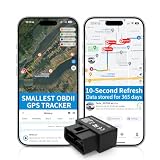
- 【5-day Free Trial】After the trial, continue subscription for $6.49/month with a 1-year plan ($77.88 total) or $8.99 month-to-month. SIM & data included.
- 【Plug & Play OBD2 GPS Tracker】Installs in seconds by plugging into your car’s OBDII port. Compact and lightweight (1.53" x 1.77" x 0.87", 1.2 oz), it’s a discreet hidden GPS tracker that won’t interfere with legroom or drain your car battery.
- 【Track Speed and Driver Behavior】Receive instant alerts for speeding, geo-fence breach, vehicle crashes, hard braking or rapid acceleration. Speeding threshold is customizable. Ideal teen driver GPS or elderly vehicle tracker.
- 【10-Second Real time, No Extra Charge】The fast refresh provides fleet manager or parents with accurate and real time location. Color-coded routes show speed changes visually.
- 【12-month Data History】All tracking data is securely stored with full confidentiality, allowing you to review up to 1 year of trip history.
Rank #3

- NO MONTHLY FEES & DATA PLAN INCLUDED: Say goodbye to monthly subscription bills. TuTrackAI OBD-II GPS Tracker for vehicles includes a built-in 4G LTE SIM card and data plan, No monthly fees, no activation fees, no extra data charges, and no hidden subscription costs. Simply plug it into your vehicle's OBD-II port and start tracking for family vehicles, personal cars, logistics fleets, rental cars, and small business fleets
- EASY PLUG & PLAY OBD-II SETUP: GPS Tracking devices for cars hidden requires no wiring, no tools, and no charging. Simply plug it into your vehicle's OBD-II port for instant power, connect it with the app, and start monitoring your car in real time for teen driver monitoring, elderly family members, business vehicles, and everyday vehicle security
- 【GLOBAL 4G COVERAGE & 24/7 IN-APP SUPPORT】 Track across supported 4G networks in 170+ countries with real-time location, routes, speed, and driving status in the TuTrack App. Ideal for cross-border travel, rental vehicles, and global fleets, with 24/7 in-app support for added confidence. Coverage varies by country, carrier, and local network conditions
- REAL-TIME LOCATION & 180-DAY HISTORY: Tracking devices for cars hidden View live location, routes, stops, mileage, speed, and driving activity. Review up to 180 days of trip history whenever you need it for checking family vehicle usage, teen driving behavior, business trips, and small fleet operation records
- 5-IN-1 SMART ALERTS THAT HELP YOU ACT: Car tracker device hidden receive app notifications for geofence entry and exit, over-speeding, vibration, ignition status, and device unplugging. Share vehicle access and manage multiple trackers from one account
Product prices and availability are accurate as of the date/time indicated and are subject to change. Any price and availability information displayed on Amazon at the time of purchase will apply.
Do these 3 things before closing this tab:
1Scan for outdated or missing drivers - takes under a minute2Repair Windows errors before they cause bigger problems3Fix the driver behind crashes, sound loss and screen glitches



