The Tool Desk
Outbyte Driver Updater FREEScan for outdated or missing drivers - takes under a minuteDriver Scan →Outbyte PC Repair FREERepair Windows errors before they cause bigger problemsFix Now →Mario Kart 8 Deluxe needs Switch firmware that includes Mii data; creating a Mii alone will not fix a game that hangs at Mii selection. Install firmware dumped from your own Switch, then use Yuzu’s Mii Editor or your own Mii database if the build you use exposes those features. Menu names and paths documented for Yuzu may differ in forks and repackaged builds.
Why Miis may be missing or the game may stall
Mario Kart 8 Deluxe relies on system firmware files containing Mii data. Yuzu’s game information identifies firmware as required, and EmuDeck’s SteamOS troubleshooting notes that the game may remain stuck at the Mii selection screen if the installed firmware lacks that data. A controller configuration is separate: choosing a Pro Controller or Dual Joy-Cons does not provide Mii data.
Yuzu’s Mario Kart 8 Deluxe information describes the game’s firmware requirement and controller setup. EmuDeck’s Yuzu on SteamOS documentation identifies missing Mii data as a possible cause of a Mii-screen stall.
Set up firmware from your own Switch
- Dump your own firmware and keys. Follow the Yuzu Quickstart Guide for the user-owned-console process, including its TegraExplorer instructions. Do not obtain firmware or keys from third-party downloads.
- Put the firmware files in the directory for your setup. The Quickstart says to copy the firmware
.ncafiles intoyuzu/nand/system/Contents/registered/. EmuDeck’s SteamOS documentation instead givesEmulation/bios/yuzu/firmwarefor its setup. Follow the instructions for your platform and Yuzu package; do not assume one path applies to every installation. - Restart Yuzu after setting up the firmware, then launch Mario Kart 8 Deluxe and check whether Mii selection proceeds.
Create or import a custom Mii
If firmware is installed and the game proceeds but you want a particular Mii, Yuzu’s September 2023 progress report documents two approaches. Their availability in current forks or repackaged builds is not established, so check the menus and data directory in the build you actually use.
#1 Best Overall
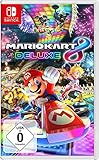
- With Nintendo Switch, fans can enjoy the definitive version of Mario Kart 8 anywhere, anytime
- the Mario Kart you know and love, with many new features
- Enjoy Mario Kart alone or with friends, anytime, anywhere, with anyone
- Supports 2 players in handheld mode, 4 players on one TV and 12-player online
- 5 exclusive new characters join the tournament, including Inkling Boy and Inkling girl.4 exclusive new multiplayer battle modes including Balloon battle and Bob-omb blast.48 tracks.40+ racers.It's the biggest Mario Kart roster ever.all downloadable content from the Wii U version included as standard Compatible with the Nintendo Switch only
Use the Mii Editor, if available
- In Yuzu, open Tools > Open Mii Editor.
- Create a Mii in the editor, then launch the game and select it.
The menu path is documented in Yuzu’s September 2023 progress report; a build without that menu may not include the documented feature.
Load your own Mii database
The same report documents this Windows-style Yuzu path for a Mii database:
Rank #2
![Mario Kart 8 Deluxe - Nintendo Switch [Digital Code]](https://m.media-amazon.com/images/I/517O3bI45YL._SL160_.jpg)
- Hit the road with the definitive version of Mario Kart 8 and play anytime, anywhere! Race your friends or battle them in a revised battle mode on new and returning battle courses
- Play locally in up to 4-player multiplayer in 1080p while playing in TV Mode. Every track from the Wii U version, including DLC, makes a glorious return
- Plus, the Inklings appear as all-new guest characters, along with returning favorites, such as King Boo, Dry Bones, and Bowser Jr.
- Players can choose a new Smart Steering feature which makes driving and staying on the track easy for novice players and kids even at 200cc
%appdata%/yuzu/nand/system/save/8000000000000030/MiiDatabase.dat
Use your own database and confirm that this is the active Yuzu data directory for your installation. The path is not a universal location for every operating system, fork, or package.
Recommended Free Tools
Rank #3
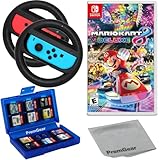
- Included is the following: Mario Kart 8 Deluxe - Nintendo Switch Game, 2x PremGear Steering Driving Wheels to use with your Joy-Con Controllers (NOT COMPATIBLE WITH SWITCH 2), PremGear 24 Slot Game card Case/Holder with 2 Slot MicroSD Memory Card Adapter and PremGear Quality Cleaning Cloth
- RACE ANYTIME, ANYWHERE! Hit the road with the definitive version of Mario Kart 8. Race your friends or battle them in a revised battle mode on new and returning battle courses
- Play locally in up to 4-player multiplayer in 1080p while playing in TV Mode. Every track from the Wii U version, including DLC, makes a glorious return
- Plus, the Inklings appear as all-new guest characters, along with returning favorites, such as King Boo, Dry Bones, and Bowser Jr.!
- Players can choose a new Smart Steering feature which makes driving and staying on the track easy for novice players and kids even at 200cc
Troubleshoot the specific symptom
The game boots but never gets past Mii selection
- Check that you installed firmware containing Mii data, rather than assuming that any firmware files are sufficient.
- Re-dump firmware from your own Switch if needed, then verify that the files are in the directory expected by your platform’s Yuzu package.
- For EmuDeck on SteamOS, consult its documented firmware location and Mii-screen troubleshooting guidance.
The Mii Editor menu is missing
The editor is documented in Yuzu’s September 2023 report, but that does not establish that every build or successor fork includes it. Check the installed build’s Tools menu; do not try to solve a missing menu by downloading unofficial system files.
Your custom Mii does not appear
Check that MiiDatabase.dat is your own database and that you placed it under the active Yuzu data directory. The report documents a Windows-style path, not a guaranteed path for other packages.
Rank #4
![Mario Kart 8 Deluxe Bundle Standard - Nintendo Switch [Digital Code]](https://m.media-amazon.com/images/I/51t7MfoTDGL._SL160_.jpg)
- Guest characters Inkling Girl and Inkling Boy join Splatoon karts and the Urchin Underpass Battle course
- Nintendo Switch Online membership (sold separately) and Nintendo Account required for online features
You changed controller settings, but the problem remains
Controller setup and Mii data are separate. Yuzu’s game information recommends controller configurations for play, but controller selection does not add the firmware data Mario Kart 8 Deluxe needs.
Independent reader supportYour contribution helps us test, update, and keep practical guides available for everyone.Choose the route that fits your setup
| Route | What it does | What you need |
|---|---|---|
| Install firmware with Mii data | Provides the system Mii data the game depends on. | Your own Switch to dump firmware, plus the correct firmware location for your platform and Yuzu package. |
| Use the Mii Editor | Creates a custom Mii through the documented Yuzu applet. | A build exposing Tools > Open Mii Editor; feature availability may differ in current forks. |
| Load a Mii database | Uses an existing database rather than creating a Mii in the editor. | Your own MiiDatabase.dat and the active data-directory path for your build. |
Firmware setup addresses missing system Mii data; the editor and database are optional custom-Mii routes, not substitutes for firmware that the game requires. The documented menu and database path come from a September 2023 Yuzu report, while firmware paths vary by setup. Current behavior is not established for every fork or repackaged build.
Do these 3 things before closing this tab:
1Scan for outdated or missing drivers - takes under a minute2Clear out junk files and repair common Windows errors3Fix the driver behind crashes, sound loss and screen glitchesQuick Recap
Best Value
![Mario Kart 8 Deluxe – Booster Course Pass - Nintendo Switch [Digital Code]](https://m.media-amazon.com/images/I/51yDGvODqXL._SL160_.jpg)
- Racers who have an active Nintendo Switch Online plus Expansion Pack membership will have access to all of these newly-added courses as they are released at no additional cost.
- Non-members can access the courses as they are released by purchasing the Mario Kart 8 Deluxe – Booster Course Pass on its own.
- A total of 48 courses from throughout the Mario Kart series are racing to the Mario Kart 8 Deluxe game as paid DLC
- Speed through location-based courses like Paris Promenade and nostalgic classics like Coconut Mall
- Courses will release in 6 waves of 8 courses each from March 18, 2022 until the end of 2023. Full version of game required to use DLC. Sold Separately.
Product prices and availability are accurate as of the date/time indicated and are subject to change. Any price and availability information displayed on Amazon at the time of purchase will apply.




