Reach the summit campfire in Roots and light it to clear the fog wall and open the way forward. The route can vary, so climb cautiously, limit time in spore clouds, and change course when your current approach becomes unsafe.
What is the objective in Roots?
Roots is a redwood forest biome with mushrooms. It can appear as one of the possible second biomes after the Shore; the community-maintained Roots wiki describes the route onward as leading to either the Alpine or Mesa. That sequence is not guaranteed for every run.
As an Amazon Associate I earn from qualifying purchases.
Your immediate goal is the summit campfire. Light it to dispel the fog wall and unlock the route to the next biome. Eligible living Scouts can also receive the Forestry Badge.
Do these 3 things before closing this tab:
1Clear out junk files and repair common Windows errors2Scan for outdated or missing drivers - takes under a minute3Repair Windows errors before they cause bigger problemsHow to climb through Roots
There is no single verified route that works across map seeds. Treat the climb as a series of safe decisions rather than trying to follow fixed coordinates or force one line upward.
#1 Best Overall

- 【Supported Operating System】The Game Controller is specifically designed for playing classic old school retro snes games on computer or laptop. Compatible with Windows 98 / ME / Vista / 2000/2003 / XP / 7 / 8 / 8.1 / 10/11, Mac OS X/ OS X 10.0 and beyond, Raspberry Pi, Raspberry PI 2 model B,Model A, Raspberry Pi 1 Model B+, Raspberry Pi 2,Raspberry Pi OS, Raspberry Pi 3 Model B+, Raspberry Pi 3, Raspberry Pi Zero.
- 【Simple USB Plug and Play】If your program or application accepts USB controller input, this classic game controller do not need install drivers or patches. 1.5 meter external cable(approx. 5 ft. Long). Notice: Please download the game emulator first before start the games, and then you must manually set the buttons and directionals within the emulator you're using, and the controller not automatically assigns buttons/directional axes. If on the Steam platform, you need to first enable Steam's "Universal Controller Configuration Support" and then restart Steam. After entering the game, you also need to manually bind key positions in the game
- 【High Sensitivity without Delay】Super sensitive buttons for precision control: 6 fire buttons, a 'Start' button and a 'Select' button, motion control cross. Play your favorite old school games with classic retro feel. Fits perfectly in the hand and also perfect for two player action.Note: Not applicable to Switch/PS games. Not Compatible with TV/ TV Box, third Mini Games Box and Tesla Model 3
- 【Supported Game Emulators】The game controller works with most emulators. Download any emulator you wish to download and use from Google and do the same with ROMS. Notice:Third party controller, not original controller. But it works phenomenal with the Raspberry Pi game emulation and so on
- 【Product Service】If you have any problem during use, send message to us and we will help you to solve the problem soon
- Scan for a manageable ascent. Look for stable climbing structures and footholds, and choose a direction that lets you rest safely when needed.
- Spend stamina deliberately. Avoid uncertain moves that may leave you without enough stamina to continue or recover. Pause at safe spots instead of pushing through a difficult stretch without a plan.
- Reroute when conditions worsen. If the current approach becomes hazardous, look for another way up rather than treating it as the only path. Routes and hazards may differ between runs.
- Keep the summit in mind. Continue upward until you reach the campfire, then light it to clear the fog wall.
How to avoid spore trouble
Spore clouds are a hazard worth minimizing. The inventory guide associates Spore status with standing in a Roots cloud and says the status decays slowly; the Roots page also warns that spores can build quickly in the biome.
- Do not linger in a cloud when you can move around it safely.
- Watch your status effects as you climb, especially after passing through a cloud.
- Use restorative or protective options when they are available and address the hazard you are actually facing. The available guidance does not establish a precise decay timer or a guaranteed cure.
Does the strategy change in solo or co-op?
PEAK supports both single-player and online co-op, according to its Steam listing. The available sources do not show that either mode is easier for Roots, so choose the one that suits your group rather than relying on a claimed mode-specific advantage. In either case, the core plan remains to climb cautiously, avoid unnecessary spore exposure, and reach the summit campfire.
Rank #2
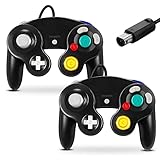
- 【Wide Compatibility & Plug and Play】Fiotok GameCube controllers are compatible with GameCube and Nintendo Wii. Note: Wii support is limited to GameCube games only, and plug and play requires a built-in GameCube port on your Wii console. Just plug in and play, no extra drivers or complicated setup required
- 【Upgraded Analog Stick & Rumble Feedback】Fiotok wired gamecube controller retains smooth performance of original controller. It features refined analog joystick design that minimizes stick drift and button sticking, paired with upgraded dual analog joysticks and responsive D-pad. Built-in vibration feedback provides automatic vibration adjusted according to games to enhance your gaming experience. Perfect for Melee and Smash series games
- 【4-Player Multiplayer Ready】GameCube controllers are designed for Nintendo GameCube/Wii and fully support Super Smash Bros. Equipped with fully analog pressure-sensitive action buttons & D-Pad for precise in-game inputs. With a controller adapter, Fiotok game cube wired controllers work with Switch, PC and Wii U. Up to 4 controllers can be connected to the console at once, ideal for multiplayer party games to enjoy game time with your friends (Note: Adapter is not included)
- 【Christmas Gift For Family】The gamecube controller is a nice holiday gift for kids to boost parent-child interaction. This game cubes controller fits all ages to unwind and escape daily pressure, bringing relaxing and joyful gaming time for family and friends
- 【Durability Support】We've worked hard to improve product quality and customer service. If you have any questions about our Fiotok brand products, please let us know. We will reply to you within 24 hours and provide support for you.
What is not established about Roots?
Current sources do not establish a fixed seed-by-seed route, guaranteed shortcut, best Roots-specific loadout, exact spore timing, or a comprehensive account of enemy behavior. Because Roots details come from a community-maintained wiki and game mechanics can change, rely on what you see in your current run rather than assuming every route or hazard will match another player’s account.
Recommended Free Tools
Quick Recap
Rank #4

- 【Wide Compatibility & Plug and Play】Fiotok GameCube controllers are compatible with GameCube and Nintendo Wii. Note: Wii support is limited to GameCube games only, and plug and play requires a built-in GameCube port on your Wii console. Just plug in and play, no extra drivers or complicated setup required
- 【Upgraded Analog Stick & Rumble Feedback】Fiotok wired gamecube controller retains smooth performance of original controller. It features refined analog joystick design that minimizes stick drift and button sticking, paired with upgraded dual analog joysticks and responsive D-pad. Built-in vibration feedback provides automatic vibration adjusted according to games to enhance your gaming experience. Perfect for Melee and Smash series games
- 【4-Player Multiplayer Ready】GameCube controllers are designed for Nintendo GameCube/Wii and fully support Super Smash Bros. Equipped with fully analog pressure-sensitive action buttons & D-Pad for precise in-game inputs. With a controller adapter, Fiotok game cube wired controllers work with Switch, PC and Wii U. Up to 4 controllers can be connected to the console at once, ideal for multiplayer party games to enjoy game time with your friends (Note: Adapter is not included)
- 【Christmas Gift For Family】The gamecube controller is a nice holiday gift for kids to boost parent-child interaction. This game cubes controller fits all ages to unwind and escape daily pressure, bringing relaxing and joyful gaming time for family and friends
- 【Durability Support】We've worked hard to improve product quality and customer service. If you have any questions about our Fiotok brand products, please let us know. We will reply to you within 24 hours and provide support for you.
Rank #3

- ✅【Compatibility】Compatible with Raspberry Pi, Windows PC, Linux ,Mac. Specifically designed for playing classic old school retro snes games on computer or laptop.This is the USB controller what has a USB plug for PC, NOT compatible for Original SNES super Nintendo console
- ✅ 【Ergonomic Design】Super precise cross key and function buttons,the cross direction key adopts frosted concave design,anti-sweat and anti-slip.The shape of the controller is designed to fit the contour of your hands,easy and comfortable to hold.
- ✅ 【Advanced Game Experience】PC running operating system:Windows 98/2000/ ME/XP/Vista/Win7/8/8.1/11 or later,or Mac running OS X 10.0/Mac OS X or above.It works with most of emulators you wish to download and use,such as VirtuaNES(PC),sens9x,Zsens,sensgt,Uosnesw,RetroArch,OpenEmu(MAC),NESEmu and Jnes etc.
- ✅ 【Wired USB Connection】Standard USB 2.0 port with a 1.5 meters (5ft) cable, don't need to install any drivers, you must manually set the buttons and directionals within the emulator you're using, and the controller not automatically assigns buttons/directional axes. Notice: please download the game emulator first before start the games, you can download the emulator “VirtuaNES” on PC and “OpenEmu”on MAC.
- ✅【Satisfaction】Third party controller(USB Version), not for original snes console and not support for switch. If there is an incompatibility on MAC or Raspberry Pi , please contact the seller for a support.
Product prices and availability are accurate as of the date/time indicated and are subject to change. Any price and availability information displayed on Amazon at the time of purchase will apply.




