
Do these 3 things before closing this tab:
1Scan for outdated or missing drivers - takes under a minute2Clear out junk files and repair common Windows errors3Fix the driver behind crashes, sound loss and screen glitchesYes, a powerful Mini-ITX 4K gaming PC is practical in 2026—but it must be designed around the graphics card, airflow, power supply, and cable clearance. For most builders, the best balance is a well-ventilated 15–25-liter case with a Radeon RX 9070 XT, Ryzen 7 9800X3D or a lower-power AM5 processor, 32–64GB of DDR5, and an 850W SFX or SFX-L power supply. An RTX 5090 build is possible, but it is an advanced project with exceptional heat, power, noise, and fitment demands.
Define your 4K target first
“4K performance” can mean several different things:
As an Amazon Associate I earn from qualifying purchases.
- Native 4K raster: 3840×2160 rendered directly with conventional lighting.
- Upscaled 4K: The game renders below 4K and reconstructs the image with FSR, DLSS, or another upscaler.
- 4K ray tracing: Much more demanding and often dependent on upscaling.
- 4K high refresh: 120Hz or faster requires substantially more GPU performance than a 60Hz target.
- 4K VR: High per-eye render resolutions create different performance and latency requirements.
An “Ultra” preset is not a universal quality standard. Some Ultra settings have a large performance cost for a small visual improvement. Likewise, frame generation can make motion appear smoother, but generated frames do not remove the base-render latency of the game.
The Tool Desk
Outbyte Driver Updater FREEScan for outdated or missing drivers - takes under a minuteDriver Scan →Outbyte PC Repair FREEClear out junk files and repair common Windows errorsFree Scan →The RTX 5090 supports DLSS 4, DisplayPort 2.1b, HDMI 2.1b, and display output up to 4K at 480Hz under the stated display and DSC conditions. That is an output capability, not a guarantee that games will render at 480 frames per second. See NVIDIA’s RTX 5090 specifications.
#1 Best Overall

- JONSBO/JONSPLUS Z20 Mini Micro-ATX PC with Detachable Carrying handle-Built with only about 20L of volume, be easily placed in various desktop environments..Easier to build your PC,More convenient
- Thick to 2mm integrated bent steel panels (panel + top panel)Complemented by a large area of delicate square openings,matx case Combines heat dissipation and craftsmanship,Comprehensive Coverage Magnetic Dust Filter
- Innovative Design: Removable PCI-E Fixing Piece to Optimize the Installation Experience for Longer GPU PC Case with handle
- [FAN]TOP 120mm*2/140mm*2 Bottom 120mm*2/140mm*2 Real 120mm*1 /92mm*1 [GPU Clearance]:Up to 363mm,depends on other hardware configurations Please refer to the 'Sixth Image' for GPU compatibility.
- 【ATX PSU】 ATX/SFX/SFX-L The power supply can be adjusted in multiple gears. It is recommended to check the picture for detailed introduction to prevent interference from different hardware. It supports SFX side mounting.
Choose the case before buying anything
Mini-ITX describes the motherboard format, not the size or capability of the finished computer. A Mini-ITX board can live in a relatively roomy SFF case, and that is usually the right approach for sustained 4K gaming.
- Choose the case.
- Record its maximum GPU length, height, thickness, and power-connector clearance.
- Check CPU-cooler height and radiator support.
- Check the PSU format and maximum PSU length.
- Confirm motherboard, riser, and storage compatibility.
- Only then choose the exact graphics card and cooler.
Do not approve a GPU because its published length alone fits. A side panel, radiator, intake fan, backplate, or power cable may occupy the remaining space. NVIDIA’s RTX 5090 guidance lists 304 × 137 × 61mm for the Founders Edition and recommends approximately 36mm of additional space for power cables. Its installation guide illustrates why connector clearance is a separate requirement.
Case compatibility worksheet
| Check | What to record | Why it matters |
|---|---|---|
| Internal volume | Liters | More volume generally improves airflow and component choice. |
| GPU | Maximum length, thickness, height | Partner cards can be much larger than reference designs. |
| Connector space | Clearance behind the GPU plug | Prevents unsafe bends and side-panel pressure. |
| CPU cooling | Cooler height and radiator positions | Determines whether air cooling or a 240mm AIO is realistic. |
| PSU | SFX/SFX-L support and maximum length | A longer PSU can consume vital GPU or radiator space. |
| Riser | Generation and included cable | Signal problems are common in tightly routed layouts. |
| Fans | Included fans and available intake/exhaust positions | GPU heat must leave the enclosure during long sessions. |
The Cooler Master NR200P V2 and NZXT H2 Flow Mini represent the more forgiving, airflow-oriented class. The Fractal Design Terra is substantially more compact, but its internal layout makes GPU thickness, CPU-cooler height, and airflow compromises more significant. Check the manufacturer’s current specifications before purchase.
Choose the GPU
Radeon RX 9070 XT: the practical high-end choice
The RX 9070 XT is the better default for most powerful Mini-ITX 4K systems. AMD specifies 16GB of GDDR6, 304W total board power, two 8-pin connectors, and a 750W recommended system PSU. Its listed reference specifications include 64 compute units, 4,096 stream processors, a 256-bit memory interface, and boost speeds up to 2,970MHz. The details are in AMD’s RX 9000 quick-reference guide.
Its advantages in an SFF system are manageable power, simpler cooling, and a more forgiving range of case options. The trade-offs are that 16GB may become limiting in some future 4K ray-traced or heavily modded games, and partner-board coolers may be far larger than the reference form factor. Verify the exact card model, including its thickness, height, connector position, and recommended PSU.
Rank #2

- Ample Interior: Explore ample interior space for Micro-ATX or Mini-ITX motherboards, ensuring easy and future expansion
- Components Clearance: Accommodates CPU coolers with a max height of 159mm, GPU cards up to 360mm, and PSU up to 160mm in length.
- Versatile Cooling: Maximize cooling performance with a 240mm liquid cooler and 5 fans.
- Modular I/O Panel: You have the flexibility to adjust its position at the front, top, or bottom on both sides
- Edge-To-Edge Panel: Show off your meticulous build through the transparent side panel with pride.
RTX 5090: maximum performance with major compromises
The RTX 5090 is appropriate only when maximum 4K performance, heavy ray tracing, 32GB of VRAM, DLSS features, CUDA, or creator software justify the cost and complexity. NVIDIA lists 21,760 CUDA cores, 32GB of GDDR7, 575W total graphics power, and a 1,000W recommended system power figure.
A 575W graphics card produces an exceptional heat load in a small enclosure. Partner cards can be longer, taller, thicker, or arranged differently from the Founders Edition. NVIDIA’s SFF-Ready program is a compatibility guideline, not approval for every Mini-ITX case. Check the designation on both the specific card and chassis.
In practice, an RTX 5090 Mini-ITX build may use a Mini-ITX motherboard while still being physically large, loud, expensive, and difficult to cable. Choose a larger SFF enclosure with unrestricted intake and exhaust rather than forcing a flagship card into an ultra-compact case.
Choose the CPU and AM5 platform
The Ryzen 7 9800X3D is an excellent premium gaming CPU, especially for CPU-limited games, high-refresh gaming, or a system that will also run at 1080p and 1440p. It is not mandatory for 4K. At 3840×2160, the GPU usually limits performance first, so a lower-power Ryzen 7 or Ryzen 5 may leave more budget and thermal headroom for the graphics card, PSU, and cooling.
Use an AM5 Mini-ITX motherboard with DDR5 support, modern I/O, Wi-Fi, and a useful upgrade path. B850I and X870I boards are suitable classes, but compare:
Rank #3

- Ultra-Compact 15L mini-itx with flexible motherboard support – Maximize performance in minimal space. SSUPD Meshroom S V2 features adjustable internal MB tray that supports ITX, MATX, and ATX motherboards. (require extra length PCIe riser cable for MATX and ATX setup)
- GPU Compatibility – 4-Slot Ready : Supports full-width GPUs up to 152mm and, with optional 30–50mm aluminum feet, fits GPU lengths up to 353mm, making it perfect for high-end RTX 5090 and Radeon builds.
- Compatible with a 240/280mm AIO on the front mounting bracket. Supports dual-radiator custom loop designs and accommodates a ddc pump. CPU Cooler Max at 74mm height.
- PSU Supports SFX, SFX-L, or ATX power supplies up to 170mm in length.
- Fully Breathable Mesh Panels on all sides provide superior airflow; Tool-less external panels and easy to assemble. High quality powder coated SGCC steel.
- BIOS Flashback and CPU support before purchase.
- EXPO support and the board’s memory QVL.
- PCIe slot generation and riser compatibility.
- M.2 slot placement and heatsink clearance.
- Rear USB-C, fan headers, Wi-Fi antenna clearance, and VRM heatsinks.
Mini-ITX boards normally have two memory slots. Use a matched 2×16GB kit for 32GB or 2×32GB for 64GB. DDR5-6000 is a sensible AM5 target, but a kit’s advertised speed is not guaranteed on every board.
Free tools Windows power users keep installed
One-click scans. No signup required.
Plan cooling around the GPU
Low-profile air cooling
Use a capable low-profile cooler when the case is compact, reliability matters, or the CPU will be power-limited. The trade-offs are greater noise under sustained all-core workloads and the possibility that the cooler draws warm air from the GPU area. Set a sensible PPT, ECO-mode limit, or manual power limit if CPU temperatures or noise become excessive.
240mm AIO cooling
A 240mm AIO makes sense when the case supports a side- or top-mounted radiator and the CPU needs sustained performance. It also introduces pump noise, tubing constraints, and another failure point. A radiator can block GPU length, intake airflow, or PSU cable space, so verify the complete layout rather than radiator support in isolation.
GPU-led airflow
- Feed cool air to the GPU whenever the chassis layout permits.
- Use exhaust fans to prevent hot-air recirculation.
- Keep cables away from GPU fans and intake openings.
- Test with the side panel installed; an open-panel result is not representative.
Select the power supply by more than wattage
Use a quality SFX or SFX-L unit with ATX 3.x and PCIe 5 support where possible. Check its physical length, connector count, cable flexibility, transient-load handling, fan behavior, warranty, and independent electrical testing.
- RX 9070 XT: Begin with an 850W SFX/SFX-L unit in a premium system, despite AMD’s 750W recommendation. This provides useful headroom for a 9800X3D, factory-overclocked card, multiple drives, and transient loads.
- RTX 5090: Use at least a suitable 1,000W unit, and consider 1,200W in a larger SFF case if the manufacturer and case support it.
Prefer a native 12V-2×6 or PCIe Gen 5 cable for a compatible RTX 5090 PSU. Otherwise follow the GPU’s supplied adapter requirements exactly. Never reuse modular cables from another PSU, and do not use split or daisy-chained PCIe leads where separate connectors are required. Do not force a side panel against a power connector.
Quick wins for a faster PC:
Fix the driver behind crashes, sound loss and screen glitchesFind Drivers →Clear out junk files and repair common Windows errorsFree Scan →Scan for outdated or missing drivers - takes under a minuteDriver Scan →Rank #4
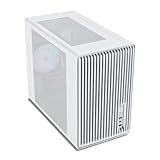
- Compact but Powerful Design: Micro-ATX / Mini-ITX case with high-airflow mesh front for maximum cooling in a space-efficient build. Ideal for gamers and compact setups
- Superior Cooling Options: Supports up to 5×120mm fans and a 240mm top radiator, ensuring stable temperatures for gaming PCs and high-performance systems
- Room for High-End GPUs: Fits graphics cards up to 355mm long, making it compatible with popular GPUs from NVIDIA RTX and AMD Radeon series
- Flexible PSU Mounting: Adjustable power supply installation with max length of 160mm, allowing better layout and airflow customization
- Modern I/O Connectivity: Equipped with front panel USB Type-C and USB 3.0 ports for fast data transfer and easy access to modern peripherals
Validated balanced 4K build
| Component | Recommendation | Reason |
|---|---|---|
| CPU | AMD Ryzen 7 9800X3D | Premium gaming performance without prioritizing unnecessary CPU cores. |
| Cooler | 240mm AIO, or a low-profile cooler with a 65–105W CPU limit | Choose according to the case’s radiator and height limits. |
| Motherboard | B850I or X870I AM5 Mini-ITX | DDR5, modern connectivity, PCIe 5 support, and upgrade potential. |
| GPU | Compact RX 9070 XT | Strong 4K target with more manageable heat and power. |
| Memory | 32GB 2×16GB DDR5-6000; 64GB for heavy use | Two-DIMM capacity suits Mini-ITX boards. |
| Storage | 2TB PCIe 4.0 NVMe SSD | Good capacity and a better heat-to-cost balance than PCIe 5 storage. |
| PSU | 850W SFX or SFX-L, preferably ATX 3.x | Headroom for GPU transients and upgrades. |
| Case | NR200P V2, H2 Flow Mini, or equivalent airflow-oriented chassis | More forgiving GPU, radiator, and fan clearance. |
| Fans | At least two quality intake/exhaust fans where supported | Improves sustained GPU temperatures. |
| OS | Windows 11 64-bit | Required by many current games and driver features. |
This is a compatibility direction, not a guarantee that every RX 9070 XT or every motherboard fits every listed case. Confirm the exact dimensions and connector positions before ordering.
Extreme RTX 5090 variant
- Ryzen 7 9800X3D.
- RTX 5090 Founders Edition or a specifically verified compact partner card.
- 64GB DDR5-6000.
- 1,000–1,200W SFX-L or compact PSU approved for the configuration.
- A larger SFF case with clear GPU intake, exhaust, and cable space.
- A native PCIe 5 power cable where supported.
Expect higher heat, noise, cost, and installation difficulty. Treat every dimension—including cable bend radius—as a hard requirement.
Assembly procedure
Before installation
- Download the motherboard and case manuals.
- Confirm CPU, memory, BIOS, GPU, cooler, PSU, and riser compatibility.
- Update the BIOS if the board needs a newer version for the CPU.
- Label or photograph modular PSU cables.
- Test-fit the GPU and power cables outside the case if the layout is unusually tight.
Recommended order
- Install the CPU, M.2 SSD and heatsink, and memory on the motherboard.
- Install the cooler mounting hardware or backplate.
- Install the motherboard while cooler access remains available.
- Install the PSU and route only the required cables.
- Install the cooler or radiator.
- Route the riser without sharp folds.
- Install the GPU last and inspect connector clearance.
- Connect power, front-panel, USB, audio, fan, and pump cables.
- Ensure no cable can touch a fan blade or press against a GPU connector.
- Boot first with the side panel removed, then repeat testing with the case closed.
BIOS, drivers, and tuning
Menu names vary among ASUS, MSI, Gigabyte, ASRock, and different firmware versions. Look for these functions rather than assuming an identical path:
- EXPO: Enables the rated DDR5 memory profile.
- Resizable BAR or Smart Access Memory: Leave enabled where supported.
- PCIe link speed: Start with Auto; use Gen 4 as a riser troubleshooting setting.
- Above 4G Decoding: Commonly used with ReBAR.
- PBO/ECO mode: Reduces CPU heat and noise.
- Fan curves: Use a GPU-temperature source if the board supports it.
- CSM: Usually disabled for modern UEFI/GPT installations.
- Secure Boot and TPM: Keep enabled for current Windows requirements unless diagnosing a specific legacy problem.
After the first stable boot, install motherboard chipset, LAN, Wi-Fi, and audio drivers as needed, then install the current GPU driver from AMD or NVIDIA. Set the monitor to its correct refresh rate. Test upscaling and frame generation separately so you can judge image quality and latency rather than looking only at the displayed FPS.
Test sustained performance, not just a short benchmark
- Boot at default memory settings and confirm both DIMMs, the SSD, fans, and pump are detected.
- Update firmware and drivers.
- Enable EXPO only after the system is stable.
- Run a short CPU and GPU test with the side panel removed.
- Run a long gaming session with the side panel installed.
- Watch CPU and GPU temperatures, clock speeds, power limits, fan speeds, crashes, and WHEA errors.
- If temperatures rise continuously or clocks fall, improve airflow, lower power limits, or choose a larger case.
Troubleshooting common failures
Power on, but no display
- Check the monitor input and cable.
- Check GPU power and reseat the graphics card.
- Reseat the riser and memory.
- Confirm BIOS support for the CPU.
- Try one memory module.
- Set the PCIe slot to Gen 4.
- Test the GPU directly in the motherboard slot if possible.
- Reset CMOS.
Memory instability after EXPO
Disable EXPO, update the BIOS, test one module at a time, and use the recommended slots. If necessary, reduce memory speed or loosen timings. Check the board’s QVL; advertised DDR5 speed is not a universal guarantee.
Best Value

- JONSBO D32 STD Micro-ATX PC Case- Unmatched Price per Performance - An economical M-ATX chassis that is compatible with main popular hardware such as back connect motherboard, 240AIO, 365mm GPU , ATX(150-200mm) /SFX-L/SFX PSU (16A plug except) etc. easier to build your PC,More convenient.
- 【Small and Compact】 - Desktop dessert grade size control, mini case Bottom with magnetic dust proof net
- 【Water Cooling】: Top 240 AIO 【CPU Air Cooler】:164mm MAX (Intel CPU) or 163mm MAX (AMD CPU)
- 【FAN:】Top 120mm*2/140mm*2 Bottom 120mm*3/140mm*2 Rear 120mm*1
- 【GPU Length】: 365mm /14.37IN
Thermal throttling
Confirm that protective film was removed, reinstall the cooler with even pressure, check pump RPM and radiator orientation, rebalance intake and exhaust, and reduce the CPU power limit. A cautious GPU undervolt can also reduce heat. Always test with the side panel installed.
Excessive noise
Smooth the fan curves, reduce the GPU power target, cap FPS slightly below the display refresh rate, use an appropriate upscaler, and replace turbulent or restrictive fans. The PSU fan may be reacting to the combined GPU load.
Unsafe GPU cable bend
Do not force the side panel closed. Use the approved cable, avoid a sharp bend immediately at the connector, and select a different GPU or larger case if the cable cannot route naturally.
Recommended Free Tools
PCIe riser problems
No display, intermittent driver crashes, incorrect link speed, WHEA errors, and game crashes can indicate a riser problem. Connect the GPU directly if possible, set PCIe to Gen 4, update the BIOS, reseat or replace the riser, and keep it away from high-current power cables. Do not assume a Gen 3 riser works reliably with a Gen 5 slot.
Which parts should receive the budget?
Choose the RX 9070 XT when:
- You want high-end 4K gaming with sensible power and cooling.
- You value easier case compatibility and lower noise.
- 16GB of VRAM is acceptable for your games and mods.
- You do not depend on CUDA or NVIDIA-specific software.
Choose the RTX 5090 when:
- Maximum 4K and ray-tracing performance is the priority.
- 32GB of VRAM, DLSS, CUDA, encoding, or creator tools matter.
- You accept a larger case, higher power draw, noise, and cost.
Choose a larger SFF case when:
- The GPU is 300W or more.
- You want a 240mm radiator.
- You expect long gaming sessions.
- Quiet operation or easy assembly matters.
- This is your first Mini-ITX build.
Current component prices and availability change quickly. Retailer coverage has placed the RX 9070 XT around $740 and the Ryzen 7 9800X3D roughly in the low-to-mid $400s at various points, but those are dated market signals rather than publication-date guarantees. Verify live pricing and exact stock before buying.
Conclusion
The strongest general-purpose Mini-ITX 4K build is not the smallest one. Start with an airflow-oriented case, choose an exact GPU that fits with its power cable connected, use an 850W quality SFX/SFX-L PSU for an RX 9070 XT-class system, and give the GPU priority over an unnecessarily powerful CPU. The Ryzen 7 9800X3D is a premium option, not a requirement. An RTX 5090 can deliver a much higher performance ceiling, but only when the case, cooling, PSU, riser, and cable routing have been validated as a complete system.
Quick Recap
Product prices and availability are accurate as of the date/time indicated and are subject to change. Any price and availability information displayed on Amazon at the time of purchase will apply.

