What’s actually slowing this PC down?
Pick the symptom - the matching free tool is one click away.
You can charge original Nintendo Switch Joy-Con without a dock by attaching them to a Nintendo Switch or Switch OLED console connected to its AC adapter. Keep the console powered on or in Sleep Mode. If you want to charge the controllers separately from the console, use the separately sold Joy-Con Charging Grip (HAC-012), connected directly to the adapter.
Choose a dock-free charging method
| Method | What you need | Best for | Important limit |
|---|---|---|---|
| Attach Joy-Con to the console | Nintendo Switch or Switch OLED connected to its AC adapter; console powered on or in Sleep Mode | Charging with the console and its existing accessories | Switch Lite cannot charge Joy-Con |
| Use the Joy-Con Charging Grip (HAC-012) | Separately sold charging grip and Nintendo Switch AC adapter (HAC-002) | Charging while holding or using the controllers | The standard Joy-Con Grip (HAC-011) does not charge |
Charge Joy-Con while attached to a Switch or Switch OLED
- Attach both Joy-Con to the console’s side rails.
- Connect the console to its AC adapter.
- Leave the console powered on or in Sleep Mode while the controllers charge.
- Open the HOME Menu’s Controllers screen to check the charging indicator.
Nintendo’s Joy-Con Controller Power Issues guidance estimates approximately three and a half hours for a full charge. This is Nintendo’s estimate; the support result does not state a publication year.
Charge with a Joy-Con Charging Grip
The separately sold Joy-Con Charging Grip, model HAC-012, holds a pair of original Joy-Con and charges them. For a dock-free setup, connect the grip directly to the Nintendo Switch AC adapter (HAC-002), then plug the adapter into a wall outlet. Nintendo says the grip’s recharge LED stays lit while the controllers charge and turns off when they are fully charged. See Nintendo’s Joy-Con Do Not Charge While Attached to the Charging Grip support instructions.
Check which grip you have
The standard Joy-Con Grip (HAC-011), included with a Nintendo Switch bundle, combines the controllers into a traditional-style controller but does not charge them. The charging model is HAC-012; the two accessories are not interchangeable for charging.
PC Slower Than It Used to Be?
A free scan shows the junk files, broken settings and background clutter dragging Windows down - then fixes them in one click.Free scan · Windows 10 & 11Crashes, No Sound, or Screen Glitches?
Random freezes, missing sound and display glitches usually trace back to one bad driver. Find and replace yours safely.Free scan · under a minute#1 Best Overall
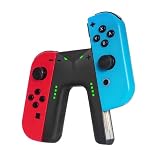
- WIDE COMPATIBILITY: This charging grip is perfectly compatible with Nintendo Switch NS / OLED model Joy-Con controllers serving as an ideal replacement for your original or damaged joy-con charging accessories (Note: Joy-cons, protective case and charging cable are NOT included)
- UNINTERRUPTED GAMING EXPERIENCE: Built-in dedicated charging ports support charging your Joy-Con controllers while gaming. It effectively eliminates low-power interruptions, allowing you to immerse yourself in long-hour gameplay without pause.
- PREMIUM SAFETY & DURABILITY: Equipped with intelligent control circuit, resettable fuse and flame-retardant outer shell, this joy-con charging grip provides stable, over-current and over-heat protected charging. It ensures safe daily use and extends the service life of your controllers.
- PLUG & PLAY OPERATION: Features a user-friendly sliding rail design for quick and stable Joy-Con installation. Simply slide in your controllers and connect a Type-C cable for power supply. Clear LED indicator shows red for charging status and green for fully charged for easy monitoring
- LIGHTWEIGHT & RELIABLE AFTER-SALES: Ultra-portable and lightweight design fits easily in bags for home and travel use. We provide 12-month professional warranty and 24-hour online email customer service to solve your usage problems in time.
What if you have a Switch Lite?
Nintendo states that Joy-Con cannot be charged using Nintendo Switch Lite. To recharge them, use a compatible charging accessory such as the HAC-012 Charging Grip with the AC adapter, or attach them to a Nintendo Switch or Switch OLED connected to power.
Troubleshoot Joy-Con that will not charge
- Attached to the console: Confirm the console is connected to its AC adapter and is powered on or in Sleep Mode. Nintendo advises checking that you are using the correct Nintendo Switch AC adapter, model HAC-002.
- Charges on a grip but not on the console: Nintendo says the console may need service.
- Charges on the console but not on the charging grip: Nintendo’s troubleshooting guidance points to the grip as a likely issue.
For the full official troubleshooting guidance, see Nintendo’s Joy-Con Controller Power Issues page.
Rank #2

- For Switch Joy-Con: This charger is compatible with Nintendo Switch NS/OLED Joy-Con controller. (Joycon, protective case and charging cable are not included.)
- Play while Charging: Game playing will not be affected while charging the Joycon and the power of Joycon continues to increase.
- Safe and Durable: The Joy-Con charging grip adopts intelligent control circuit technology, resettable fuse, and flame retardant shell. The charger continuously and safely charges joycons.
- Easy to Use: Slide the Joycon into the rail and connect to a power source with a type-C charging cable. Red light indicates charging, green light indicates fully charged.
- Convenient to Carry: Lightweight and portable, it is very convenient to use at home or on the go. We offer 12 months warranty and 24 hour email service. If you have any questions, please feel free to contact us.
Do not mix up original Joy-Con and Joy-Con 2
These steps and the HAC-012 grip apply to original Joy-Con for Nintendo Switch and Switch OLED. Joy-Con 2 are a separate product family: Nintendo says they charge while attached to a Nintendo Switch 2 connected to its AC adapter and powered on or in Sleep Mode, or while attached to the separate Joy-Con 2 Charging Grip (BEE-010). The original HAC-012 grip is not the Joy-Con 2 charging accessory. See Nintendo’s How to Charge the Joy-Con 2 Controllers instructions.
Quick Recap
Rank #4

- Ergonomic Design: Featuring a sleek and sturdy construction, this grip provides a comfortable and secure hold for your Joy-Con controllers.
- Charging Capability: Integrated charging ports allow you to charge your Joy-Con controllers while playing, ensuring uninterrupted gameplay.
- LED Indicators: Intuitive LED lights indicate the charging status, letting you know when your controllers are fully powered.
- Universal Compatibility: Designed to work seamlessly with the Switch console, this grip offers a versatile gaming experience.
- Lightweight and portable, it is very convenient to use at home or on the go. We offer a 12-month warranty and 24-hour email service. If you have any questions, please feel free to contact us.
Rank #3
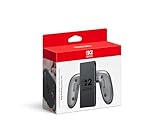
- Attach the Joy-Con 2 controllers (sold separately) to the Joy-Con 2 Charging Grip to use as a classic-style controller—or a handy charging station with the included USB charging cable.
- Includes the GL/GR Buttons, which can be mapped to whatever buttons you like.
- Only for use with the Nintendo Switch 2 system.
Product prices and availability are accurate as of the date/time indicated and are subject to change. Any price and availability information displayed on Amazon at the time of purchase will apply.




