Free tools Windows power users keep installed
One-click scans. No signup required.
Connect a Nintendo Switch 2 Pro Controller by USB and it automatically uses wired communication. For an original Nintendo Switch Pro Controller, first enable Nintendo Switch Pro Controller Wired Communication, then connect it to the dock and press SYNC followed by another button. The steps differ by controller model and play mode.
Identify your controller before connecting it
Nintendo documents wired setup for two models: the Nintendo Switch 2 Pro Controller and the original Nintendo Switch Pro Controller. The original model is listed as compatible with Switch 2, but it needs a setting change and a different activation sequence. These instructions do not establish compatibility for every third-party USB controller or support in every game.
| Controller | Connection covered | Setup | NFC while wired |
|---|---|---|---|
| Nintendo Switch 2 Pro Controller | Dock for TV mode; direct connection to console for tabletop mode | Connect the specified cable; wired communication is automatic | Remains available |
| Original Nintendo Switch Pro Controller | USB connection to the dock | Enable the wired communication setting, dock the console, press SYNC once, then press another controller button | Disabled |
Sources: Nintendo Switch 2 Pro Controller wired setup, original Pro Controller wired setup, wired communication setting and feature notes, and controller compatibility.
Connect a Nintendo Switch 2 Pro Controller in TV mode
- Place the Switch 2 console in its dock.
- Connect a USB-C to USB-A cable, model BEE-011, to a USB port on the side of the dock.
- Connect the USB-C end to the port on top of the Switch 2 Pro Controller.
The controller automatically uses wired communication when connected this way. Nintendo identifies the BEE-011 cable for this setup; its setup instructions do not say whether the cable is included with a controller purchase.
#1 Best Overall

- Hall Effect Modules: Say goodbye to stick drift with contract-free magnetic sensors in the thumbsticks giving you smoother control, enhanced precision, and increased longevity
- Advanced Gaming Buttons: Get an edge over the competition with mappable Advanced Gaming Buttons you can program on-the-fly, mid-game—no system settings to configure
- C Button: Easily activate fun GameChat features
- On-board Audio Controls: Quickly adjust the volume of your headset, mute your mic and change the EQ mode for a more immersive gaming experience using the audio button on the back of the controller. EQ Modes: Standard, Bass Boost, Immersive.
- Wired Control: No batteries? No problem. The PowerA Advantage Wired Controller for Nintendo Switch 2 system includes a detachable 10 ft. USB-C cable, giving you plenty of space to get to your favorite spot in the room and play for hours
Connect a Nintendo Switch 2 Pro Controller in tabletop mode
- Open the console’s rear stand and place the console on a flat surface.
- Connect a USB-C to USB-C cable between the USB-C port on top of the console and the USB-C port on top of the controller.
Nintendo specifies that the USB-C to USB-C cable is sold separately. The automatic wired-communication behavior applies to the Switch 2 Pro Controller; you do not need to enable the older controller’s wired communication setting for it.
Independent reader supportYour contribution helps us test, update, and keep practical guides available for everyone.Set up the original Nintendo Switch Pro Controller
If you have the original Pro Controller rather than the Switch 2 model, enable its wired communication setting and follow the activation sequence. Nintendo’s instructions connect this controller to the dock.
Rank #2
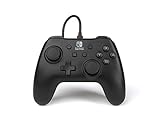
- Matte black design
- Ergonomic controller shape with Nintendo Switch button layout
- Instant plug and play connection (no sync required)
- Detachable 10ft (3m) USB cable with Velcro strap
- On the Switch 2, open System Settings > Controllers & Accessories.
- Turn on Nintendo Switch Pro Controller Wired Communication.
- Connect the controller to the Switch 2 dock using USB cable model HAC-010.
- Place the console in the dock.
- Press SYNC on the controller once to disconnect it from the console.
- Press another button on the controller to activate wired use.
Wired communication disables the NFC touchpoint on the original Nintendo Switch Pro Controller. Nintendo says NFC remains available on the Switch 2 Pro Controller while it is wired.
Quick Recap
Best Value

- Officially Licensed Nintendo Product - Officially licensed by Nintendo for Nintendo Switch, Nintendo Switch Lite, and Nintendo Switch - OLED Model. Also works with Nintendo Switch 2 - C Button not available.
- Custom RGB Lighting - Glow up your setup with eight RGB zones and four preset modes, creating vibrant color combinations to light up your game like never before!
- Mappable Quick-Action Buttons - Re-map functions to the two programmable back buttons for faster reactions and a more personalized, customized gameplay experience.
- Built-in Audio Controls - Stay fully immersed with D-pad audio controls, a 3.5mm headset jack, and USB-chat compatibility, giving you seamless sound and communication without interrupting gameplay.
Rank #4
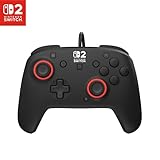
- Hall-Effect thumbsticks for greater precision and durability
- C Button for GameChat features
- 10ft / 3m USB cable for wired gameplay
- 3.5mm jack for audio and USB-chat
- D-pad audio controls
Rank #3

- Works with Nintendo Switch 2. C button not available
- 3.5mm audio jack , On guard against the fiercest attacks, Link is ready to take on the most fearsome of Hyrule’s enemies.
- Mappable Advanced Gaming Buttons
- Detachable 10ft (3m) USB Cable
- No batteries required
If the original Pro Controller still behaves wirelessly
- Confirm that Nintendo Switch Pro Controller Wired Communication is enabled under System Settings > Controllers & Accessories.
- Check that the original controller is connected to the Switch 2 dock with USB cable HAC-010.
- After docking the console, press SYNC once and then press a different controller button. The second button press activates wired use.
Product prices and availability are accurate as of the date/time indicated and are subject to change. Any price and availability information displayed on Amazon at the time of purchase will apply.




