To cool down a PS3, turn it off, unplug it before cleaning or moving it, clear space around its vents, and keep it out of enclosed or heat-trapping locations. Sony recommends at least 10 cm (4 in) between the console and a wall, and removing vent dust with a low-powered vacuum cleaner. If the power light flashes red and green on a covered model, stop playing and let the system cool before improving its ventilation.
Give the PS3 room to release heat
Power the console off before moving it. Place it on a stable, open surface where air can circulate, and check that walls, nearby objects, shelving, or cloth are not blocking its vents. Sony’s original PS3 manual specifies at least 10 cm (4 in) between the system and a wall; that measurement is a manufacturer placement instruction, not a guarantee of a particular temperature reduction.

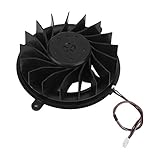
- Do not place the system on a long-fiber carpet or under cloth.
- Avoid narrow, cramped spaces and closed cabinets where heat can build up.
- Keep the vents unobstructed rather than pressing the console against a wall or surrounding it with objects.
These placement instructions come from Sony’s original PS3 manual; check the safety guide for your exact model for any model-specific guidance. Sony PS3 manuals and safety guides
Clean dust from the vents safely
- Turn off and unplug the PS3. Disconnect the AC cord before cleaning.
- Remove vent dust externally. Sony specifies a low-powered vacuum cleaner for dust accumulated in the system vents. Do not push tools or attachments into the vents.
- Wipe the outside if needed. Use a soft, dry cloth. Sony advises against solvents and chemically treated cleaning cloths.
Sony’s cleaning guidance does not recommend opening the case or using liquids or compressed air as routine owner cleaning methods. Sony PS3 manuals and safety guides
Crashes, No Sound, or Screen Glitches?
Random freezes, missing sound and display glitches usually trace back to one bad driver. Find and replace yours safely.Free scan · under a minuteWindows Errors? Fix Them Before They Spread
Repair common Windows errors and clear accumulated junk for a smoother, more stable PC - no reinstall needed.Free scan · no reinstall#1 Best Overall

- On/Off switch
- 4 x Low-noise sleeve fans
- Cooling fan system is designed to contour the shape of your PS3
- Quad-fan design provides maximum cooling capacity
- Enhanced cooling environment extends the life of your PS3 console
What to do if the PS3 shows an elevated-temperature warning
On Sony’s CECH-43xx model, an elevated internal temperature is indicated by the power light flashing alternately red and green. If you see this warning, stop playing, turn off the system, and let it cool. Then move it to a well-ventilated location before trying again. Sony does not specify a wait time, and cooling and repositioning are not a guaranteed fix for a persistent fault.
The warning-light behavior is specific to the CECH-43xx guide. If you have a different PS3 model, consult its own safety guide rather than assuming the indicator behavior is identical. Sony also cautions that dust buildup or cigarette-smoke residue on internal components can cause malfunction. Sony PS3 manuals and safety guides
Rank #2

- 【2 in 1 Dual Row 120mm USB Fan】ELUTENG dual row 12cm USB fan, USB powered, plug and play, can place the fan horizontally or vertically, ideal for cooling PC/Laptop/TV box/Receiver/Mobile phone/PS4 /Projector Instrument/ Router/Hard Drive Enclosure. 2 fans are connected together and run at the same time, the cooling effect is better.
- 【3 Adjustable Wind Speeds】The latest upgraded 120mm silent fan has a 3-speed speed controller (low, medium and high) to control the wind speed. The speed is: 900/1200 /1500rpm (×2)and the air volume is: 23.9 / 27.9 / 31.98 CFM(×2). Depending on the operating environment, you can choose between different wind speed levels.
- 【Durable & Quiet】 Adopting hydraulic bearings, it is very durable and has a long service life. The noise level is 25.6dB (weak) to 32.5dB (strong), so you can use it flat or upright in a quiet place such as library or study. In addition, the noise does not increase with the use time and it can work continuously for 24 hours.
- 【Multiple Protection】The bottom is equipped with 4 removable rubber shock absorbers for more convenient use, safer, more stable and reliable. Metal grids are used on both sides to prevent the blade from hurting your fingers and damaging the wire when working. The corner joint is equipped with cable protection glue, which is wear-resistant, not easy to break, and is safer and more reliable to use.
- 【Wide Practicality】Size: 12 x 12 x 2.5cm(×2); Cable length: 1 m. It is not only suitable for cooling devices such as PCs, routers and hard drives, but also AV devices and game consoles. Just plug in any device equipped with a USB port to start cooling without the hassle of wiring.
When ventilation and external cleaning are not enough
If the console remains unusually noisy, smells unusual, feels too hot to touch, or continues to show trouble, stop using it and unplug it. Contact PlayStation support or seek qualified repair rather than repeatedly restarting a system that is still showing symptoms.
Sony’s reviewed owner documentation describes external cleaning and ventilation, not routine internal fan servicing or thermal-paste replacement. Sony Interactive Entertainment Europe says diagnostics are for authorized repairers and parts are available to authorized repair or refurbishment centres; that information applies to Europe and does not establish service availability in other regions. PlayStation hardware support
Quick wins for a faster PC:
Clear out junk files and repair common Windows errorsFree Scan →Fix the driver behind crashes, sound loss and screen glitchesFind Drivers →Do cooling stands or internal repairs solve the problem?
The official guidance cited here does not establish that a cooling stand or external fan is necessary, or that it will resolve overheating. It also does not provide a routine owner procedure for opening the console, servicing the internal fan, or replacing thermal paste. Start with the documented low-risk steps—clear ventilation and external vent cleaning—and use authorized service if the problem persists.
Quick Recap
Best Value
Rank #4
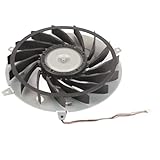
- Fit for PS3 Console: Designed with precision engineering to seamlessly replace your old internal cooling fan without modifications
- High Performance Cooling: 15 blades design generates powerful airflow to effectively dissipate heat and maintain optimal system temperature during extended gaming sessions
- Durable Metal Construction: Premium metal housing provides superior durable and ensures long-lasting reliability for consistent cooling performance
- Optimized Airflow Efficiency: 12 volt 2.65 amp motor delivers balanced airflow with minimal noise interference for uninterrupted gaming experiences
- Complete Replacement Package: Includes 1pcs 145 mm cooling fan specifically engineered for PS3 console internal heat dissipation requirements
Product prices and availability are accurate as of the date/time indicated and are subject to change. Any price and availability information displayed on Amazon at the time of purchase will apply.




