Download software for the Ryzen 5 2600 from AMD’s official Ryzen 5 2600 Drivers and Downloads page. Select your installed edition and architecture—Windows 11 64-bit or Windows 10 64-bit—then download AMD Ryzen Master only if you need AMD’s processor-management utility. The page also identifies RHEL x86 64-bit and Ubuntu x86 64-bit in the processor specifications.
There is an important distinction: the Ryzen 5 2600 itself normally does not require a standalone “CPU driver.” Motherboard chipset software handles platform features such as USB, PCIe and power management, while the graphics driver belongs to your discrete graphics card. AMD specifies that this processor requires a discrete graphics card, so display problems should be traced to that card’s driver rather than to Ryzen Master.
As an Amazon Associate I earn from qualifying purchases.
What “Ryzen 5 2600 driver” usually means
Search results often group several different downloads under the word driver. Treating them as interchangeable can leave a problem unresolved or install software for the wrong device.
Recommended Free Tools
Ryzen Master is a processor utility, not a replacement for chipset or graphics software
AMD’s Ryzen 5 2600 page lists Ryzen Master under Additional Software and Utilities for Ryzen 2000-series processors and older. It is the relevant AMD download when you want the processor utility. It is not the package that makes a motherboard’s USB controller, PCIe lanes or power-management devices work, and it cannot replace a discrete GPU driver.
#1 Best Overall
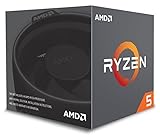
- Includes Wraith Stealth Cooler
- Prosumers, Enthusiasts, and Mainstream Users
- Power through heavy workloads like photo & video editing with ultimate performance
- Featuring True Machine Intelligence to optimize responsiveness every millisecond
Chipset software belongs to the motherboard platform
If the symptom involves USB ports, PCIe devices, sleep or power management, motherboard devices, or unknown entries in Device Manager, identify the motherboard’s chipset and obtain the matching chipset package from the motherboard manufacturer or AMD’s chipset-support route. A Ryzen 5 2600 can be installed on different AM4 motherboards, so the correct chipset package depends on the board, not only on the processor name.
Graphics software belongs to the discrete GPU
The Ryzen 5 2600 has no integrated graphics output; AMD specifies that a discrete graphics card is required. No Ryzen download will provide display support for that card. Identify the graphics-card model and use the graphics driver supplied by its GPU vendor when the issue is black screens, missing resolutions, game crashes, flicker or poor 3D performance.
Rank #2

- Can deliver fast 100 plus FPS performance in the world's most popular games, discrete graphics card required
- 6 Cores and 12 processing threads, bundled with the AMD Wraith Stealth cooler
- 4.2 GHz Max Boost, unlocked for overclocking, 19 MB cache, DDR4-3200 support
- For the advanced Socket AM4 platform
Ryzen 5 2600 specifications that affect installation
Knowing the platform helps you choose the correct packages and avoid assuming that every AM4 download applies to every component.
Do these 3 things before closing this tab:
1Scan for outdated or missing drivers - takes under a minute2Clear out junk files and repair common Windows errors3Fix the driver behind crashes, sound loss and screen glitches| Specification | Ryzen 5 2600 detail |
|---|---|
| Family and series | Ryzen, Ryzen 2000 Series |
| Former codename | Pinnacle Ridge |
| Cores and threads | 6 cores, 12 threads |
| Clock speeds | 3.4 GHz base; up to 3.9 GHz boost |
| Socket | AM4 |
| Memory support | DDR4, two channels, up to 2933 MT/s |
| Default TDP | 65 W |
| Graphics | Discrete graphics card required |
| Bundled thermal solution | AMD Wraith Stealth |
| Launch date | April 19, 2018 |
These specifications describe the processor; they do not tell you which chipset or graphics package your particular computer needs. For those, record the motherboard and GPU models separately.
Rank #3

- Makes work processing morestable and reliable
- Replace the old or damaged CPU directly.Ensure that the computer can run smoothly and improve work efficiency when processing these tasks
- This cpu gaming slot is small in size and light in weight, which can be easily carried around your computer.
- Improve the overall performance of the system and ensure the stability and security of data processing
- A stable CPU can ensure long-term stable operation of the computer, reducing the risk of system crashes or data loss caused by hardware issues
Download the official Windows software
- Bring Windows up to date. Open Settings > Windows Update, select Check for updates, install available updates, and restart when Windows requests it. AMD states that its software and drivers are designed to work best with up-to-date operating systems.
- Open AMD’s Ryzen 5 2600 Drivers and Downloads page. Confirm that the page identifies the Ryzen 5 2600 rather than a similarly named Ryzen model.
- Choose the operating system and architecture. Select Windows 11 64-bit or Windows 10 64-bit to match the installation shown in Settings > System > About. Do not choose a package for a different Windows edition merely because the processor is the same.
- Decide whether you actually need Ryzen Master. Download the item listed as AMD Ryzen Master when you need AMD’s processor utility. If your problem is a USB controller, storage controller, PCIe device or motherboard power-management feature, return to the motherboard or chipset download instead.
- Save the installer locally. Keep the downloaded file in a known folder so you can find it after a restart. Avoid repackaged downloads from unidentified sites; the official AMD page is the source for Ryzen Master.
- Restart after installation. A restart lets Windows load the installed software and refresh device status. If the original symptom remains, continue with the chipset and GPU checks below rather than repeatedly reinstalling Ryzen Master.
Install Ryzen Master carefully
Before you run the installer
- Close games, monitoring utilities and other hardware-tuning programs.
- Use an administrator account or approve the Windows permission prompt.
- Record any custom settings you may want to restore; an installation or reset can return utility settings to their defaults.
After installation
Launch Ryzen Master from the Windows Start menu and verify that it identifies the Ryzen 5 2600. The utility can display processor information and expose processor-management controls, but changing those controls is separate from installing a driver. If the application will not start, first confirm that the Windows architecture selection matched your installation, complete pending Windows updates, restart, and reinstall the current package from AMD’s page.
Install the motherboard chipset package for platform problems
- Identify the motherboard manufacturer and exact model. Windows’ System Information panel can show baseboard details; the model is also commonly printed on the board or listed in firmware setup.
- Open the board manufacturer’s support page and select the exact model and operating system. If the manufacturer directs you to AMD’s chipset-support route, follow that route rather than choosing a package based only on “Ryzen 5.”
- Download the chipset package that matches the board and Windows architecture. Read the package description so you do not confuse chipset software with a BIOS or firmware update.
- Close running applications, run the installer with the requested permissions, and accept a restart if offered.
- After restarting, open Device Manager and inspect the affected controller under categories such as Universal Serial Bus controllers, System devices or IDE ATA/ATAPI controllers. A warning icon or an “unknown device” indicates that the platform issue still needs attention.
A BIOS update is a separate operation with its own motherboard-specific instructions. Do not substitute a BIOS file for a Windows chipset package, and do not flash firmware simply because Ryzen Master is missing.
Rank #4

- 6 Cores/12 Threads UNLOCKED; Max temps: 95°C
- Frequency: 4.2 GHz Max Boost. Includes Wraith Spire cooler
- 19MB of combined Cache. Pci Express version is PCIe 3.0 x16 and CMOS 12 nm FinFET
- Socket AM4 motherboard required
- Supported technologies are AMD storemi technology, AMD sensemi technology, AMD Ryzen master utility and AMD Ryzen VR-Ready premium
Install the correct discrete graphics driver
- Find the graphics-card model in Settings > System > Display > Advanced display or in Device Manager > Display adapters. If Windows shows only a generic display adapter, use the card label, the purchase record or the motherboard case documentation to identify it.
- Go to that GPU vendor’s official support page and select the exact card family and the Windows architecture you confirmed earlier.
- Choose a clean installation only when a normal update fails, an old driver was corrupted, or you are changing GPU vendors. A clean install removes existing graphics components and may reset graphics settings.
- Restart, then test the display at its normal resolution and run the game or application that originally failed. If the issue is limited to one game, also check that game’s own requirements and settings rather than changing CPU software.
Linux options listed for this processor
AMD’s processor specifications list RHEL x86 64-bit and Ubuntu x86 64-bit. Linux systems generally receive core processor and platform support through the distribution’s kernel and package updates, while graphics support still comes from the discrete GPU’s Linux driver path. Use the update mechanism and documentation for your installed distribution, and verify that any package is intended for your exact GPU and release. The Windows Ryzen Master download is not a substitute for those Linux packages.
Quick wins for a faster PC:
Repair Windows errors before they cause bigger problemsFix Now →Fix the driver behind crashes, sound loss and screen glitchesFind Drivers →Is the Ryzen 5 2600 supported by Windows 11?
Yes. Microsoft’s Windows 11 supported-processor documentation includes the AMD Ryzen 5 2600. Processor support alone does not guarantee that every computer qualifies for an upgrade: the complete system must also satisfy Windows 11’s other requirements, and firmware settings or hardware configuration can affect eligibility. Confirm the requirements for your edition and installation through Windows Update or Microsoft’s current compatibility guidance before changing the operating system.
Best Value

- AMD's fastest 6 core processor for mainstream desktop, with 12 processing threads. System Memory Type: DDR4
- Can deliver elite 100+ FPS performance in the world's most popular games
- Bundled with the quiet, capable AMD Wraith Stealth cooler
- 4.6 GHz Max Boost, unlocked for overclocking, 35 MB of cache, DDR-3200 support
- For the advanced Socket AM4 platform, can support PCIe 4.0 on X570 and B550 motherboards
Choose the package by symptom
| Observed problem | Most relevant package or check | Why |
|---|---|---|
| Ryzen Master is absent or will not launch | Ryzen Master from AMD’s Ryzen 5 2600 page; then update Windows and restart | This is AMD’s listed processor utility for Ryzen 2000-series and older. |
| USB, PCIe, motherboard or power-management device has a warning icon | Exact motherboard chipset package | These functions are tied to the AM4 motherboard platform. |
| Black screen, missing resolution, flicker or 3D-game crash | Exact discrete GPU driver | The Ryzen 5 2600 requires a separate graphics card. |
| Windows reports an unknown system device | Identify the motherboard model, then install its chipset package | The processor name alone cannot identify every board controller. |
| Performance changes after firmware work | Check BIOS or firmware separately from Windows drivers | Firmware and operating-system packages are different update paths. |
Clean installation or in-place update?
| Approach | Use it when | Trade-off |
|---|---|---|
| In-place update | The current device works and you are applying a normal version update | Preserves existing settings and is usually the least disruptive approach. |
| Clean installation | A previous package is corrupted, conflicts remain after removal, or you changed graphics-card vendors | Can remove conflicting components and reset settings, but requires reconfiguring preferences afterward. |
Troubleshoot a failed or incomplete installation
The download does not match your system
Return to Settings > System > About and confirm whether Windows is 64-bit. Re-select Windows 10 64-bit or Windows 11 64-bit on AMD’s page. A Ryzen 5 2600 does not determine the operating-system selection; the installed Windows architecture does.
The installer finishes but the symptom remains
Identify which component is actually failing. Display symptoms point to the discrete GPU, while USB, PCIe and motherboard-device symptoms point to the chipset. Installing Ryzen Master again will not correct either class of problem. In Device Manager, open the affected device’s Properties and note its name and status before choosing a replacement package.
Windows keeps reverting or showing a warning icon
Restart after each package, install pending Windows updates, and remove only the device software that the relevant vendor’s instructions identify as obsolete. Do not delete unrelated system devices to force a clean list. If the warning returns, check that the motherboard model and GPU model were selected exactly, and consider whether the cause is firmware or a physical connection rather than software.
The computer has no display after a change
Because this processor requires a discrete graphics card, connect the monitor to the card’s output and verify the card’s power and seating. If the system can start Windows, reinstall the correct GPU driver. If it cannot, undo the most recent hardware or firmware change according to the motherboard or GPU manufacturer’s recovery instructions.
Quick Recap
Safety checklist before you download
- Use AMD’s official Ryzen 5 2600 page for Ryzen Master.
- Match Windows 10 64-bit or Windows 11 64-bit to the installed system.
- Use the motherboard model—not just “AM4” or “Ryzen”—for chipset selection.
- Use the discrete GPU model for graphics-driver selection.
- Update Windows first and restart after installation.
- Keep BIOS or firmware updates separate from Windows driver installers.
- Prefer an official-vendor package over an unidentified repackaged download.
As an optional shortcut, Outbyte Driver Updater can scan more than 100 devices for outdated, corrupted or missing drivers, install only official drivers, show current and recommended versions, and provide driver backup, restore and scheduled scans. It runs on Windows 11, 10, 8 and 7 and offers a two-day free trial with no credit card before a subscription.
Product prices and availability are accurate as of the date/time indicated and are subject to change. Any price and availability information displayed on Amazon at the time of purchase will apply.




