Download League of Legends from Riot’s official download page, select Download for Windows, then run the installer and follow its prompts. Before troubleshooting a launch problem, check that your PC meets Riot’s current Windows requirements.
Download and install the Windows version
- Open Riot’s League of Legends download page and choose Download for Windows. The page also lists a Mac installer, so confirm you select the Windows option.
- Run the downloaded installer. Riot’s installation walkthrough says that
LeagueofLegends.exefirst downloads updated setup files; installation begins when that download finishes. - Follow the on-screen installation prompts. Riot says the launcher opens automatically when installation is complete.
- If you are reinstalling, or the launcher does not open automatically, use the game shortcut or open
LeagueClient.exein the game’s installation directory, as described in Riot’s reinstall guide.
The installer sequence is described in Riot’s installation walkthrough. For installation errors that persist, consult Riot Player Support for instructions specific to the error rather than changing security or firewall settings without guidance.
Check whether your Windows PC meets the requirements
Riot’s requirements article, dated September 22, 2026, lists the following minimum and recommended configurations for Windows. These are compatibility specifications, not a guarantee of smooth performance.
| Requirement | Minimum | Recommended |
|---|---|---|
| Windows | Windows 10 build 19041 or later, or Windows 11; retail editions only, not Enterprise or Server | Windows 11 |
| Windows 11 security | TPM 2.0 enabled | TPM 2.0 enabled |
| Architecture | x64 | x64 |
| CPU | Intel Core i3-530 or AMD A6-3650; ARM is not supported | Intel Core i5-8250 or AMD Ryzen 3 1200; ARM is not supported |
| GPU | GeForce 400 Series, AMD HD 6570, or Intel HD 4600 | NVIDIA GeForce 560, AMD Radeon HD 6950, or Intel UHD 630 |
| Graphics feature | DirectX 11 feature level 11_0 | DirectX 11-level hardware |
| VRAM | 1 GB | 2 GB |
| Free storage | 16 GB on an HDD | 16 GB on an SSD |
| RAM | 2 GB | 4 GB |
| Graphics setting and resolution | Low; 1024×768 | High; 1920×1080 |
See Riot’s current minimum and recommended system requirements for the full specification and any updates. Riot warns that a PC meeting only the minimum requirements may still have performance issues.
Free tools Windows power users keep installed
One-click scans. No signup required.
#1 Best Overall

- 64GB RAM | 4TB SSD
- Equipped With The Most Powerful and Fast Intel 24-core Ultra 9 275HX Processor
- 18" 2.5k (2560x1600) IPS 240Hz (100% DCI-P3, 3ms, Anti-glare), Dedicated NVIDIA GeForce RTX 5070 8GB GDDR7 Graphic
- 3 x USB-A 3.2, 1 x Thunderbolt 4, 1 USB-C 3.2, 1 x HDMI 2.1 FRL, 1 x RJ45 Ethernet
- Windows 11 Professional, 4-zone RGB Backlit Keyboard, Wi-Fi 7, Smart Amp, Dolby Atmos, FHD IR Camera, Auth USB-C Hub
What to check if the game will not launch
- Windows version: Riot says Windows 10 builds earlier than 19041 will produce VAN 9004 and prompt an update. Update Windows if your PC is below that build.
- DirectX support: DirectX 11 feature level 11_0 has been required to continue playing since patch 25.21. A Windows or graphics-driver update cannot add hardware support if the graphics hardware lacks the required feature level.
- Hardware headroom: Meeting only the minimum may not provide smooth play. Compare your processor, graphics hardware, memory, and available storage with Riot’s recommended specifications.
- Installer or client errors: Follow the relevant current steps in Riot Player Support. Avoid treating firewall changes as a routine installation fix.
Riot’s current Windows requirements do not include Windows 7 or Windows 8. Older support information listing those versions is no longer the right guide for a new installation.
Quick Recap
Best Value

- READY FOR ANYTHING – Dive headfirst into gaming on Windows 11 powered by the Intel Core 5 210H processor and an NVIDIA GeForce RTX 4050 laptop GPU with a Max TGP of 115W and NVIDIA Advanced Optimus.
- SUBTLE STYLING – The TUF Gaming F16 maintains its classic design, boasting a subtle embossed TUF logo on its sleek cover.
- IMMERSIVE VISUALS – The TUF Gaming F16’s FHD 144Hz display with 100% sRGB color draws you into the action. Adaptive-Sync technology reduces lag, minimizes stuttering, and eliminates visual tearing for ultra-smooth gameplay.
- MILITARY GRADE DURABILITY – As a TUF gaming machine, the F16 has been rigorously tested to meet Military Grade testing standard, MIL-STD-810H. Rest easy knowing this laptop will operate at peak performance in harsh conditions.
- EFFICIENT COOLING – Equipped with Arc Flow Fans, 4 exhaust vents, 5 dedicated heat pipes, and an anti-dust filter, the TUF Gaming F16 optimizes cooling performance without extra noise.
Rank #4

- Designed to inspire, chosen for champions: Take your game to the next level with the proven precision of Logitech G PRO Wireless Gaming Mouse, crafted to inspire League of Legends players
- LIGHTSPEED wireless: Pro grade performance overcomes the traditional limitations of wireless latency, connectivity, and power to deliver super-fast 1 ms report rate connection
- HERO 25K sensor: Delivers peak performance at any sensitivity with zero smoothing, acceleration, or filtering; the computer mouse is optimized to track insane flicks at speeds over 400 IPS
- Ultra-lightweight: The mouse's innovative endoskeleton creates a super-thin yet incredibly strong outer shell, enabling the body to weigh in at a lightweight and maneuverable 2.8 oz (80 g)
- Ergonomic ambidextrous design: Tournament-ready gaming mouse developed with esports pros and gamers for maximum comfort, control and durability
Rank #3
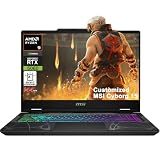
- Configuration Note: This computer has been professionally upgraded with RAM and/or storage. Each component has undergone rigorous testing to ensure optimal performance. Please note that the upgraded RAM and hard drive are covered by a one-year warranty from Cardinal Pro Electronics, while all other original components are backed by the standard one-year manufacturer warranty.
- AMD 8-core Ryzen 9 270 Processor (4.0GHz base clock, up to 5.2GHz max turbo, 16MB Smart Cache, 16 threads)
- 15.6-inch FHD (1920 x 1080) IPS screen with a 144Hz refresh rate, powered by a dedicated NVIDIA GeForce RTX 5060 graphics card with 8GB GDDR7 memory.
- Features 2 x USB-A 3.2 ports, 1 x USB-C 3.2 (DisplayPort / Power Delivery 3.0), 1 x HDMI 2.1 (supporting 4K@60Hz), and 1 x RJ45 Ethernet port for versatile peripheral and display connections.
- Pre-installed with Windows 11 Home, and equipped with a 4-zone RGB backlit keyboard, Wi-Fi 6E, an HD 3D noise reduction webcam, and DTS Audio for a premium, all-in-one experience.
Rank #2

- Flagship-Class 24-Core Performance Combo: The ASUS ROG Strix G18 Gaming Laptop is powered by the latest-generation Intel Core Ultra 9 275HX processor (24 cores, 32 threads, up to 5.4GHz). With a 35% improvement in multi-core performance compared to its predecessor, it handles multitasking with ease. Paired with an NVIDIA RTX 5070 GPU—featuring support for DLSS 4 and Ray Tracing—it delivers smooth, fluid performance for running AAA gaming blockbusters
Product prices and availability are accurate as of the date/time indicated and are subject to change. Any price and availability information displayed on Amazon at the time of purchase will apply.
Independent reader supportYour contribution helps us test, update, and keep practical guides available for everyone.



