The Tool Desk
Outbyte Driver Updater FREEFix the driver behind crashes, sound loss and screen glitchesFind Drivers →Outbyte PC Repair FREEClear out junk files and repair common Windows errorsFree Scan →For the Epic Games version of Darkest Dungeon, the practical route is to download a mod, extract its files, and place them in the mods folder inside the game’s Epic installation directory. Do not copy the Steam folder path shown in some guides: the reviewed sources do not establish a default Epic install path or current Epic-specific activation steps, and not every mod is guaranteed to work.
Download and install a mod
- Choose a mod for Darkest Dungeon. Nexus Mods’ Darkest Dungeon listing includes categories such as classes, skins, gameplay changes, items, interface changes, and fixes. Individual listings and availability can change.
- Read the mod’s page before downloading. Check its installation directions, required files, and compatibility notes. The Darkest Dungeon community wiki’s mod overview notes that most mods provide instructions; follow the specific mod’s directions where they differ from general advice.
- Download and extract the archive. A Nexus community installation article describes unzipping a download and placing the files under a
modsdirectory. - Locate the Epic-installed game folder. Use the installation directory for your own Epic Games copy, then look for its
modssubfolder. The Nexus article’s example,SteamsteamappscommonDarkestDungeonmods, is a Steam path—not an Epic location. The reviewed sources do not give a verified default Epic directory string. - Put the extracted mod files in the game’s
modsfolder. Preserve the folder structure specified by the mod author; avoid adding an extra enclosing folder if the instructions expect the mod’s files directly undermods. - Launch the game and check the mod’s instructions for activation. If the mod says it must be enabled in-game, follow its directions. Current Epic-specific menu steps were not verified, so the exact controls may vary.
Which installation method works for Epic?
The game’s general modding guidance describes two routes: subscribing through Steam Workshop or installing files manually. Workshop subscription is tied to Steam, so manual download and placement is the practical route for an Epic copy in the sources reviewed. This does not establish that every Steam-listed mod is compatible with Epic.
As an Amazon Associate I earn from qualifying purchases.
The Conexus documentation says Epic and GOG are unsupported as of v1.2.0. The surfaced documentation lists Conexus 1.4.0, last updated March 17, 2021; that limitation applies to Conexus as documented, not necessarily to every mod manager. Epic’s Darkest Dungeon support page directs game questions to Red Hook and does not provide mod installation steps.
What’s actually slowing this PC down?
Pick the symptom - the matching free tool is one click away.
What to check if a mod does not appear
- Confirm that you used the Epic game’s installation folder, not the Steam path in a guide.
- Check that the extracted mod files are inside the game’s
modsfolder and that you followed the mod author’s folder-structure instructions. - Revisit the mod page for prerequisites, compatibility notes, and any activation directions.
- Do not assume an Epic-specific mod browser, Workshop integration, or identical activation controls; the reviewed sources do not verify those features.
The official modding guide provides foundational information about moddable files in the game installation, but it is old and is not a current Epic setup guide.
Quick Recap
Best Value

- Complete five-piece accessory bundle designed to expand, organize, and protect your Darkest Dungeon: The Board Game collection
- Includes two Musketeer Hero Boxes featuring one pre-painted miniature and one unpainted miniature, giving collectors a display-ready hero and a version ready for hobby assembly and custom painting
- Protect your game components with two Heroic Protection from Darkness sleeve sets, plus 10 Imp Mini Sleeve Packs providing 500 mini sleeves and 1 Hydra Sleeve Pack providing 100 standard sleeves for long-lasting card protection
- Darkest Organizer features a durable plastic design with 25 individual compartments that store and organize more than 300 tokens from the Darkest Dungeon core game and expansions for quicker setup and easier cleanup
- Keeps cards, tokens, and accessories neatly organized while reducing table clutter, helping streamline gameplay and making storage and transport more convenient between gaming sessions
Rank #4
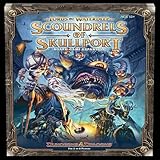
- For 2-6 players
- 60 minute playing time
- Scoundrels of skull port adds brand new content for owners of the Lords Of water deep. It is not one, but two, complete expansions, the sprawling dungeon of under Mountain and the criminal Haven of skull port.
- Adds a 6th player to the game.
Rank #2

- Enter the Crimson Court expansion and uncover a decayed Courtyard filled with bloodthirsty aristocrats and insect-like horrors.
- Enhance your Darkest Dungeon adventure with new room tiles, monsters, bosses, quests, and curios that deepen the challenge.
- Face fresh mechanics like stress, bleed, and blight, pushing your heroes to the limits of endurance and strategy.
- Expand replayability with diverse encounters, immersive miniatures, and treacherous objectives to overcome.
- Designed for cooperative play, this expansion heightens tension and adds new layers of danger to your dungeon crawl.
#1 Best Overall

- Join the Adventure: Darkest Dungeon: The Board Game is a cooperative dungeon crawler for 1-4 players, where you complete missions and restore the Heir's mansion.
- Face the Darkness: Battle evil forces and overcome challenges as you explore the treacherous Darkest Dungeon.
- Game Components (2 boxes in 1 game!): The Core Game includes all cardboard/paper pieces, while the Strongbox contains detailed miniatures.
- Popular Origin: Based on the critically acclaimed video game by Red Hook Studios, which has sold over 8 million copies.
- Tabletop Transition: Experience the dark and immersive world of Darkest Dungeon now in a board game format.
Product prices and availability are accurate as of the date/time indicated and are subject to change. Any price and availability information displayed on Amazon at the time of purchase will apply.
Independent reader supportYour contribution helps us test, update, and keep practical guides available for everyone.



