Recommended Free Tools
Open the GameBanana page for the Friday Night Funkin’ (FNF) mod you want, read its requirements and installation notes, then choose Manual Download or a compatible 1-Click Install option. After downloading, follow that mod’s own instructions: some releases are folders for a particular engine, while others are complete builds with their own executable.
Before you download
GameBanana says ordinary mod downloads do not require membership; its public homepage identifies NSFW downloads as requiring signup. Access can vary by page or content, so follow the live download page if it asks you to sign in. GameBanana

- Check the mod description for the required engine, platform, update notes and installation steps.
- See whether the download is a mod folder, an asset pack or a complete/preinstalled build.
- Look for a README or other included instructions, especially if the page describes multiple files or versions.
Download and install manually
- Find the FNF mod on GameBanana and open its page.
- Read the description and file notes. Identify the intended download and any required engine or other prerequisite.
- Select the matching Manual Download option. If the page offers several files or builds, use the author’s notes to choose; the filename alone may not explain what to install.
- When the archive finishes downloading, extract it into a clearly named folder.
- Follow the mod page and any included README to place the files correctly and launch the mod with the specified engine or executable.
A GameBanana community tutorial recommends keeping an unmodified desktop copy of the base game separate from a modded copy. Treat that as community guidance, not a requirement for every mod. GameBanana community installation tutorial
Optional: use 1-Click Install with FileDaddy
1-Click Install is an optional route for pages compatible with FileDaddy; it is not available or suitable for every mod. FileDaddy’s instructions say to open the application once, then select the install button on a compatible mod page and accept the browser prompt to open FileDaddy. Confirm the download in the application and let it finish. FileDaddy also describes manual installation by placing an extracted mod folder in its mods directory. FileDaddy on GameBanana
Do these 3 things before closing this tab:
1Scan for outdated or missing drivers - takes under a minute2Clear out junk files and repair common Windows errors3Fix the driver behind crashes, sound loss and screen glitches#1 Best Overall
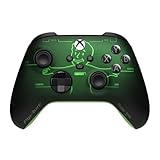
- FALLOUT PIP-BOY EDITION — Introducing the XBOX Wireless Controller – Fallout Pip-Boy. Display your survival prowess on console, PC, and cloud. Inspired by the arm accessory worn by Fallout's vault dwellers, this Vault-Tec approved gear radiates craftsmanship and heritage.*
- WASTELAND-READY DESIGN — The black top case features the outer casing of Pip-Boy with a bright green icon of the Vault Boy in the center, paired with Fallout's signature green tones and HUD iconography throughout.
- PRECISION PERFORMANCE — Stay on target with a hybrid D-pad and textured grip on the triggers, bumpers, and back case for enhanced handling — whether you're exploring the wasteland or battling raiders.
- UP TO 40 HOURS OF BATTERY LIFE — Get up to 40 hours of battery life so your sessions last as long as the wasteland demands. Crafted for enhanced comfort and effortless control during gameplay.*
- PLAY ACROSS EVERY SCREEN — Quickly pair with, play on, and switch between devices including console and PC. Stream games across mobile, gaming handhelds, Smart TVs, and supported VR headsets with XBOX Cloud Gaming.**
FileDaddy lists Windows and a .NET runtime among its requirements. Its published version information is old, so check current compatibility before relying on it. Its author says antivirus alerts for FileDaddy may be false positives; that statement applies to the tool author’s claim, not to every mod or download. If a page offers an executable mod, FileDaddy advises downloading and handling it manually.
Why one FNF mod may install differently from another
There is no single folder recipe for all FNF mods. The Neo Revival page, for example, offers both a folder intended for a specified engine and a preinstalled build. Its instructions say to extract the ZIP and run the included EXE for the preinstalled option, while the folder option has engine-specific placement directions. The Neo Revival on GameBanana
Rank #2
Friday Night Vibin’ provides another example: its page directs users to run an included executable and gives a separate asset-folder procedure for add-ons. Friday Night Vibin’ on GameBanana
When a page offers multiple routes, compare the format, required engine and platform, whether it includes an executable or only assets, and whether its instructions call for manual extraction or an installer. Use the instructions for the specific release you downloaded rather than assuming that a guide for another mod applies.
What’s actually slowing this PC down?
Pick the symptom - the matching free tool is one click away.
Rank #3

- Made for PC, Cloud, and Mobile - Optimized for gaming on PC desktops and laptops. Connect to cloud gaming devices such as compatible Smart TVs, and Android smartphones and tablets
- Bonus Fortnite virtual item included (Assault Bomber)
- Hall Effect Thumbsticks and Triggers - Reliable Hall Effect sensors built into the thumb sticks and triggers deliver a more precise and fluid response
- 3 Connection Options - Reliable connection via low-latency 2.4GHz wireless, Bluetooth, or Wired USB for the most flexibility on various gaming devices
- Mappable Buttons - Boost your effectiveness with 4 customizable Advanced Gaming Buttons that let you adapt to any gaming experience
Download safety and troubleshooting
Do not treat a “Clean” or “CleanWarning” label, an antivirus warning, or a 1-Click Install button as proof that a file is safe. These labels and claims are not an independent guarantee for each download. FileDaddy’s author says some alerts for that tool may be false positives, but that does not establish the safety of other executables or mod files.
Quick Recap
Best Value
Rank #4

- Works with Nintendo Switch 2
- C button not available
- Code for Bonus Virtual Item Included – On The Hook Emote
- Wireless Freedom – Play wirelessly on Nintendo Switch – OLED Model, Nintendo Switch and Nintendo Switch Lite
- Motion Controls - Tilt, turn and twist your way through dynamic and unique gameplay
- Stay on the intended GameBanana page, check the submitter’s directions and confirm that the downloaded filename and format match what the page describes.
- Pause if a browser prompt, download or executable differs from the page’s instructions. Do not run an unexpected executable just because an install button is available.
- If the mod will not launch, check that you used the specified engine or included executable and followed the folder-placement instructions.
- For a mod-specific error, check the page’s updates and comments or issue area for fixes that apply to that release.
Product prices and availability are accurate as of the date/time indicated and are subject to change. Any price and availability information displayed on Amazon at the time of purchase will apply.



