Free tools Windows power users keep installed
One-click scans. No signup required.
To factory reset a PS Vita that starts normally, open Settings > Format > Restore This System and follow the prompts. Some older menus show the route as Settings > Start > Format > Restore This System. This restore deletes data in system storage and, on models with one, the internal memory card. Sony says it cannot be undone, so back up anything you need before proceeding.
What a PS Vita factory reset erases
Sony’s user guide says Restore This System returns system software settings and system-storage data to their defaults. It also resets data on the internal memory card where applicable. Deleted data cannot be restored, and the restore does not downgrade the system software. The guide applies to system software version 3.73 or later: Restore This System | PlayStation Vita User’s Guide.
Storage differs by model: PCH-1000 series systems do not have an internal memory card. Do not assume every Vita has the same built-in storage arrangement.
Choose the right reset option
The Format menu includes options with different effects. Confirm the exact label before accepting an irreversible operation.
Do these 3 things before closing this tab:
1Scan for outdated or missing drivers - takes under a minute2Repair Windows errors before they cause bigger problems3Fix the driver behind crashes, sound loss and screen glitches#1 Best Overall

- Read It Before Buying: The SD2Vita is a third-party memory card adapter. It requires you to currently be on an unlocked 3.60 firmware, such as HENkaku/Ensō, and is also supports 3.60+ firmware 3.65-3.72, which has been released. Note: Please insert it into the game card slot as if it were a PS Vita game cartridge. (Not suitable for the memory card slot)
- Perfect Fit & Seamless Experience: 1:1 precision molding with PS Vita game cartridge. It’s easy to insert and remove without any sticking or popping out. The precise molding ensures smooth operation, but please insert or remove the card slowly to avoid bending or breaking the internal pins
- Wide Compatibility: This PS Vita memory card adapter is compatible with all PlayStation Vita models, including PS Vita 1000, 2000, and PlayStation TV (PSTV). It provides fast game loading with no delays, making it a perfect upgrade for passionate gamers
- Meets All Your Gaming Needs: The included 128GB micro SD card offers lightning-fast read speeds of up to 140MB/s, so you won’t need to spend extra money on additional memory cards. Start your gaming experience right away! Latest version 6.0 SD2VITA microSD card adapter supports any standard microSD card (up to 512GB) to replace expensive PS Vita official memory cards. Enjoy faster loading speeds—20% to 30% faster than the original PS Vita game card
- Never Worry About Running Out of Storage: Sunloy high-speed TF cards feature Class 10, U3, V30, UHS-I, and A1 speed ratings—delivering ultra-fast transfer speeds with exceptional stability. Perfect for storing games, high-res photos, and full HD/4K UHD videos recording. Compatible with smartphones, tablets, cameras, GoPro, laptops, drones, dash cams, DSLRs, computers, security camera, Nintendo Switch, PS Vita, and other portable gaming consoles
| Option | What it does | Use it when |
|---|---|---|
| Restore Settings | Returns software settings, the home screen, and the start screen to their defaults; Sony does not describe this option as deleting all system data. Sony’s Restore Settings guide. | You want default settings and screens, not a full system restore. |
| Format Memory Card | Deletes all data on the inserted memory card. The operation cannot be undone; do not remove the card or turn off the Vita while it formats. Sony’s Format Memory Card guide. | You intend to erase only the card. |
| Restore This System | Resets system software settings and deletes system-storage data, including internal memory-card data where applicable. The operation cannot be undone. | You want to restore the Vita itself to its default state. |
Before you reset
- Back up important data. Sony’s hardware manual describes backing up to a PS3 or computer with Content Manager. Use the on-screen prompts and the manual for the applicable workflow: PCH-1001 / PCH-1101 User Manual.
- If transferring or disposing of the Vita, deactivate it first. Sony’s manual gives the path Settings > Start > PlayStation Network > System Activation for deactivating each content category. Sony warns that the system cannot be deactivated after it has been given away or disposed of.
- Know your Parental Controls passcode. The restore may request it if Parental Controls restrict the feature.
How to factory reset a PS Vita
- On the Vita, open Settings > Format > Restore This System. If your menu has the older layout, open Settings > Start > Format > Restore This System.
- Read the on-screen warning and confirm only if you are ready to erase the data described above.
- Enter the Parental Controls passcode if prompted, then follow the remaining on-screen instructions.
- Leave the console powered on until the restore finishes. Sony warns that interrupting it can cause the system to malfunction.
If the Vita will not start normally
Sony’s hardware manual describes Safe Mode as a limited startup mode for troubleshooting. Hold the Power button until the Safe Mode menu appears, then follow its on-screen instructions. If Safe Mode does not appear after holding Power for more than 30 seconds, Sony says the battery may be too low and recommends charging with the included AC adapter. The manual does not establish a specific Safe Mode button sequence for performing a factory restore, so use only the options shown on the console rather than relying on an undocumented combination. The PCH-2006 / PCH-2007 manual also covers Safe Mode: PCH-2006 / PCH-2007 User Manual.
If the issue is with system software rather than stored data, updating is a separate troubleshooting route. PlayStation lists Wi-Fi, PS3, PC with Content Manager Assistant, and a qualifying PS Vita card as update methods. Do not interrupt an update or use update data from unofficial sources: PS Vita System Software.
Quick Recap
Best Value

- The memory card expands the storage capacity and multimedia capabilities for Sony PlayStation Vita handheld system.
- This memory card can store save data for games, songs, photos, movies, and games for PlayStation Vita, depending on the file sizes.
- You can transfer files from other devices or download directly from internet.
- Required for most game play for PS Vita system. Store game saves, game downloads, and personal media. Provide storage for up to: 4-8 full games for PS Vita system, or 12 movies, or 4500 songs, or 3200 photos
- Compatible with: All Sony PS Vita PSV 1000 / 2000 consoles (PCH-1000 / PCH-2000)
Rank #4

- Read It Before Buying: The SD2Vita is a third-party memory card adapter. It requires you to currently be on an unlocked 3.60 firmware, such as HENkaku/Ensō, and is also supports 3.60+ firmware 3.65-3.72, which has been released. Note: Please insert it into the game card slot as if it were a PS Vita game cartridge. (Not suitable for the memory card slot)
- Perfect Fit & Seamless Experience: 1:1 precision molding with PS Vita game cartridge. It’s easy to insert and remove without any sticking or popping out. The precise molding ensures smooth operation, but please insert or remove the card slowly to avoid bending or breaking the internal pins
- Wide Compatibility: This PS Vita memory card adapter is compatible with all PlayStation Vita models, including PS Vita 1000, 2000, and PlayStation TV (PSTV). It provides fast game loading with no delays, making it a perfect upgrade for passionate gamers
- Meets All Your Gaming Needs: The included 64GB micro SD card offers lightning-fast read speeds of up to 80MB/s, so you won’t need to spend extra money on additional memory cards. Start your gaming experience right away! Latest version 6.0 SD2VITA microSD card adapter supports any standard microSD card (up to 512GB) to replace expensive PS Vita official memory cards. Enjoy faster loading speeds—20% to 30% faster than the original PS Vita game card
- Never Worry About Running Out of Storage: Sunloy high-speed TF cards feature Class 10, U3, V30, UHS-I, and A1 speed ratings —delivering ultra-fast transfer speeds with exceptional stability. Perfect for storing games, high-resolution photos, recording and storing full HD/4K videos, and other data types. It’s compatible with smartphones, tablets, cameras, GoPro/action cameras, laptops, desktop PCs, DSLR cameras, drones, Nintendo Switch, PlayStation Vita, and other portable gaming consoles
Rank #3

- The Official PlayStation Vita Memory Card
- Required for most game play on PS Vita
- Store game saves, PSN downloads, and personal media
- Save up to : 8 to 16 full PlayStation Vita games, 24 movies, 9,136 songs, or 6,400 photos
Rank #2
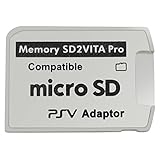
- Read This Before Buying: sd2vita is a third party memory card adapter which requires you to currently be on an unlocked 3.60 firmware like HENkaku/ Ensō, also supports 3.60+ firmware 3.65-3.68, which has been released
- sd2vita can’t be used as ps vita memory card, it doesn’t fit the memory card slot, put this in your game card slot as the PSV game cartridge
- Latest Version 5.0 SD2VITA microSD card adapter, you can replace the expensive PS Vita memory card with any microSD card up to 256GB, loading speed is 20% - 30% faster than original game card
- 1:1 precise molding from the PS Vita game cartridge, easy to push in and eject, no stuck or stick out problem as the sd2vita 3.0 version or lower, perfect fit in your PS Vita
- Fully compatible with all Playstation Vita devices – PS Vita 1000/ 2000/ PlayStation TV
Product prices and availability are accurate as of the date/time indicated and are subject to change. Any price and availability information displayed on Amazon at the time of purchase will apply.



