Quick wins for a faster PC:
Repair Windows errors before they cause bigger problemsFix Now →Scan for outdated or missing drivers - takes under a minuteDriver Scan →Yes. A Wii U can use a USB storage device for Wii U games, apps, downloadable content, updates, and save data after the console formats it for its exclusive use. Nintendo recommends a self-powered external hard drive (HDD), and the console can use up to 2 TB. Formatting erases everything already on the drive, so back it up first.
Which USB drive should you use with a Wii U?
Nintendo recommends an HDD with its own power supply—typically an AC adapter—rather than a drive that relies only on the Wii U’s USB port. Nintendo says device usability and performance vary, and it does not guarantee that a particular drive will work. Its older tested-device examples should not be treated as a guarantee for a model you buy today.
A bus-powered HDD may draw more current than a USB 2.0 port can supply and may not run reliably. Nintendo says a Y-cable connected to two USB ports may help in that situation, but its primary recommendation is still a separately powered HDD.
How the options compare
| Option | Power and capacity | What to know |
|---|---|---|
| Self-powered external HDD | Uses its own power supply; Wii U supports up to 2 TB | Nintendo’s recommended type. Compatibility and performance still vary by device. |
| Bus-powered external HDD | Draws power from USB; Wii U supports up to 2 TB | May be unstable if it draws more current than USB 2.0 can supply. A Y-cable may help, but is not Nintendo’s preferred setup. |
| Flash or thumb drive | Capacity depends on the device; Wii U’s usable limit remains 2 TB | Nintendo does not recommend flash drives for long-term storage of important game data because flash memory has a limited number of rewrites. |
How much storage can the Wii U use?
The Wii U can use a maximum of 2 TB of external storage. Nintendo says its latest system update lets the console recognize a device of any size, but the console cannot use capacity above 2 TB.
#1 Best Overall
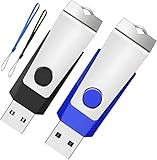
- Double the Storage, Double the Convenience: With two 2GB USB 2.0 flash drives in one pack, you'll have ample space for all your important files and documents. The black and blue color combination makes it easy to distinguish between the two drives
- Reliable Performance: These memory sticks are built to last, featuring a sturdy construction and high-quality materials to ensure reliable performance and durability
- Easy to Use: The thumb drives are plug-and-play, allowing for easy use with any computer that has a USB 2.0 port. They are compatible with most operating systems, including Windows (7/8/10/11/Vista/XP/2000/ME/NT), Mac, and Linux
- Portable Design: The compact size and lightweight design make these drives easy to carry wherever you go. Each drive comes with a color-matched lanyard, allowing you to attach it to your keychain, bag, or lanyard for added convenience
- Perfect for Storage and Backup: Whether you're storing photos, videos, music, or documents, these Wooolken thumb drives offer a reliable and secure way to back up your important data
Nintendo reports approximately 3 GB available for storage and downloads on the 8 GB Basic system and approximately 25 GB on the 32 GB Deluxe system. These are Nintendo’s stated figures; actual free space depends on what is already stored. Nintendo also notes that some eShop titles require more than 10 GB, so an external drive can provide useful extra room for Wii U content.
What to know before formatting the drive
- Back up its contents first. Configuring the device for Wii U erases existing data, and Nintendo says that data cannot be recovered.
- Expect the drive to be dedicated to one console. After formatting, it cannot be used to store other files or with a PC, Mac, or another Wii U unless it is reformatted. Reformatting erases its contents.
- Wii Mode content is not supported. Wii Mode purchases and content migrated from a Wii cannot be stored on this Wii U external USB device.
- Only one USB storage device can be in use at a time. To switch devices, turn off the console before reconnecting another.
How to set up USB storage on Wii U
- Back up anything you want to keep from the drive.
- With the Wii U powered off, connect the USB storage device. For the most reliable setup, use an HDD with its own power supply.
- Turn on the console. If prompted to format or configure the device, follow the on-screen instructions. This process erases the drive.
- If no prompt appears, open System Settings → Data Management and configure or format the USB storage device there.
- After setup, manage content from Data Management using Copy/Move/Delete Data.
Always power off the Wii U before connecting or disconnecting USB storage. Do not turn off the console or remove the drive while data is being read or written; Nintendo warns this can damage the console or device or cause data loss.
Rank #2

- Large Data Storage Capacity: Flash Drive with 128GB capacity, meet your needs of daily use on work, school, home and travelling for photos, music, videos, files storage and transfer
- Easy to use: The thumb drive is plug and play without any software installation; Supports Windows 7/8/10 / Vista / XP / Unix / 2000 / ME / NT Linux and Mac OS, also compatible with USB 2.0 and 1.1 ports; Storage is fast, safe and stable
- Wide Compatibility: USB flash drive support TV, desktop, notebook computer, car, audio and other device; It is your great data storage and transfer companion with traveling and working
- Retractable Desgin: The usb drive's retractable design can effectively protect the USB interface; The capless design can avoid losing of cap; Weight: 7g, Size: 2.6 × 0.8 × 0.4 inch. Portable to take your digital world anywhere
- What You Get: 1 x 128GB USB Flash Drive Thumb Drive, All of usb drives have been rigorously tested and formatted before leaving the factory; The default format of the USB stick is exFAT
What USB storage can—and cannot—hold
A configured drive can store Wii U games, applications, downloadable content, application updates, and save data. It does not expand the console’s online services or guarantee access to any particular software. Wii Mode purchases and content transferred from a Wii are outside the supported scope of this storage feature.
Independent reader supportYour contribution helps us test, update, and keep practical guides available for everyone.Should you use a USB thumb drive?
A thumb drive may connect, but Nintendo advises against relying on flash storage for important game data over the long term. Its limited number of rewrites makes a self-powered HDD the better-supported choice for a library you want to keep on the console.
The Tool Desk
Outbyte Driver Updater FREEScan for outdated or missing drivers - takes under a minuteDriver Scan →Outbyte PC Repair FREERepair Windows errors before they cause bigger problemsFix Now →Quick Recap
Best Value
- Double the Storage, Double the Convenience: With two 4GB USB 2.0 flash drives in one pack, you'll have ample space for all your important files and documents. The black and blue color combination makes it easy to distinguish between the two drives
- Reliable Performance: These memory sticks are built to last, featuring a sturdy construction and high-quality materials to ensure reliable performance and durability
- Easy to Use: The thumb drives are plug-and-play, allowing for easy use with any computer that has a USB 2.0 port. They are compatible with most operating systems, including Windows (7/8/10/11/Vista/XP/2000/ME/NT), Mac, and Linux
- Portable Design: The compact size and lightweight design make these drives easy to carry wherever you go. Each drive comes with a color-matched lanyard, allowing you to attach it to your keychain, bag, or lanyard for added convenience
- Perfect for Storage and Backup: Whether you're storing photos, videos, music, or documents, these Wooolken thumb drives offer a reliable and secure way to back up your important data
Rank #4

- What You Get - 2 pack 64GB genuine USB 2.0 flash drives, 12-month warranty and lifetime friendly customer service
- Great for All Ages and Purposes – the thumb drives are suitable for storing digital data for school, business or daily usage. Apply to data storage of music, photos, movies and other files
- Easy to Use - Plug and play USB memory stick, no need to install any software. Support Windows 7 / 8 / 10 / Vista / XP / Unix / 2000 / ME / NT Linux and Mac OS, compatible with USB 2.0 and 1.1 ports
- Convenient Design - 360°metal swivel cap with matt surface and ring designed zip drive can protect USB connector, avoid to leave your fingerprint and easily attach to your key chain to avoid from losing and for easy carrying
- Brand Yourself - Brand the flash drive with your company's name and provide company's overview, policies, etc. to the newly joined employees or your customers
Rank #3

- Please note: The capacity of the small capacity USB thumb drive is 128MB, not 128GB !!!
- USB flash drives is sufficient capacity( 118MB not GB ) ,adopts international first-line brand A+ class chips, faster speed and better quality! Write Speed: 5MB/S-8MB/S; Read Speed: 15MB/S-16MB/S
- Fashionable and Durable: 360° rotating design USB flash drive is made of ABS plastic and colored aluminium alloy housing body is very nice and doesn't rust as easily as iron and steel. Small, light and easy to carry! Dimension:58.5MM*19MM*11MM
- Plug and Play: USB flash drive supports plug and play without any software installation, just simple plug into the USB port of a computer or other devices, is compatible with Windows 98second edition/ NT/ ME/ 2000/ XP/ 7/ 8.1/ 10 and above, it also compatible with Linux and Mac OS 10.3 and above, support portable speakers, car speakers, car audio, TV and projector
- Interface: USB2.0, backwards USB1.1, Fast Data transmission speed, suitable for storing digital data for school students, business or daily usage. The digital data includes music, video, photos, movies, bidding&tender documents, softwares,etc
Product prices and availability are accurate as of the date/time indicated and are subject to change. Any price and availability information displayed on Amazon at the time of purchase will apply.




