
Free tools Windows power users keep installed
One-click scans. No signup required.
If Windows 8 shows 0x80004005, the code alone does not identify one fault. It is an unspecified, context-dependent Windows error. The practical fix depends on what you were doing when it appeared: opening a shared folder, activating Windows, checking for updates, extracting a file, or launching another component. The title 0X080004005 appears to contain an extra zero; the Microsoft-documented form is 0x80004005.
First, identify the exact situation
Before changing settings, write down the complete message and the action that failed. Record any server name, folder path, application name, product-key message, update number, or component name shown on screen. This prevents you from applying an activation repair to a network problem, or enabling an old file-sharing protocol when the error came from Windows Update.
As an Amazon Associate I earn from qualifying purchases.
- Shared folder or network path: the error appears while opening a folder on another computer, server, or network-attached device.
- Windows activation: it appears while activating Windows or validating a product key.
- Windows Update: it appears during an update scan, download, or installation. Check the digits carefully because Microsoft also lists a similar-looking update code,
0x8004005. - File extraction or an application: it appears while unpacking an archive, opening a file, or starting a program.
The same hexadecimal value can be generated by unrelated components. Treat the triggering action as the diagnosis’s starting point, not the number by itself.
Choose the procedure that matches the trigger
| Where it appeared | First procedure | Likely privilege | Main security consideration |
|---|---|---|---|
| Shared folder or network path | Test the share from Command Prompt; then review SMB and LanmanWorkstation settings. | Testing may work as a standard user; changing Windows features or policy normally requires an administrator. | SMB 1.0/CIFS is legacy technology. Do not enable it unless the device or share genuinely requires it. |
| Windows activation | Run the Activation troubleshooter and verify connectivity, firewall or proxy access, and edition/key matching. | Activation changes may require administrator credentials. | Do not replace a valid license with an unrelated key or alter licensing files. |
| Windows Update | Confirm the exact code, inspect update history, and follow the Microsoft procedure for that update scenario. | Update repair usually requires an administrator. | Do not disable security controls permanently to force an update. |
| Extraction, application, or other operation | Capture the full message and identify the component that failed before choosing a repair. | Depends on the application and location. | A generic registry edit is not a reliable response to an unspecified code. |
Fix 0x80004005 when opening a shared folder
1. Test the path from Command Prompt
Open Command Prompt and test the same network path directly. For example, if the share is named games on a computer called fileserver, run:
#1 Best Overall

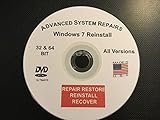
- Repair, Recover, Restore, and Reinstall any version of Windows. Professional, Home Premium, Ultimate, and Basic
- Disc will work on any type of computer (make or model). Some examples include Dell, HP, Samsung, Acer, Sony, and all others. Creates a new copy of Windows! DOES NOT INCLUDE product key
- Windows not starting up? NT Loader missing? Repair Windows Boot Manager (BOOTMGR), NTLDR, and so much more with this DVD
- Step by Step instructions on how to fix Windows 10 issues. Whether it be broken, viruses, running slow, or corrupted our disc will serve you well
- Please remember that this DVD does not come with a KEY CODE. You will need to obtain a Windows Key Code in order to use the reinstall option
net use \fileservergamesUse the actual computer and share names from your error message. If Windows asks for credentials, enter an account that is permitted on the remote computer. A successful connection confirms that the path is reachable and gives you a clearer result than the graphical error alone. To inspect the directory after connecting, run:
dir \fileservergamesIf the command reports that the network name cannot be found, check the server name, spelling, network connection, and whether the computer hosting the share is powered on. If it reports an access or logon failure, the path may be valid but the account lacks permission or the supplied credentials are wrong. Keep the complete command output for escalation.
2. Review SMB 1.0/CIFS only when the share requires it
Some older Windows 8-era devices and appliances rely on the legacy SMB 1.0/CIFS protocol. Windows exposes its optional components at Control Panel > Programs and Features > Turn Windows features on or off. Look for SMB 1.0/CIFS File Sharing Support.
What’s actually slowing this PC down?
Pick the symptom - the matching free tool is one click away.
Do not turn this feature on merely because the number is 0x80004005. First establish that the remote device cannot use a newer, supported SMB version. SMB 1.0 is legacy technology and increases security exposure compared with current protocols. If you must test it for compatibility, make the smallest change possible, retry the share, and remove the feature again if it is not needed. A business or managed computer should be handled according to its administrator’s security policy.
3. Check the LanmanWorkstation guidance for the exact scenario
Microsoft’s shared-folder guidance also covers the LanmanWorkstation service policy and parameter settings. Review that procedure for your Windows edition and the specific server or client arrangement before changing anything. The correct value depends on the scenario; copying a registry or policy change from an unrelated error page can create a new connectivity or security problem.
Rank #2

- Repair, Recover, Restore, and Reinstall any version of Windows. Professional, Home Premium, Ultimate, and Basic
- Disc will work on any type of computer (make or model). Some examples include Dell, HP, Samsung, Acer, Sony, and all others. Creates a new copy of Windows DOES NOT INCLUDE product key
- Windows not starting up? NT Loader missing? Repair Windows Boot Manager (BOOTMGR), NTLDR, and so much more with this DVD
- Step by Step instructions on how to fix Windows 7 issues. Whether it be broken, viruses, running slow, or corrupted our disc will serve you well
- Please remember that this DVD does not come with a KEY CODE. You will need to obtain a Windows Key Code in order to use the reinstall option
When a setting change is required, note its original value, make one change at a time with administrator rights, restart the affected service or computer as directed by the authoritative procedure, and retest the same share. If the change has no effect, restore the original setting rather than stacking additional undocumented edits.
4. Separate connectivity from permissions
A share can be reachable while its folder permissions still deny access. Test with the same account and path that failed in File Explorer. If another permitted account works, ask the owner of the remote computer or server to verify both the share permission and the underlying folder permission. Do not assume that installing SMB 1.0 can correct an account authorization failure.
Windows Errors? Fix Them Before They Spread
Repair common Windows errors and clear accumulated junk for a smoother, more stable PC - no reinstall needed.Free scan · no reinstallOutdated Drivers Are Slowing You Down
One free scan finds every outdated or missing driver and matches the right update for your exact hardware.Free scan · exact hardware matchFix 0x80004005 during Windows activation
1. Run the Activation troubleshooter
Open the Windows activation settings and start the Activation troubleshooter when that option is offered. Windows 8 installations and later Windows editions do not always present identical labels, so use the activation page or the Control Panel’s System activation area that exists on your edition. Follow the prompts and record the result instead of repeatedly entering the same key.
2. Verify the activation prerequisites
- Confirm that the computer has a working internet connection. A browser connection alone does not prove that activation endpoints are reachable if a proxy intercepts system traffic.
- Check firewall and proxy rules. A corporate proxy, filtering gateway, or locally blocked service can prevent the activation request from completing.
- Confirm that the product key or digital entitlement matches the installed Windows edition. A key for a different edition is not made valid by retrying activation.
- Check the full error text for a licensing or edition reference and preserve it for the person who supplied the key or manages the device.
If the troubleshooter reports that the license belongs to another edition or device, the next step is a licensing decision, not an SMB or registry repair. If internet access is restricted by an organization, ask its administrator to verify the required activation traffic rather than disabling the firewall globally.
When the error appears during Windows Update
Do not automatically apply the shared-folder or activation instructions to an update failure. Microsoft separately lists a similar-looking update code, 0x8004005, which is not the same digit sequence as 0x80004005. Re-read the screen character by character and copy the complete message.
Rank #3
- Open Windows Update and note the update name or number that failed.
- Review update history and record whether the failure occurred during detection, download, installation, or restart.
- Compare the displayed code with the matching Microsoft diagnostic guidance for that update scenario.
- Use the Windows edition and build shown in System properties when selecting instructions; a procedure for another edition may use different controls.
If the update page shows a different code or a component name, follow that component’s procedure. Avoid deleting update folders, editing the registry, or turning off security software unless an authoritative instruction for the exact failure calls for it.
Other occurrences: extraction, applications, and unknown components
For an archive, installer, or application that reports 0x80004005, the code is still not a diagnosis. Capture the program name, file location, archive type, and the point at which the operation stops. A failure limited to one archive can indicate a damaged download or an archive-specific problem; a failure across unrelated files points toward a broader Windows or storage issue. The evidence needed to choose between those cases is the complete message and a repeatable test, not the hexadecimal value alone.
Try the operation again only after confirming that the source file is complete and that the destination is writable. If the application is installed in a protected location, use its documented repair or reinstall option rather than granting broad permissions to the entire computer. For a work or school device, send the application name, Windows edition/build, exact error text, and reproduction steps to the administrator.
Evidence to collect before escalating
If the scenario-specific procedure does not resolve the error, prepare a concise record:
- The exact code, preserving the order of every digit and letter.
- The full message and the action that triggered it.
- Windows edition and build, plus whether the computer is managed by an organization.
- For a share: the server and share path, Command Prompt output, and whether another account or computer can connect.
- For activation: the installed edition, the troubleshooter result, and whether a firewall or proxy is involved. Do not send a product key in an unsecured message.
- For updates: the update identifier, update-history entry, and whether the code is
0x80004005or the similar0x8004005. - Relevant Event Viewer entries, including the event source and timestamp, without deleting logs before they are reviewed.
This evidence lets support match the error to the correct Microsoft procedure. It also prevents an administrator from repeating unrelated changes that could weaken security or alter licensing configuration.
Recommended Free Tools
Quick Recap
Changes to avoid
- Do not treat 0x80004005 as proof of malware, a damaged hard drive, or one universal Windows defect.
- Do not enable SMB 1.0/CIFS permanently when the remote device supports a newer protocol.
- Do not disable the firewall, proxy, or other security controls globally to test activation or file sharing.
- Do not apply registry edits or LanmanWorkstation values copied from a different error or Windows edition.
- Do not publish or share a Windows product key while asking for help.
A practical decision checklist
- Correct the apparent typo: verify whether the screen actually says
0x80004005. - Write down the operation, full message, component name, and Windows edition/build.
- Use the shared-folder procedure only for a network path, the activation procedure only for licensing, and the update procedure only for Windows Update.
- Make one controlled change at a time and record its result.
- Restore unnecessary legacy or temporary settings after testing.
- Escalate with the collected evidence if the error remains or if the requested change would weaken security.
As an optional shortcut after trying the manual steps, Outbyte PC Repair can address more than 100 common Windows issues where possible, including broken system elements, invalid redirects, shared DLL files, temporary and cache cleanup, settings that affect CPU, RAM, and disk load, privacy warnings, vulnerability checks, a real-time boost, file shredding, and an app-crash log. It complements antivirus software rather than replacing it, results vary, and no tool repairs every crash. It runs on Windows 11, 10, 8, and 7; a category-based free trial lasts at least two days before a paid subscription.
Product prices and availability are accurate as of the date/time indicated and are subject to change. Any price and availability information displayed on Amazon at the time of purchase will apply.

