If your Xbox controller moves on its own, start with the official Xbox calibration instructions for your exact controller, then check its firmware and settings. Calibration or configuration changes may help with a software-side problem, but they are not guaranteed to repair a worn or damaged stick. If drift persists, use model-specific service or repair guidance rather than opening the controller with instructions meant for another model.
First, check whether calibration is an option for your controller
Open the Xbox Support controller calibration-tool page and follow the current instructions it gives for your controller. The page’s current steps and supported controller models could not be confirmed here, so do not assume that every Xbox controller is eligible or use an old Windows calibration path as a substitute.
Calibration is a sensible early check when the problem may be related to configuration. It cannot be assumed to reverse physical wear, and the available guidance does not establish one cause for every case of stick drift.
Check firmware and settings
A response in Microsoft Q&A suggests checking controller firmware in the Xbox Accessories app. Treat that as community Q&A advice, not a guaranteed Microsoft repair procedure. If firmware is available to update, follow the app’s current prompts for your controller.
#1 Best Overall
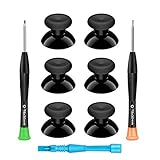
- 🎮 BEST XBOX THUMBSTICKS IN THE MARKET - Don't continue playing with those ratty old Xbox One thumbsticks! Game longer, better and more comfortably with original Xbox thumbsticks. Our inexpensive analog sticks are designed to be direct replacement of the original One/One S/One X Controller joystick, makes your controller stand out from the crowd with a new, fresh look and unique styling unlike any other.
- 🎮 ENJOY YOUR FULLY FUNCTION XBOX ONE CONTROLLER - Personalize and enhance your gaming experience with feedback based rubber design. True rubberized on the top and side, you will no longer have to worry about slipping off the analog stick of your controllers, and provide more accuracy and sensitivity, give you the most complete game pleasures.
- 🎮 UPGRADED PREMIUM QUALITY - Created with the gamer in mind, perfectly fit for your controller with aggressive textured grip. Also all products from us will be put under professional quality inspection before packaging to make sure the joysticks you received are in good condition.
- 🎮 MONEY SAVER & EASY TO INSTALL - There are plenty of YouTube videos that will walk you through the process, T8 T6 screwdrivers included help you open the shell very easily, then just replace the worn out or broken controller thumbsticks which will make your controller look awesome again, everybody is able to save $60 controller with our cheap parts in 10 minutes.
The same response mentions remapping controls or changing sensitivity as possible workarounds. These changes can alter how noticeable unwanted movement feels, but they do not establish that the stick hardware has been repaired. If the controller still registers movement when it should not, continue troubleshooting rather than treating a setting change as a confirmed fix.
Clean around the stick cautiously
The Microsoft Q&A response also suggests cleaning around the thumbstick base with a cotton swab and isopropyl alcohol. This is advice from an individual Q&A response, not a universal manufacturer instruction for every controller. Do not pour or spray liquid into the controller. If you are unsure whether cleaning is appropriate for your model, consult its current support guidance before proceeding.
Rank #2

- Custom designed joysticks to perfectly fit for Xbox Series X/S, for Xbox Core controller (Model 1914) , for Xbox One standard (Model 1537/1697), for Xbox One X/S (Model 1708), for Xbox One Elite V1 (Model 1698) controller; Not compatible with Xbox Elite Series 2 and other controllers. Work exactly like the original thumbsticks
- Unique replacement to add much more personality to your controller. The replacement thumb sticks will make your controller distinct when playing with friends, no more boring standard color
- Made of premium PC & TPE plastic material, durable and practical. Ideal replacement for your broken or cracked controller thumbsticks
- The black color looks great; Would be awesome if you combine it with the custom shell from eXtremeRate (You can find these shells in our store.)
- Easy to install, requires internal fitting, the screwdriver tool included can help you easily open the shell and install the gaming parts
When drift continues, choose model-specific service or repair
Persistent drift may require hardware diagnosis, but replacing a part without confirming the fault can waste money or damage the controller. Before buying anything or opening the device, identify the exact controller model and check that the proposed part and repair instructions apply to it.
Consider official service if you lack the tools or experience
Use Xbox Support to check current service options for your controller and region. The available sources do not establish controller-specific eligibility or service terms, so confirm those details directly rather than assuming a repair option is available.
Quick wins for a faster PC:
Clear out junk files and repair common Windows errorsFree Scan →Scan for outdated or missing drivers - takes under a minuteDriver Scan →Repair Windows errors before they cause bigger problemsFix Now →Rank #3

- HIGH QUALITY: 2 metal thumbsticks are made of high quality stainless steel metal, perfect fit, very durable and not easy to wear out.
- PERFECT COMPATIBILITY: Perfectly compatible with Xbox Elite Series 2 and Elite Series 2 Core controllers. These grips can be remapped to other buttons or functions to enhance the game control experience.
- RUN SMOOTHER: Enhance your gaming experience with our carefully crafted Xbox controller kits. They work perfectly with the official Xbox Elite Series 2 and Elite 2 Core controllers. It improves force, sensitivity and precision with pulse triggers for more feedback and a fully immersive gaming experience.
- GREAT GAMING FEEL: With the joystick, players can more easily trigger specific buttons or commands without taking their finger off the joystick or trigger.
- CONVENIENT AND SIMPLE: You don't need to disassemble the joystick, just place the metal paddle replacement into the correct hole and start gaming without any tools! Every step is very simple and convenient.
Use repair instructions only for the model they cover
Microsoft’s Elite Series 2 repair guide covers that controller specifically. It includes disassembly procedures, required tools, and safety warnings, including instructions to disconnect and power down the device before opening it and battery precautions. Its steps should not be applied to other Xbox controller models, and removing a thumbstick cap is not the same as replacing a joystick sensor.
Microsoft’s Xbox Series X service guide discusses self-repair considerations and names Microsoft and iFixit as sources for Series X console replacement parts. That is console guidance, not confirmation of controller parts or controller repair policy. Do not use it to infer that a particular controller module is available or compatible.
Rank #4

- Requires some soldering to install, otherwise it is easy to repair, It's recommended for you to find some video on Youtube about how to fix the Controllers.
- To repair your worn, out of control, insensitive and drift joystick.
- For replacing the joystick of Xbox One S/X Controller; Please Note: You will need basic soldering skills along with soldering tools and other basic tools
- Comes with T6 T8 T10 Cross Screwdriver repair tools,12 Replacement "T6" Screws,7 Replacement "T8" Screws,2 x pry tools, 1 x pry bar ,4 Thumbstick Caps,1 x Brush
Before buying a replacement joystick module
If you have established that the fault is hardware-related and are considering a replacement, search for a module or repair kit that explicitly matches your controller’s exact model. The sources here do not verify a specific listing, compatibility, price, or soldering requirements. Check those details and the required tools before purchasing; if the repair requirements exceed your experience, choose an appropriate service option instead.
Quick Recap
Best Value
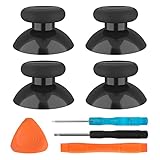
- SAVE MONEY! Perfectly fit for Xbox One/ Xbox One S controllers, replace your broken or worn-out original controller thumbsticks. This repair kit contains everything you need to switch the old analog joysticks out and save you from spending $60 on a new controller
- COMPATIBILITY: Only official orginal controller,compatible for Xbox One, for Xbox One S, for Xbox One X, for PS4 controllers,NOT compatible with PS5,NOT compatible with Nintendo switch pro,Power A controllers.NOT FOR any Third-party Brands controller
- MORE DURABLE THAN THE ORIGINAL - The top and sides are coated with hard rubber, which makes them last longer than the original rubber joystick.
- PACKAGE INCLUDE: 4 x Joystick Thumbsticks, 1 x T8 Screwdriver, 1 x Phillips Screwdriver, 1 x Prying Tool, 1 x Triangle Opening Picks
- At TOMSIN we stand by our products. That's we offer a 1-year warranty for all of our products. Any problems, please feel free to contact us via Amazon Email System and we will do our best to solve it
Product prices and availability are accurate as of the date/time indicated and are subject to change. Any price and availability information displayed on Amazon at the time of purchase will apply.




