Free tools Windows power users keep installed
One-click scans. No signup required.
Open the function wheel and select Whispers. You no longer need to craft or carry the old Whisper item: Version 1.4.3 moved the feature to the function wheel and removed the item’s formula. In the keyboard controls documented by the update, long-press Tab to open the wheel.
How to open Whispers
- Open the function wheel. On the keyboard setup documented in the Version 1.4.3 update, long-press Tab.
- Select Whispers. Use the feature from the wheel; there is no need to craft the legacy Whisper item.
The official instructions establish this keyboard shortcut, but not the current controls for every platform or custom keybinding. If Tab does not open the wheel, check your in-game bindings rather than relying on an older crafting guide.
How to create and find Whispers
Create a message
Open the Whispers feature and create a post. As of the Version 2.0 update, you do not have to enter a title or tags; the system generates these automatically for high-quality Whispers.
Browse posts
Use the Discover tab to browse Trending and Nearby sections. The update documents these as ways to explore Whispers, but does not specify how Nearby determines what appears.
Recommended Free Tools
#1 Best Overall

- 【14Lighting Modes】This gaming mouse pad features 14 lighting modes: including colorful, dynamic breathing lighting mode and monochrome static lighting mode, making your gaming atmosphere warmer and more atmospheric. It also has a power-off memory function, which can memorize the mode you selected last time.
- 【Gaming Mouse Pad Large】The 31.5 x 12x 0.3 inch mouse pad fits your desktop perfectly and provides a lot of space for movement. The large mouse pad is suitable for computers and keyboards and mice, bringing the greatest help to your work environment or games.
- 【Easy to use】 This extended mouse pad has a button to control the lighting. Press once to change the color you like, press twice quickly to change the brightness, press and hold for about 3 seconds to turn on/off. The mouse pad is powered by USB, plug and play, no driver required.
- 【Super soft, smooth and waterproof】 The RGB gaming mouse pad is made of smooth microfiber material, which makes the mouse move more precise. The soft and smooth surface is more perfect for waterproofing. Effectively prevent damage from spilled beverages or other liquids, and is easy to clean with water without fading. Ideal for games or work
- [Rubber material] It is made of rubber material, which is stable and not easy to move.
How to interact with a Whisper
Whispers support likes, saves, comments, and replies. The My tab lets you track views and your posted messages, according to the Version 2.0 notes.
Set interaction and notification preferences
To manage who can interact with your messages or turn off Whisper notifications, open Settings → Game Settings → Gameplay → Whispers. These controls are documented in the Version 2.0 update.
Rank #2

- 【Large size】:Measuring 800 x 300 mm/ 31. 5×12 inches, which is wider and taller than others. Large mouse pad can perfectly fit your keyboard and mouse of any size, and there is also ample space for peripherals such as phones, tablets, etc.
- 【LED backlight mouse pad】:Blade Hawks RGB mouse pad provides 7 static modes and 7 dynamic modes will give you the options you are looking for. Power-off memory function remembers the last lighting mode you selected. The super glow fiber Chroma will give you a colorful gaming setup that you want.
- 【Anti-slip rubber base】:Made from Natural rubber, this gaming mousepad will firmly grip your desktop, allowing you to enjoy the ultimate precision in the games you are most passionate about. It also comes with a texture that enhances this ability even further.
- 【Smooth and waterproof surface】: Micro-textured cloth surface, for extremely precise mouse control and a smooth movement. When liquid splashes on the gaming mouse pad, it forms water droplets and slides down. Will not delay your work or gameplay.
- 【Plug and play】: This mouse and keyboard pad is powered by USB, plug and play, no driver required. One button control light modes. Press one time to change the lighting mode, press twice to change the brightness, press and hold about 3 seconds turn ON/OFF.
What changed from older guides
Earlier guides describe leaving short messages in the world with a craftable Whisper item. That is the former implementation, not the current method described in the official Version 1.4.3 notes. The update moved Whispers to the function wheel, said crafting the item was no longer necessary, and removed its formula. The older description appears in this Epic Games Store guide.
Independent reader supportYour contribution helps us test, update, and keep practical guides available for everyone.Platform controls and limits
The official notes cited here do not establish the exact steps on mobile or console, posting eligibility or daily limits, or whether you can edit or delete a post. The latest dated official update cited here, Version 2.3.4 from March 11, 2026, does not resolve those Whisper-specific details: Version 2.3.4 announcement.
Quick Recap
Best Value

- [Customizable RGB Lighting Modes] Featuring 14 lighting effects, including static solid colors and dynamic gradient modes. You can switch and adjust via the one-button controller to match your gaming setup, home office, or personal style. The soft non-glare lighting adds ambient style to your desktop, without harsh glare to distract from your work or gameplay
- [Extended Large Size for Full Desktop Coverage] Measuring 31.5'' × 11.8'' with a 0.16 inch thickness, providing enough space for your full-size keyboard, mouse, headset, and other small desktop accessories. The reinforced stitched edges reduce fraying, curling, and deformation, helping the mat stay flat on most desk surfaces for long-term daily use
- [Smooth Fabric Surface for Consistent Mouse Control] Crafted with high-density premium soft fabric, the mouse pad delivers a smooth, low-friction glide for consistent and accurate cursor tracking. It works well with most optical, laser, wired, and wireless mice, supporting stable performance for both gaming sessions and daily office work
- [Non-Slip Rubber Base & Waterproof Fabric] The high-density textured rubber base grips firmly to most smooth desk surfaces, reducing sliding and shifting during mouse movement or regular use. The waterproof fabric surface repels accidental spills and daily stains
- [Stylish RGB Design for Modern Desk Setups] The RGB edge lighting adds a sleek and visually appealing touch to your desktop, creating a more immersive and visually appealing gaming environment.
Rank #4
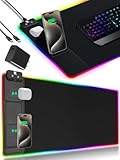
- 【Fast Charging Mouse Pad with Phone Holder】Gaming Mouse Pad has built-in 15W fast wireless charging function, which can conveniently charge your compatible devices without extra cables interfering with your desktop. Desk Mat compatible with iPhone 15/14/13/12/11/X/XR/XS/8 series; Samsung Galaxy S23/S22/S21/S20/S10/S9/S8/Note 9/8; Airpods 3rd/Airpods Pro 2nd/Airpods Pro and other Qi enabled devices. (Note: 15W need power adapter 9V 3A, and power adapter is not included with this Mousepad)
- 【Desk Mat with 11 RGB Lighting Modes】LED Mouse Pad designed with 11 different lighting modes - 2 dynamic modes and 11 static lighting modes; RGB Gaming Mouse Pad allows you to personalize your gaming setup. Choose your favorite color to create a visually stunning gaming experience. The power-off memory function can remember your last light mode choice. Awesome Cool Gaming Mousepad.
- 【XXL Oversized Desk Pad】Mouse Pad has large size 31.49x15.75 inch, the extended mousepad provides a larger usable area to cover your keyboard, mouse and other stuffs on your desktop. Desk Pad provides a comfortable experience while playing games or working. And protect your desktop from scratches, stains and water spills. Say goodbye to messy desktop and hello to a clean and organized workspace.
- 【4mm Thick High-Quality Mousepad】The mouse pad features a Nano-textured fabric surface and stitched edges to ensure durability. The ultra-smooth surface provides more precise mouse movement. Less resistance compared to other mouse pads. Waterproof surface is easy to clean and Non-Slip Rubber Base can firmly grip your desktop, taking your gaming experience to the higher level.
- 【Easy to Use】Extended mouse pad is powered by USB and no driver required. One button controls all light modes, press once to switch light color, long press to switch light modes. The wireless charging function and RGB lighting can work separately. Just Plug and Play. Awesome Gaming Mouse Pad for Gamer Esports Pros.
Rank #3

- 【12 Stunning RGB Light Modes】: Featuring 4 dynamic modes (Color Gradient, Breathing, Flicker Change, Cycle Color) and 8 static modes, this gaming mouse pad offers vivid RGB lighting to create an immersive gaming atmosphere - all while ensuring your eyes remain comfortable.
- 【Oversized for Full Coverage】: With dimensions of 31.5 x 11.8 inches, this mouse pad provides plenty of space for both your keyboard and mouse. The smooth surface allows for precise movements, offering an ideal experience for gaming or office work.
- 【Durable & High Quality】: Built with a durable touch button switch to easily turn the lights on and off, reducing unnecessary power consumption. The long-lasting LED bulbs are resistant to damage, ensuring consistent brightness over extended use.
- 【Anti-Slip Rubber Base】: The natural rubber base grips your desk firmly, preventing any movement during intense gaming sessions or work tasks, offering stability and a smooth experience.
- 【Edge Stitching】: Reinforced anti-fray stitching around the edges ensures the mouse pad’s durability, preventing wear and tear over time.
Product prices and availability are accurate as of the date/time indicated and are subject to change. Any price and availability information displayed on Amazon at the time of purchase will apply.




