Free tools Windows power users keep installed
One-click scans. No signup required.
To get the best picture your Xbox 360 can deliver, choose the highest dashboard output resolution supported by your TV and use a compatible video connection. This can improve how the console’s signal appears compared with standard-definition video, but it does not upgrade the console’s graphics hardware or make every game render at the selected resolution.
Choose a supported display resolution
Open the Xbox 360 display settings and select the highest resolution the connected television or monitor supports. The available choices depend on the display and video connection, and menu wording can vary by dashboard version, so use the options actually shown on your console rather than relying on a path that may not match your setup.
Microsoft’s 2005 Xbox 360 television guidance lists 480i, 480p, 720p and 1080i as output standards. It says that selecting a supported 720p or 1080i setting in the dashboard makes Xbox 360 games support that output. That describes the output format, not a promise that every game renders its images internally at that resolution. Microsoft’s Xbox 360 television FAQ is period guidance, not a current guarantee about every television or game.
Set the aspect ratio to match your screen
If you have a widescreen television, enable the widescreen setting in the dashboard and check a game or menu for correct proportions. Microsoft said a widescreen TV is not required, but that games support the widescreen dashboard setting when one is used. If the picture looks stretched or objects appear unusually wide, revisit the setting and the TV’s own aspect-ratio controls.
PC Slower Than It Used to Be?
A free scan shows the junk files, broken settings and background clutter dragging Windows down - then fixes them in one click.Free scan · Windows 10 & 11Outdated Drivers Are Slowing You Down
One free scan finds every outdated or missing driver and matches the right update for your exact hardware.Free scan · exact hardware match#1 Best Overall
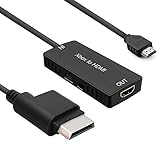
- 🎮 HD Link: Convert the native component signals from Xbox 360 to digital HDMI signals for modern HDTVs/monitors/projectors.
- 🎮Awesome Image: Provide the best signal processing with great precision, colors, resolution and details at this price.
- 🎮HD Ready: maximum possible video quality from our HDMI converter cable. Xbox 360 games that are native 720p will run in their respective resolutions.
- 🎮Compatible with: Microsoft Xbox 360 / XBOX 360 Slim.
- 🎮High Definition Connection; Plug and play; Need External Power Required; Won't affect the sound quality!
Match the cable to the console and TV
A cable cannot add graphics capability, but the connection determines which video signals can reach the display. Microsoft’s Xbox 360-era accessory information lists several legacy cable categories; confirm the ports on your exact console revision and display before buying anything. Microsoft’s accessory announcement documents those original options, but does not establish current stock or the quality of modern adapters.
| Connection route | When it may fit | What to check |
|---|---|---|
| Component HD AV Cable | Your TV accepts component video and your console supports the cable. | Match the cable’s console connector and the TV’s component inputs; Microsoft listed it for HD and standard-definition connections. |
| VGA HD AV Cable | Your flat-panel TV or monitor has VGA input and the console/cable combination is compatible. | Confirm the display has VGA and verify compatibility with the exact console. |
| Standard AV, S-Video or SCART | You need a legacy standard-definition connection or a region-specific input. | Confirm the connector and regional format. These options do not by themselves provide an HD upgrade. |
| Third-party converter or scaler | Your display lacks a compatible input for the console’s available cable. | Check the exact console output, converter-supported resolutions, display inputs and return policy. Microsoft’s cited material does not establish any particular modern converter’s compatibility or picture quality. |
If your TV has only HDMI, do not assume a generic HDMI converter will work well—or at all—with your setup. Converter performance is not established by Microsoft’s legacy accessory documentation, so check the device’s stated input support and return terms before relying on it.
Rank #2
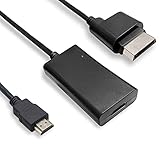
- COMPATIBILITY* Supports all versions of Xbox 360, especially the 1st version. Convert the component signals from Xbox 360 to digital HDMI signals for HDTVs/monitors.
- AWESOME IMAGE * Provide the best signal processing with great precision, colors, resolution and details at this price.
- EASY TO USE* Convert Xbox signal to HDMI signal, connect game console to HDMI TV, let you relive classic games. No power supply needed, plug and play, meet your daily needs.
- PACKAGE INCLUDE* HDMI Adapter for Original Xbox 360*1, HDMI Cable*1, Instruction*1
- 1 Year Warranty
Understand what the resolution setting can—and cannot—do
The dashboard setting controls the video output format. It does not add detail to a game’s assets, change the Xbox 360’s graphics hardware, or guarantee that a game renders natively at 1080i. A higher output mode may improve presentation on a compatible display, but the result still depends on the game and the display’s processing.
The cited Xbox 360 guidance lists output up to 1080i; it does not document 4K output. A cable, dashboard option or generic converter should not be treated as a way to make the original console produce 4K graphics.
Rank #3

- Composite to HDMI Converter: Converts analog AV composite (Yellow, White, Red) input to HDMI 720P/1080P (60HZ) output, displayed on smart TV, Projector or HD Display, which bring back your old and cherish memories.
- Plug to Play: This HDMI Converter no extra drivers need, just plug and play,easy to use. Please hook up the USB Power Cable (included) to 5V power source during use. Note: The Video Converters only support converts AV to HDMI, can't converts HDMI to AV.
- Widely Used: This composite to hdmi adapter is widely applied to PS1, PS2, PS3, Xbox, N64, Wii, STB, VHS, VCR, DVD Players and other devices with standard composite AV input. Note: It can only be used when PS2 is set to RGB output.
- Wide Compatibility: This Video Audio Converter Adapter supports source formats of PAL, NTSC3.58, NTSC4.43, SECAM, PAL/M, PAL/N standard TV. Provide advanced signal processing with great precision, colors, resolutions, and details. Important Note: This converter can't improve video quality!
- Attention & Package: Please ensure to connect this av hdmi converter to power source to make it work. Package include: 1*AV to HDMI Adaptor, 1*USB Power Cable(adapter not included), 1*User Manual.
Do not confuse Xbox One X enhancements with Xbox 360 settings
Microsoft separately described selected backward-compatible Xbox 360 games running on Xbox One X with higher resolution, increased texture detail and antialiasing. Its 2018 announcement said those selected titles could run at nine times the original pixel count on Xbox One X. That enhancement is an Xbox One X feature for supported games, not a graphics mode or upgrade available on the original Xbox 360. Microsoft’s Xbox One X announcement explains the distinction.
Quick Recap
Best Value
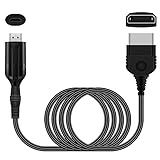
- The HD Link Cable for Xbox Convert Original Xbox signal to HDMI signal, the game console is connected to a new HDMI TV.
- HDMI signals to 1080p (60HZ)/720p(60hz) output(with the switch buttom)
- The Original Xbox to HDMI converter powers via a USB cable. (the package has not the power adapter)
- Don't need to install a driver,do not need a hdmi/x box cable, convenient and flexible, plug and play.
- if you have any question,please contact us at first . thank you
Rank #4
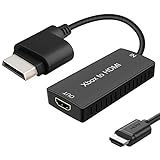
- 🎮 HD Link: Xbox 360 adapter Convert the native component signals from Xbox 360 to digital HDMI signals for modern HDTVs/monitors/projectors.
- 🎮Awesome Image: Provide the best signal processing with great precision, colors, resolution and details at this price.Xbox 360 converter is specifically designed to provide the sharpest video and sound for your Microsoft xBox 360 gaming system.
- 🎮HD Ready: maximum possible video quality from our HDMI converter cable. Xbox 360 and Xbox360 Slim games that are native 720p will run in their respective resolutions.
- 🎮Compatible with: Xbox 360 and XBOX 360 Slim.
- 🎮High Definition Connection; Plug and play; Won't affect the sound and video quality!
Product prices and availability are accurate as of the date/time indicated and are subject to change. Any price and availability information displayed on Amazon at the time of purchase will apply.